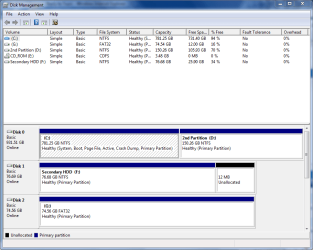
This is my first post in the forum, but I really need help.
This is what happened:
I tried to install the LCD driver and sw for my Samsung LCD, then it crashed and unable to boot up properly, can't get even inot he windows screen.
All methods I tried failed, so I had to reinstall.
After reinstalling Win7, I perform a restore to a point which I've created previously.
Now with this restore point, I'm not able to boot normally with my HDD installed with and restored Win7 x64 Ultimate.
I will encounter the error msg "BOOTMGR missing, Press CTRL+ALT+DEL to restart" something like that.
I've have to enable CD-ROM boot(with the Win7 installation Disc in drive), followed by HDD to be able to boot normally.
Pls assist.
I've already tried running RE and perform startup repair, no help.
I've also run and also no help.
bootrec /rebuildbcd
bootrec /Fixmbr
bootrec /FixBoot
Here's my bcdedit for reference:
Windows Boot Manager
--------------------
identifier {bootmgr}
device partition=C:
path \bootmgr
description Windows Boot Manager
locale en-US
inherit {globalsettings}
default {current}
resumeobject {86280344-2f2a-11e0-b1db-e15a6667e45a}
displayorder {current}
toolsdisplayorder {memdiag}
timeout 30
Windows Boot Loader
-------------------
identifier {current}
device partition=C:
path \Windows\system32\winload.exe
description Windows 7
locale en-US
inherit {bootloadersettings}
recoverysequence {86280346-2f2a-11e0-b1db-e15a6667e45a}
recoveryenabled Yes
testsigning Yes
osdevice partition=C:
systemroot \Windows
resumeobject {86280344-2f2a-11e0-b1db-e15a6667e45a}
nx OptIn
This is what happened:
I tried to install the LCD driver and sw for my Samsung LCD, then it crashed and unable to boot up properly, can't get even inot he windows screen.
All methods I tried failed, so I had to reinstall.
After reinstalling Win7, I perform a restore to a point which I've created previously.
Now with this restore point, I'm not able to boot normally with my HDD installed with and restored Win7 x64 Ultimate.
I will encounter the error msg "BOOTMGR missing, Press CTRL+ALT+DEL to restart" something like that.
I've have to enable CD-ROM boot(with the Win7 installation Disc in drive), followed by HDD to be able to boot normally.
Pls assist.
I've already tried running RE and perform startup repair, no help.
I've also run and also no help.
bootrec /rebuildbcd
bootrec /Fixmbr
bootrec /FixBoot
Here's my bcdedit for reference:
Windows Boot Manager
--------------------
identifier {bootmgr}
device partition=C:
path \bootmgr
description Windows Boot Manager
locale en-US
inherit {globalsettings}
default {current}
resumeobject {86280344-2f2a-11e0-b1db-e15a6667e45a}
displayorder {current}
toolsdisplayorder {memdiag}
timeout 30
Windows Boot Loader
-------------------
identifier {current}
device partition=C:
path \Windows\system32\winload.exe
description Windows 7
locale en-US
inherit {bootloadersettings}
recoverysequence {86280346-2f2a-11e0-b1db-e15a6667e45a}
recoveryenabled Yes
testsigning Yes
osdevice partition=C:
systemroot \Windows
resumeobject {86280344-2f2a-11e0-b1db-e15a6667e45a}
nx OptIn
My Computer
- OS
- Windows 7 Ultimate x64
- CPU
- AMD
- Motherboard
- Gigabyte M68MT-D3