BOOTMGR missing when removing HDD1

gridsystems

New member
Member
Local time
10:30 PM
Messages
31
Hi,
I have been dual booting XP on HDD1 and Win7 on HDD2 for a while.

Now I want to completely remove HDD1 from the system and only keep the current Win7 installation on HDD2 (not re-install Win7).

But when I remove HDD1 and switch the HDD2 SATA cable to SATA0 connector on the motherboard, I cannot boot at all because "bootmgr is missing".

I presume all bootdata is on HDD1. How can I get Win 7 to boot when only HDD2 is connected?

Thanks!
 

My Computer

Computer Manufacturer/Model Number
built it myself
OS
Windows 7 Pro 64-bit
CPU
Intel i7 950
Motherboard
Asus Sabertooth X58
Memory
18GB
Graphics Card(s)
Gigabyte Radeon HD7700
Sound Card
onboard Realtek HD audio chip
Monitor(s) Displays
2 x Dell U2412M
Screen Resolution
1920x1200
Hard Drives
3 SSD
4 Western Digital Caviar Green
PSU
SeaSonic x650
Case
Fractal Design R3 case
Cooling
Magehalems rev. B CPU cooler
Hi,

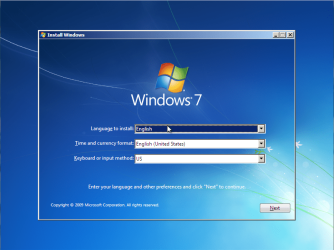
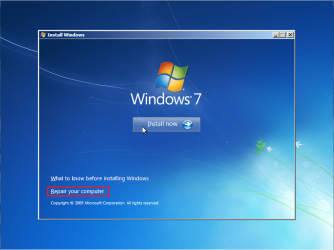
Do you have the Windows 7 DVD? If so you can boot from it (without HDD1 plugged in) and once the setup screen comes up choose to 'Repair' you computer. This will run a check on the current HDD and automatically try to fix any errors it detects, 1 of which is a missing BOOTMGR as I've had the same happen on my machine.

   Tip
You may need to click the 'Install Windows' button first to access the next page in the install


Hope it helps :)


OS
 

My Computer

Computer Manufacturer/Model Number
Compaq Desktop
OS
Windows 7 Ultimate x64
CPU
AMD Sempron Dual Core
Memory
3GB
Graphics Card(s)
NVIDIA GeForce 6150SE nForce 430
Screen Resolution
1024x768
Hard Drives
150GB Sata
Hi, thanks for your quick reply.
Yes, I have the Windows DVD.

1) Is this procedure risky in any way? I can't afford to muck up my Win7 installation just this week. I get a bit nervous when you say I might have to click install Windows first to get the right options. How do I know I don't begin to re-install everything?

2) My Win7 is 32-bit but I just realized I have that disc at the office. I have a 64-bit Win7 DVD here at home though. Would that one do just as fine?

Thanks!
 

My Computer

Computer Manufacturer/Model Number
built it myself
OS
Windows 7 Pro 64-bit
CPU
Intel i7 950
Motherboard
Asus Sabertooth X58
Memory
18GB
Graphics Card(s)
Gigabyte Radeon HD7700
Sound Card
onboard Realtek HD audio chip
Monitor(s) Displays
2 x Dell U2412M
Screen Resolution
1920x1200
Hard Drives
3 SSD
4 Western Digital Caviar Green
PSU
SeaSonic x650
Case
Fractal Design R3 case
Cooling
Magehalems rev. B CPU cooler
My mistake :o

Once you enter the Regional Information you can then click the 'Repair your compuuter' option.

Install 7 Step 1 (Main Menu).PNG
Install 7 Step 2 (Install).PNG

The 64bit disk should still detect the error with the BOOTMGR

OS
 

My Computer

Computer Manufacturer/Model Number
Compaq Desktop
OS
Windows 7 Ultimate x64
CPU
AMD Sempron Dual Core
Memory
3GB
Graphics Card(s)
NVIDIA GeForce 6150SE nForce 430
Screen Resolution
1024x768
Hard Drives
150GB Sata
Hmm... It repaired at first, but then it would not boot anyway (bootmgr still missing). I realized I had not connected the HDD2 cable to SATA0 connector so I did that. It would still not boot. I ran the DVD again but this time it said (after having listed the entry for the recovered OS) that this version of system repair is not compatible with the OS you are trying to recover.
:mad:
I don't know what to do. I think I will just maybe buy a new HDD and use that one in my new computer and lkeave these 2 HDD in the current computer and be done with it.

Thanks for your help.
If you have any other ideas, though, feel free to share them.

(I did tri-boot with Linux for a while and then I had to fix entries with NeoGrub. Maybe I messed something up royally back then which Windows can't fix.)
 

My Computer

Computer Manufacturer/Model Number
built it myself
OS
Windows 7 Pro 64-bit
CPU
Intel i7 950
Motherboard
Asus Sabertooth X58
Memory
18GB
Graphics Card(s)
Gigabyte Radeon HD7700
Sound Card
onboard Realtek HD audio chip
Monitor(s) Displays
2 x Dell U2412M
Screen Resolution
1920x1200
Hard Drives
3 SSD
4 Western Digital Caviar Green
PSU
SeaSonic x650
Case
Fractal Design R3 case
Cooling
Magehalems rev. B CPU cooler
Does plugging in the old XP (HDD1) solve the problem? You might have to wait until you have the 32bit DVD then try the repair option again. If I think of anything else I'll post back :)
 

My Computer

Computer Manufacturer/Model Number
Compaq Desktop
OS
Windows 7 Ultimate x64
CPU
AMD Sempron Dual Core
Memory
3GB
Graphics Card(s)
NVIDIA GeForce 6150SE nForce 430
Screen Resolution
1024x768
Hard Drives
150GB Sata

My Computer

Computer Manufacturer/Model Number
Compaq Desktop
OS
Windows 7 Ultimate x64
CPU
AMD Sempron Dual Core
Memory
3GB
Graphics Card(s)
NVIDIA GeForce 6150SE nForce 430
Screen Resolution
1024x768
Hard Drives
150GB Sata
Does plugging in the old XP (HDD1) solve the problem? You might have to wait until you have the 32bit DVD then try the repair option again. If I think of anything else I'll post back :)

It doesn't solve the problem of getting the system to boot with only one HDD but it does enable me to get back to status quo and boot Win7 with both drives connected.
 

My Computer

Computer Manufacturer/Model Number
built it myself
OS
Windows 7 Pro 64-bit
CPU
Intel i7 950
Motherboard
Asus Sabertooth X58
Memory
18GB
Graphics Card(s)
Gigabyte Radeon HD7700
Sound Card
onboard Realtek HD audio chip
Monitor(s) Displays
2 x Dell U2412M
Screen Resolution
1920x1200
Hard Drives
3 SSD
4 Western Digital Caviar Green
PSU
SeaSonic x650
Case
Fractal Design R3 case
Cooling
Magehalems rev. B CPU cooler

My Computer

Computer Manufacturer/Model Number
Compaq Desktop
OS
Windows 7 Ultimate x64
CPU
AMD Sempron Dual Core
Memory
3GB
Graphics Card(s)
NVIDIA GeForce 6150SE nForce 430
Screen Resolution
1024x768
Hard Drives
150GB Sata
Hello gridsystems, welcome to Seven Forums!


First here's a link that you can download a Windows repair disk that will do the startup repairs, just be sure to get the correct bit-rate you're trying to repair.

How to Create a Windows 7 System Repair Disc


Disconnect all but the HDD with Windows 7 on.

Then set the Hard Disk Drive (HDD) with the Windows you want to keep as the first boot device in the PC bios and boot the created repair disk, then first you will have to mark the partition with Windows 7 on as "Active" (see Option Two) in this tutorial at the link below.

Then you will have to do the 3 separate startup repairs with the restarts discussed in the same tutorial to create a new set of boot files to the Windows 7 partition.

Startup Repair - Run 3 Separate Times


Be sure to post back with any further questions you may have and to keep us informed.
 

My Computer

Computer Manufacturer/Model Number
* BFK Customs *
OS
W 7 64-bit Ultimate
CPU
Intel Q9550 Yorkfield
Motherboard
ASUS P5Q Pro
Memory
8GB Dominator 8500C5D
Graphics Card(s)
ATI : XFX 5870
Sound Card
Realtek HD Audio 7-1
Monitor(s) Displays
1x 47" LCD HDMI & 3x 26" LCD HDMI
Screen Resolution
1920x1080P & 1920x1200
Hard Drives
1x 80GB Intel X25-M G2 SSD : 1x 500GB & 1x 640GB WD Caviar Black(s)
PSU
Corsair 620HX
Case
Cooler Master RC-690
Cooling
Tuniq Tower 120, 2x 140mm and 3x 120mm case fans
Keyboard
Microsoft 500
Mouse
Razer Diamondback 3G
Internet Speed
14 Mb/s
Other Info
1x Koutech 3Gb/s SATA HDD Hot Swap Rack
Back
Top