bootmgr missing. windows 7

greezw14

New member
Local time
11:54 PM
Messages
3
my hard drive has to partitions one is recovery. basically i was trying to make the recovery partition visible in my computer. and i made it the active partition by mistake. so all the os and booting data is on the other partition. is there any way i can change the active partition without a disk because i havnt got one. i am using 7 ultimate. thanks in advance
 

My Computer

Computer Manufacturer/Model Number
sony vaio vgn-ns10l
OS
windows 7
CPU
2GHz Intel Pentium dual-core T3200
Memory
3GB DDR2 RAM
Graphics Card(s)
Intel GMA 4500MHD Dynamic Video Memory Technology 5.0
Sound Card
Microsoft WSS 1.0/2.0, DirectSound3D, High Definition Audio
Monitor(s) Displays
15.4in 16:10 display
Screen Resolution
(1,280 x 800)
Hard Drives
250gb

My Computer

Computer Manufacturer/Model Number
Custom
OS
Windows 7 Professional x64
CPU
Intel i7 2600K OC'd @ 4620 MHz
Motherboard
Asus P8Z68-V Pro
Memory
16GB GSkill Sniper 2133 Mhz (4x4GB)
Graphics Card(s)
EVGA GeForce GTX 480 SuperClocked+
Sound Card
Realtek High Definition Audio
Monitor(s) Displays
2x Acer S273HLbmii 27"
Screen Resolution
2 x 1920x1080
Hard Drives
64GB Crucial M4 SSD

Storage: Hitachi 1TB 5400RPM, Samsung 1.5TB 5400RPM
PSU
Corsair HW Series 750w (modular)
Case
Cooler Master HAF 932 Advanced Blue Edition
Cooling
CM Hyper 212+ CPU cooler, 3x 230mm + 1x 140mm case fans
Keyboard
Logitech MK320 (wireless)
Mouse
Logitech MK320 (wireless)
Internet Speed
30 Mb/s : 2 Mb/s
Curious, why do you want to make the Recovery partition visible? Doesn't seem like a good idea to me.
 

My Computer

Computer type
PC/Desktop
Computer Manufacturer/Model Number
Lenovo IdeaCenter 450
OS
Windows 10 Pro X64
CPU
Intel Quad Core i7-4770 @ 3.4Ghz
Memory
16.0GB PC3-12800 DDR3 SDRAM 1600 MHz
Graphics Card(s)
Intel Integrated HD Graphics
Sound Card
Realtek HD Audio
Monitor(s) Displays
HP 22" LCD
Screen Resolution
1680 x 1050
Hard Drives
250GB Samsung EVO SATA-3 SSD
2TB Seagate ST2000DM001 SATA-2
1.5TB Seagate ST3150041AS SATA
Keyboard
Dell USB
Mouse
Lenovo USB
Internet Speed
Cable via Road Runner 3MB Upload, 30MB Download
Antivirus
Windows Defender, MBAM Pro, MBAE
Browser
Seamonkey
Other Info
UEFI/GPT
PLDS DVD-RW DH16AERSH
You may need to both mark Win7 active and mark Recovery Inactive using the Command Line from the Win7 DVD Repair console or Repair CD as given in the tutorial linked by Jonathan.

If it still fails to start, then boot back into Repair, click through to Recovery Tools list to run Startup Repair up to 3 separate times which should start Win7 if it alone is marked Active.

You make a partition visible by giving it a letter in Disk Management, which is strongly not recommended on SysReserved or Recovery partitions because backup may try to store things there until it becomes inoperable.

If you want to browse it to see what's there, use free Partition Wizard to rightclick>Explore.
 
Last edited:
all i do i just put the windows 7 cd back in and choose fix startup problems.

then windows checks for errors and fixes them!
 

My Computer

Computer Manufacturer/Model Number
Fujitsu Siemens
OS
Windows 7 Professional
Memory
2gb
Graphics Card(s)
1gb
Sound Card
265
Monitor(s) Displays
1080p
Hard Drives
1 external 1tb
Cooling
fan

My Computer

Computer Manufacturer/Model Number
* BFK Customs *
OS
W 7 64-bit Ultimate
CPU
Intel Q9550 Yorkfield
Motherboard
ASUS P5Q Pro
Memory
8GB Dominator 8500C5D
Graphics Card(s)
ATI : XFX 5870
Sound Card
Realtek HD Audio 7-1
Monitor(s) Displays
1x 47" LCD HDMI & 3x 26" LCD HDMI
Screen Resolution
1920x1080P & 1920x1200
Hard Drives
1x 80GB Intel X25-M G2 SSD : 1x 500GB & 1x 640GB WD Caviar Black(s)
PSU
Corsair 620HX
Case
Cooler Master RC-690
Cooling
Tuniq Tower 120, 2x 140mm and 3x 120mm case fans
Keyboard
Microsoft 500
Mouse
Razer Diamondback 3G
Internet Speed
14 Mb/s
Other Info
1x Koutech 3Gb/s SATA HDD Hot Swap Rack
all i do i just put the windows 7 cd back in and choose fix startup problems.

then windows checks for errors and fixes them!

If this is enough to get it consistently booting correctly, then fine.

Often times it isn't enough however. In the case where you marked Recovery Active, you will have to mark it InActive and mark Win7 Active again using the tutorial.

If it still won't start, the MBR needs to be repaired by again booting into the Repair CD to run Startup Repair repeatedly until Win7 starts up. And it will only repair the MBR correctly if Win7 partition is marked Active first.

At this point, if you still have Recovery marked Active and it ran a repair successfully, it is possible it moved the System MBR to Recovery which can be problematic.

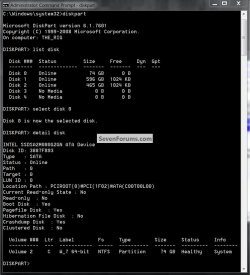
Follow the steps given earlier to fix this correctly by marking Win7 Active, marking Recovery Inactive then running Startup Repair 3 times from booted Repair CD. If any problems persist then return to the CD/DVD command line to type:

DISKPART
LIST DISK
SELECT DISK 0 (confirm this is Win7 HD)
DETAIL DISK

Now post back everything it says for the partitions on the Win7 HD.
 
I like that one Greg, thanks!


detail disk.jpg
 

My Computer

Computer Manufacturer/Model Number
* BFK Customs *
OS
W 7 64-bit Ultimate
CPU
Intel Q9550 Yorkfield
Motherboard
ASUS P5Q Pro
Memory
8GB Dominator 8500C5D
Graphics Card(s)
ATI : XFX 5870
Sound Card
Realtek HD Audio 7-1
Monitor(s) Displays
1x 47" LCD HDMI & 3x 26" LCD HDMI
Screen Resolution
1920x1080P & 1920x1200
Hard Drives
1x 80GB Intel X25-M G2 SSD : 1x 500GB & 1x 640GB WD Caviar Black(s)
PSU
Corsair 620HX
Case
Cooler Master RC-690
Cooling
Tuniq Tower 120, 2x 140mm and 3x 120mm case fans
Keyboard
Microsoft 500
Mouse
Razer Diamondback 3G
Internet Speed
14 Mb/s
Other Info
1x Koutech 3Gb/s SATA HDD Hot Swap Rack
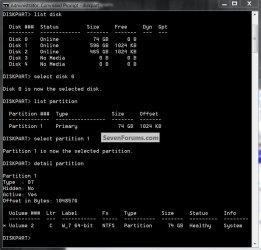
What we're looking for is which partition is System.
 
Last edited:
OK, like this.


detail partition.jpg
 

My Computer

Computer Manufacturer/Model Number
* BFK Customs *
OS
W 7 64-bit Ultimate
CPU
Intel Q9550 Yorkfield
Motherboard
ASUS P5Q Pro
Memory
8GB Dominator 8500C5D
Graphics Card(s)
ATI : XFX 5870
Sound Card
Realtek HD Audio 7-1
Monitor(s) Displays
1x 47" LCD HDMI & 3x 26" LCD HDMI
Screen Resolution
1920x1080P & 1920x1200
Hard Drives
1x 80GB Intel X25-M G2 SSD : 1x 500GB & 1x 640GB WD Caviar Black(s)
PSU
Corsair 620HX
Case
Cooler Master RC-690
Cooling
Tuniq Tower 120, 2x 140mm and 3x 120mm case fans
Keyboard
Microsoft 500
Mouse
Razer Diamondback 3G
Internet Speed
14 Mb/s
Other Info
1x Koutech 3Gb/s SATA HDD Hot Swap Rack
I like it too Greg. For my computer which has 3 HDs (1 ATA, 2 SATA) and 5 partitions, I setup a little batch file and diskpart script so I can get full info on all of them in a notepad window.

The diskpart script looks like this:
list disk
select disk 0
detail disk

select partition 1
detail partition

select partition 2
detail partition

select partition 3
detail partition

select disk 1
detail disk

select partition 1
detail partition

select partition 2
detail partition

select disk 2
detail disk

select partition 1
detail partition

exit
The batch file to invoke it looks like this:
@Echo off
diskpart /s diskpartinfo.txt > diskpartinfolog.txt & notepad diskpartinfolog.txt & del diskpartinfolog.txt
Pops up a notepad window where I can copy the output then paste it anywhere I want, or even save the file else where if needed. The diskpartinfo.txt file has to be in the current directory.
 

My Computer

Computer type
PC/Desktop
Computer Manufacturer/Model Number
Lenovo IdeaCenter 450
OS
Windows 10 Pro X64
CPU
Intel Quad Core i7-4770 @ 3.4Ghz
Memory
16.0GB PC3-12800 DDR3 SDRAM 1600 MHz
Graphics Card(s)
Intel Integrated HD Graphics
Sound Card
Realtek HD Audio
Monitor(s) Displays
HP 22" LCD
Screen Resolution
1680 x 1050
Hard Drives
250GB Samsung EVO SATA-3 SSD
2TB Seagate ST2000DM001 SATA-2
1.5TB Seagate ST3150041AS SATA
Keyboard
Dell USB
Mouse
Lenovo USB
Internet Speed
Cable via Road Runner 3MB Upload, 30MB Download
Antivirus
Windows Defender, MBAM Pro, MBAE
Browser
Seamonkey
Other Info
UEFI/GPT
PLDS DVD-RW DH16AERSH
Back
Top