BOOTMGR missing!

It is on the same drive, different partition.
 

My Computer

Computer type
PC/Desktop
Computer Manufacturer/Model Number
Self built.
OS
Windows 7 RTM 64bit, Windows 8 Pro 64bit
CPU
Intel i5-2500K @ 3.3Ghz
Motherboard
Asus Maximus IV GENE-Z/GEN3
Memory
16GB G.Skill RaptorX 1600MHz DDR3
Graphics Card(s)
N570GTX Twin Frozr III Power Edition
Sound Card
SupremeFX X-Fi 2
Monitor(s) Displays
BenQ XL2420T 120Hz 24 inch gaming monitor, Acer V233H 23 inc
Screen Resolution
1920x1080
Hard Drives
320GB Seagate Barracuda
WD 1TB Black Caviar
2TB WD Green Caviar
Samsung SSD 840 PRO Series
PSU
CoolerMaster Silent Pro Gold 1200WATT 80 Plus Gold
Case
CoolerMaster HAF X RC-942
Cooling
CoolerMaster V6GT Multi-Platform CPU Cooler
Keyboard
Logitech G510 Gaming Keyboard
Mouse
Logitech G700 Gaming Mouse
Antivirus
Norton Internet Security
Browser
Firefox 21
Other Info
Logitech Extreme 3D Pro Gaming Joystick, Logitech G930 Wireless Gaming Headset
Hi Bull,

Where is bootmgr and the yellow Boot folder ?

Does bcdedit say it's on C:?

Does the 1.46gb partition that we can't see inside say Active, by any chance?
 

My Computers

System One System Two

  • Computer type
    PC/Desktop
    OS
    7 X64
    CPU
    i5 8400
    Motherboard
    gigabyte b365m ds3h
    Memory
    2x8gb 3200mhz
    Hard Drives
    various
    PSU
    pure power 11 400w cm
    Case
    Coolermaster
    Cooling
    cryorig m9i
  • Computer type
    PC/Desktop
    OS
    7x64
    CPU
    g5400
    Motherboard
    ga b365m ds3h
    Memory
    8gb ddr4 2400
    PSU
    xfx pro 450w
Hi Bull,

Where is bootmgr and the yellow Boot folder ?

Does bcdedit say it's on C:?

Does the 1.46gb partition that we can't see inside say Active, by any chance?

Yes the first partition (1.46 gb toshiba recovery) is marked as active.
 

My Computer

OS
Win 7
Hi SIW2, check my screenshots on page 3. thanks.
 

My Computer

Computer type
PC/Desktop
Computer Manufacturer/Model Number
Self built.
OS
Windows 7 RTM 64bit, Windows 8 Pro 64bit
CPU
Intel i5-2500K @ 3.3Ghz
Motherboard
Asus Maximus IV GENE-Z/GEN3
Memory
16GB G.Skill RaptorX 1600MHz DDR3
Graphics Card(s)
N570GTX Twin Frozr III Power Edition
Sound Card
SupremeFX X-Fi 2
Monitor(s) Displays
BenQ XL2420T 120Hz 24 inch gaming monitor, Acer V233H 23 inc
Screen Resolution
1920x1080
Hard Drives
320GB Seagate Barracuda
WD 1TB Black Caviar
2TB WD Green Caviar
Samsung SSD 840 PRO Series
PSU
CoolerMaster Silent Pro Gold 1200WATT 80 Plus Gold
Case
CoolerMaster HAF X RC-942
Cooling
CoolerMaster V6GT Multi-Platform CPU Cooler
Keyboard
Logitech G510 Gaming Keyboard
Mouse
Logitech G700 Gaming Mouse
Antivirus
Norton Internet Security
Browser
Firefox 21
Other Info
Logitech Extreme 3D Pro Gaming Joystick, Logitech G930 Wireless Gaming Headset
Thanks Bull,

I had already looked at those - bootmgr and boot folder aren't there. They must be on the hidden 1.46gb partition.

I haven't had one of Win 7's 100mb hidden system partitions, but ( if I remember correctly from other people's posts) - 7 regards that as part of itself and bcdedit declares bootmgr to be on C:

Seems something similar is going on here.

Yup Yup - have you had one of those 100mb partitions, - what do you think?

I would use a 3rd party app. to give that 1.46gb partition a drive letter - "S" is as good a choice as any. Then we can see inside it.

You could use the bootable partition app. attached to this tutorial to do that

http://www.vistax64.com/tutorials/163304-dual-boot-using-free-partitioning-software.html
 

My Computers

System One System Two

  • Computer type
    PC/Desktop
    OS
    7 X64
    CPU
    i5 8400
    Motherboard
    gigabyte b365m ds3h
    Memory
    2x8gb 3200mhz
    Hard Drives
    various
    PSU
    pure power 11 400w cm
    Case
    Coolermaster
    Cooling
    cryorig m9i
  • Computer type
    PC/Desktop
    OS
    7x64
    CPU
    g5400
    Motherboard
    ga b365m ds3h
    Memory
    8gb ddr4 2400
    PSU
    xfx pro 450w
I think the 1.46G part should be changed to the D: drive if possible (after we fix this), otherwise the XP recovery CD will not be able to access it later on if needed. The XP boot files shouldn't have been placed in there AFAIK, that recovery drive should be write-locked until physically unlocked.
Maybe we should forget about the current XP boot files and get some new ones going. The problem with XP that I found many times, is that it will see a different partition (1st NTFS partition on drive, many times it's NOT the wanted drive) as the C: drive and install the boot files in there. I've had it install on my Music drive, my Movie drive, my storage drive, until I started unplugging all other physical drives and hiding the other partitions on that last drive from the XP installer using Partition Magic, that was the only way I could get XP to install the boot files on the proper partition...no wonder they changed the bootloader style eh ;)

Like Barrod stated, seems we need to get back to basics here.
Disable the Sandisk in Dev. Mgr if it's not plugged in and still shows anyway, let's get that out of the picture.
Now, I can't remember if EasyBCD allows you to hide partitions or not, so I'll have to do some research and get back on this, otherwise if you have a partition manager like PMagic or the like, I think we need to hide every partition except the XP one and then run the XP CD and repair the startup files, that should guarantee that they get installed on the proper drive this time ( I HATE XP's boot.ini system).
Then EasyBCD should have no trouble setting up the dual boot for you.

Lemme see what I can find, or if the other guys/gals here know if EasyBCD can hide parts or if they know of a safe free tool to do it, let's hope they post.
 
Last edited:

My Computer

Computer Manufacturer/Model Number
Personal Build
OS
Vista Ult 64bit - Windows 7 Ult 7264 64bit
CPU
Intel Core 2 Duo E6750
Motherboard
Asus Commando
Memory
4 G's Crucial Ballistix Tracer
Graphics Card(s)
BFG Nvidia 8800 GTS 340
Sound Card
Creative Sound Blaster X-FI Platinum FATAL1TY
Monitor(s) Displays
2-22" HP W2207 LCD
Screen Resolution
1920 x 1080
Hard Drives
3 x 500G WD Caviar SATA II
PSU
Enermax Noise Taker II 600W
Case
NZXT Lexa Classic (dual doored & windowed)
Cooling
Zalman 9700 CPU cooler - 4 x 120mm, 1 x 90mm fans
Keyboard
Logitech MX 5500
Mouse
Logitech MX Revolution
Internet Speed
Blazing...
Hi Chappy,

The bootable partition manager attached here should be able to hide Drives.

Dual Boot using free partitioning software - Vista Forums

Just had a look at Easybcd - doesn't seem to do it.

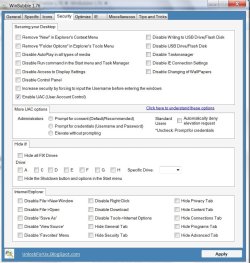
Winbubble says it does

WINBUBBLE2009-04-21_013128.jpg

View attachment WinBubble 1.76.zip

This is what it does:

*Hide ALL Fix Drives
*Hide a specific Drive

This feature will only hide the drive from being displayed. You can still access the drive by manually writing the path to the explorer's address bar, using command prompt and other applications.

Or use cmd prompt to remove the drive letters.
 

My Computers

System One System Two

  • Computer type
    PC/Desktop
    OS
    7 X64
    CPU
    i5 8400
    Motherboard
    gigabyte b365m ds3h
    Memory
    2x8gb 3200mhz
    Hard Drives
    various
    PSU
    pure power 11 400w cm
    Case
    Coolermaster
    Cooling
    cryorig m9i
  • Computer type
    PC/Desktop
    OS
    7x64
    CPU
    g5400
    Motherboard
    ga b365m ds3h
    Memory
    8gb ddr4 2400
    PSU
    xfx pro 450w
Thanks Bull,

I had already looked at those - bootmgr and boot folder aren't there. They must be on the hidden 1.46gb partition.

I haven't had one of Win 7's 100mb hidden system partitions, but ( if I remember correctly from other people's posts) - 7 regards that as part of itself and bcdedit declares bootmgr to be on C:

Seems something similar is going on here.

Yup Yup - have you had one of those 100mb partitions, - what do you think?

I would use a 3rd party app. to give that 1.46gb partition a drive letter - "S" is as good a choice as any. Then we can see inside it.

You could use the bootable partition app. attached to this tutorial to do that

Dual Boot using free partitioning software - Vista Forums

99% of the installs i do i make sure the hidden partition is not created, but on the ones it did create if i recall only contained the recovery environment and the boot manager was on C:. Knowing where the boot manager is would be helpful but not really needed, it is working correctly and boots windows 7 plus has the entries for XP pointing to the correct location of the NTLDR. Given all of this i would guess the reason XP does not boot is the info in the boot.ini is incorrect, or the extension is missing from the boot.ini (since we can not see it and don't know if bull has extensions for known file types showing or not).


Edit: Should be other way around hidden partition contains boot files c: contains recovery environment.
 

My Computer

OS
Win 7
If you cant find the bootmgr anywhere don't bother dinking around with downloads, boot in to 7, start, type 'diskmgmt.msc" <enter> right click the partition and Change Letter and Paths... Now you can get at those boot files with bcdedit to add XP.
 

My Computer

Computer type
Laptop
Computer Manufacturer/Model Number
Apple
OS
El Capitan / Windows 10
CPU
i7-4980HQ
Memory
16GB
Graphics Card(s)
Iris 5200
Hi baarod,

He tried that already. It is one of those oem non-standard partitions that doesn't allow you to change it or even add a drive letter with Disk Management.

Might be able to assign a letter with Diskpart.
 

My Computers

System One System Two

  • Computer type
    PC/Desktop
    OS
    7 X64
    CPU
    i5 8400
    Motherboard
    gigabyte b365m ds3h
    Memory
    2x8gb 3200mhz
    Hard Drives
    various
    PSU
    pure power 11 400w cm
    Case
    Coolermaster
    Cooling
    cryorig m9i
  • Computer type
    PC/Desktop
    OS
    7x64
    CPU
    g5400
    Motherboard
    ga b365m ds3h
    Memory
    8gb ddr4 2400
    PSU
    xfx pro 450w
Hi baarod,

He tried that already. It is one of those oem non-standard partitions that doesn't allow you to change it or even add a drive letter with Disk Management.

Might be able to assign a letter with Diskpart.

I'd say then that's likely the problem. Just set the Windows 7 boot volume to also be the Windows 7 system volume using DISKPART to set it active and BCDBOOT to write the new bootfiles out. Then use BCDEDIT to write in the XP loader. Forget entirely about messing with something that you know your standard tools wont touch. Just bypass it and get a standard boot sequence established. You know if it were me, non-standard, hidden, OEM, reserved, etc partitions are immediately reclaimed as freespace with extreme prejudice. If I don't create it, control it or write it myself it doesn't last on my systems.
 

My Computer

Computer type
Laptop
Computer Manufacturer/Model Number
Apple
OS
El Capitan / Windows 10
CPU
i7-4980HQ
Memory
16GB
Graphics Card(s)
Iris 5200
Guys, my apologies, but I am now as confused as puke in a tumble dryer! Baarod would you mind giving me step by step instructions please?
 

My Computer

Computer type
PC/Desktop
Computer Manufacturer/Model Number
Self built.
OS
Windows 7 RTM 64bit, Windows 8 Pro 64bit
CPU
Intel i5-2500K @ 3.3Ghz
Motherboard
Asus Maximus IV GENE-Z/GEN3
Memory
16GB G.Skill RaptorX 1600MHz DDR3
Graphics Card(s)
N570GTX Twin Frozr III Power Edition
Sound Card
SupremeFX X-Fi 2
Monitor(s) Displays
BenQ XL2420T 120Hz 24 inch gaming monitor, Acer V233H 23 inc
Screen Resolution
1920x1080
Hard Drives
320GB Seagate Barracuda
WD 1TB Black Caviar
2TB WD Green Caviar
Samsung SSD 840 PRO Series
PSU
CoolerMaster Silent Pro Gold 1200WATT 80 Plus Gold
Case
CoolerMaster HAF X RC-942
Cooling
CoolerMaster V6GT Multi-Platform CPU Cooler
Keyboard
Logitech G510 Gaming Keyboard
Mouse
Logitech G700 Gaming Mouse
Antivirus
Norton Internet Security
Browser
Firefox 21
Other Info
Logitech Extreme 3D Pro Gaming Joystick, Logitech G930 Wireless Gaming Headset
Hi baarod,

The screenshot is a few pages back - so here it is again:

http://www.sevenforums.com/attachments/installation-setup/8138d1239756783-bootmgr-missing-3.png

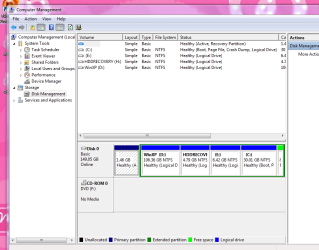
Win 7 Boot partition (C) already declares itself as System, Active - yet is a logical drive within an Extended partition . Bootmgr is not on it.

I assume Win 7 bootfiles are on the Primary partition which also declares itself Active - that is the 1.46gb Toshiba recovery partition.

http://www.sevenforums.com/attachments/installation-setup/8151d1239779904-bootmgr-missing-1.png

http://www.sevenforums.com/attachments/installation-setup/8136d1239756783-bootmgr-missing-.png

http://www.sevenforums.com/attachments/installation-setup/8137d1239756783-bootmgr-missing-2.png
 

My Computers

System One System Two

  • Computer type
    PC/Desktop
    OS
    7 X64
    CPU
    i5 8400
    Motherboard
    gigabyte b365m ds3h
    Memory
    2x8gb 3200mhz
    Hard Drives
    various
    PSU
    pure power 11 400w cm
    Case
    Coolermaster
    Cooling
    cryorig m9i
  • Computer type
    PC/Desktop
    OS
    7x64
    CPU
    g5400
    Motherboard
    ga b365m ds3h
    Memory
    8gb ddr4 2400
    PSU
    xfx pro 450w
Hi Bull,

The best thing for you to try is Unawaves suggestion - it won't do any harm, you are just copying the XP bootfiles from E to D and making an entry in bcd that points the right way ( hopefully).
Copy and paste these three files from E onto D.

boot
ntdetect
ntldr

You should be able to then see those files on the D drive in exactly the same way as you see them on the E drive.

Next, type cmd into start search box, when it pops up, rt click and run as admin. Then copy and paste the following directly at the prompt (this bit >) and press enter.

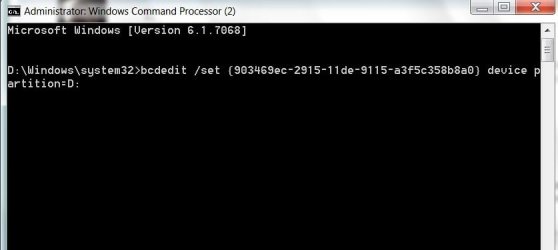
bcdedit /set {903469ec-2915-11de-9115-a3f5c358b8a0} device partition=D:

It should look like this ( yours will say C:\Windows\System32>):

CMD-2009-04-21_033942.jpg

After you press enter you should get a message saying it was successful. Then close cmd prompt.

Reboot - see if you get XP boot option, and if it boots up.
 

My Computers

System One System Two

  • Computer type
    PC/Desktop
    OS
    7 X64
    CPU
    i5 8400
    Motherboard
    gigabyte b365m ds3h
    Memory
    2x8gb 3200mhz
    Hard Drives
    various
    PSU
    pure power 11 400w cm
    Case
    Coolermaster
    Cooling
    cryorig m9i
  • Computer type
    PC/Desktop
    OS
    7x64
    CPU
    g5400
    Motherboard
    ga b365m ds3h
    Memory
    8gb ddr4 2400
    PSU
    xfx pro 450w
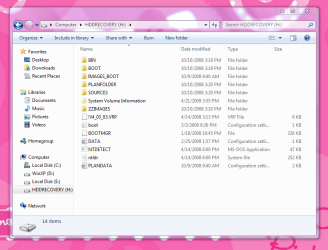
OK, guys. This what I did. I first tried Unawaves suggestion, but that didn't work, so I deleted those 3 bootfiles from E. I then managed to get that other drives name changed, and opened it. I then pasted those 3 files in there, but still no go. I am not sure whether or how I should change the command prompt instruction I tried with E though. I paste screenshots of that drive as well as disk management.
Thanks so much!!

1.PNG 2.PNG

Should I keep those 3 bootfiles in the H drive now, or should I delete them again??
 
Last edited:

My Computer

Computer type
PC/Desktop
Computer Manufacturer/Model Number
Self built.
OS
Windows 7 RTM 64bit, Windows 8 Pro 64bit
CPU
Intel i5-2500K @ 3.3Ghz
Motherboard
Asus Maximus IV GENE-Z/GEN3
Memory
16GB G.Skill RaptorX 1600MHz DDR3
Graphics Card(s)
N570GTX Twin Frozr III Power Edition
Sound Card
SupremeFX X-Fi 2
Monitor(s) Displays
BenQ XL2420T 120Hz 24 inch gaming monitor, Acer V233H 23 inc
Screen Resolution
1920x1080
Hard Drives
320GB Seagate Barracuda
WD 1TB Black Caviar
2TB WD Green Caviar
Samsung SSD 840 PRO Series
PSU
CoolerMaster Silent Pro Gold 1200WATT 80 Plus Gold
Case
CoolerMaster HAF X RC-942
Cooling
CoolerMaster V6GT Multi-Platform CPU Cooler
Keyboard
Logitech G510 Gaming Keyboard
Mouse
Logitech G700 Gaming Mouse
Antivirus
Norton Internet Security
Browser
Firefox 21
Other Info
Logitech Extreme 3D Pro Gaming Joystick, Logitech G930 Wireless Gaming Headset
1. Have you make this changes:
bcdedit /set {903469ec-2915-11de-9115-a3f5c358b8a0} device partition=D:

2. show us the content of "boot"(.ini) from drive H:
 

My Computer

OS
Windows XP and 7
ok this way more harder than it should be...
rename both the boot.ini and the ntdlr file and
you can put these two files in the C root drive...
View attachment NTLDR.zip
restart and you should see Microsoft Windows XP Professional along with Win7
AFAIK it should look like this...
multi(0)disk(0)rdisk(0)partition(2)\WINDOWS="Microsoft Windows XP Professional" /fastdetect
although i havent done it with extended partition it should work
 

My Computer

Computer Manufacturer/Model Number
Tx2500z Tablet Pc/Homemade Server
OS
Windows 7 Ult x64(x2), HomePrem x32(x4), Server 08 (+VM), 08 R2 (VM) , SuSe 11.2 (VM), XP 32 (VM)
CPU
Turion X2 ultra (oh well came with laptop)/P4 @3.2 (yes P4)
Motherboard
IDK HP Motherboard / Intel DG965SS
Memory
OCZ Dual Channel 4GB kit/ 1gb Dual Channel
Graphics Card(s)
HD 3200 graphics /GMA x3100 (yay for intergrated!!)
Sound Card
Realtek HD Audio(mic working, well sort of)/Siig IC-70012
Monitor(s) Displays
built-in Hp 12" laptop screen/ Acer 19"
Screen Resolution
1280x800 /1440x900
Cooling
All Air Cooled
Mouse
Logi MX Rev. /MS Wheel Optical 1.1A /Logitech Optical Mouse
Internet Speed
College baby but its still routed through vpn to 1536k...
Other Info
love my wacom pen and pressure sensitivity...
wished it worked in 7, SUSE for that matter though

My Computer

Computer type
PC/Desktop
Computer Manufacturer/Model Number
Self built.
OS
Windows 7 RTM 64bit, Windows 8 Pro 64bit
CPU
Intel i5-2500K @ 3.3Ghz
Motherboard
Asus Maximus IV GENE-Z/GEN3
Memory
16GB G.Skill RaptorX 1600MHz DDR3
Graphics Card(s)
N570GTX Twin Frozr III Power Edition
Sound Card
SupremeFX X-Fi 2
Monitor(s) Displays
BenQ XL2420T 120Hz 24 inch gaming monitor, Acer V233H 23 inc
Screen Resolution
1920x1080
Hard Drives
320GB Seagate Barracuda
WD 1TB Black Caviar
2TB WD Green Caviar
Samsung SSD 840 PRO Series
PSU
CoolerMaster Silent Pro Gold 1200WATT 80 Plus Gold
Case
CoolerMaster HAF X RC-942
Cooling
CoolerMaster V6GT Multi-Platform CPU Cooler
Keyboard
Logitech G510 Gaming Keyboard
Mouse
Logitech G700 Gaming Mouse
Antivirus
Norton Internet Security
Browser
Firefox 21
Other Info
Logitech Extreme 3D Pro Gaming Joystick, Logitech G930 Wireless Gaming Headset
ok this way more harder than it should be...
rename both the boot.ini and the ntdlr file and
Sorry, rename these files to what??

the file you have right now in your C:\ drive....
change the boot.ini to lets say boot1
and then copy the boot.ini in this zip file and restart your computer...
 

My Computer

Computer Manufacturer/Model Number
Tx2500z Tablet Pc/Homemade Server
OS
Windows 7 Ult x64(x2), HomePrem x32(x4), Server 08 (+VM), 08 R2 (VM) , SuSe 11.2 (VM), XP 32 (VM)
CPU
Turion X2 ultra (oh well came with laptop)/P4 @3.2 (yes P4)
Motherboard
IDK HP Motherboard / Intel DG965SS
Memory
OCZ Dual Channel 4GB kit/ 1gb Dual Channel
Graphics Card(s)
HD 3200 graphics /GMA x3100 (yay for intergrated!!)
Sound Card
Realtek HD Audio(mic working, well sort of)/Siig IC-70012
Monitor(s) Displays
built-in Hp 12" laptop screen/ Acer 19"
Screen Resolution
1280x800 /1440x900
Cooling
All Air Cooled
Mouse
Logi MX Rev. /MS Wheel Optical 1.1A /Logitech Optical Mouse
Internet Speed
College baby but its still routed through vpn to 1536k...
Other Info
love my wacom pen and pressure sensitivity...
wished it worked in 7, SUSE for that matter though
Hi Bull,

If you go to folder options and show file extensions , it may help.

At the moment you are seeing a file called boot. If you show extensions, you will see it is called boot.ini.

That may be less confusing.

Darkassain thinks boot.ini is pointing the wrong way and that the XP bootfiles wil be better on the C drive.

He suggests you change the name of your existing boot.ini to make it inoperative . You could change it to boot1.ini, or bootold.ini - as long as it is different. Also change ntldr to ntldrold.

He has posted another copy of the XP bootfiles - which he thinks you should put on the C drive and see if it works.
 

My Computers

System One System Two

  • Computer type
    PC/Desktop
    OS
    7 X64
    CPU
    i5 8400
    Motherboard
    gigabyte b365m ds3h
    Memory
    2x8gb 3200mhz
    Hard Drives
    various
    PSU
    pure power 11 400w cm
    Case
    Coolermaster
    Cooling
    cryorig m9i
  • Computer type
    PC/Desktop
    OS
    7x64
    CPU
    g5400
    Motherboard
    ga b365m ds3h
    Memory
    8gb ddr4 2400
    PSU
    xfx pro 450w
Back
Top