Bootmgr missing

bjproc

New member
Member
VIP
Local time
12:06 AM
Messages
198
i installed win7 basic on my netbook, it's been great for a couple of days, i switched it on tonight and i get this message

bootmgr is missing
press ctrl, alt & delete to reboot.

i've used the install disc to repair the start up (run once), it now boots up windows ok.

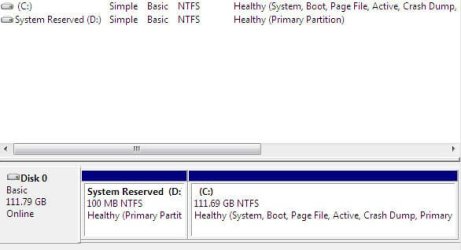
but i've now noticed that i now have a 'D' drive called system reserved at 99.9MB in size.

any ideas on how to make the system reserved into a hidden partition & no drive letter as such.


cheers

PS, wasn't sure what section to put this in, if it needs moved, please do.
 

My Computer

Computer Manufacturer/Model Number
Mesh Q4
OS
Win 7 Pro 32bit
CPU
Intel Quad Core 6600
Motherboard
Asus P5N-E SLI
Memory
4 GB
Graphics Card(s)
nVidia 8800GT
Sound Card
Onboard
Hard Drives
1TB Samsung Spinpoint,
1TB WD Eco Green
thanks theog, looking at that, i don't think thats what i'm looking for.

here are some screen shots.

1st one, disc management

2nd, my computer

i don't think that the system reserved be as a D drive.
 

Attachments

  • 1.jpg
    1.jpg
    20.1 KB · Views: 8
  • 2.jpg
    2.jpg
    5.7 KB · Views: 5

My Computer

Computer Manufacturer/Model Number
Mesh Q4
OS
Win 7 Pro 32bit
CPU
Intel Quad Core 6600
Motherboard
Asus P5N-E SLI
Memory
4 GB
Graphics Card(s)
nVidia 8800GT
Sound Card
Onboard
Hard Drives
1TB Samsung Spinpoint,
1TB WD Eco Green
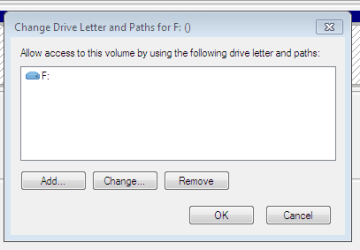
Right click Computer from your start menu, click Manage

Click Disk Management

You will see D:, Right click it and choose "Change drive Letter and Paths.."

Highlight D:, click Remove
 

My Computer

Computer Manufacturer/Model Number
Custom Built
OS
Windows 7 Ultimate
CPU
AMD Athlon II X2 245 2.90Ghz
Motherboard
Some Gigabyte one, dont remember model
Memory
3.00 GB
Graphics Card(s)
8800GTS 512MB
Sound Card
Sound Blaster X-Fi Titanium Fatal1ty
Monitor(s) Displays
Dual 22" widescreen
Hard Drives
250GB internal, 500GB internal
PSU
CORSAIR CMPSU-850TX 850W Power Supply
Case
Thermalkake Tsunami Dream
Cooling
Thermaltake Golden Orb II
Keyboard
Saitek Eclipse 2
Mouse
Logitech MX518
Right click Computer from your start menu, click Manage

Click Disk Management

You will see D:, Right click it and choose "Change drive Letter and Paths.."

Highlight D:, click Remove
ahh, that simple :o


thanks, never knew i could just remove it.


thanks
 

My Computer

Computer Manufacturer/Model Number
Mesh Q4
OS
Win 7 Pro 32bit
CPU
Intel Quad Core 6600
Motherboard
Asus P5N-E SLI
Memory
4 GB
Graphics Card(s)
nVidia 8800GT
Sound Card
Onboard
Hard Drives
1TB Samsung Spinpoint,
1TB WD Eco Green

My Computer

Computer Manufacturer/Model Number
Mesh Q4
OS
Win 7 Pro 32bit
CPU
Intel Quad Core 6600
Motherboard
Asus P5N-E SLI
Memory
4 GB
Graphics Card(s)
nVidia 8800GT
Sound Card
Onboard
Hard Drives
1TB Samsung Spinpoint,
1TB WD Eco Green
Letter or not, apparently Startup Repair marked your Win7 partition active and wrote the System MBR to it, as it is now "System Active" partition.

This means the SysReserved no longer has a purpose as a boot partition, and may be useless unless the "Repair My Computer" console it places on F8 menu at bootup is still there. Test it.
 
hi greg, i've rebooted, and it's started up ok & the system reserved isn't showing in my computer.

here's hoping that everythings fine now.

thanks
 

My Computer

Computer Manufacturer/Model Number
Mesh Q4
OS
Win 7 Pro 32bit
CPU
Intel Quad Core 6600
Motherboard
Asus P5N-E SLI
Memory
4 GB
Graphics Card(s)
nVidia 8800GT
Sound Card
Onboard
Hard Drives
1TB Samsung Spinpoint,
1TB WD Eco Green
Glad to hear I could help! Rep is appreciated :) :)
 

My Computer

Computer Manufacturer/Model Number
Custom Built
OS
Windows 7 Ultimate
CPU
AMD Athlon II X2 245 2.90Ghz
Motherboard
Some Gigabyte one, dont remember model
Memory
3.00 GB
Graphics Card(s)
8800GTS 512MB
Sound Card
Sound Blaster X-Fi Titanium Fatal1ty
Monitor(s) Displays
Dual 22" widescreen
Hard Drives
250GB internal, 500GB internal
PSU
CORSAIR CMPSU-850TX 850W Power Supply
Case
Thermalkake Tsunami Dream
Cooling
Thermaltake Golden Orb II
Keyboard
Saitek Eclipse 2
Mouse
Logitech MX518
Back
Top