BOOTMGR problem + no bootable partition

Riruka

New member
Member
Local time
2:05 PM
Messages
32
i have a samsung netbook n210.

when my netbook was returned from the repair shop, my hard drive is already partitioned into two.
it's bothering me so i combined them.
i searched for it before doing it, its safe they said, just make sure the other drive is empty.
it was a success. but after i turned it on again.. an error appeared.

BOOTMGR is missing
press ctrl+alt+delete


since i dont have a disk drive 'coz its a netbook..
i have a spare disk of windows 7 starter 32bit.
i copied it's contents on my usb.

then, i changed the boot order so i can boot my usb.

then another problem appeared again,

no bootable partition in table

oh no. i dont know what to do now T_T

thank you for reading this and hope u can help me out... :(
 

My Computer

OS
Windows 7 Ultimate
You need to mark the partition containing the boot files ACTIVE.

That might the windows 7 partition - or if you have a separate 100mb partition - that will the one you need to mark active.

If you don't have a dvd drive - you need to boot something from usb stick which will let you do that.

It is possible with windows 7 installation installation media - you need to select Repair my computer at the bottom left of the "Install Now " window.

If you run startup repair a few times, it will try and guess which partition it should set active.
 

My Computers

System One System Two

  • Computer type
    PC/Desktop
    OS
    7 X64
    CPU
    i5 8400
    Motherboard
    gigabyte b365m ds3h
    Memory
    2x8gb 3200mhz
    Hard Drives
    various
    PSU
    pure power 11 400w cm
    Case
    Coolermaster
    Cooling
    cryorig m9i
  • Computer type
    PC/Desktop
    OS
    7x64
    CPU
    g5400
    Motherboard
    ga b365m ds3h
    Memory
    8gb ddr4 2400
    PSU
    xfx pro 450w
You need to mark the partition containing the boot files ACTIVE.

That might the windows 7 partition - or if you have a separate 100mb partition - that will the one you need to mark active.

If you don't have a dvd drive - you need to boot something from usb stick which will let you do that.

It is possible with windows 7 installation installation media - you need to select Repair my computer at the bottom left of the "Install Now " window.

If you run startup repair a few times, it will try and guess which partition it should set active.

if i remember correctly, i make sure to mark it as active. yeah i did.
i am doing it now but i cant get past to no partition table something problem.

thanks for replying btw. :)
 

My Computer

OS
Windows 7 Ultimate

My Computers

System One System Two

  • Computer type
    PC/Desktop
    OS
    7 X64
    CPU
    i5 8400
    Motherboard
    gigabyte b365m ds3h
    Memory
    2x8gb 3200mhz
    Hard Drives
    various
    PSU
    pure power 11 400w cm
    Case
    Coolermaster
    Cooling
    cryorig m9i
  • Computer type
    PC/Desktop
    OS
    7x64
    CPU
    g5400
    Motherboard
    ga b365m ds3h
    Memory
    8gb ddr4 2400
    PSU
    xfx pro 450w
In that case , you will need to create a bootable usb stick with a linux based partition manager - something like this:

At the bottom of the page - it is free:

Free download Magic Partition Manager Software, partition magic alternative, free partition magic, partition magic Windows 7 and server partition software - Partition Wizard Online

defragment the pwhe7.iso with this:

WinContig

Try this free program to put it on usb stick:

YUMI - Multiboot USB Creator (Windows) | USB Pen Drive Linux

yay! it's fixed now.
i made a .. bootable usb drive.
it reinstalled the OS.
'coz there's no option like 'repair the computer' just like on youtube..
but im glad my files are still there.. in windows.old

but there's another problem.

why is my desktop screen stretched than normal?
i mean.. its ugly :(
its not normal. hope u can help me out with this.. thanks! :)
 

My Computer

OS
Windows 7 Ultimate
Not sure what you mean exactly.

Did you check the settings?

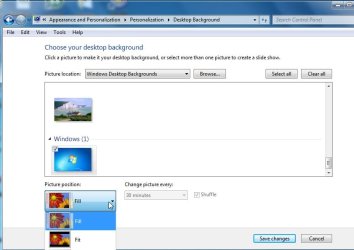
Rt click desktop, select personalize>desktopbackground

desktop.jpg
 

My Computers

System One System Two

  • Computer type
    PC/Desktop
    OS
    7 X64
    CPU
    i5 8400
    Motherboard
    gigabyte b365m ds3h
    Memory
    2x8gb 3200mhz
    Hard Drives
    various
    PSU
    pure power 11 400w cm
    Case
    Coolermaster
    Cooling
    cryorig m9i
  • Computer type
    PC/Desktop
    OS
    7x64
    CPU
    g5400
    Motherboard
    ga b365m ds3h
    Memory
    8gb ddr4 2400
    PSU
    xfx pro 450w
Oh, it is starter edition.

I has forgotten it existed.

There are some limtations on that.

Were you able to fix the issue?
 

My Computers

System One System Two

  • Computer type
    PC/Desktop
    OS
    7 X64
    CPU
    i5 8400
    Motherboard
    gigabyte b365m ds3h
    Memory
    2x8gb 3200mhz
    Hard Drives
    various
    PSU
    pure power 11 400w cm
    Case
    Coolermaster
    Cooling
    cryorig m9i
  • Computer type
    PC/Desktop
    OS
    7x64
    CPU
    g5400
    Motherboard
    ga b365m ds3h
    Memory
    8gb ddr4 2400
    PSU
    xfx pro 450w
Clean Reinstall - Factory OEM Windows 7

As it says it the tutorial do all of your Important and Optional Updates to get the latest drivers installed, then check for any missing in Device Manager.

There may still be a newer Display driver on the Support Downloads webpage for your PC model.
 
yup guys. i was able to fix the issue :)
gregrocker was right.. just install the latest updates and you're done.. its not stretched anymore, weeee :D
though, i cant change the background 'coz its starter. *bummer* hahaha

again, thank you sooooo much. goodbyeee!
 

My Computer

OS
Windows 7 Ultimate
Back
Top