Bootup BSOD - CPU failure?

rcjhood

New member
Local time
5:57 PM
Messages
12
Problem:
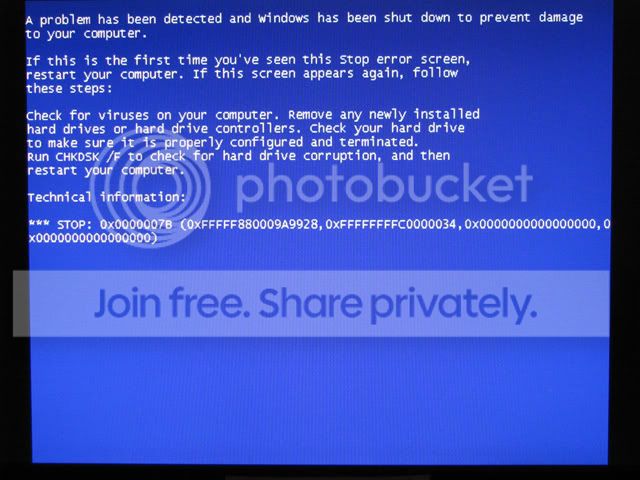
Win7 Pro 64-bit installed and worked perfectly for a week. Then it began giving me the occasional random BSOD on bootup until it eventually stopped booting at all. I tried recovering from the Win7 install disk but it gives me the same BSOD. Here is where it occurs:

It boots from the disk and copies the files just fine

01.jpg


Then the progress bar moves for a short time

02.jpg


Then this:
03.jpg


Troubleshooting:
I ran several HDD tests (CHKDSK, Seatools, SpinRite 6) without a single error. I also tested the memory (memtest86 and windiag) but found no errors. I finally formatted the HDD for a fresh install and it still didn't work.

I reinstalled XP Pro 32-bit and it has been working flawlessly for six months.

Since then, I have systematically replaced the HDD, memory, DVD-ROM, PSU, and motherboard (going from a P35 to P45 chipset). I also tried three different video cards (1 ATI and 2 nVidia). The only thing I have not replaced is the CPU (e8400) because of the expense. None of these things fixed the problem.

When I try to install, I disconnect all the peripherals and internal components not necessary for installation. I've tried a PS/2 keyboard with no USB devices connected. I tried the backup disk I got from MS instead of the ISO I downloaded (which is what I used to install in the first place). I've flashed to the latest BIOS. I've played with every BIOS setting I can think of that might be causing the problem. None of this works.

Solutions?
The only hardware I haven't tested is the CPU. XP 32-bit works fine but Win7 64-bit does not. Is it possible that a CPU could fail in a way that it will not run a 64-bit OS but will still run a 32-bit OS?

It's got to be a hardware failure but I have never heard of a CPU acting this way. What else is there to try before replacing the CPU for an unlikely fix?

Original setup:
e8400
Gigabyte P35-DS4
4GB Corsair DDR2 800
Seagate Barracuda 250GB
Geforce 8800GT
Antec Truepower 550W

New setup:
e8400 (same one)
Gigabyte EP45-UD3P
4GB Patriot DDR2 1066
WD Black 500GB
Radeon 4890
Antec Truepower 750W

EDIT: added hard drives to setups
 
Last edited:

My Computer

OS
Win XP Pro/Win 7 Pro
CPU
E8400 OC'd to 3.51
Motherboard
Gigabyte P35-DS4 2.1
Memory
4GB Corsair XMS2
Graphics Card(s)
ATI Gigabyte 4890
Sound Card
Audigy 2 Plat
Monitor(s) Displays
Samsung 21", Samsung 19"
Hard Drives
5x SATA: WD Black 500, Seagate cuda 300 x2, 250, 160
PSU
Antec True 550W
Case
Cooler Master Cosmos
Cooling
Air
Stop error 7B means windows cant access the boot drive. Your chipset drivers/ storage drivers may be acting up or your hard drive may be failing. Though you did say, XP has been running fine for 6 months.

Try updating your chipset drivers/ storage drivers. As a side note, does your bios have the option to switch from AHCI to IDE? I just remembered this because in XP, i used to occasionally come across this error and that was always because in the bios the drive mode had got toggled from IDE to AHCI.
 

My Computer

Computer Manufacturer/Model Number
Too many to describe...
OS
Windows 7 x64 pro/ Windows 7 x86 Pro/ XP SP3 x86
The SATA controller is set to IDE by default and AHCI does not work either.

Are you talking about updating the windows drivers? I don't even have Win7 installed so I'm not sure how that would help install from the disk.

What else could keep it from accessing the boot drive? I've tried two different cleanly formatted, error-free HDDs so it must be a problem in BIOS, no? But why would it have failed like it did, BSODing intermittently at first, then failing altogether?

Should I scrounge up a PATA drive to try booting from?
 

My Computer

OS
Win XP Pro/Win 7 Pro
CPU
E8400 OC'd to 3.51
Motherboard
Gigabyte P35-DS4 2.1
Memory
4GB Corsair XMS2
Graphics Card(s)
ATI Gigabyte 4890
Sound Card
Audigy 2 Plat
Monitor(s) Displays
Samsung 21", Samsung 19"
Hard Drives
5x SATA: WD Black 500, Seagate cuda 300 x2, 250, 160
PSU
Antec True 550W
Case
Cooler Master Cosmos
Cooling
Air
Have you tried resetting the bios. Sometimes bios corruptions due to weak batteries etc. can be the problem. There are two steps that you can take.
1) go into bios and set it to default.
2) reset the bios on the motherboard using jumpers and temporarily removing the bios battery.
If step 1 does not work, try step two.
 

My Computer

Computer Manufacturer/Model Number
Homemade
OS
Win 7 64 bit professional
CPU
CPU: 3930K @ 4.8 MHz Stable as a rock
Motherboard
ASUS Rampage IV Extreme LGA 2011
Memory
CORSAIR DOMINATOR GT 16GB (4 x 4GB) 240-Pin DDR3
Graphics Card(s)
EVGA SuperClocked+ GeForce GTX 680
Monitor(s) Displays
Dell 3007WFP
Screen Resolution
2560 x 1600
Hard Drives
Vector(256gb) x 2
RevoDrive 3 X2 space (240 GB)
Crucial C300 256 GB SSD
PSU
CORSAIR AX1200i 1200W Digital ATX12V v2.31 and EPS 2.92 SLI
Cooling
Water cooling EK Supremacy ELITE
Mouse
ratZ-7
Other Info
WEI-7.8
Yes I've reset the BIOS several times. The problem persists across different motherboards anyway.
 

My Computer

OS
Win XP Pro/Win 7 Pro
CPU
E8400 OC'd to 3.51
Motherboard
Gigabyte P35-DS4 2.1
Memory
4GB Corsair XMS2
Graphics Card(s)
ATI Gigabyte 4890
Sound Card
Audigy 2 Plat
Monitor(s) Displays
Samsung 21", Samsung 19"
Hard Drives
5x SATA: WD Black 500, Seagate cuda 300 x2, 250, 160
PSU
Antec True 550W
Case
Cooler Master Cosmos
Cooling
Air
Anyone have a clue here? I am completely out of ideas at this point. I wonder of Microsoft could help...

Also - when it BSODs before it's even installed, does it do a dump anywhere on the hard drive?
 

My Computer

OS
Win XP Pro/Win 7 Pro
CPU
E8400 OC'd to 3.51
Motherboard
Gigabyte P35-DS4 2.1
Memory
4GB Corsair XMS2
Graphics Card(s)
ATI Gigabyte 4890
Sound Card
Audigy 2 Plat
Monitor(s) Displays
Samsung 21", Samsung 19"
Hard Drives
5x SATA: WD Black 500, Seagate cuda 300 x2, 250, 160
PSU
Antec True 550W
Case
Cooler Master Cosmos
Cooling
Air
here is a long shot and I am reaching. Windows XP will not access your 4 GB of RAM, however Windows 7 64 bit will access all the RAM. It is possible that you have a bad stick of memory that is ignored by Windows XP but comes into play with Windows 7. Try removing two sticks in different combinations and see if that makes a difference.
 

My Computer

Computer Manufacturer/Model Number
Homemade
OS
Win 7 64 bit professional
CPU
CPU: 3930K @ 4.8 MHz Stable as a rock
Motherboard
ASUS Rampage IV Extreme LGA 2011
Memory
CORSAIR DOMINATOR GT 16GB (4 x 4GB) 240-Pin DDR3
Graphics Card(s)
EVGA SuperClocked+ GeForce GTX 680
Monitor(s) Displays
Dell 3007WFP
Screen Resolution
2560 x 1600
Hard Drives
Vector(256gb) x 2
RevoDrive 3 X2 space (240 GB)
Crucial C300 256 GB SSD
PSU
CORSAIR AX1200i 1200W Digital ATX12V v2.31 and EPS 2.92 SLI
Cooling
Water cooling EK Supremacy ELITE
Mouse
ratZ-7
Other Info
WEI-7.8
That's a good thought but I've already tried it. I tried each stick individually from both matched sets and in every slot. I've also tested them thoroughly with memtest and windiag. I'm pretty sure it's not the memory.
 

My Computer

OS
Win XP Pro/Win 7 Pro
CPU
E8400 OC'd to 3.51
Motherboard
Gigabyte P35-DS4 2.1
Memory
4GB Corsair XMS2
Graphics Card(s)
ATI Gigabyte 4890
Sound Card
Audigy 2 Plat
Monitor(s) Displays
Samsung 21", Samsung 19"
Hard Drives
5x SATA: WD Black 500, Seagate cuda 300 x2, 250, 160
PSU
Antec True 550W
Case
Cooler Master Cosmos
Cooling
Air
Another long shot-- have you tried underclocking your cpu or increasing your vcore and vdimm ?
 

My Computer

Computer Manufacturer/Model Number
Homemade
OS
Win 7 64 bit professional
CPU
CPU: 3930K @ 4.8 MHz Stable as a rock
Motherboard
ASUS Rampage IV Extreme LGA 2011
Memory
CORSAIR DOMINATOR GT 16GB (4 x 4GB) 240-Pin DDR3
Graphics Card(s)
EVGA SuperClocked+ GeForce GTX 680
Monitor(s) Displays
Dell 3007WFP
Screen Resolution
2560 x 1600
Hard Drives
Vector(256gb) x 2
RevoDrive 3 X2 space (240 GB)
Crucial C300 256 GB SSD
PSU
CORSAIR AX1200i 1200W Digital ATX12V v2.31 and EPS 2.92 SLI
Cooling
Water cooling EK Supremacy ELITE
Mouse
ratZ-7
Other Info
WEI-7.8
Nope, I'll give those a try. But if installing Windows 7 means that I have to underclock my CPU, I'm going to be pissed.
 
Last edited:

My Computer

OS
Win XP Pro/Win 7 Pro
CPU
E8400 OC'd to 3.51
Motherboard
Gigabyte P35-DS4 2.1
Memory
4GB Corsair XMS2
Graphics Card(s)
ATI Gigabyte 4890
Sound Card
Audigy 2 Plat
Monitor(s) Displays
Samsung 21", Samsung 19"
Hard Drives
5x SATA: WD Black 500, Seagate cuda 300 x2, 250, 160
PSU
Antec True 550W
Case
Cooler Master Cosmos
Cooling
Air
No luck with the speed and voltage changes. Good thought, tho.

EDIT:
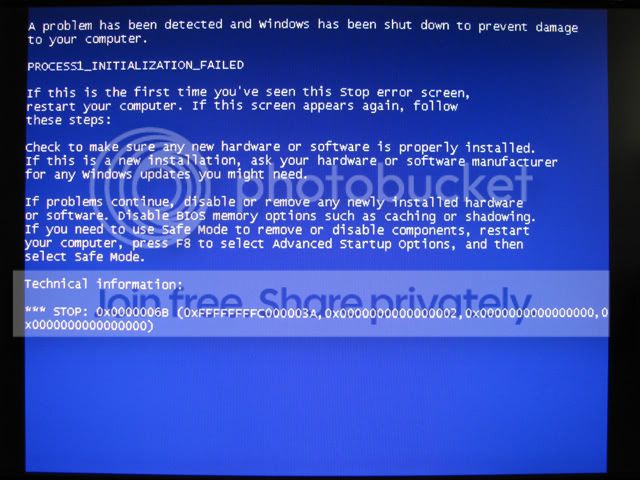
I did get a 6B stop error once (instead of the 7B) when adjusting the vdimm but I couldn't recreate it:

04.jpg
 

My Computer

OS
Win XP Pro/Win 7 Pro
CPU
E8400 OC'd to 3.51
Motherboard
Gigabyte P35-DS4 2.1
Memory
4GB Corsair XMS2
Graphics Card(s)
ATI Gigabyte 4890
Sound Card
Audigy 2 Plat
Monitor(s) Displays
Samsung 21", Samsung 19"
Hard Drives
5x SATA: WD Black 500, Seagate cuda 300 x2, 250, 160
PSU
Antec True 550W
Case
Cooler Master Cosmos
Cooling
Air
Is the "Native Mode" setting in the BIOS enabled?
6B means Bootcat.cache is corrupted.
 

My Computer

Computer Manufacturer/Model Number
self built
OS
Windows 7 Professional 64
CPU
i7 860
Motherboard
ASUS P7P55D-E Pro /onboard SATA 6Gb/s USB 3.0
Memory
8GB Corsair CMX4GX3M2A1600C9 DDR3 1600
Graphics Card(s)
(2) Nvidia EVGA GTX 470 SLI
Sound Card
Onboard VIA VT1828S 8 channels
Monitor(s) Displays
ASUS VW266H 25.5" HDMI Widescreen LCD and HP vs19 LCD 19"
Screen Resolution
1920 x 1200 : 1280 X 1024 dual
Hard Drives
Intel X25-M 80GB SSD (boot)
Seagate Barracuda 80GB
Western Digital Caviar Black 500GB
Asus DRW-24B1ST/BLK/B/AS
PSU
COOLER MASTER Silent Pro 1000W
Case
LIAN LI Lancool PC-K62
Cooling
Prolimatech Megahalems with Scythe "ULTRA KAZE" 120
Keyboard
Saitek
Mouse
Microsoft Optical comfort mouse 3000
Internet Speed
Comcast Ultra tier 30/5
Native Mode was not enabled but I just tried it to no avail.

Bootcat.cache is a kernel file that exists when the OS is already installed, isn't it? Windows 7 is not even installed so I'm not sure why I would have seen it.
 

My Computer

OS
Win XP Pro/Win 7 Pro
CPU
E8400 OC'd to 3.51
Motherboard
Gigabyte P35-DS4 2.1
Memory
4GB Corsair XMS2
Graphics Card(s)
ATI Gigabyte 4890
Sound Card
Audigy 2 Plat
Monitor(s) Displays
Samsung 21", Samsung 19"
Hard Drives
5x SATA: WD Black 500, Seagate cuda 300 x2, 250, 160
PSU
Antec True 550W
Case
Cooler Master Cosmos
Cooling
Air
I know you have played with your bios, have you tried loosening your memory timings.
 

My Computer

Computer Manufacturer/Model Number
Homemade
OS
Win 7 64 bit professional
CPU
CPU: 3930K @ 4.8 MHz Stable as a rock
Motherboard
ASUS Rampage IV Extreme LGA 2011
Memory
CORSAIR DOMINATOR GT 16GB (4 x 4GB) 240-Pin DDR3
Graphics Card(s)
EVGA SuperClocked+ GeForce GTX 680
Monitor(s) Displays
Dell 3007WFP
Screen Resolution
2560 x 1600
Hard Drives
Vector(256gb) x 2
RevoDrive 3 X2 space (240 GB)
Crucial C300 256 GB SSD
PSU
CORSAIR AX1200i 1200W Digital ATX12V v2.31 and EPS 2.92 SLI
Cooling
Water cooling EK Supremacy ELITE
Mouse
ratZ-7
Other Info
WEI-7.8
No, I have not. What would you recommend? The stock timings are 5-5-5-15
 

My Computer

OS
Win XP Pro/Win 7 Pro
CPU
E8400 OC'd to 3.51
Motherboard
Gigabyte P35-DS4 2.1
Memory
4GB Corsair XMS2
Graphics Card(s)
ATI Gigabyte 4890
Sound Card
Audigy 2 Plat
Monitor(s) Displays
Samsung 21", Samsung 19"
Hard Drives
5x SATA: WD Black 500, Seagate cuda 300 x2, 250, 160
PSU
Antec True 550W
Case
Cooler Master Cosmos
Cooling
Air
Are you at 1t or 2t ?
 

My Computer

Computer Manufacturer/Model Number
Homemade
OS
Win 7 64 bit professional
CPU
CPU: 3930K @ 4.8 MHz Stable as a rock
Motherboard
ASUS Rampage IV Extreme LGA 2011
Memory
CORSAIR DOMINATOR GT 16GB (4 x 4GB) 240-Pin DDR3
Graphics Card(s)
EVGA SuperClocked+ GeForce GTX 680
Monitor(s) Displays
Dell 3007WFP
Screen Resolution
2560 x 1600
Hard Drives
Vector(256gb) x 2
RevoDrive 3 X2 space (240 GB)
Crucial C300 256 GB SSD
PSU
CORSAIR AX1200i 1200W Digital ATX12V v2.31 and EPS 2.92 SLI
Cooling
Water cooling EK Supremacy ELITE
Mouse
ratZ-7
Other Info
WEI-7.8
2t I believe. The manual says it translates as 2-3-2-5.
 

My Computer

OS
Win XP Pro/Win 7 Pro
CPU
E8400 OC'd to 3.51
Motherboard
Gigabyte P35-DS4 2.1
Memory
4GB Corsair XMS2
Graphics Card(s)
ATI Gigabyte 4890
Sound Card
Audigy 2 Plat
Monitor(s) Displays
Samsung 21", Samsung 19"
Hard Drives
5x SATA: WD Black 500, Seagate cuda 300 x2, 250, 160
PSU
Antec True 550W
Case
Cooler Master Cosmos
Cooling
Air
try 6-6-6-20. If that helps tighten up in steps. Very crude approach but could pinpoint the issue.
 

My Computer

Computer Manufacturer/Model Number
Homemade
OS
Win 7 64 bit professional
CPU
CPU: 3930K @ 4.8 MHz Stable as a rock
Motherboard
ASUS Rampage IV Extreme LGA 2011
Memory
CORSAIR DOMINATOR GT 16GB (4 x 4GB) 240-Pin DDR3
Graphics Card(s)
EVGA SuperClocked+ GeForce GTX 680
Monitor(s) Displays
Dell 3007WFP
Screen Resolution
2560 x 1600
Hard Drives
Vector(256gb) x 2
RevoDrive 3 X2 space (240 GB)
Crucial C300 256 GB SSD
PSU
CORSAIR AX1200i 1200W Digital ATX12V v2.31 and EPS 2.92 SLI
Cooling
Water cooling EK Supremacy ELITE
Mouse
ratZ-7
Other Info
WEI-7.8

My Computer

OS
Windows 7 x64/XP x86 Dual Boot
CPU
Intel Core 2 Duo E6850 3.0GHz
Motherboard
Asus P5E WS Pro LGA 775 Intel X38 ATX
Memory
8GB Corsair Dominator (4 x 2GB PC2 8500) TWIN2X4096-8500C5D
Graphics Card(s)
EVGA GeForce GTX 480
Sound Card
AuzenTech AZT-XM71 X-Meridian 7.1
Monitor(s) Displays
Apple 27" LED Cinema Display
Screen Resolution
2560 X 1440
Hard Drives
2 Western Digital VelociRaptor WD3000HLFS 300GB (RAID 0)
2 Samsung Spinpoint F1 HD103UJ 1TB (RAID 1)
PSU
Seasonic M12 SS-700HM
Case
Silverstone TJ-07
Cooling
Enzotech Ultra-X
Keyboard
Logitech G510
Mouse
Logitech G9x
Adjusting the RAM timings with your suggested numbers didn't work. I'm not familiar with what these numbers actually mean or how they affect performance so I can't make a good guess on what else to try here.

DonD - Could it be that I'm not alone?! I read your post and it is very similar to what I experienced at the start of my problem. I was also dual booting with XP at the time. Once, before the total failure, it booted up and Windows 7 prompted me for an error check because of the blue screens. It found an error which I kick myself for not writing down. It had to do with a failure on the boot sector and it said that it could not correct it. When I first started looking into the issue, I found that some people who were dual booting with Vista and XP were getting the same error. So I decided to delete all partitions and completely format the disk, getting rid of the dual boot altogether. It did not work.

For a while I tried disconnecting various components to find the problem. With certain hardware configurations I would not get a BSOD but instead it would hang at the same place yours is hanging. Now, however, it is all BSODs all the time.

Since your problem has not progressed as far as mine, try checking your HDD for errors and see what comes up. I would run both CHKDSK and the HDD manufacturer's diagnostic. And anything else if you have it (like SpinRite).

Everything seems to point to a HDD error but my own attempts to fix it have failed.
 

My Computer

OS
Win XP Pro/Win 7 Pro
CPU
E8400 OC'd to 3.51
Motherboard
Gigabyte P35-DS4 2.1
Memory
4GB Corsair XMS2
Graphics Card(s)
ATI Gigabyte 4890
Sound Card
Audigy 2 Plat
Monitor(s) Displays
Samsung 21", Samsung 19"
Hard Drives
5x SATA: WD Black 500, Seagate cuda 300 x2, 250, 160
PSU
Antec True 550W
Case
Cooler Master Cosmos
Cooling
Air
Back
Top