Bootup hangs on post screen.

NonMagical

New member
System:

Newegg.com - Once You Know, You Newegg

All computer parts are brand new, including the case. Bios are essentially default (no overclocking at least).

Here's a brief story of what I've gone through so far: I installed Windows 7 last night, installed the necessary updates, MoBo drivers, video card drivers, etc. After that I begun the usual process of getting basic applications downloaded, as well as transferring over multimedia from my old HDD. Everything was going good until...

The first thing that happened was while deleting 4 gigs of music off my usb flash drive, Windows Explorer crashed and had to restart. I continued deleting it, and it crashed again. A couple crash and restarts later and all the files were successfully deleted. After this a couple programs on my computer started to hang and crash. No program really in particular, but it was usually one I would be using at the time. It would crash, restart without issue, and I could continue on my way. Most notable with this was downloading one of my games over Steam. Steam crashed multiple times in the process, but eventually finished.

The most notable thing though was at one point while my system was idle and I was talking to my dad, some critical error popped up explaining that there was something wrong with my brand new HDD and that I should immediately back up my files or risk losing them. It had instructions on how to do that. For the time being I skipped it. Only other thing that happened was after coming back from hibernation one time the whole system locked up and needed to be restarted (and went through a chkdsk during the reboot).

So, I decided to just reformat and try again. Windows 7 installed fine again, and the updates did, too. I installed the MoBo drivers after that. Everything was fine. Then I installed my anti-virus and video card drivers. A reboot was needed, so I restarted. Now I can't get past the MoBo post screen. I can't even get into the bios. The system just sits on the post screen until I turn it off.

Suggestions? Probable that my brand new HDD came already busted? Possible other issues?

TL;DR version

Fresh Windows install. Windows updates, MoBo drivers, anti-virus, and video drivers installed. Can't get past post, not even to bios. Help?

Thanks for any suggestions! I really want to get this brand new computer up and running without issues :/ It's my first build and this has been problem #15923. Pretty discouraging...
 

My Computer

OS
Windows 7

My Computer

Computer Manufacturer/Model Number
Custom
OS
Windows 7 Professional x64
CPU
Intel i7 2600K OC'd @ 4620 MHz
Motherboard
Asus P8Z68-V Pro
Memory
16GB GSkill Sniper 2133 Mhz (4x4GB)
Graphics Card(s)
EVGA GeForce GTX 480 SuperClocked+
Sound Card
Realtek High Definition Audio
Monitor(s) Displays
2x Acer S273HLbmii 27"
Screen Resolution
2 x 1920x1080
Hard Drives
64GB Crucial M4 SSD

Storage: Hitachi 1TB 5400RPM, Samsung 1.5TB 5400RPM
PSU
Corsair HW Series 750w (modular)
Case
Cooler Master HAF 932 Advanced Blue Edition
Cooling
CM Hyper 212+ CPU cooler, 3x 230mm + 1x 140mm case fans
Keyboard
Logitech MK320 (wireless)
Mouse
Logitech MK320 (wireless)
Internet Speed
30 Mb/s : 2 Mb/s
Looks like the hard drive is failing. Try testing it with one of these programs: Hard Drive Diagnostics Tools and Utilities (Storage) - TACKtech Corp.

I was under the impression that the hard drive isn't even called upon until after the post is done. So it is possible the hard drive is preventing me passing that early part of the boot up?

Little update on my problem: It seems that having a USB jump drive in the USB 3.0 spot was causing it to instantly freeze on bootup, which seems strange. Never had an issue with jump drives causing crashes. The only things on the jump drive are all my install files for programs.

I'm still wanting to try out the diagnostics tool. I don't have a floppy drive, sadly, so now I have to see if I have any cd's lying around. Do you know if any of those will run if I stick it on a USB? What else would I need on the USB to make it work?


Edit 2: Windows Explorer just crashed for the first time on this new install. Only things currently on the system: Anti-virus (Avast), Google Chrome, MoBo drivers, Video Card drivers, Windows 7 updates, and a variety of install programs I had seconds early finished transferring off my jump drive into a folder.

Here is the error that came up:

Windows Explorer has stopped working
Windows is collecting more information about the problem. This might take several minutes…


That brought up this window:


Do you want to send more information about the problem?
Send information
Cancel


Which had these details:


Files that help describe the problem:
C:\Users\(name)\AppData\Local\Temp\WER2CE9.tmp.WERInternalMetadata.xml
C:\Users\(name)\AppData\Local\Temp\WER4135.tmp.appcompat.txt
C:\Users\(name)\AppData\Local\Temp\WER4155.tmp.mdmp


I went to the Local\Temp folder and could not find the files it talked about. I attempted to type the whole file name into the address bar and couldn't find them, either.


Could this possibly be something to do with the jump drive itself? These latest problems have all happened while the drive is plugged in. I don't remember in the past if that was the case since I would have never thought it could be causing problems. Is is bad to plug an old USB drive into a USB 3.0 spot maybe? It transferred a ton of files without issue already.

Edit3: While typing the above edit, Windows had another crash, but this time not the explorer. The USB drive was still plugged in. This time it was the Peer Networking Identity Manager. These are the files it said to look at:


C:\ProgramData\Microsoft\Windows\WER\ReportQueue\AppCrash_svchost.exe_p2pi_e0ebdb47794af6e4b85f912482bc82de72de638_cab_0dbfb192\WERAFFD.tmp.appcompat.txt
C:\ProgramData\Microsoft\Windows\WER\ReportQueue\AppCrash_svchost.exe_p2pi_e0ebdb47794af6e4b85f912482bc82de72de638_cab_0dbfb192\WERB00D.tmp.WERInternalMetadata.xml
C:\ProgramData\Microsoft\Windows\WER\ReportQueue\AppCrash_svchost.exe_p2pi_e0ebdb47794af6e4b85f912482bc82de72de638_cab_0dbfb192\WERB157.tmp.mdmp


Once again I could not find the files. Best I could find was that inside ReportQueue was a bunch of folders called NonCritical_x64 with a bunch of random letters after that. Most just had a report.wer file in them, but two had another file: DMIEDE.tmp.log and DMI7ACA.tmp.log. I can post their logs if people think they are relevant, it's mostly just a bunch of "property guid" tags that I can't make heads or tails of.

I've since taken out my jump drive so I'll see if any more crashes occur.

Edit4: While idle and on my old computer, the new computer crashed and had to be force rebooted. No errors, just locked up. I noticed that my monitor was black as if it had tried to hibernate, but couldn't fully come out of it when I hit the button. Best it would do was show my desktop but I couldn't move the mouse or anything. Got the standard "windows did not shut down properly" message upon booting. No USB.
 
Last edited:

My Computer

OS
Windows 7
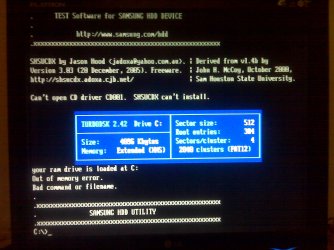
Burned the Hutil210 diagnostics tool onto a CD-ROM and popped it in my computer. It instantly had a BSOD but turned itself off before I could read it. It booted up normally though and I selected to boot from CD-ROM and this is the information that came up. I took a picture of it so I wouldn't have to type it all. It's attached.

If it's hard to read the most important info I think is:

Can't open CD driver CD001. SHSUCDX can't install.

and

your ram drive is loaded at C:
Out of memory error.
Bad command or filename.

I'm going to attempt the other utility now, and I'll post the results of it after.

Edit2: The other diagnostics utility gave me the exact same screen. Word for word I believe.

After rebooting my computer fully it has told me the BSOD error. Here it is:

Code:
Problem signature:
  Problem Event Name:    BlueScreen
  OS Version:    6.1.7600.2.0.0.768.3
  Locale ID:    1033

Additional information about the problem:
  BCCode:    1a
  BCP1:    0000000000003452
  BCP2:    0000000076B12000
  BCP3:    FFFFF70001080F00
  BCP4:    14F00001049D7424
  OS Version:    6_1_7600
  Service Pack:    0_0
  Product:    768_1

Files that help describe the problem:
  C:\Windows\Minidump\070110-20217-01.dmp
  C:\Users\Matt\AppData\Local\Temp\WER-35677-0.sysdata.xml
I have also attempted to swap RAM around to see if that helps. I swapped the two spots and still couldn't run the diagnostics. I took out the 2nd one and still couldn't run it. I'll try running the 2nd stick alone, but I have a feeling that won't help.


If any of you have any ideas, please please post your thoughts!

Update: Ran memtest86+ for an hour and a half or so. After 3 complete passes with both sticks of ram in there were 0 errors. I tried to run hddscan from hddscan.com, also. It worked fine on my old rig but when I put it on my new system it couldn't detect the hard drive. All it said was "Unknown disc".

Update2: Ran MHDD, another diagnostic tool. Was able to do a SMART scan through it. Here is what it told me:

Name | Val | Worst | Raw
Read error rate | 100 | 100 | 0
Throughput performance | 252 | 252 | 0
Spin up time | 20 | 20 | 9176
Number of spin-up times | 100 | 100 | 24
Reallocated sectors count | 252 | 252 | 0
Seek error rate | 252 | 252 | 0
Seek time performance | 252 | 252 | 0
Power-on time | 100 | 100 | 32
Spin-up retries | 252 | 252 | 0
Calibration retries | 252 | 252 | 0
Start/stop count | 100 | 100 | 25
Unknown | 252 | 252 0
Power-off retract count | 252 | 252 0
HDA Temperature | 64 | 64 | 27
Hardware ECC recovered | 100 100 | | 0
Reallocate event count | 252 | 252 | 0
Current pending sectors | 252 | 252 | 0
Offline scan UNC sectors | 252 | 252 | 0
Ultra ATA CRC Error Rate | 252 | 252 | 0

I have no idea how to interpret any of that.

I also did an extensive scan of the entire hard disk. Took over 2 hours to do it. Nothing came back over 50ms, and only like a hundred.. pings? I don't even know what it was scanning. But it only came up with like a hundred units between 10ms and 50ms, and a couples thousand between 3ms and 10ms, and the other million was all under 3ms.
 

Attachments

  • IMG00236.jpg
    IMG00236.jpg
    596.1 KB · Views: 21
Last edited:

My Computer

OS
Windows 7
Back
Top