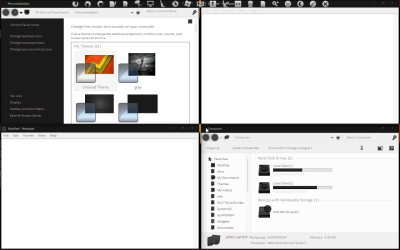
Greetings. I'm currently using a Windows 7 Visual Style called, TAPEK.
Tapek by =kiko11 on deviantART
It uses invisible borders, and requires disabling of the blur effect to look proper. The problem is that when I snap my windows to the grid to tile them manually, there will be spaces between the edge of the window and the edge of my screen, because of these invisible borders. I've found that I can reduce the size of these spaces by reducing the border padding, through right clicking my desktop > Personalize > Window Colour > Advanced Appearance Settings. Even at 0, the lowest border padding setting attainable through this method, some space is still visible.
My question is, how do I make the border padding even lower, in the negative values?
Tapek by =kiko11 on deviantART
It uses invisible borders, and requires disabling of the blur effect to look proper. The problem is that when I snap my windows to the grid to tile them manually, there will be spaces between the edge of the window and the edge of my screen, because of these invisible borders. I've found that I can reduce the size of these spaces by reducing the border padding, through right clicking my desktop > Personalize > Window Colour > Advanced Appearance Settings. Even at 0, the lowest border padding setting attainable through this method, some space is still visible.
My question is, how do I make the border padding even lower, in the negative values?
My Computer
- OS
- Windows 7 64bit