Borders

Phrosen

New member
Member
Local time
1:06 AM
Messages
92
Location
Sweden
Hi.
I'm wondering if you guys know how to make any good-looking borders (for, for example, signatures.)

I usually just:
-Select canvas
-Modify, Border, 2px
-Fill with *color*
-Done

Not very awesome borders there.

Would be nice with some tips on how to make better borders.
Thanks in advance. =)
 

My Computer

Computer type
PC/Desktop
Computer Manufacturer/Model Number
Myself
OS
Windows 7 Professional x64
CPU
AMD FX 8320
Motherboard
ASUS M5A97
Memory
8GB
Graphics Card(s)
Nvidia Geforce GTX 770
Monitor(s) Displays
Acer P223w
Screen Resolution
1680x1050
Hard Drives
Samsung SpinPoint 1TB @ 7200rpm
PSU
Corsair 620HX - 620W
Case
Lian-Li Scandinavian Edition
Keyboard
Razer Lycosa
Mouse
Razer DeathAdder
Would that be in Photoshop?

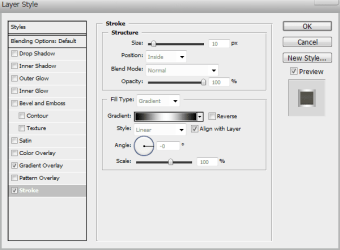
I do mine with a layer style using 'stroke' but set stroke to inside.
 

Attachments

  • stroke_inside.PNG
    stroke_inside.PNG
    10.7 KB · Views: 21

My Computer

Computer type
PC/Desktop
Computer Manufacturer/Model Number
Self Build
OS
MS Windows 7 Professional 64-bit SP1
CPU
AMD FX(tm)-6100 Six-Core Processor Socket AM3+ (942)
Motherboard
ASUSTeK COMPUTER INC. SABERTOOTH 990FX (AM3r2)
Memory
8.00 GB Dual-Channel DDR3 @ 802MHz (11-11-11-36) 1.5Volts
Graphics Card(s)
NVIDIA GeForce GTX 560 Ti
Sound Card
Onboard Realtek HD
Monitor(s) Displays
shimian (1920x1080@60Hz)
Screen Resolution
1920*1080
Hard Drives
OCZ-AGIL ITY3 SATA Disk Device 120GB
PSU
Corsair TX 750
Case
Corsair
Cooling
WaterCooled
Keyboard
Microsoft Wired
Mouse
Logitech USB Optical TiltWheel Mouse
Internet Speed
Realtek PCIe GBE Family Controller 20MB*1MB
Antivirus
Avast
Browser
Firefox
Other Info
150GB Internal Hard Drive for Backing Up Important Files -
Hauppauge Nova-DT Dual DVB-T Tuner Device (+IR) -
USB PC Camera with Mic (SN9C105)
Would that be in Photoshop?

I do mine with a layer style using 'stroke' but set stroke to inside.

Any program is fine, I guess.
I use Photoshop myself, so it would be better if you guys could explain in PS.

What I'm really looking for is nice borders and how to make them, though.
Simple tips like rounded edges and whatnot would be great.
 

My Computer

Computer type
PC/Desktop
Computer Manufacturer/Model Number
Myself
OS
Windows 7 Professional x64
CPU
AMD FX 8320
Motherboard
ASUS M5A97
Memory
8GB
Graphics Card(s)
Nvidia Geforce GTX 770
Monitor(s) Displays
Acer P223w
Screen Resolution
1680x1050
Hard Drives
Samsung SpinPoint 1TB @ 7200rpm
PSU
Corsair 620HX - 620W
Case
Lian-Li Scandinavian Edition
Keyboard
Razer Lycosa
Mouse
Razer DeathAdder
Would that be in Photoshop?

I do mine with a layer style using 'stroke' but set stroke to inside.

Hi Anthony!
Sorry for the funny question :o From the screenshot it seems to be taken from a mac?
 

My Computer

Computer type
PC/Desktop
Computer Manufacturer/Model Number
Self Assembled
OS
Microsoft Windows 10 Pro Insider Preview 64-bit
CPU
Intel(R) Core(TM) i3-4130 CPU @ 3.40GHz
Motherboard
Gigabyte Technology Co., Ltd. B85M-D3H
Memory
Corsair Vengence 4GB x2 (8.00GB Dual-Channel DDR3 @ 798MHz)
Graphics Card(s)
2047MB GeForce GTS 450 (ZOTAC International)
Sound Card
Onboard (Realtek High Definition Audio)
Monitor(s) Displays
LG Flatron E2040T
Screen Resolution
1600x900
Hard Drives
Western Digital 1 TB
Seagate 500 GB
PSU
Corsair VS550
Case
Cooler Master K380
Cooling
Cooler Master Seidon 120V Plus
Keyboard
Logitech MK260r
Mouse
Logitech MK260r
Internet Speed
PMPL Broadband
Antivirus
Windows Defender + MBAM
Browser
Firefox
Other Info
Dell Studio 15" Laptop
Would that be in Photoshop?

I do mine with a layer style using 'stroke' but set stroke to inside.

Hi Anthony!
Sorry for the funny question :o From the screenshot it seems to be taken from a mac?

Buttons on the right side. :p
Also, Windows systems can very easily be made to look like Macs.
 

My Computer

Computer type
PC/Desktop
Computer Manufacturer/Model Number
Custom built
OS
Windows 8 Pro 64-bit
CPU
Intel Core i7 950 @4.4GHz
Motherboard
EVGA 131-GT-E767
Memory
12GB DDR3 1333MHz @1400 (9-9-9-24)
Graphics Card(s)
2x AMD Radeon HD 6770
Sound Card
Sound Blaster Audigy
Monitor(s) Displays
Acer S231HL + Acer E19T5W
Screen Resolution
1920x1080 + 1440x900
Hard Drives
128GB Samsung 840 Pro
1TB Seagate Barracuda 7200RPM 64mb
500GB Seagate Barracuda 7200RPM 16mb
PSU
Corsair GS800
Case
Custom-made
Cooling
CM Hyper212+, lots of fans
Keyboard
NMB RT8255C+
Mouse
Func MS-3
Internet Speed
30/1.5
Antivirus
Microsoft Security Essentials/Spybot SD/Malwarebytes
Browser
Google Chrome
Other Info
Onkyo TX-27 receiver & two Realistic Optimus T100s.

My Computer

Computer type
PC/Desktop
Computer Manufacturer/Model Number
Custom built
OS
Windows 8 Pro 64-bit
CPU
Intel Core i7 950 @4.4GHz
Motherboard
EVGA 131-GT-E767
Memory
12GB DDR3 1333MHz @1400 (9-9-9-24)
Graphics Card(s)
2x AMD Radeon HD 6770
Sound Card
Sound Blaster Audigy
Monitor(s) Displays
Acer S231HL + Acer E19T5W
Screen Resolution
1920x1080 + 1440x900
Hard Drives
128GB Samsung 840 Pro
1TB Seagate Barracuda 7200RPM 64mb
500GB Seagate Barracuda 7200RPM 16mb
PSU
Corsair GS800
Case
Custom-made
Cooling
CM Hyper212+, lots of fans
Keyboard
NMB RT8255C+
Mouse
Func MS-3
Internet Speed
30/1.5
Antivirus
Microsoft Security Essentials/Spybot SD/Malwarebytes
Browser
Google Chrome
Other Info
Onkyo TX-27 receiver & two Realistic Optimus T100s.
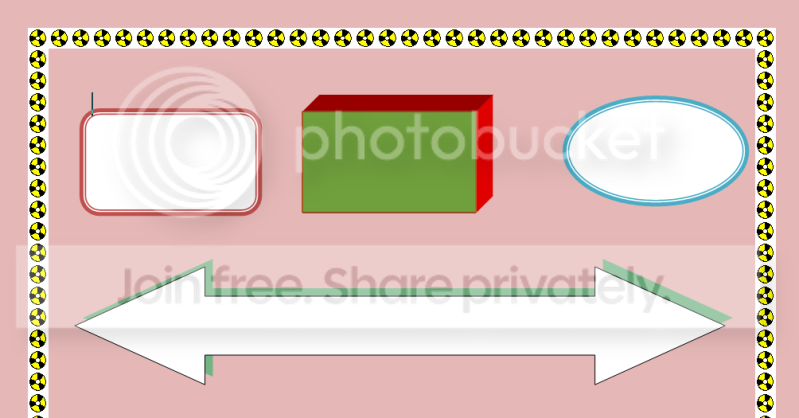
I use Word 2007 for that. On e.g. the "Page Layout" button, there is a vast selection of borders - simple and fancy ones. Here is an example.

2010-03-23_160642.png
 

My Computer

Computer Manufacturer/Model Number
HP, Dell, Gateway, Toshiba - 4 laptops and 2 desktops
OS
Vista, Windows7, Mint Mate, Zorin, Windows 8
CPU
from 1.6GHz Duo to i7
Monitor(s) Displays
2x HP w2207
Hard Drives
5x HDD, 7x SSD, 12x Externals
Keyboard
with trackball - no mices
Mouse
Trackball mice
Internet Speed
DSL 6000
I use Word 2007 for that. On e.g. the "Page Layout" button, there is a vast selection of borders - simple and fancy ones. Here is an example.

Excuse me for saying so but that border is horrible. :P
 

My Computer

Computer type
PC/Desktop
Computer Manufacturer/Model Number
Myself
OS
Windows 7 Professional x64
CPU
AMD FX 8320
Motherboard
ASUS M5A97
Memory
8GB
Graphics Card(s)
Nvidia Geforce GTX 770
Monitor(s) Displays
Acer P223w
Screen Resolution
1680x1050
Hard Drives
Samsung SpinPoint 1TB @ 7200rpm
PSU
Corsair 620HX - 620W
Case
Lian-Li Scandinavian Edition
Keyboard
Razer Lycosa
Mouse
Razer DeathAdder
I use Word 2007 for that. On e.g. the "Page Layout" button, there is a vast selection of borders - simple and fancy ones. Here is an example.

Excuse me for saying so but that border is horrible. :P
That was just an example out of at least 70 different choices. And the little boxes were done a little differently.
 

My Computer

Computer Manufacturer/Model Number
HP, Dell, Gateway, Toshiba - 4 laptops and 2 desktops
OS
Vista, Windows7, Mint Mate, Zorin, Windows 8
CPU
from 1.6GHz Duo to i7
Monitor(s) Displays
2x HP w2207
Hard Drives
5x HDD, 7x SSD, 12x Externals
Keyboard
with trackball - no mices
Mouse
Trackball mice
Internet Speed
DSL 6000

My Computer

Computer type
PC/Desktop
Computer Manufacturer/Model Number
Myself
OS
Windows 7 Professional x64
CPU
AMD FX 8320
Motherboard
ASUS M5A97
Memory
8GB
Graphics Card(s)
Nvidia Geforce GTX 770
Monitor(s) Displays
Acer P223w
Screen Resolution
1680x1050
Hard Drives
Samsung SpinPoint 1TB @ 7200rpm
PSU
Corsair 620HX - 620W
Case
Lian-Li Scandinavian Edition
Keyboard
Razer Lycosa
Mouse
Razer DeathAdder
Well, that is certainly different - and not really my taste. I like things "plain". LOL
 

My Computer

Computer Manufacturer/Model Number
HP, Dell, Gateway, Toshiba - 4 laptops and 2 desktops
OS
Vista, Windows7, Mint Mate, Zorin, Windows 8
CPU
from 1.6GHz Duo to i7
Monitor(s) Displays
2x HP w2207
Hard Drives
5x HDD, 7x SSD, 12x Externals
Keyboard
with trackball - no mices
Mouse
Trackball mice
Internet Speed
DSL 6000
Back
Top