Bosd while loading windows

Mano

New member
Member
Local time
1:38 PM
Messages
52
bosd while loading windows. After I install LA noire and then whenever i play game for about 20 min my pc restart and vga fan run at maximum speed (have to unplug the pc to stop the fan). so i decided to uninstall it and ....
 

My Computer

OS
Windows 7
CPU
i7 920
Motherboard
Evga x58 SLI LE
Memory
2x2GB G.Skill 1333
Graphics Card(s)
Gigabyte GTX 670
Monitor(s) Displays
Dell 2711
Screen Resolution
2560x1440
PSU
Seasonic M12-620W
Case
naked
bosd while loading windows. After I install LA noire and then whenever i play game for about 20 min my pc restart and vga fan run at maximum speed (have to unplug the pc to stop the fan). so i decided to uninstall it and ....

There are 3 different causes in these. One is serious.

First remove sptd.sys (probably not the problem but should be removed)

If you continue to crash or have the fan symptoms make a backup and restore point.

This bring us to the serious one. This can be caused by a BIOS bug causing you computer to run hot till it auto shuts down. Can be terminal. Dont ignore this!!
An inconsistency in the ACPI driver is so severe that continuing to run would cause serious problems.
One possible source of this problem is a BIOS error.


I would normally not suggest a BIOS update but here it is needed.


Go to the mfr and download and install the newest BIOS revision available.


Let us know if you need help


Dont push the system by playing high intensity games in High resolution, etc until the problem is resolved.
 

My Computer

Computer Manufacturer/Model Number
HP Pavillion dv-7 1005 Tx
OS
Win 8 Release candidate 8400
CPU
[email protected]
Memory
4 gigs
Graphics Card(s)
Nvidia 9600M
Sound Card
HD built-in
Monitor(s) Displays
17" Wxga
Screen Resolution
1440x900
Cooling
none
Internet Speed
45Mb down 5Mb up
Mano,
Just in case.....
IF your computer IS under Warranty I would strongly suggest that you seek advice asap.
 

My Computer

Computer Manufacturer/Model Number
LAPTOP. HP Pavilion dv7-4010TX .
OS
Win 7 Ultimate 64-bit. SP1.
CPU
Intel i7 -720QM.[1.6GHz Turbo Boost 2.8GHz. 6MB Cache.]
Memory
8 DDR 3 RAM. 1066MHZ
Graphics Card(s)
ATI 1024 MB. DDR3. Radeon HD5650
Monitor(s) Displays
17.3" High Definition Brightview LCD. LED Backlit.
Screen Resolution
1600 x 900.
Hard Drives
640GB
Case
Laptop / notebook.
Mouse
Logitech Anywhere mouse. MX.
Internet Speed
ADSL [ but too slow ]
Just to footnote zigzag here's the easiest way to remove sptd.sys

Start off by removing Dameon Tools/Alcohol 120%. Its driver, SPTD, is known to cause BSODs. Once the program is removed run the SPTD removal tool. DuplexSecure - Downloads
 

My Computer

Computer Manufacturer/Model Number
Insane hobo technologies. ;-)
OS
Windows 7 x64
CPU
Intel i7 2600k
Motherboard
Asrock z68 extreme 4 gen 3
Memory
G.skill Ripjaw 16gigs @ 1866
Graphics Card(s)
Nvidia gtx580 (evga)
Sound Card
Integrated HD audio + hdmi
Monitor(s) Displays
24" ASUS widescreen + 42" insignia
Screen Resolution
1080p (1920x1080)
Hard Drives
128 Samsung 830
256 Samsung 840
3 x 1tb storage drive (various)
1 western digital 1tb (eSATA)
1 Seagate 1tb (eSATA)
PSU
1 kilowatt SLI/Crossfire rated Silverstone modular
Case
NZXT Phantom + additional 220 fan
Cooling
Zalmann
Keyboard
Microsoft wireless 3000 (v2)
Mouse
MS - wireless 5000 (bluetrack)
Internet Speed
depends on if you ask me or my provider.
Other Info
The above information is provided as is, and the author assumes no responsibility for issues it may cause with your sanity or fanboyism.
thx for helping guys


Just to footnote zigzag here's the easiest way to remove sptd.sys

Start off by removing Dameon Tools/Alcohol 120%. Its driver, SPTD, is known to cause BSODs. Once the program is removed run the SPTD removal tool. DuplexSecure - Downloads
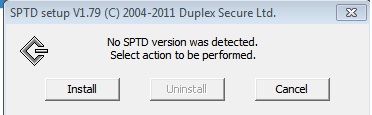
i downloaded the duplexsecure however when i ran it i saw

9Wk8J.jpg


the uninstall button is suppose to be not gray out right?

ops i just remember, few months ago i posted a similar thread and Wish advised me to uninstall Alcohol and i did so.

I would normally not suggest a BIOS update but here it is needed.
You mean mainboard driver? I tried to get new bios from Evga website several time but unable to access the forum for download link.

IF your computer IS under Warranty I would strongly suggest that you seek advice asap.


My mobo is only 2.5 years old (Evga x58 SLI LE) but I moved to oversea and brought along my pc (without the case) so ....


btw i used to play a mmo very lite graphics one, for ages. However i started getting instant restart (no bosd as i checked the dump folder, the vga backplate was only 40 degree C warm as i feel it with my hand) right when loading the game or after 15-20min playing.


Last edited:

My Computer

OS
Windows 7
CPU
i7 920
Motherboard
Evga x58 SLI LE
Memory
2x2GB G.Skill 1333
Graphics Card(s)
Gigabyte GTX 670
Monitor(s) Displays
Dell 2711
Screen Resolution
2560x1440
PSU
Seasonic M12-620W
Case
naked
Back
Top