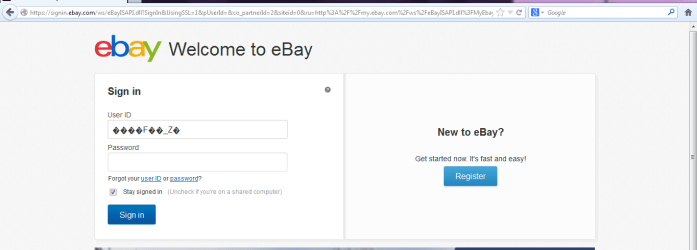
I have thoroughly searched my answer everywhere..I promise... when I try to log in Ebay where it is supposed to have my username, it has a bunch of symbols!
So when I try to log in, I get the symbols in autopopulate, and at the same time this started. the browsers started returning "cookies not enabled" errors. But they are enabled, Everything is updated, I don't understand how it is on every browser on my computer, I can log in elsewhere fine.
And I have these entries in my about:config in Firefox one is quite long (see below)
I may not be in the right place, but if anyone would be kind enough to direct me to the right place. This started a week ago, I can log in from another computer fine.
Updated Java
Updated Windows
Uninstalled IE and FF deleted profiles reinstalled
removed all addons/themes/toolbars/
ran antivirus scan
about:config in FF has the entries in the first picture, , but I can not find WAJAM anywhere besides there
The fourth line down in the picture actually is quite long, and it reads as follows
` "extensions.wajam.trace_log;1361846650237 - processInstallationUpgrade - version set to : 1.26
1361846650238 - processBrowserLoad - Bad mappingListJsonString: null
1361846652852 - onFlagInfoReceived - JSON Received: {"unique_id":"A2B697018234AD036EBDFAFB5009BBC1","urls_mapping_version":"0.21084","send_debug_info":false}
1361846652853 - onFlagInfoReceived - Server mapping version: 0.21084
1361846652854 - onFlagInfoReceived - No client-side server mapping version, don't update
1361846652856 - onFlagInfoReceived - Saving server mapping version
1361846652859 - onFlagInfoReceived - No user current mapping version specified, set to '0'
1361846652860 - onFlagInfoReceived - Unique ID saved"enter code here `
Anyway I hope I am in the right place.. Thanks in advance, if you need anything else let me know, If I am in the wrong neighborhood I would appreciate it if someone would let me know.
So when I try to log in, I get the symbols in autopopulate, and at the same time this started. the browsers started returning "cookies not enabled" errors. But they are enabled, Everything is updated, I don't understand how it is on every browser on my computer, I can log in elsewhere fine.
And I have these entries in my about:config in Firefox one is quite long (see below)
I may not be in the right place, but if anyone would be kind enough to direct me to the right place. This started a week ago, I can log in from another computer fine.
Updated Java
Updated Windows
Uninstalled IE and FF deleted profiles reinstalled
removed all addons/themes/toolbars/
ran antivirus scan
about:config in FF has the entries in the first picture, , but I can not find WAJAM anywhere besides there
The fourth line down in the picture actually is quite long, and it reads as follows
` "extensions.wajam.trace_log;1361846650237 - processInstallationUpgrade - version set to : 1.26
1361846650238 - processBrowserLoad - Bad mappingListJsonString: null
1361846652852 - onFlagInfoReceived - JSON Received: {"unique_id":"A2B697018234AD036EBDFAFB5009BBC1","urls_mapping_version":"0.21084","send_debug_info":false}
1361846652853 - onFlagInfoReceived - Server mapping version: 0.21084
1361846652854 - onFlagInfoReceived - No client-side server mapping version, don't update
1361846652856 - onFlagInfoReceived - Saving server mapping version
1361846652859 - onFlagInfoReceived - No user current mapping version specified, set to '0'
1361846652860 - onFlagInfoReceived - Unique ID saved"enter code here `
Anyway I hope I am in the right place.. Thanks in advance, if you need anything else let me know, If I am in the wrong neighborhood I would appreciate it if someone would let me know.
Attachments

My Computer
- Computer Manufacturer/Model Number
- HP zd7010us
- OS
- Windows 7 Ultimate
- CPU
- P4 2.66
- Motherboard
- unknown
- Memory
- 1.0 gig
- Graphics Card(s)
- nvidia gforce 440 go
- Sound Card
- ??
- Monitor(s) Displays
- 17' TFT