Solved Bottom bar Missing in File Explorer (Windows 7 x64)

Symbfrk

New member
Local time
5:20 AM
Messages
17
As the title states, The bottom bar (I don't know what its called) is missing from my file explorer. Have look:
17r8s3.png

Any help would be appreciated!
P.S: Also, do you know the registry key to disable the irritating "Sticky keys" Popup which occur if you press shift five times?
 

My Computer My Computer

Computer type
PC/Desktop
OS
Windows 7 Ultimate 64-Bit
nilank got it!
 

My Computer My Computer

Computer type
PC/Desktop
Computer Manufacturer/Model Number
Home Built desktop, Dell G15 5511 Gaming laptop,MS Surface Pro 7 tablet
OS
W10 Pro desktop, W11 laptop, W11 Pro tablet (all 64-bit)
CPU
3.7Ghz 8700K i7, i7-11800H, i7-1065G7
Motherboard
ASUS TUF Z370-Pro Gaming in desktop
Memory
16G desktop, 16G laptop, 4G tablet
Graphics Card(s)
AMD Radeon RX580, RTX 3060, Intel Iris Plus
Sound Card
High Definition Audio (Built-in to mobo)
Monitor(s) Displays
Samsung U32J59 32" (2x), 15.6", 12"
Screen Resolution
3840x2160, 3840x2160, 1920x1080, 2160x1440
Hard Drives
500G SSD for OS; 2T, 10T & 15T HDDs for Data on Desktop, 1TB SSD laptop, 128G SSD tablet.
PSU
Corsair CX 750M
Case
Antec 100
Cooling
CM 212+
Keyboard
IBM Model M - used continuously since 1986
Mouse
Microsoft Pro IntelliMouse
Internet Speed
400M down 8M up
Antivirus
Windows Defender
Browser
FireFox
Other Info
Built my first computer (8Mhz 8088cpu, 640K RAM, 20MB HDD, 2 360K floppy drives) in 1985 and have been building them for myself, relatives and friends ever since.
P.S: Also, do you know the registry key to disable the irritating "Sticky keys" Popup which occur if you press shift five times?

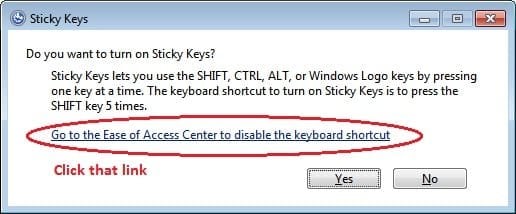
To disable sticky keys, press Shift key 5 times the click the link I have encircled in the following image:

Untitled.jpg

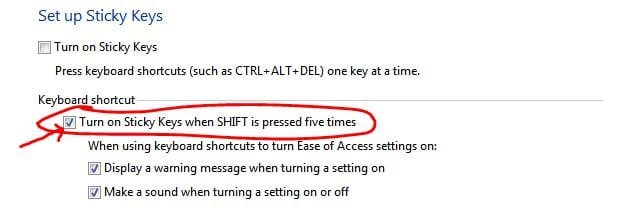
Then uncheck the option shown encircled in the following image:

Capture34.JPG

Now click OK. Done.
 
You seem to be using 3rd party themes. These modify system files.

Press Win+R > type "sfc /scannow" and hit enter to restore original versions of Windows protected files. Now restart and see if you find the details pane option.

And why do you want to do that via regedit? Any specific reason?
 
Tried, still no luck. Yes the reason is that I have made a few basic modifications which I intend to apply in one-click using a regfile so that I don't have to do them all manually after a fresh installation of windows.
 

My Computer My Computer

Computer type
PC/Desktop
OS
Windows 7 Ultimate 64-Bit
If you are using a third-party theme try switching back to the default Aero theme and see if it comes back if it does then go to C:\Windows\Resources\Themes\Aero and copy the Shell folder and and replaced the one that's in the third party theme folder.

Jerry
 

My Computer My Computer

Computer type
Laptop
Computer Manufacturer/Model Number
Sager NP9170
OS
Win 7 Pro x64 / Win 10 Pro
CPU
Intel(R) Core(TM) i7-3630QM CPU @ 2.40GHz
Motherboard
CLEVO P170EM
Memory
12 GB
Graphics Card(s)
(1) Intel(R) HD Graphics 4000 (2) NVIDIA GeForce GTX 675M
Sound Card
(1) Realtek High Definition Audio (2) Intel(R) Display Aud
Monitor(s) Displays
17.3
Screen Resolution
1920x1080
Hard Drives
(1) Samsung 860 EVO 500GB(OS) (1) Samsung 860 EVO 500GB(Data)
Keyboard
Backlite
Antivirus
MSE, Malwarebytes Pro
Browser
Firefox
Other Info
DESKTOP: Custom-built.
OS: Win 10 Pro x64.
CASE: Rosewill R5.
CPU: Intel I5 4670K CPU @ 3.40GHz.
CPU COOLER: Cool Master Hyper 212 EVO.
MOTHERBOARD: Asus Z87-A.
MEMORY: Kingston HyperX 2x4 GB.
GPU: Nvidia Geforce 650 TI.
PSU: Corsair TX750.
DRIVES: (1) Samsung 840 120 GB SSD (2) Western Digital blue 500 GB 7200 RPM.
I've been using this theme for about 2 months, never had a problem. Still I tried what u suggested but nothing..
 

My Computer My Computer

Computer type
PC/Desktop
OS
Windows 7 Ultimate 64-Bit
One thing I forgot to add is before you replace the shell folder you should switch to a different theme log off and log on and then replaced the shell folder and try it. Is the detail pane missing when you are on the default Aero theme?

And to run the sfc /scannow needs to be run in a elevated command prompt.
Do Option 2 of this tutorial http://www.sevenforums.com/tutorials/1538-sfc-scannow-command-system-file-checker.html it will not harm any data or programs you have installed it will try to find and repair any corrupt system files that you have. You may need to do this up to three separate times with a reboot after each scan.

Jerry
 

My Computer My Computer

Computer type
Laptop
Computer Manufacturer/Model Number
Sager NP9170
OS
Win 7 Pro x64 / Win 10 Pro
CPU
Intel(R) Core(TM) i7-3630QM CPU @ 2.40GHz
Motherboard
CLEVO P170EM
Memory
12 GB
Graphics Card(s)
(1) Intel(R) HD Graphics 4000 (2) NVIDIA GeForce GTX 675M
Sound Card
(1) Realtek High Definition Audio (2) Intel(R) Display Aud
Monitor(s) Displays
17.3
Screen Resolution
1920x1080
Hard Drives
(1) Samsung 860 EVO 500GB(OS) (1) Samsung 860 EVO 500GB(Data)
Keyboard
Backlite
Antivirus
MSE, Malwarebytes Pro
Browser
Firefox
Other Info
DESKTOP: Custom-built.
OS: Win 10 Pro x64.
CASE: Rosewill R5.
CPU: Intel I5 4670K CPU @ 3.40GHz.
CPU COOLER: Cool Master Hyper 212 EVO.
MOTHERBOARD: Asus Z87-A.
MEMORY: Kingston HyperX 2x4 GB.
GPU: Nvidia Geforce 650 TI.
PSU: Corsair TX750.
DRIVES: (1) Samsung 840 120 GB SSD (2) Western Digital blue 500 GB 7200 RPM.
Nope. Same thing.
 

My Computer My Computer

Computer type
PC/Desktop
OS
Windows 7 Ultimate 64-Bit

My Computer My Computer

Computer type
Laptop
Computer Manufacturer/Model Number
Sager NP9170
OS
Win 7 Pro x64 / Win 10 Pro
CPU
Intel(R) Core(TM) i7-3630QM CPU @ 2.40GHz
Motherboard
CLEVO P170EM
Memory
12 GB
Graphics Card(s)
(1) Intel(R) HD Graphics 4000 (2) NVIDIA GeForce GTX 675M
Sound Card
(1) Realtek High Definition Audio (2) Intel(R) Display Aud
Monitor(s) Displays
17.3
Screen Resolution
1920x1080
Hard Drives
(1) Samsung 860 EVO 500GB(OS) (1) Samsung 860 EVO 500GB(Data)
Keyboard
Backlite
Antivirus
MSE, Malwarebytes Pro
Browser
Firefox
Other Info
DESKTOP: Custom-built.
OS: Win 10 Pro x64.
CASE: Rosewill R5.
CPU: Intel I5 4670K CPU @ 3.40GHz.
CPU COOLER: Cool Master Hyper 212 EVO.
MOTHERBOARD: Asus Z87-A.
MEMORY: Kingston HyperX 2x4 GB.
GPU: Nvidia Geforce 650 TI.
PSU: Corsair TX750.
DRIVES: (1) Samsung 840 120 GB SSD (2) Western Digital blue 500 GB 7200 RPM.
@OP, your system files/registry are/is modified. It very clearly seems from the screenshot itself you have done lot of modification. So chances are great that your system was modified by the third party stuff, especially registry. Remove all those stuff and then see.

Also do a full system malware scan.

As per sticky keys part, sorry no idea.
 
Okay, I was thinking about going fresh install. Thank-you for help. You may close the thread.
 

My Computer My Computer

Computer type
PC/Desktop
OS
Windows 7 Ultimate 64-Bit
Back
Top