Bought USED Laptop - Windows 7 Pro NOT ACTIVATED yet - internet?

duc01748man

New member
Local time
3:08 PM
Messages
2
Hey Guys,

Hoping someone or collectively can help me?
I bought a USED (looks pretty well taken care of though) laptop off EBAY.
- HP ProBook 6550b - intel CORE i7, 2.67Hz, 4gb, 160GB,

Seller said it has Windows 7 Pro installed - Recent Clean install but NOT ACTIVATED.
- I have not Activated it yet.

I aquired the Laptop basically to run Microsoft Office, Excel, Infopath & Emails & Internet. Out of the box it DOES NOT pick up or even show a Wifi network at my house. I stick the RJ jack straight from my Wireless Router & it still DOES NOT locate a Network. It seems the only driver installed is a "Bluetooth" one. It DOES NOT identify any problems when i troubleshoot in Network & Sharing Center.

Question 1
Will I need to Activate 1st in order to obtain a driver to have the Networking portion to operate.

Question 2
There is NO Microsoft Office Suite installed. I'm specifically wanting to install Microsoft Office 2010 Professional Plus, I have a 2nd laptop same model with this version installed on it. Will i be able to copy this over to my NEW laptop? I've looked at purchasing it Online BUT, I never see "InfoPath" listed in the Included suites & it is uber Important i obtain this ste.

ANY help is appreciated, thanks Keith!
 

My Computer My Computer

At a glance

Windows 7 Pro 64intel core i74gb
Computer type
Laptop
Computer Manufacturer/Model Number
HP ProBook 6550b
OS
Windows 7 Pro 64
CPU
intel core i7
Memory
4gb
Hard Drives
150gb
Hi Duco,

If you want to see if its genuine, run this tool, copy/paste the output
If you used the correct media it should have self activated
http://go.microsoft.com/fwlink/?LinkID=52012
(whats on the COA sticker, DONT POST THE KEY. HP OEM W7 Pro?)

As you have another (same) laptop
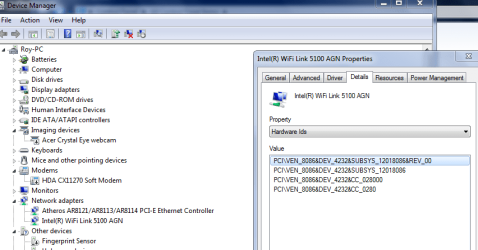
Open device manager on both, compare the entries under Network Adapters.
It maybe your new comp has problem devices, installed but no driver, if so check the pci/ven no,
see screenshot.
if same download the same driver from HP make/model download site.

Q1 NO
Q2 i found it here,
Introduction to Microsoft InfoPath 2010 - InfoPath
but its not free.


Roy
 

Attachments

  • pcivendet.PNG
    pcivendet.PNG
    28.6 KB · Views: 1

My Computer My Computer

At a glance

W7 home premium 32bit/W7HP 64bit/w10 tp insid...E5300 dual core3gbNvidia Geforce 7100 Nforce 630i
Computer type
PC/Desktop
Computer Manufacturer/Model Number
medionl/Aspire 6930G/acer x55a
OS
W7 home premium 32bit/W7HP 64bit/w10 tp insider ring
CPU
E5300 dual core
Motherboard
medion MS7366
Memory
3gb
Graphics Card(s)
Nvidia Geforce 7100 Nforce 630i
Monitor(s) Displays
avixc
Internet Speed
n (isp resticted to 72)
Antivirus
mse/pands
Browser
palemoon
Other Info
Belkin Fd7050 n USB using Railink RT2870 drivers, more upto date

My Computers My Computers

  • At a glance

    7 X64i5 84002x8gb 3200mhz
    Computer type
    PC/Desktop
    OS
    7 X64
    CPU
    i5 8400
    Motherboard
    gigabyte b365m ds3h
    Memory
    2x8gb 3200mhz
    Hard Drives
    various
    PSU
    pure power 11 400w cm
    Case
    Coolermaster
    Cooling
    cryorig m9i
  • At a glance

    7x64g54008gb ddr4 2400
    Computer type
    PC/Desktop
    OS
    7x64
    CPU
    g5400
    Motherboard
    ga b365m ds3h
    Memory
    8gb ddr4 2400
    PSU
    xfx pro 450w
Hi Roy,

The sticker on the bottom says
HP Windows 7 Pro OA

I did not install anything on this computer, the seller did say someone with configuration exper. But followed it with there are not any factory downloads or software if that's what you are looking for. I figured well i can download stuff. They did not mention networking was not functional.

When i looked under the device manager there is no Intel wifi or what ever the other thing you have on yours. Mine just shows Bluetooth drivers ( 2 of them ).

Could i copy the drivers off my other laptop on a thumb drive and place them on the new one? I'm sure the 2 laptops i have differ in years & i know they have diff. CPU's or Processors. I'm not sure where to begin :confused::confused:
 

My Computer My Computer

At a glance

Windows 7 Pro 64intel core i74gb
Computer type
Laptop
Computer Manufacturer/Model Number
HP ProBook 6550b
OS
Windows 7 Pro 64
CPU
intel core i7
Memory
4gb
Hard Drives
150gb
I'm not at all familiar with that laptop but, is there a Fn button that controls the wireless or possibly a switch on the side of the laptop? It could just be off and that's why it's not picking up a WiFi signal.
 

My Computer My Computer

At a glance

Windows 7 Professional 64bitIntel i7-5960X64GB Corsair Dominator 2400MHz3 EVGA GTX980's
Computer type
PC/Desktop
Computer Manufacturer/Model Number
custom build
OS
Windows 7 Professional 64bit
CPU
Intel i7-5960X
Motherboard
EVGA X99 Classified
Memory
64GB Corsair Dominator 2400MHz
Graphics Card(s)
3 EVGA GTX980's
Sound Card
on board
Monitor(s) Displays
3 Dell E2715H 27"
Screen Resolution
1920x1080 (5760x1080)
Hard Drives
Samsung 950 Pro 1TB M.2 SSD,
Western Digital Black 2TB HDD's x5
Western Digital Black 1TB HDD's x3
PSU
Corsair AX1200i
Case
Corsair 750D
Cooling
Corsair H110i GT
Keyboard
Corsair K70
Mouse
Corsair M45
Internet Speed
250 down/10 up
Antivirus
Microsoft Security Essentials
Browser
IE 11, Google Chrome
Hi Kieth,
Havoc could be right, mines a weird set up, FnX or the Wifi indicator doesnt even look like an on/off button!
from HP
Touch-sensitive controls
Touch-sensitive controls provide easy access to the following features: HP QuickLook 3, HP QuickWeb, wireless on/off, volume mute, volume down, volume up. The HP ProBook 6550b also features a calculator button.
Note as the bloatware has been removed these functions may NOT work


It woudnt be worth the seller removing the Ethernet and wifi cards, so that just leaves on/off or driver.
Can you snip a copy of device manager, the drivers should be there

Go to the HP homepage for your model
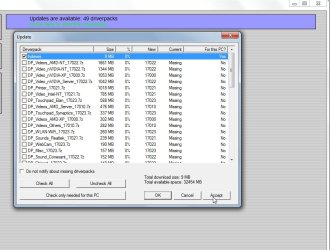
Download the Support Assistant, it will check your drivers are upto date, its the only bloatware you'll need
(enter your Servicetag id for the correct model).
As your other comps a few years older likely different.
If your really Techy and want to know about your lappy's inards run this,
HWiNFO - Download


As for Activating, by the sounds of it the sellers tech installed a generic version of W7, NOT a problem,
although you may have to phone MS to activate it, if using the COA key.
run the tool i mentioned earlier i can check
No reason not to activate/register it now.

Hopefully you have SP1 installed otherwise loads of updates:confused:.
But on a brighter note it supports 8GB ram:D
Also suggest
Go to the Intel site update your drivers
As its looks a very nice lappy and you want InfoPath i would get an SSD 240GB+.

Roy
 

My Computer My Computer

At a glance

W7 home premium 32bit/W7HP 64bit/w10 tp insid...E5300 dual core3gbNvidia Geforce 7100 Nforce 630i
Computer type
PC/Desktop
Computer Manufacturer/Model Number
medionl/Aspire 6930G/acer x55a
OS
W7 home premium 32bit/W7HP 64bit/w10 tp insider ring
CPU
E5300 dual core
Motherboard
medion MS7366
Memory
3gb
Graphics Card(s)
Nvidia Geforce 7100 Nforce 630i
Monitor(s) Displays
avixc
Internet Speed
n (isp resticted to 72)
Antivirus
mse/pands
Browser
palemoon
Other Info
Belkin Fd7050 n USB using Railink RT2870 drivers, more upto date
Back
Top