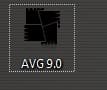
T tystuh New member Local time 11:25 PM Messages 25 Jan 27, 2011 #1 when i single click an icon and then click the desktop it leaves this behind is there any way to hide it? Attachments Untitled.jpg 2 KB · Views: 240 My Computer Computer Manufacturer/Model NumberDellOSwindows 7 ultimate 32-bitCPUIntel pentium 4 3.00 GhzMotherboardphoenix i thinkMemory4 gbGraphics Card(s)ATI Radeon 4800
when i single click an icon and then click the desktop it leaves this behind is there any way to hide it?
ie9 Leak Addict Pro User VIP Local time 12:25 AM Messages 689 Jan 27, 2011 #2 To the best of my knowledge it's a "feature" that will remain, but you could try right clicking on the desktop and choosing refresh, or clicking on an open spot in the taskbar, it's worked sometimes for me. Or you could juse re-boot the computer Edit: Just found this: http://www.sevenforums.com/customization/53318-remove-focus-rectangle-icons.html#post489478 Not sure if it works or not though My Computer Computer Manufacturer/Model NumberVostroOSWindows 7 Ultimate (SP1)CPUAMD Sempron 3600+Graphics Card(s)ATI Radeon Xpress 1150Screen Resolution1200 x 800Hard DrivesWD Scorpio Blue 500 GB
To the best of my knowledge it's a "feature" that will remain, but you could try right clicking on the desktop and choosing refresh, or clicking on an open spot in the taskbar, it's worked sometimes for me. Or you could juse re-boot the computer Edit: Just found this: http://www.sevenforums.com/customization/53318-remove-focus-rectangle-icons.html#post489478 Not sure if it works or not though