Solved Brave Browser Help

Memory: 4 GB

Lately that's not a lot. You might need more memory if you want to run Firefox or at least fine tune your computer more. Start by turning off unneeded processes. Go through this list very carefully to help you with disabling processes. You can start with the "safe" configuration. If that isn't enough you can try the tweaked configuration. Black Viper’s Windows 7 Service Pack 1 Service Configurations – Black Viper | www.blackviper.com Somethings you might not need such as print spooler if you don't have a printer.

Also from start menu run msconfig, click on the start up tab, and uncheck anything that looks like you might not need it such as the bluetooth icon or one note snip it; a few examples of programs that like to run all the time just in case you need them. You're graphics driver and maybe audio driver might have installed programs that run all the time that aren't really needed. Don't touch anything antivirus related. You can take some screenshots for further help there.
 

My Computers

System One System Two

The PC doesn't do too badly on the memory, I don't do gaming, just use it for surfing, documents and emails. I moved my docs to the D drive a few years ago which helped. I have looked at turning off services and switched off a few that I know I don’t use but the rest I’ve no idea if they’re safe to turn off and would prefer to do this manually.

As for supermium, adbloc wouldn't work (noticed I wasn't the only one this had happened to) I've uninstalled it for now as I couldn't download youtube videos unlike Chrome which I still can. I may take another look at SM in the future as it looks as though they are updating all the time, so for now I'll stick with Chrome with DDG search engine and Brave as my favoured browser.
 
Last edited:

My Computer

Computer type
Laptop
Computer Manufacturer/Model Number
Samsung S3511
OS
Windows 7 Home Premium 64 Bit (Service Pack 1)
CPU
Premium Dual Core P6200
Motherboard
Samsung S3511
Memory
4 GB
Graphics Card(s)
Intel (R) HD Graphic
Sound Card
Realtek High Definition Audio
Screen Resolution
1366 x 768
Hard Drives
C: D: E: (NTFS)
Cooling
Drive temperature: 38 / 100
Mouse
Wired Logitech B100
Antivirus
McAfee Total Protection
Browser
Supermium Portable and r3dfox
Youtube isn't like most other sites where you click on download and you get the download. They blocked it and no browser than I know of has that option builtin. You have to use extensions either added to the browser or there are some applications run outside of the browser. If you can use chrome then you must have an extension installed. Look through the extensions and either install it on superium or google it to find one to add. Technically this gets into copyright violations (hence the reason why it doesn't come built into browsers) so we can't provide specific recommendations. However if you look you'll find some. Otherwise keep using chrome if you want.

As for Firefox the requirements say 2 gb on a 64 bit os but that's generic recommendation. It is much more heavyweight than it used to be and the more tab you open the more memory it uses.If you'd look at that link there are a list of processes to stop.
 

My Computers

System One System Two

Youtube isn't like most other sites where you click on download and you get the download. They blocked it and no browser than I know of has that option builtin. You have to use extensions either added to the browser or there are some applications run outside of the browser. If you can use chrome then you must have an extension installed. Look through the extensions and either install it on superium or google it to find one to add. Technically this gets into copyright violations (hence the reason why it doesn't come built into browsers) so we can't provide specific recommendations. However if you look you'll find some. Otherwise keep using chrome if you want.

As for Firefox the requirements say 2 gb on a 64 bit os but that's generic recommendation. It is much more heavyweight than it used to be and the more tab you open the more memory it uses.If you'd look at that link there are a list of processes to stop.
I tried replicating downloading a YT video, same extensions, same video, same downloader, same keystrokes certain it would work on SM but it didn't. Interesting, so I'll keep Chrome for the meantime alongside Brave.

Also I had a look at services and turned off Bluetooth Bitlocker Computer Browser Distributed Link Tracking Client Encrypting File System (EFS) Function Discovery Provider Host HomeGroup Listener HomeGroup Provider Tablet PC Input Service Windows Biometric Service Windows Media Player Network Sharing Service. Can’t say if it’s improved speed but from the possibilities, it is a small number.
 
Last edited:

My Computer

Computer type
Laptop
Computer Manufacturer/Model Number
Samsung S3511
OS
Windows 7 Home Premium 64 Bit (Service Pack 1)
CPU
Premium Dual Core P6200
Motherboard
Samsung S3511
Memory
4 GB
Graphics Card(s)
Intel (R) HD Graphic
Sound Card
Realtek High Definition Audio
Screen Resolution
1366 x 768
Hard Drives
C: D: E: (NTFS)
Cooling
Drive temperature: 38 / 100
Mouse
Wired Logitech B100
Antivirus
McAfee Total Protection
Browser
Supermium Portable and r3dfox
Disabling services does not really save resource usage, except for sysmain(superftech) and maybe like print spooler if it goes haywire as some of these services have potential to cause resource issues at times.
You only have 4gb ram so i would advise disabling sysmain. All the other services are more about turning of those features which can in a way improve security but not necessarily help resource usage.

Its also more about being preemptive so all those services you don't require get disabled so that they no longer have potential to become an issue. eg there is a few services for remote computing that you should turn off and it means that, that area of the OS is now more secure. Or like don't have smart card capability? which is not common anyway turn it off etc. By doing this you are looking down the computer in ways that means its more secure in theory.
 

My Computers

System One System Two

  • OS
    10
  • Computer type
    PC/Desktop
I've recently downloaded Brave as an alternative to Chrome which I want to uninstall at some point. I really like Brave and it runs smoothly. There are two things that I'm trying to do: does anyone have the line to delete in the registry to get rid of the reminder about 'to get future updates you'll need windows 10.'

Secondly, the only thing Brave won't do is let me download a video from Youtube. I can't seem to find another browser that does this, Citrio takes me to a broken link page. Anyone know of a suitable browser for a laptop that can do this (apart from Chrome, Edge or Firefox).

You could try yt-dlp-gui yt-dlp-gui 2023.03.28 Free Download - VideoHelp

Also I understand you have only 4 GB RAM. I have a similar set up win 7 64 bit and I have 16 GB RAM. Maybe look at increasing RAM
 

My Computers

System One System Two

  • Computer type
    PC/Desktop
    OS
    win 7 64 bit
  • Computer type
    PC/Desktop
Disabling services does not really save resource usage, except for sysmain(superftech) and maybe like print spooler if it goes haywire as some of these services have potential to cause resource issues at times.
You only have 4gb ram so i would advise disabling sysmain. All the other services are more about turning of those features which can in a way improve security but not necessarily help resource usage.

Its also more about being preemptive so all those services you don't require get disabled so that they no longer have potential to become an issue. eg there is a few services for remote computing that you should turn off and it means that, that area of the OS is now more secure. Or like don't have smart card capability? which is not common anyway turn it off etc. By doing this you are looking down the computer in ways that means its more secure in theory.
Thanks, I've disabled Superfetch and the two smart cards. I have a printer so don't want to disable that. What are the services for disconnecting remote services as I won't use that. Just to note I do have a works laptop running off my router so I wouldn't want to disable anything that would affect that.

- - - Updated - - -

You could try yt-dlp-gui yt-dlp-gui 2023.03.28 Free Download - VideoHelp

Also I understand you have only 4 GB RAM. I have a similar set up win 7 64 bit and I have 16 GB RAM. Maybe look at increasing RAM

I can for some reason dowload videos on Chrome so am using DDG to take care of tracking. I had thought about increasing RAM but I wouldn't want to open up the laptop as there is the potential to upset the balance of it, I'm a great believer in if it's not broken, don't fix it. I can see it's possible to increase RAM by using a USB. I moved my documents to the D drive a few years back and that's made a big difference. I did look into trying to move system files to the D drive but I don't think you can; also I tried to repartition the D drive but I don't think you can do that. I do a clean out every so often, clearing out the recyle bin and getting rid of temporary internet files and the big one, deleting restore points.
 

My Computer

Computer type
Laptop
Computer Manufacturer/Model Number
Samsung S3511
OS
Windows 7 Home Premium 64 Bit (Service Pack 1)
CPU
Premium Dual Core P6200
Motherboard
Samsung S3511
Memory
4 GB
Graphics Card(s)
Intel (R) HD Graphic
Sound Card
Realtek High Definition Audio
Screen Resolution
1366 x 768
Hard Drives
C: D: E: (NTFS)
Cooling
Drive temperature: 38 / 100
Mouse
Wired Logitech B100
Antivirus
McAfee Total Protection
Browser
Supermium Portable and r3dfox
I've been able to change the registry successfully for both Brave and Chrome, so thanks to everyone for their help.
 

My Computer

Computer type
Laptop
Computer Manufacturer/Model Number
Samsung S3511
OS
Windows 7 Home Premium 64 Bit (Service Pack 1)
CPU
Premium Dual Core P6200
Motherboard
Samsung S3511
Memory
4 GB
Graphics Card(s)
Intel (R) HD Graphic
Sound Card
Realtek High Definition Audio
Screen Resolution
1366 x 768
Hard Drives
C: D: E: (NTFS)
Cooling
Drive temperature: 38 / 100
Mouse
Wired Logitech B100
Antivirus
McAfee Total Protection
Browser
Supermium Portable and r3dfox
Anything that says "Remote" in the services can be disabled or on Manual except for RPC. its too hard to try and describe all the stuff you can potentially disable as its personal preference just research what services do and determine if you need that, if the information says an explicit no not a good idea then follow that.

There is not many services that will break anything drastic, there is some core ones that you want to leave alone like networking stuff etc, BFE DHCP anything to with malware or AV, security center or windows update etc.

You also cannot disable DCOM service but you want to look up how to disable certain functionality
DCOM for Windows 7, 10, & Server 2008R2

ActiveX is basically dead because like many thing Microsoft it is a vulnerability its for old apps and internet, consider disabling it, unless you really need it past that is not useful for anything these days and was dropped because it was a security issue, just disable it.
 
Last edited:

My Computers

System One System Two

  • OS
    10
  • Computer type
    PC/Desktop
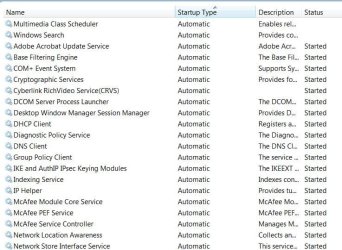
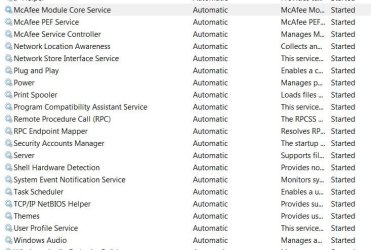
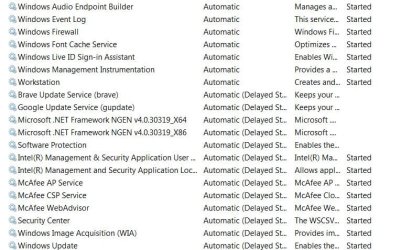
Thanks for that; I'm making really good progress with this, have disabled many things. I've attached some screenshots of the services that are active if you have the time to point out anything else that could be disabled.
 

Attachments

  • Services1.JPG
    Services1.JPG
    104.7 KB · Views: 9
  • Services2.JPG
    Services2.JPG
    96.4 KB · Views: 9
  • services3.JPG
    services3.JPG
    114.2 KB · Views: 0

My Computer

Computer type
Laptop
Computer Manufacturer/Model Number
Samsung S3511
OS
Windows 7 Home Premium 64 Bit (Service Pack 1)
CPU
Premium Dual Core P6200
Motherboard
Samsung S3511
Memory
4 GB
Graphics Card(s)
Intel (R) HD Graphic
Sound Card
Realtek High Definition Audio
Screen Resolution
1366 x 768
Hard Drives
C: D: E: (NTFS)
Cooling
Drive temperature: 38 / 100
Mouse
Wired Logitech B100
Antivirus
McAfee Total Protection
Browser
Supermium Portable and r3dfox
Brave updater since there aren't anymore updates for brave.
Google update service for the same reason.
The 2 .net framework.
The 2 intel ones.
Adobe acrobate update
Cyberlink Rich Video (CLRV)
Print spooler if you don't have a printer.
Windows search
indexing service

Do you use windows live? I suspect that Mcafee is using a lot of memory. I would ditch it and go with Microsoft Security essentials.
 

My Computers

System One System Two

Brave updater since there aren't anymore updates for brave.
Google update service for the same reason.
The 2 .net framework.
The 2 intel ones.
Adobe acrobate update
Cyberlink Rich Video (CLRV)
Print spooler if you don't have a printer.
Windows search
indexing service

Do you use windows live? I suspect that Mcafee is using a lot of memory. I would ditch it and go with Microsoft Security essentials.

Great, thank you, I'll have a look at those. I think I do use windows live as I have Live Mail so wouldn't be able to uninstall.
 

My Computer

Computer type
Laptop
Computer Manufacturer/Model Number
Samsung S3511
OS
Windows 7 Home Premium 64 Bit (Service Pack 1)
CPU
Premium Dual Core P6200
Motherboard
Samsung S3511
Memory
4 GB
Graphics Card(s)
Intel (R) HD Graphic
Sound Card
Realtek High Definition Audio
Screen Resolution
1366 x 768
Hard Drives
C: D: E: (NTFS)
Cooling
Drive temperature: 38 / 100
Mouse
Wired Logitech B100
Antivirus
McAfee Total Protection
Browser
Supermium Portable and r3dfox
Back
Top