
bridging and pppoe

modem connected with ethernet to switch and pc's connected to switch , 2 pc's can dial at the same time that way (this is what isp allows, unless you have more usernames/passwords then you can connect more)
pppoe to work afaik you dont need an ip assigned in order to dial, it uses pppoe network discovery which sends a broadcast packet (layer 2 packet) to which the isp will responde and eastablish the connection, i never have an ip on my other pc configured to dial the connection and no dhcp either.
 

My Computer

OS
Windows 7
He is creating a direct dial-up connect using the "Set up a dial-up connection" option. And this has worked (PC access internet fine). He then wants to bridge this connection to a wireless ad-hoc connection create on PC2 for PC1 to connect.

Is this correct?

Also, when he says PPPoe connection, he meant the setup of the dial-up. Is this also correct?
 

My Computer

Computer Manufacturer/Model Number
Lenovo ThinkPad T60
OS
Windows 7 Ultimate 64Bit
CPU
GenuineIntel Intel(R) Core(TM) DuoCore T2400 @ 1.83GHz
Motherboard
Intel(R) 82801G (ICH7 Family)
Memory
2.00 GB
Graphics Card(s)
Mobile Intel(R) 945 Express Chipset
Sound Card
SoundMAX Integrated Digital HD Audio
Monitor(s) Displays
ThinkPad Display
Screen Resolution
1400x1050
Hard Drives
100Gb SATA
Keyboard
Standard Keyboard
Mouse
HID-compliant Mouse
Internet Speed
Cable Broadband - 54Mbps
Other Info
Intel(R) PRO/1000 PL Network Connection
11a/b/g Wireless LAN Mini PCI Express Adapter
In that configuration the ethernet ports are set up normally with PPPoE enabled. Each PC has it's own connection direct to the modem. That's why it worked.

Bridged mode however just doesn't work that way.

Try ICS on PC2. Set the ethernet port for PPPoE as you normally do when you connect to the modem. Then share it with ICS and the WiFi adapter.

Use the tutorial I referred to earlier.

Good Luck!
 

My Computer

Computer Manufacturer/Model Number
Dell C521
OS
W7 Ultimate 64bit W7 Premium 64bit W7 Premium 32bit WXP Home 32bit
CPU
Athlon 64X2 5000+
Motherboard
Dell
Memory
4GB
Graphics Card(s)
ATI X1300
Sound Card
On Board
Monitor(s) Displays
Dell 19" Flat
Screen Resolution
1280x1024
Hard Drives
500GB Western Digital Caviar Green
Mouse
Microsoft Wireless Intellimouse Explorer 2.0
Internet Speed
SBC DSL - 6Mbps
not the dialup connection, but the broadband connection.
and right, the pc in the middle connects fine but i dont even care if that is connected, i want the other pc (pc2) to connect to the internet through the bridged connection to the modem.
and by modem i mean , cable modem (not dialup via phone line :S)

EDIT:
In that configuration the ethernet ports are set up normally with PPPoE enabled. Each PC has it's own connection direct to the modem. That's why it worked.

Bridged mode however just doesn't work that way.

Try ICS on PC2. Set the ethernet port for PPPoE as you normally do when you connect to the modem. Then share it with ICS and the WiFi adapter.

Use the tutorial I referred to earlier.

Good Luck!

Right exactly, but you mean that pppoe is disabled with windows bridging , shouldnt a bridge work the same way as a switch? (direct connection to modem?)
and unfortunately i tried internet connection sharing , but that is blocked by my isp :( i can only ping their server im connected to with the sharing but nothing else past that ( they blocked it with ttl - or the hop counts)
oh well i guess proxy is fine...
 

My Computer

OS
Windows 7
PC1 ->(wifi)-> [PC2 (wifi bridged with lan)]->(lan)-> ISP modem -> isp

1) PC1 ---wifi -- > PC2 (this wifi is an ad-hoc wifi, correct?)

2) PC2---LAN---> ISP modem (ethernet, using either DHCP or static, correct?)

3) ISP Modem --- > ISP (PPPoe setup, correct?)

4) Bridging connections for 1) and 2), correct?
 

My Computer

Computer Manufacturer/Model Number
Lenovo ThinkPad T60
OS
Windows 7 Ultimate 64Bit
CPU
GenuineIntel Intel(R) Core(TM) DuoCore T2400 @ 1.83GHz
Motherboard
Intel(R) 82801G (ICH7 Family)
Memory
2.00 GB
Graphics Card(s)
Mobile Intel(R) 945 Express Chipset
Sound Card
SoundMAX Integrated Digital HD Audio
Monitor(s) Displays
ThinkPad Display
Screen Resolution
1400x1050
Hard Drives
100Gb SATA
Keyboard
Standard Keyboard
Mouse
HID-compliant Mouse
Internet Speed
Cable Broadband - 54Mbps
Other Info
Intel(R) PRO/1000 PL Network Connection
11a/b/g Wireless LAN Mini PCI Express Adapter
not the dialup connection, but the broadband connection.
and right, the pc in the middle connects fine but i dont even care if that is connected, i want the other pc (pc2) to connect to the internet through the bridged connection to the modem.
and by modem i mean , cable modem (not dialup via phone line :S)

EDIT:
In that configuration the ethernet ports are set up normally with PPPoE enabled. Each PC has it's own connection direct to the modem. That's why it worked.

Bridged mode however just doesn't work that way.

Try ICS on PC2. Set the ethernet port for PPPoE as you normally do when you connect to the modem. Then share it with ICS and the WiFi adapter.

Use the tutorial I referred to earlier.

Good Luck!

Right exactly, but you mean that pppoe is disabled with windows bridging , shouldnt a bridge work the same way as a switch? (direct connection to modem?)
and unfortunately i tried internet connection sharing , but that is blocked by my isp :( i can only ping their server im connected to with the sharing but nothing else past that ( they blocked it with ttl - or the hop counts)
oh well i guess proxy is fine...

A bridge will work like a switch but in your case you don't have it connected the same way. You're passing through PC2 to get to the modem. PC2's ethernet port can't be bridged and support PPPoE at the same time.
 

My Computer

Computer Manufacturer/Model Number
Dell C521
OS
W7 Ultimate 64bit W7 Premium 64bit W7 Premium 32bit WXP Home 32bit
CPU
Athlon 64X2 5000+
Motherboard
Dell
Memory
4GB
Graphics Card(s)
ATI X1300
Sound Card
On Board
Monitor(s) Displays
Dell 19" Flat
Screen Resolution
1280x1024
Hard Drives
500GB Western Digital Caviar Green
Mouse
Microsoft Wireless Intellimouse Explorer 2.0
Internet Speed
SBC DSL - 6Mbps
PC1 ->(wifi)-> [PC2 (wifi bridged with lan)]->(lan)-> ISP modem -> isp

PC1 ---wifi -- > PC2 (this wifi is an ad-hoc wifi, correct?)

PC2---LAN---> ISP modem (ethernet, using either DHCP or static, correct?)
its ad-hoc right, and no DHCP or static (modem isnt connected to internet , i have to dial up the broadband connection from pc)
 

My Computer

OS
Windows 7
PC1 ->(wifi)-> [PC2 (wifi bridged with lan)]->(lan)-> ISP modem -> isp

PC1 ---wifi -- > PC2 (this wifi is an ad-hoc wifi, correct?)

PC2---LAN---> ISP modem (ethernet, using either DHCP or static, correct?)
its ad-hoc right, and no DHCP or static (modem isnt connected to internet , i have to dial up the broadband connection from pc)

This broadband connection is off what device, USB modem, wifi??
 

My Computer

Computer Manufacturer/Model Number
Lenovo ThinkPad T60
OS
Windows 7 Ultimate 64Bit
CPU
GenuineIntel Intel(R) Core(TM) DuoCore T2400 @ 1.83GHz
Motherboard
Intel(R) 82801G (ICH7 Family)
Memory
2.00 GB
Graphics Card(s)
Mobile Intel(R) 945 Express Chipset
Sound Card
SoundMAX Integrated Digital HD Audio
Monitor(s) Displays
ThinkPad Display
Screen Resolution
1400x1050
Hard Drives
100Gb SATA
Keyboard
Standard Keyboard
Mouse
HID-compliant Mouse
Internet Speed
Cable Broadband - 54Mbps
Other Info
Intel(R) PRO/1000 PL Network Connection
11a/b/g Wireless LAN Mini PCI Express Adapter
not the dialup connection, but the broadband connection.
and right, the pc in the middle connects fine but i dont even care if that is connected, i want the other pc (pc2) to connect to the internet through the bridged connection to the modem.
and by modem i mean , cable modem (not dialup via phone line :S)

EDIT:
In that configuration the ethernet ports are set up normally with PPPoE enabled. Each PC has it's own connection direct to the modem. That's why it worked.

Bridged mode however just doesn't work that way.

Try ICS on PC2. Set the ethernet port for PPPoE as you normally do when you connect to the modem. Then share it with ICS and the WiFi adapter.

Use the tutorial I referred to earlier.

Good Luck!

Right exactly, but you mean that pppoe is disabled with windows bridging , shouldnt a bridge work the same way as a switch? (direct connection to modem?)
and unfortunately i tried internet connection sharing , but that is blocked by my isp :( i can only ping their server im connected to with the sharing but nothing else past that ( they blocked it with ttl - or the hop counts)
oh well i guess proxy is fine...

A bridge will work like a switch but in your case you don't have it connected the same way. You're passing through PC2 to get to the modem. PC2's ethernet port can't be bridged and support PPPoE at the same time.
ok i get it then, thats a shame then. This doesnt mean that windows bridging "physically" (if i may say so) bridges the two adapters, it is then filtering the data passing through it (in this case pppoe data - thats what i noticed with wireshark).
so no way around this? (except an access point of course)

well thanks for your help and time :)
 

My Computer

OS
Windows 7
PC1 ---wifi -- > PC2 (this wifi is an ad-hoc wifi, correct?)

PC2---LAN---> ISP modem (ethernet, using either DHCP or static, correct?)
its ad-hoc right, and no DHCP or static (modem isnt connected to internet , i have to dial up the broadband connection from pc)

This broadband connection is off what device, USB modem, wifi??
lol you dial the broadband connection to access internet. i got a cable modem and theres no internet on the middle pc, i wanted to use that just a switch to pass the data directly to the modem from PC1 but it seems as that is not possible.
 

My Computer

OS
Windows 7
You dial the broadband connection out of thin air? Do you have a build modem or some device that allows you to dial this connection?
 

My Computer

Computer Manufacturer/Model Number
Lenovo ThinkPad T60
OS
Windows 7 Ultimate 64Bit
CPU
GenuineIntel Intel(R) Core(TM) DuoCore T2400 @ 1.83GHz
Motherboard
Intel(R) 82801G (ICH7 Family)
Memory
2.00 GB
Graphics Card(s)
Mobile Intel(R) 945 Express Chipset
Sound Card
SoundMAX Integrated Digital HD Audio
Monitor(s) Displays
ThinkPad Display
Screen Resolution
1400x1050
Hard Drives
100Gb SATA
Keyboard
Standard Keyboard
Mouse
HID-compliant Mouse
Internet Speed
Cable Broadband - 54Mbps
Other Info
Intel(R) PRO/1000 PL Network Connection
11a/b/g Wireless LAN Mini PCI Express Adapter
the middle PC (this case PC2) is connected directly to the cable modem which (the modem) is operating in bridged mode and alows the computer (PC2) to send discovery packets in the isp network. of course it doesnt dial out of 'thin air', this is how pppoe simply works. The modem or pc2 doesnt have an ip assigned to it nor is dhcp runnnig, again that doesnt matter because its just how pppoe works too. once you establish a pppoe connection you get an ip assigned and dns and all that but in the new pppoe connection (the lan connection to the modem will never have an ip assigned). The modem does have a local IP but that is just for configuration, which i cant do anything with because it is locked by the isp too. Also i found out that the modem has an isp level network adress (which is hidden from visibility on the setup pages) that is used for it to communicate with isp tftp servers to receive software updates and configuration updates , nothing else.
i Dial the connection through the pc connected directly to the modem (doesnt not matter what ip i have on that interface, itll work, as long as it is connected directly to the modem or through a switch which is directly to the modem, it just isnt working through windows briging).
I hope you understand now.
cheers
 

My Computer

OS
Windows 7
i Dial the connection through the pc connected directly to the modem (doesnt not matter what ip i have on that interface, itll work, as long as it is connected directly to the modem or through a switch which is directly to the modem, it just isnt working through windows briging).
I hope you understand now.
cheers

Thank you, regardless of how you dial up/connect, there is a device called a modem (can be in various form and connection type) that you go thru inorder to get to your ISP (speaking from a home environment).

This connection is good with internet doesn't matter how many devices it goes thru to get internet, it is still a connection for PC2 - a "LAN" connection?. This LAN connection on PC2 should be able to be used as one of a bridging connection if it is recognised as a LAN connection (if not, then what is it showing as in your network connection?).

A LAN connection can be bridge with a Wireless network connection, where W7 has defined your particular LAN connection as one, or something else, that remain to be seen...in Network Connections.

Noname.jpg
 

My Computer

Computer Manufacturer/Model Number
Lenovo ThinkPad T60
OS
Windows 7 Ultimate 64Bit
CPU
GenuineIntel Intel(R) Core(TM) DuoCore T2400 @ 1.83GHz
Motherboard
Intel(R) 82801G (ICH7 Family)
Memory
2.00 GB
Graphics Card(s)
Mobile Intel(R) 945 Express Chipset
Sound Card
SoundMAX Integrated Digital HD Audio
Monitor(s) Displays
ThinkPad Display
Screen Resolution
1400x1050
Hard Drives
100Gb SATA
Keyboard
Standard Keyboard
Mouse
HID-compliant Mouse
Internet Speed
Cable Broadband - 54Mbps
Other Info
Intel(R) PRO/1000 PL Network Connection
11a/b/g Wireless LAN Mini PCI Express Adapter
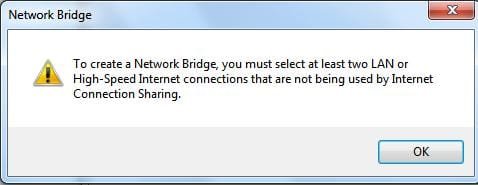
its a a lan connection, and it is showing as one under network adapters. And the bridging works just fine ( i first had that message you have posted, but that was because i had internet sharing enabled -which wouldnt work, so i disabled that and the bridge between wireless and lan connection was set up successfully), the pc2 in the middle has no internet connection whatsoever but it can dial a connection through the ethernet port (lan) which is connected to the cable modem, but i dont want to dial it from that pc (the middle one in this case, pc2) but i want it to be dialed from pc1 , which is connected over wifi (ad-hoc) to pc2 , where on pc2 , the wireless adapter and ethernet adapter are bridged (thus connecting a straigh connection for pc1 to the cable modem).
idk what clearer than this to explain :P
 

My Computer

OS
Windows 7
Right, heres a little graph i put together, maybe itll help you understand my problem a little more.
1e5g14.jpg
 

My Computer

OS
Windows 7
Hello...
Rofl its so funny how you try to explain how your setup works but i have the same problem with my network setup its almost the same as yours but i connect with wifi to my router and then from pc 1 to pc 2 with Ethernet as far as I know the bridge of the two connections confuses the pppoe connection or something like that :P .

Let me know if you got it to work.
 

My Computer

OS
Windows 7
Back
Top