Bright pixel on Windows 7 Desktop

obee

New member
Local time
8:33 PM
Messages
9
Hello,

I recently buy a fujitsu laptop with preloaded Windows 7 Home Basic.

After using it for a while, I noticed that there is a Bright pixel in upper left corner of the windows desktop. I'm sure it is not a deadpixel because if I drag a window to that pixel, the pixel will display the right color.

I think it is software related. I already read other thread that mentioning this problem, but he already solved it by disabling an AOL software. But the case here is that I'm not using that AOL software.

the Bright pixel will disappear if I restart the laptop, but it suddenly appear again when I open the "desktop Background" menu.

ANyone can help me? thanx..
 

My Computer My Computer

Computer Manufacturer/Model Number
Fujitsu P3110
OS
Windows 7 Home Basic
CPU
Intel Pentium Dual Core ULV SU4100 1,3 GHZ
Screen Resolution
1366 x 768
A dead pixel will always be the same, just less noticeable with different backgrounds. If your description is correct, I doubt that it is a dead pixel.
 

My Computer My Computer

Computer type
PC/Desktop
Computer Manufacturer/Model Number
Dell XPS 420
OS
Windows 10, Home Clean Install
CPU
Intel Core2 processsor Q8200(2.33Ghz 1333FSB) Quad Core Tech
Motherboard
Dell
Memory
6 gb
Graphics Card(s)
ATI Radeon 256MB HD3650
Sound Card
Intergrated 7.1 Channel Audio
Monitor(s) Displays
Dell SP2009W 20"
Hard Drives
640 GB Serial ATA Hard drive
Cooling
Fan
Keyboard
Dell USB Keyboard
Mouse
Dell Premium Optical USB
Internet Speed
DSL 2.85
A dead pixel will always be the same, just less noticable with different backgrounds. If your description is correct, I doubt that it is a dead pixel.

the bright pixel disappear when I restart the computer.. It will correctly display the background color or any other color on my desktop..

BUT, when I enter the "desktop background" menu, the dot appear and will stay that way Until I restart the computer.

Oh, and the bright pixel can be seen on a printscreen of my desktop. A deadpixel definitely will not appear on a printscreen. So I am sure it is not a deadpixel.
 

My Computer My Computer

Computer Manufacturer/Model Number
Fujitsu P3110
OS
Windows 7 Home Basic
CPU
Intel Pentium Dual Core ULV SU4100 1,3 GHZ
Screen Resolution
1366 x 768
Did you try changing the desktop background?
 

My Computer My Computer

Computer type
PC/Desktop
Computer Manufacturer/Model Number
Dell XPS 420
OS
Windows 10, Home Clean Install
CPU
Intel Core2 processsor Q8200(2.33Ghz 1333FSB) Quad Core Tech
Motherboard
Dell
Memory
6 gb
Graphics Card(s)
ATI Radeon 256MB HD3650
Sound Card
Intergrated 7.1 Channel Audio
Monitor(s) Displays
Dell SP2009W 20"
Hard Drives
640 GB Serial ATA Hard drive
Cooling
Fan
Keyboard
Dell USB Keyboard
Mouse
Dell Premium Optical USB
Internet Speed
DSL 2.85
Did you try changing the desktop background?

There was no deadpixel BEFORE I entered the desktop background menu. example, If I am using a Solid Black desktop background, then all the pixel on my monitor will be black.

BUT AFTER I entered the desktop background menu to change my background, the bright pixel appear on any background that I chose.
 

My Computer My Computer

Computer Manufacturer/Model Number
Fujitsu P3110
OS
Windows 7 Home Basic
CPU
Intel Pentium Dual Core ULV SU4100 1,3 GHZ
Screen Resolution
1366 x 768
obee,

Can you make some screen shots with the snipping tool & attach them in your post with the paper clip icon ?
 

My Computer My Computer

Computer type
PC/Desktop
Computer Manufacturer/Model Number
Built them myself, Science Experiments !
OS
Win7 Enterprise, Win7 x86 (Ult 7600), Win7 x64 Ult 7600, TechNet RTM on AMD x64 (2.8Ghz)
CPU
AMD fx8350 4ghz, AMD-32 2400mhz, AMD-64 3200mhz, AMDx64 2.8G
Motherboard
SIS 755, ECS-K8M890M-M (Ult 7600), GigaByte & others
Memory
2gb, 4gb on the Ult 7600, 4gb on Technet RTM, 32gb on FX8350
Graphics Card(s)
Draw my own Graphics, several nVidia cards
Sound Card
on motherboard
Monitor(s) Displays
19" flat scr, 28" I-Inc widescr,22" Emprex Widescr, 23" Acer
Screen Resolution
1280 x 1024, 1440 x 900, 1920 x 1080
Hard Drives
6 pata Ide HD's & 2 Sata HD's
added 80gb external on Ult 7600 computer,
numerous extra 1tb, 2TB, 3Tb SATA HD's
A collection of ext HD Docks w/ HDs
PSU
430w, 550w, 600w, 700, 800, etc
Case
All Generic Full Towers
Cooling
Open Air & a few fans, some w/ colored LEDs
Keyboard
Compaq & Dell recycled from GoodWill
Mouse
Made in China Optical Wired Mouse
Internet Speed
Fast Cable InterNet
Antivirus
AVG Free on 24 different Desktops, NO Problems!
Browser
IE 8 is preferred, but use FireFox sometimes
Other Info
Linksys Routers, switches, & Hubs
Too Many USB Flash Drives to count, Biggest is 64GB !
Eight computers in my home network.
Sixteen computers at my business network.
Linked via TeamViewer !
Lots of old used spare computer parts everywhere!
Did you try changing the desktop background?

There was no deadpixel BEFORE I entered the desktop background menu. example, If I am using a Solid Black desktop background, then all the pixel on my monitor will be black.

BUT AFTER I entered the desktop background menu to change my background, the bright pixel appear on any background that I chose.

If you are curious, does it show if you go to another user account?
 

My Computer My Computer

Computer type
PC/Desktop
Computer Manufacturer/Model Number
Dell XPS 420
OS
Windows 10, Home Clean Install
CPU
Intel Core2 processsor Q8200(2.33Ghz 1333FSB) Quad Core Tech
Motherboard
Dell
Memory
6 gb
Graphics Card(s)
ATI Radeon 256MB HD3650
Sound Card
Intergrated 7.1 Channel Audio
Monitor(s) Displays
Dell SP2009W 20"
Hard Drives
640 GB Serial ATA Hard drive
Cooling
Fan
Keyboard
Dell USB Keyboard
Mouse
Dell Premium Optical USB
Internet Speed
DSL 2.85
@richc46 : When I switch to another user account, the pixel didn't appear (yet). When I entered the desktop background menu, the bright pixel appear exactly the same as in my other account.

@docbrown : Okay here is the file. Maybe its a little bit difficult to notice the bright pixel because it is located on the upper most left corner of the desktop. I am using solid black to make you easier noticing it.
 

Attachments

My Computer My Computer

Computer Manufacturer/Model Number
Fujitsu P3110
OS
Windows 7 Home Basic
CPU
Intel Pentium Dual Core ULV SU4100 1,3 GHZ
Screen Resolution
1366 x 768
I could not find a pic in your zip file. Just use the snipping tool from the Start Menu.
 

Attachments

  • jan_5_2010_desktop.JPG
    jan_5_2010_desktop.JPG
    160.7 KB · Views: 373

My Computer My Computer

Computer type
PC/Desktop
Computer Manufacturer/Model Number
Built them myself, Science Experiments !
OS
Win7 Enterprise, Win7 x86 (Ult 7600), Win7 x64 Ult 7600, TechNet RTM on AMD x64 (2.8Ghz)
CPU
AMD fx8350 4ghz, AMD-32 2400mhz, AMD-64 3200mhz, AMDx64 2.8G
Motherboard
SIS 755, ECS-K8M890M-M (Ult 7600), GigaByte & others
Memory
2gb, 4gb on the Ult 7600, 4gb on Technet RTM, 32gb on FX8350
Graphics Card(s)
Draw my own Graphics, several nVidia cards
Sound Card
on motherboard
Monitor(s) Displays
19" flat scr, 28" I-Inc widescr,22" Emprex Widescr, 23" Acer
Screen Resolution
1280 x 1024, 1440 x 900, 1920 x 1080
Hard Drives
6 pata Ide HD's & 2 Sata HD's
added 80gb external on Ult 7600 computer,
numerous extra 1tb, 2TB, 3Tb SATA HD's
A collection of ext HD Docks w/ HDs
PSU
430w, 550w, 600w, 700, 800, etc
Case
All Generic Full Towers
Cooling
Open Air & a few fans, some w/ colored LEDs
Keyboard
Compaq & Dell recycled from GoodWill
Mouse
Made in China Optical Wired Mouse
Internet Speed
Fast Cable InterNet
Antivirus
AVG Free on 24 different Desktops, NO Problems!
Browser
IE 8 is preferred, but use FireFox sometimes
Other Info
Linksys Routers, switches, & Hubs
Too Many USB Flash Drives to count, Biggest is 64GB !
Eight computers in my home network.
Sixteen computers at my business network.
Linked via TeamViewer !
Lots of old used spare computer parts everywhere!
I could not find a pic in your zip file. Just use the snipping tool from the Start Menu.

I am using the snipping tools. and the file is in MHTML type. the picture is there in that mhtml file.
 

My Computer My Computer

Computer Manufacturer/Model Number
Fujitsu P3110
OS
Windows 7 Home Basic
CPU
Intel Pentium Dual Core ULV SU4100 1,3 GHZ
Screen Resolution
1366 x 768
Here is what I get in the zip file
 

Attachments

  • obee_probs.JPG
    obee_probs.JPG
    44.4 KB · Views: 36

My Computer My Computer

Computer type
PC/Desktop
Computer Manufacturer/Model Number
Built them myself, Science Experiments !
OS
Win7 Enterprise, Win7 x86 (Ult 7600), Win7 x64 Ult 7600, TechNet RTM on AMD x64 (2.8Ghz)
CPU
AMD fx8350 4ghz, AMD-32 2400mhz, AMD-64 3200mhz, AMDx64 2.8G
Motherboard
SIS 755, ECS-K8M890M-M (Ult 7600), GigaByte & others
Memory
2gb, 4gb on the Ult 7600, 4gb on Technet RTM, 32gb on FX8350
Graphics Card(s)
Draw my own Graphics, several nVidia cards
Sound Card
on motherboard
Monitor(s) Displays
19" flat scr, 28" I-Inc widescr,22" Emprex Widescr, 23" Acer
Screen Resolution
1280 x 1024, 1440 x 900, 1920 x 1080
Hard Drives
6 pata Ide HD's & 2 Sata HD's
added 80gb external on Ult 7600 computer,
numerous extra 1tb, 2TB, 3Tb SATA HD's
A collection of ext HD Docks w/ HDs
PSU
430w, 550w, 600w, 700, 800, etc
Case
All Generic Full Towers
Cooling
Open Air & a few fans, some w/ colored LEDs
Keyboard
Compaq & Dell recycled from GoodWill
Mouse
Made in China Optical Wired Mouse
Internet Speed
Fast Cable InterNet
Antivirus
AVG Free on 24 different Desktops, NO Problems!
Browser
IE 8 is preferred, but use FireFox sometimes
Other Info
Linksys Routers, switches, & Hubs
Too Many USB Flash Drives to count, Biggest is 64GB !
Eight computers in my home network.
Sixteen computers at my business network.
Linked via TeamViewer !
Lots of old used spare computer parts everywhere!
I think the previous file stored the image on my computer, not on the file..

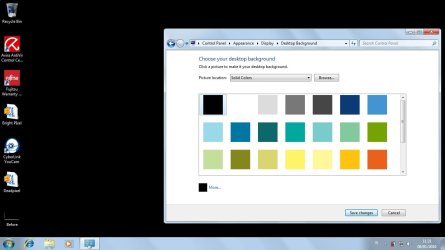
here are 2 jpeg image. the first one is before i went to desktop background menu, and the other one is after.
 

Attachments

  • Before.jpg
    Before.jpg
    18.4 KB · Views: 281
  • After.jpg
    After.jpg
    55.7 KB · Views: 279

My Computer My Computer

Computer Manufacturer/Model Number
Fujitsu P3110
OS
Windows 7 Home Basic
CPU
Intel Pentium Dual Core ULV SU4100 1,3 GHZ
Screen Resolution
1366 x 768
That is clearly a white pixel on top of your desktop background. I suspect it is caused by a running application or driver.
If you click on the SHOW DESKTOP icon will it disappear momentarily? I suspect the answer is yes.
The advice I can give you is go to Task Manager and start shutting down active tasks untill the white pixel disappears, then you will know which program is causing this.
PS: It could be a malware as well.
 

My Computer My Computer

Computer type
PC/Desktop
OS
Windows 7 64bit SP1
CPU
Intel i7 940
Motherboard
Intel DX58SO
Memory
12GB
Graphics Card(s)
POV Nvidia GTX280EXO
Sound Card
RealtekHD
Monitor(s) Displays
Viewsonic VX2233WM
Screen Resolution
1080p
Hard Drives
2X Samsung 500GB
1x WD 1TB
PSU
ThermalTake ToughPower 700Watts
Case
ThermalTake Strike MX
Cooling
Stock
Keyboard
Logitech MX 3200 Wireless
Mouse
Logitech MX 3200 Laser Wireless
I had click the SHOW DESKTOP but the pixel didnt disappear.
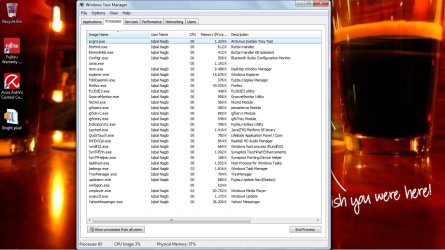
Here are my running process when the bright pixel appear... any idea which process maybe causing the problem? I am worried if I close the wrong process and something bad happen to my computer..
 

Attachments

  • taskmanager.jpg
    taskmanager.jpg
    137.2 KB · Views: 94

My Computer My Computer

Computer Manufacturer/Model Number
Fujitsu P3110
OS
Windows 7 Home Basic
CPU
Intel Pentium Dual Core ULV SU4100 1,3 GHZ
Screen Resolution
1366 x 768
Doubtful it's down to anything except a hardware screen issue, and since one pixel is within acceptable defect limits there's nothing you can do about it unless your supplier was specifically paid to check for defective pixels or there's a warranty from the manufacturer about an exchange of hardware if you get a dead or bright pixel... :zip:

Dell have one of the best policies on this type of fault, other manufacturers don't tend to want to do much about pixellation defects which call within the norms...

idsjmx.gif


The above chart shows what degree of dead pixels are acceptable per million, for various classes of hardware...

Sometimes people claim 'massaging' a pixel with the tip of a blunt pencil can restore normal functionality, however I'm not telling you to try the same... ;)
 

My Computer My Computer

Computer Manufacturer/Model Number
Custom built machine
OS
W7 x64
CPU
Intel Q9300 2.5Ghz Quad LGA775 (Would like Q9650)
Motherboard
Gigabyte GA-EP45T-UD3R (F6 Bios)
Memory
4Gb OCZ Gold 1,333Mhz
Graphics Card(s)
Palit HD4850 O/C Sonic 512Mb DDR3, Dual DViD's
Sound Card
Azalia to twin Samson 50w Studio Monitors
Monitor(s) Displays
Twin Dell (E-IPS) U2311H 23.6" Screens
Screen Resolution
1920 x 1080 @ 60Hz
Hard Drives
Crucial M4 SSD, archives on twin Western Digital Caviar Black WD2002FAEX, 2TB, 7200rpm HDD's, Samsung Ritemaster CD/DVD Burner...
PSU
OCZ 600w
Case
Lian-Li PC8 acoustifoamed' aluminium tower
Cooling
Scythe 140mm Zipang
Keyboard
Cherry PS/2 custom model
Mouse
Lenovo USB laser "Thinkpad" Mouse
Internet Speed
ADSL2+ @14Mbps downstream & Cat6 Gigabit Ethernet
Antivirus
NOD32
Browser
Opera
Other Info
Silicon Dust HD Homerun Dual FTA (Ethernet) TV Tuners, Dray Tek Vigor 2850Vn router and 8x HP Gigabit Switch. Lian-Li CR26 Card Reader, Canon MF4430 iSensys laser printer/scanner.
I closed the Desktop Window Manager process and now the pixel disappear...

anyone know what cause that? what is Desktop Window Manager?
 

My Computer My Computer

Computer Manufacturer/Model Number
Fujitsu P3110
OS
Windows 7 Home Basic
CPU
Intel Pentium Dual Core ULV SU4100 1,3 GHZ
Screen Resolution
1366 x 768
DWM is resposible for the aero and eye candy in Win7 and Vista.
 

My Computer My Computer

Computer type
PC/Desktop
OS
Windows 7 64bit SP1
CPU
Intel i7 940
Motherboard
Intel DX58SO
Memory
12GB
Graphics Card(s)
POV Nvidia GTX280EXO
Sound Card
RealtekHD
Monitor(s) Displays
Viewsonic VX2233WM
Screen Resolution
1080p
Hard Drives
2X Samsung 500GB
1x WD 1TB
PSU
ThermalTake ToughPower 700Watts
Case
ThermalTake Strike MX
Cooling
Stock
Keyboard
Logitech MX 3200 Wireless
Mouse
Logitech MX 3200 Laser Wireless
It could be possible a program/driver is causing it. maybe the Fujitsu Display manager? What is it for?
Boot into Safe Mode, see if its still there.

If so, it could also be a stuck pixel. So there may still be hope.

A stuck pixel will appear in any of the colors that its three subpixels (red, green and blue) can form.
In a dead pixel, all subpixels are permanently off, which will make the pixel appear black.

http://komku.blogspot.com/2008/03/how-to-fix-stuck-pixel-using-udpixel-2.html
 

My Computer My Computer

Computer Manufacturer/Model Number
Custom (Self Build)
OS
Windows 7 Home Premium 64bit
CPU
Intel Core i7 2700k
Motherboard
eVGA P67 SLI
Memory
8GB Mushkin Redline Ridgebacks @1866
Graphics Card(s)
EVGA GTX570 SC
Sound Card
XiFi Titanium HD
Monitor(s) Displays
LG W2453V
Screen Resolution
1920x1080
Hard Drives
Intel 320 80GB -- Intel X25-V 40GB --WD Black 1TB x2 -- WD Blue 640GB
PSU
Seasonic x750
Case
Corsair 600T SE White
Cooling
eVGA Superclocked CPU Cooler
Keyboard
Saitek Cyborg
Antivirus
Kaspersky
Browser
IE
Other Info
LG BD/DVD
It cannot be a stuck pixel, I had a stuck pixel once and it didn't appear on any snapshot and certainly not on other computers at the same spot!!!
This is certainly a driver/utility causing this and I bet it won't show in safe mode.
As Wishmaster said, try to close the Fujitsu Display Manager and try.
 

My Computer My Computer

Computer type
PC/Desktop
OS
Windows 7 64bit SP1
CPU
Intel i7 940
Motherboard
Intel DX58SO
Memory
12GB
Graphics Card(s)
POV Nvidia GTX280EXO
Sound Card
RealtekHD
Monitor(s) Displays
Viewsonic VX2233WM
Screen Resolution
1080p
Hard Drives
2X Samsung 500GB
1x WD 1TB
PSU
ThermalTake ToughPower 700Watts
Case
ThermalTake Strike MX
Cooling
Stock
Keyboard
Logitech MX 3200 Wireless
Mouse
Logitech MX 3200 Laser Wireless
QDos, a hardware issue wouldn't show in a screenshot like his is. I agree with the others in that it's an application that's running.

Try this, use msconfig to run a diagnostic startup (basic devices and services only) and then immediately after the reboot go to the screen where you see the pixel. Does it appear? If so, I suspect maybe an updated video driver is needed. If it doesn't, go back to a normal startup, except use the startup tab to enable 4-5 items at a time with reboots after each "group" to test. When you get the pixel, it's one of those 5.
 

My Computer My Computer

Computer Manufacturer/Model Number
Home built
OS
Windows 7 Home Premium x64
CPU
Phenom II X4 955 BE
Motherboard
Asus Sabertooth 990FX
Memory
8 GB OCZ BE 1667
Graphics Card(s)
EVGA GeForce GTX470 SC
Monitor(s) Displays
BenQ 19"
Screen Resolution
1280x1024
Hard Drives
256 GB OCZ Vertex 3 SSD
2x WD 1 TB
1x WD 2 TB
PSU
Thermaltake 850W
Case
Coolermaster Cosmos 1000
Cooling
Air
Keyboard
Logitech
Mouse
Cyborg R.A.T 7
Internet Speed
Standard RR
Back
Top