Bringing back "are you sure you want to uninstal this program" warning

happycat

New member
Local time
2:41 PM
Messages
23
Bringing back "are you sure you want to uninstal this program" warning

I accidently ticked "don't show this again" when the "are you sure you want to uninstal this program" warning came up in control panel, but I actually like it incase I click the wrong one. What's the easiest way to bring the warning back? Thanks
 

My Computer My Computer

At a glance

Windows 7 64 bit
Computer type
PC/Desktop
OS
Windows 7 64 bit
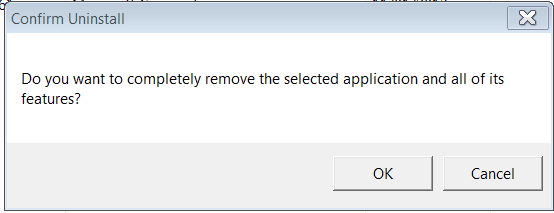
I don't think UAC will help with this one. I think the Confirm Un install notice is independant of UAC. If you turn UAC off completely you still get the confirm window like this:
Uninstall.PNG

Mind I can't see the "Don't show this message again" sign either!
HAppycat, What version of Win 7 are you running?
 

My Computer My Computer

At a glance

Microsoft Windows 7 Home Premium 64-bit 7601 ...Intel(R) Core(TM) i7-3770 CPU @ 3.40GHz8.00 GBIntel(R) HD Graphics 4000
Computer type
PC/Desktop
OS
Microsoft Windows 7 Home Premium 64-bit 7601 Multiprocessor Free Service Pack 1
CPU
Intel(R) Core(TM) i7-3770 CPU @ 3.40GHz
Motherboard
ASUSTeK COMPUTER INC. P8H77-M
Memory
8.00 GB
Graphics Card(s)
Intel(R) HD Graphics 4000
Sound Card
On Board
Monitor(s) Displays
Dell 24"
Screen Resolution
1920 x 1080
Hard Drives
(1) INTEL SSDSC2CT180A3 ATA Device (2) ST500DM002-1BD142 ATA Device (3) WDC WD3200AAKS-75L9A0 ATA Device (4) Generic- Compact Flash USB Device (5) Generic- MS/MS-Pro USB Device (6) Generic- SD/MMC USB Device (7) Generic- SM/xD-Picture USB
PSU
500w Corsair
Case
Cooler Master
Cooling
3 Fans
Keyboard
Logitech MK300
Mouse
Logitech WOM
Internet Speed
75Mb
Antivirus
Norton 360
Browser
Firefox, Opera, IE
I don't think UAC will help with this one. I think the Confirm Un install notice is independant of UAC. If you turn UAC off completely you still get the confirm window like this:
View attachment 271993

Mind I can't see the "Don't show this message again" sign either!
HAppycat, What version of Win 7 are you running?

Thanks mitchell65 I have no way of testing that at present .... At the moment i am using some one elses computer.
 

My Computer My Computer

At a glance

windows 7 home 64bitINTEL-CORE I716GB
Computer Manufacturer/Model Number
W530-3630QM1
OS
windows 7 home 64bit
CPU
INTEL-CORE I7
Memory
16GB
Hard Drives
750GB
Browser
Chrome
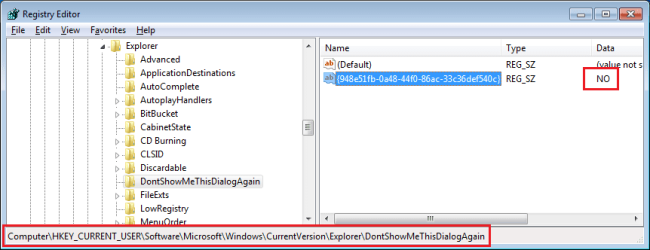
You can download and merge the reg file attached to this post or manually remove "NO" from this entry (thus leaving the entry with a blank data value):

no.png

HKEY_CURRENT_USER\Software\Microsoft\Windows\CurrentVersion\Explorer\DontShowMeThisDialogAgain

{948e51fb-0a48-44f0-86ac-33c36def540c}

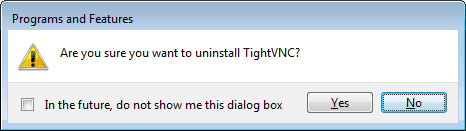
Edit: Only apps that use the native Windows installer/uninstaller will make use of that registry entry. I had to uninstall 5 or 6 apps before I found that TightVNC did bring up this:
no2.png
 

Attachments

Last edited:

My Computer My Computer

At a glance

W7 Pro SP1 64biti78GBIntel HD Graphics
Computer type
Laptop
Computer Manufacturer/Model Number
Employer provided Dell Latitude
OS
W7 Pro SP1 64bit
CPU
i7
Memory
8GB
Graphics Card(s)
Intel HD Graphics
Hard Drives
crappy SSD
Antivirus
Employer mandated Symantec Endpoint Protection
Browser
Pale Moon 64bit, IE11 64bit & Chrome 64bit
Thanks for all the helps guys and thanks very much UsernameIssues, worked perfectly :)
 

My Computer My Computer

At a glance

Windows 7 64 bit
Computer type
PC/Desktop
OS
Windows 7 64 bit
Back
Top