
Broken Gadgets - yet another post

LITM

New member
Local time
9:24 PM
Messages
10
Hi,

As you can see from the following, I too seem to be suffering from a now common problem.
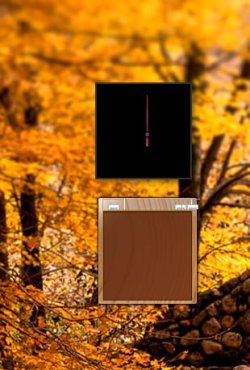
gadgets.jpg

http://www.sevenforums.com/newthread.php?do=newthread&f=50 This thread seems to have had at least what looks the same problem. But sadly nothing in that thread works for me. As in, I've tried the regsvr32 trick, the Windows Gadget Platform off and on trick, and the SFC trick. Sadly none of them have worked.

Everything was working fine until I ran "Malwarebytes' Anti-Malware". I had a few trojans that seem to have slipped passed Avast. I'm blaming IE 9 beta for this, but I have no proof.

Everything on my system is up to date. So any ideas would be helpful!
 

My Computer

OS
Windows 7 Ultimate x64
do any of the gadgets that came with windows work?

if malwarebytes broke your gadgets, chances are they contained malicious code.
 

My Computer

Computer Manufacturer/Model Number
Alienware AREA-51 M17x
OS
windows 7 ultimate 64bit
CPU
Intel Core2 Extreme x9000 2.8GHZ
Motherboard
Asus P965 Intel chipset
Memory
4Gig
Graphics Card(s)
2 NVidia GeForce 8800M GTX (SLi)
Sound Card
onboard
Monitor(s) Displays
17in. built-in, 47in JVC LCD
Screen Resolution
1080p
Hard Drives
2 250Gig Hitachi (RAID 0) @ 7200RPM
Case
17in. laptop
Mouse
touchpad, Logitech Anywhere Mouse cordless laser
Internet Speed
cable
No, they're all broken. Some partly show, some don't show at all. But nothing appears to be funcational.
 

My Computer

OS
Windows 7 Ultimate x64
No, they're all broken. Some partly show, some don't show at all. But nothing appears to be funcational.

And of course no backup to restore from, right?

Have you tried a repair install?

Are you sure you dont still have malware?
 

My Computer

Computer Manufacturer/Model Number
HP Pavillion dv-7 1005 Tx
OS
Win 8 Release candidate 8400
CPU
[email protected]
Memory
4 gigs
Graphics Card(s)
Nvidia 9600M
Sound Card
HD built-in
Monitor(s) Displays
17" Wxga
Screen Resolution
1440x900
Cooling
none
Internet Speed
45Mb down 5Mb up
Sadly no backup.

I haven't tried a repair install yet. I'm guessing I'll have to reinstall a load of stuff?

Yes I'm sure I'm rid of malware well now. I cleared it days ago, and reset a few times etc. Nothing new has appeared as of this morning.
 

My Computer

OS
Windows 7 Ultimate x64

My Computer

Computer Manufacturer/Model Number
Alienware AREA-51 M17x
OS
windows 7 ultimate 64bit
CPU
Intel Core2 Extreme x9000 2.8GHZ
Motherboard
Asus P965 Intel chipset
Memory
4Gig
Graphics Card(s)
2 NVidia GeForce 8800M GTX (SLi)
Sound Card
onboard
Monitor(s) Displays
17in. built-in, 47in JVC LCD
Screen Resolution
1080p
Hard Drives
2 250Gig Hitachi (RAID 0) @ 7200RPM
Case
17in. laptop
Mouse
touchpad, Logitech Anywhere Mouse cordless laser
Internet Speed
cable
Yeah, I've looked at that, sadly as I've already mentioned I've tried the regsvr32 trick. Doesn't work for me, and the restore points I have don't date back further than I started having the problem.
 

My Computer

OS
Windows 7 Ultimate x64
Sadly no backup.

I haven't tried a repair install yet. I'm guessing I'll have to reinstall a load of stuff?

Yes I'm sure I'm rid of malware well now. I cleared it days ago, and reset a few times etc. Nothing new has appeared as of this morning.

Repair install just fixes existing OS files. You may need to re-install some win updates, but your data should survive.

You do need a win 7 dvd.


Ken
 

My Computer

Computer Manufacturer/Model Number
HP Pavillion dv-7 1005 Tx
OS
Win 8 Release candidate 8400
CPU
[email protected]
Memory
4 gigs
Graphics Card(s)
Nvidia 9600M
Sound Card
HD built-in
Monitor(s) Displays
17" Wxga
Screen Resolution
1440x900
Cooling
none
Internet Speed
45Mb down 5Mb up
this may or may not work:

go to add/remove programs. on the left, click "turn windows features on or off". find "windows gadget platform" and uncheck it. then restart, and reverse these steps, and restart again. i dont know if you need your win7 disc or not.
 

My Computer

Computer Manufacturer/Model Number
Alienware AREA-51 M17x
OS
windows 7 ultimate 64bit
CPU
Intel Core2 Extreme x9000 2.8GHZ
Motherboard
Asus P965 Intel chipset
Memory
4Gig
Graphics Card(s)
2 NVidia GeForce 8800M GTX (SLi)
Sound Card
onboard
Monitor(s) Displays
17in. built-in, 47in JVC LCD
Screen Resolution
1080p
Hard Drives
2 250Gig Hitachi (RAID 0) @ 7200RPM
Case
17in. laptop
Mouse
touchpad, Logitech Anywhere Mouse cordless laser
Internet Speed
cable
if that doesnt work, try from safe mode.
 

My Computer

Computer Manufacturer/Model Number
Alienware AREA-51 M17x
OS
windows 7 ultimate 64bit
CPU
Intel Core2 Extreme x9000 2.8GHZ
Motherboard
Asus P965 Intel chipset
Memory
4Gig
Graphics Card(s)
2 NVidia GeForce 8800M GTX (SLi)
Sound Card
onboard
Monitor(s) Displays
17in. built-in, 47in JVC LCD
Screen Resolution
1080p
Hard Drives
2 250Gig Hitachi (RAID 0) @ 7200RPM
Case
17in. laptop
Mouse
touchpad, Logitech Anywhere Mouse cordless laser
Internet Speed
cable
As stated, tried that
 

My Computer

OS
Windows 7 Ultimate x64
sorry. i must have missed that. you tried from safe mode too?
 

My Computer

Computer Manufacturer/Model Number
Alienware AREA-51 M17x
OS
windows 7 ultimate 64bit
CPU
Intel Core2 Extreme x9000 2.8GHZ
Motherboard
Asus P965 Intel chipset
Memory
4Gig
Graphics Card(s)
2 NVidia GeForce 8800M GTX (SLi)
Sound Card
onboard
Monitor(s) Displays
17in. built-in, 47in JVC LCD
Screen Resolution
1080p
Hard Drives
2 250Gig Hitachi (RAID 0) @ 7200RPM
Case
17in. laptop
Mouse
touchpad, Logitech Anywhere Mouse cordless laser
Internet Speed
cable
This happened when IE upgraded to v8 also. Something about browser restrictions. Check the security in IE and set everything to defaults, reboot, then do the turning Windows gadgets off method previously posted in safe mode. Be sure to reboot as needed.
 

My Computer

Computer type
PC/Desktop
Computer Manufacturer/Model Number
Alienware Aurora-R4
OS
Windows 7 Professional x64
CPU
Intel(R) Core(TM) i7-3820 CPU, 4 Cores, 8 Logical Cores
Motherboard
Alienware
Memory
32 GB DDR3 1600
Graphics Card(s)
ATI Radeon HD 8950 3GB vDDR5 & ATI Radeon HD 7950 3GB vDDR5
Sound Card
Realtek 7.1 Audio
Monitor(s) Displays
Dell SP2309W 23 inch
Screen Resolution
2048x1152
Hard Drives
7.3 TB in 4 drives (Raid 0), 2TB NAS backup drive.
PSU
875w
Case
ALX Chasis with active venting
Cooling
Liquid cooled with active venting and fans.
Keyboard
Alienware TactX
Mouse
Alienware TactX
Internet Speed
15mb Cable
Antivirus
Malwarebytes
Browser
Pale Moon (Optimized Mozilla Based)
Other Info
http://www.y0himba.net
@kword88: no worries, but yeah I had.

@y0imba: Thanks for the idea, just tried it. Sadly that doesn't work either.

@zigzag3143: I tried the repair install. There were two opitions, one to repair boot and one for restore. I tried the repair boot just for the fun of it. Didn't fix anything. I also looked at the restore point, but it still didn't give me any date older than when this problem started.
 

My Computer

OS
Windows 7 Ultimate x64

My Computer

Computer type
PC/Desktop
OS
Windows 10 Home x64
CPU
INTEL Core i5-750 Quad-Core 3.37GHz
Motherboard
ASUS P7P55D
Memory
HyperX Fury Black Series 8GB (2 x 4GB) 1866Mhz
Graphics Card(s)
EVGA GeForce GTX 750 Superclocked 1GB 128-Bit GDDR5
Monitor(s) Displays
LG 32MA68HY 32" IPS
Screen Resolution
1920 x 1080
Hard Drives
Samsung 840 Evo 120GB, SEAGATE 500GB Barracuda® 7200.12, SATA 3 Gb/s, 7200 RPM, 16MB cache
PSU
ANTEC TruePower New TP-550, 80 PLUS, 550W
Case
ANTEC Three Hundred Illusion
Cooling
COOLER MASTER Hyper 212 Plus, 4 x 120mm 1 x 140mm Noctua's
Internet Speed
85 + Mbps
Antivirus
Avast
Browser
Vivaldi
to kword88

Thank you very much, kword88, your link saved me :).
 
Last edited:

My Computer

OS
Windows 10 Pro x64
Back
Top