Solved Broken headphone jack stuck, how to play through speakers?

Navijus

New member
Local time
3:50 AM
Messages
5
Hello, I have a problem, which many people probably have encountered at some point.

I have this Asus K73SV notebook, but the incident happened - my headphones jack broke and is now stuck inside my notebook. Unfortunately, I can't get it out and my computer still considers that little piece as headphones so my internal speakers makes no sound.

How can I make this work? I have Realtek drivers and I don't have that option where I could disable that jack, doesn't matter which version or from where I download those drivers. And I can only see speakers through my control panel.

I saw there is an option where you can use ForceDisableJD in registry, but there is no such option in my registries.
What should I do? I tried to fix this for the whole day and I'm completely lost.
Thanks in advance.

P.S. Sorry for bad english.
 

My Computer My Computer

At a glance

Windows 7 Ultimate x64
Computer type
PC/Desktop
Computer Manufacturer/Model Number
Asus
OS
Windows 7 Ultimate x64
Try a magnet to see if you can get the broken plug out. You can also try to super glue something to the plug and see if you can pull it out.
 

My Computer My Computer

At a glance

Windows 10 64 bitIntel i7 6700K16GB Corsair DominatorIntel CPU Graphics
Computer type
PC/Desktop
Computer Manufacturer/Model Number
My Own Build
OS
Windows 10 64 bit
CPU
Intel i7 6700K
Motherboard
ASUS ROG Maximus VIII Hero
Memory
16GB Corsair Dominator
Graphics Card(s)
Intel CPU Graphics
Sound Card
RealTek
Monitor(s) Displays
27" Dell S2719dgf
Screen Resolution
2560X1440
Hard Drives
1 TB Samsung 850 EVO SSD for Win 10 Pro
500GB Samsung 850 EVO SSD for Win 10 Insider
2 TB drive for backup
PSU
EVGA Supernova 750G2
Case
BeQuiet Silent Base 600
Cooling
Deepcool Captain 120EX
Keyboard
Microsoft Wireless 2000
Mouse
Microsoft wireless
Internet Speed
100 MB/sec (Cable)
Antivirus
Microsoft Defender and Malwarebytes
Browser
Edge/Firefox
Other Info
Cakewalk (Sonar) by BandLab and Studio One 4.1 Pro recording studio software. MOTU 896Mk3 Hybrid recording interface, Frontier Tranzport wireless control unit, Behringer X-Touch Control Surface.
Five USB connected optical drives for CD Audio production using Nero BurningROM
I tried it, but no luck, it's somehow really stuck so I wonder if there's a way to just play sound through built-in speakers.
 
Last edited:

My Computer My Computer

At a glance

Windows 7 Ultimate x64
Computer type
PC/Desktop
Computer Manufacturer/Model Number
Asus
OS
Windows 7 Ultimate x64
Not that I know of, if that jack can't be disabled.
 

My Computer My Computer

At a glance

Windows 10 64 bitIntel i7 6700K16GB Corsair DominatorIntel CPU Graphics
Computer type
PC/Desktop
Computer Manufacturer/Model Number
My Own Build
OS
Windows 10 64 bit
CPU
Intel i7 6700K
Motherboard
ASUS ROG Maximus VIII Hero
Memory
16GB Corsair Dominator
Graphics Card(s)
Intel CPU Graphics
Sound Card
RealTek
Monitor(s) Displays
27" Dell S2719dgf
Screen Resolution
2560X1440
Hard Drives
1 TB Samsung 850 EVO SSD for Win 10 Pro
500GB Samsung 850 EVO SSD for Win 10 Insider
2 TB drive for backup
PSU
EVGA Supernova 750G2
Case
BeQuiet Silent Base 600
Cooling
Deepcool Captain 120EX
Keyboard
Microsoft Wireless 2000
Mouse
Microsoft wireless
Internet Speed
100 MB/sec (Cable)
Antivirus
Microsoft Defender and Malwarebytes
Browser
Edge/Firefox
Other Info
Cakewalk (Sonar) by BandLab and Studio One 4.1 Pro recording studio software. MOTU 896Mk3 Hybrid recording interface, Frontier Tranzport wireless control unit, Behringer X-Touch Control Surface.
Five USB connected optical drives for CD Audio production using Nero BurningROM
Oh, is there any way to do this? This would solve my problem!
 

My Computer My Computer

At a glance

Windows 7 Ultimate x64
Computer type
PC/Desktop
Computer Manufacturer/Model Number
Asus
OS
Windows 7 Ultimate x64
Have it repaired. That's about it. The piece of plug must come out or the jack replaced. The contacts inside the jack are telling the hardware/software there's a headphone plugged in. You should be able to glue something to it and pull it out. Unless, of course, you've already super glued the plug to the jack.

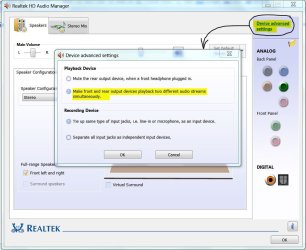
There is one option in the Realtek driver that says to treat front and rear jacks separately but I don't know if it applies to portables with only one jack. See if the option is there.
 

Attachments

  • Realtek - Separate Output.JPG
    Realtek - Separate Output.JPG
    81.5 KB · Views: 0

My Computer My Computer

At a glance

Windows 7 Pro-x64i7-2600 3.4GHz - 3.8GHz Turbo8Gb - 2x4GB, Muskin 991770 PC3-1333Integrated Intel HD 2000
Computer type
PC/Desktop
Computer Manufacturer/Model Number
Built 2/11/2011
OS
Windows 7 Pro-x64
CPU
i7-2600 3.4GHz - 3.8GHz Turbo
Motherboard
Intel DH67BL-B3
Memory
8Gb - 2x4GB, Muskin 991770 PC3-1333
Graphics Card(s)
Integrated Intel HD 2000
Sound Card
Integrated Intel 10.1 HD, RealTek ALC892
Monitor(s) Displays
Asus LCD VH222H, Haier HL24XSL2a
Screen Resolution
1920x1080, 1920x1080
Hard Drives
Crucial SSD C300-128Gb,
Western Digital WD5002AALX - 500Gb,
Western Digital WD7501AALS - 750Gb
PSU
Seasonic 650W 80+ Gold Modular
Case
Rosewill Defender
Cooling
Stock CPU, Four 120mm case fans, PCH fan added
Keyboard
Logitech EX100 Y-RBH94 Wireless
Mouse
Logitech EX100 M-RCE95 Wireless
Internet Speed
3.0/1.5 Mbs
Antivirus
Microsoft Security Essentials
Browser
Microsoft Internet Explorer 11
Other Info
Antec Veris Premier-Multimedia IR Station,
Cyber Accoustics-3602 Speakers,
AFT XM-5U Card Reader,
Hauppauge TV-HVR-2250,
Sony LX300 USB Turntable
No, unfortunately, I have no device advanced settings there. Neither this little folder option.
 

My Computer My Computer

At a glance

Windows 7 Ultimate x64
Computer type
PC/Desktop
Computer Manufacturer/Model Number
Asus
OS
Windows 7 Ultimate x64
Well, I kinda solved this problem myself now. Just found Realtek drivers from 2011 and there I found both ForceDisableJD instances in registry and changed them from 00 to 11 and restarted. Now I have sound from my built-in speakers.

And this may be the problem solver for other people, who changes ForceDisableJD from 00 to 01 or FF, but experiences no luck. Sometimes it's not working, you have to change the binary code to 11.

Well, I will try to get out those stuck pieces from there eventually, but for now, thanks for your help guys! :)
 

My Computer My Computer

At a glance

Windows 7 Ultimate x64
Computer type
PC/Desktop
Computer Manufacturer/Model Number
Asus
OS
Windows 7 Ultimate x64
Well, perhaps. Drivers get updated because they have a problem or may be incompatible with other system drivers. If you start getting BSODs, I'd advise using current drivers. In any case, thanks for the follow up. I rep'ed you for that. :cool:

Forgot to mention: You get to the Realtek Audio Manager from the Control Panel. It doesn't show up from the Sound menus.
 
Last edited:

My Computer My Computer

At a glance

Windows 7 Pro-x64i7-2600 3.4GHz - 3.8GHz Turbo8Gb - 2x4GB, Muskin 991770 PC3-1333Integrated Intel HD 2000
Computer type
PC/Desktop
Computer Manufacturer/Model Number
Built 2/11/2011
OS
Windows 7 Pro-x64
CPU
i7-2600 3.4GHz - 3.8GHz Turbo
Motherboard
Intel DH67BL-B3
Memory
8Gb - 2x4GB, Muskin 991770 PC3-1333
Graphics Card(s)
Integrated Intel HD 2000
Sound Card
Integrated Intel 10.1 HD, RealTek ALC892
Monitor(s) Displays
Asus LCD VH222H, Haier HL24XSL2a
Screen Resolution
1920x1080, 1920x1080
Hard Drives
Crucial SSD C300-128Gb,
Western Digital WD5002AALX - 500Gb,
Western Digital WD7501AALS - 750Gb
PSU
Seasonic 650W 80+ Gold Modular
Case
Rosewill Defender
Cooling
Stock CPU, Four 120mm case fans, PCH fan added
Keyboard
Logitech EX100 Y-RBH94 Wireless
Mouse
Logitech EX100 M-RCE95 Wireless
Internet Speed
3.0/1.5 Mbs
Antivirus
Microsoft Security Essentials
Browser
Microsoft Internet Explorer 11
Other Info
Antec Veris Premier-Multimedia IR Station,
Cyber Accoustics-3602 Speakers,
AFT XM-5U Card Reader,
Hauppauge TV-HVR-2250,
Sony LX300 USB Turntable
Well, I kinda solved this problem myself now. Just found Realtek drivers from 2011 and there I found both ForceDisableJD instances in registry and changed them from 00 to 11 and restarted. Now I have sound from my built-in speakers.

And this may be the problem solver for other people, who changes ForceDisableJD from 00 to 01 or FF, but experiences no luck. Sometimes it's not working, you have to change the binary code to 11.

Well, I will try to get out those stuck pieces from there eventually, but for now, thanks for your help guys! :)

I made a profile on this site to personally thank you sir, for years Ive tried to fix the same issue on my asus, I tried regedit before but like you said 0 or 1 did not work in the binarys but 11 DID! FOR YEARS I've attempted to fix this issue, it got to the point that today I was looking up headphone jacks to order to replace the bad one myself. Anybody having the same issue and didnt solve the problem, try again but instead of using 0 or 1 as the binary number try 11! Thanks again!!
 

My Computer My Computer

At a glance

Windows 7 64 bit
Computer type
PC/Desktop
OS
Windows 7 64 bit
Back
Top