
Broken retainer clip on motherboard for vid card

durango1

New member
Power User
VIP
Local time
12:49 PM
Messages
119
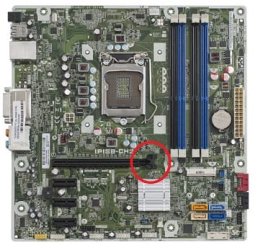
Hi, stupid stupid impatient me didnt take the time to look and took my vid card out (because i thought maybe i might have to reseat it) and in the process i broke the retainer clip on one side of the motherboard.

See image, i did make an attempt to superglue it back but i stopped trying because i figured if i got that stuff someplace it should not be i would just make the issue worse and that would be stupid stupid stupid lol.

I dont think there is any real pressure there its just for saftey i think, the mount on the rear of the unit holds it really snug so i dont think there is any real chance for it to vibrate loose but what do you all think. I say no pressure because it sure was easy to break off there.

Can that clip itself be replaced without replacing the female connection. It kind of looks like the swing arm snaps in there but i didnt want to try to pry it out.

So to explain that clip you see on the pic, the bottom of it just has a strait bar (swing arm) attached like clip/____o (the slash / is where it broke)
one end is connected to the female connection and the other to the clip, and it swivels, it broke clean off on one end on the bottom of the clip side (not the board side).

thanks
 

Attachments
  • mbvidclip.jpg
    mbvidclip.jpg
    33 KB · Views: 22

My Computer My Computer

At a glance

Windows 7 Professional 64bitCore i712GBAMD Radeon HD7670 1GB
Computer type
PC/Desktop
Computer Manufacturer/Model Number
HP Pav HPE h9-1110t
OS
Windows 7 Professional 64bit
CPU
Core i7
Memory
12GB
Graphics Card(s)
AMD Radeon HD7670 1GB
Hard Drives
160GB Main OS only Solid State
500GB Secondary
160GB Slave SCSI with interface board and cable
1 TB external HD
Cooling
Air
Mouse
Razor Mamba
The main function of that clip, in my opinion, is to assist people in seating the card all the way into the slot. It may also serve as a safety lock to avoid dislodging the card while moving stuff around inside the box, or while transporting the PC.

So I think you can live without the clip. You will just need to check for proper seating from time to time, just like in the old days.
 

My Computer My Computer

At a glance

Windows 7 64 Bit Home Premium SP1i7-3820GSkill F3-14900CL9Q - 16GBEVGA GeForce GTX660 - Driver 352.86
Computer type
PC/Desktop
Computer Manufacturer/Model Number
Home Built - Jan 2013
OS
Windows 7 64 Bit Home Premium SP1
CPU
i7-3820
Motherboard
Asus P9X79-PRO - Bios 4608
Memory
GSkill F3-14900CL9Q - 16GB
Graphics Card(s)
EVGA GeForce GTX660 - Driver 352.86
Sound Card
On board Realtek ALC898
Monitor(s) Displays
Acer S271HL
Screen Resolution
1920 x 1080
Hard Drives
#1- Samsung 840 Pro Series
#2- Western Digital WD1002FAEX Sata3 Black
#3- Western Digital WD1002FAEX Sata3 Black
PSU
Corsair CMPSU-850TX-V2 - 850 watt (by Seasonic)
Case
Corsair Obsidian 550D
Cooling
Standard 3 120mm case fans, Cooler Master Hyper 212 EVO
Keyboard
MS KC-0405
Mouse
Intellimouse 5-button
Internet Speed
56 Mbits/Sec (on a good day)
Antivirus
Avast & Malwarebytes
Browser
Firefox
Other Info
Asus DVD - DRW-24B1ST 24X
or while transporting the PC
Assuming the RAM, socket and motherboard are otherwise undamaged, I think that is the biggest concern. But to that, drive and fan motors, heavy foot falls in the room, kicks and bumps can - will - send vibrations through the case and could cause the module to gradually work its way out over time.

So periodic inspections would be wise. But then you periodically (monthly or so) inspect for dust build up anyway, right? ;)
 

My Computer My Computer

At a glance

Windows 7 Profession 64-bitIntel Core i7-860 QuadMushkin 4x2Gb PC12800Gigabyte GTX260 896Mb
Computer Manufacturer/Model Number
BrightWorks Systems B4
OS
Windows 7 Profession 64-bit
CPU
Intel Core i7-860 Quad
Motherboard
Gigabyte P55-UD4P
Memory
Mushkin 4x2Gb PC12800
Graphics Card(s)
Gigabyte GTX260 896Mb
Sound Card
Integrated 7.1 HD Dolby
Monitor(s) Displays
2 Samsung 2220wm-HAS 22"
Screen Resolution
1680 x 1050 | 1680 x 1050
Hard Drives
WD HE 1Tb
PSU
Corsair TX-750W
Case
Ultra M998
Cooling
OEM
Keyboard
MS Wireless Comfort 5000
Mouse
MS Wireless 5000
Internet Speed
Cable and pretty darn fast
Actually 2x a year i clean out the inside totally, blow it out with air take the fan off and blow out the fins and all of that so its perfectly clean inside. The main brace holds it pretty tight and no way thats comming off with vibration so yeah i think it will be fine. I still cant believe i forgot to undo that stupid thing, but i guess alot of people do from my reading. Its on a very sturdy desk and i put cushion pads on the bottom to help with any vibration just from typing on the keyboard.
 

My Computer My Computer

At a glance

Windows 7 Professional 64bitCore i712GBAMD Radeon HD7670 1GB
Computer type
PC/Desktop
Computer Manufacturer/Model Number
HP Pav HPE h9-1110t
OS
Windows 7 Professional 64bit
CPU
Core i7
Memory
12GB
Graphics Card(s)
AMD Radeon HD7670 1GB
Hard Drives
160GB Main OS only Solid State
500GB Secondary
160GB Slave SCSI with interface board and cable
1 TB external HD
Cooling
Air
Mouse
Razor Mamba
Actually 2x a year i clean out the inside totally, blow it out with air take the fan off
That's great! But I don't think you need to take the fan off - assuming you mean CPU fan. You should be able to clean the heatsink fins without removing the fan and risking damage to the CPU. Remember, TIM (thermal interface materials) do not go bad or wear out or become ineffective over time. It can and does last 10, 15 years or longer AS LONG AS the cured bond between the mating surfaces is not broken. And about the only way the cured bond is broken is by rough handling during transport, dropping the computer on the floor, or, ironically by twisting the heatsink to see if loose.
 

My Computer My Computer

At a glance

Windows 7 Profession 64-bitIntel Core i7-860 QuadMushkin 4x2Gb PC12800Gigabyte GTX260 896Mb
Computer Manufacturer/Model Number
BrightWorks Systems B4
OS
Windows 7 Profession 64-bit
CPU
Intel Core i7-860 Quad
Motherboard
Gigabyte P55-UD4P
Memory
Mushkin 4x2Gb PC12800
Graphics Card(s)
Gigabyte GTX260 896Mb
Sound Card
Integrated 7.1 HD Dolby
Monitor(s) Displays
2 Samsung 2220wm-HAS 22"
Screen Resolution
1680 x 1050 | 1680 x 1050
Hard Drives
WD HE 1Tb
PSU
Corsair TX-750W
Case
Ultra M998
Cooling
OEM
Keyboard
MS Wireless Comfort 5000
Mouse
MS Wireless 5000
Internet Speed
Cable and pretty darn fast
thanks ill remember to be extra careful not to budge it, if i do then i do happen to have a tube of that stuff here i can reapply if needed. I have to remove the fan because i have dermatitus, exima, and psoriasis very bad on my scalp and eyebrows and face. And if you have ever known anyone with this then you know that this stuff gets into every crack and crevisis there is and it gets packed in there. It looks like dust but its dead skin and you almost have to wipe it to get it dislodged from a surface, thats why the fan comes off so i can use a soft small paint brush to clean the blade surfaces.

This stuff is such a pain, i started shaving my head to cut down on the "its snowing" affect. But still it gets all over everything in short order. I even have to dust my keyboard 2x a day to keep this stuff off it. Totally sucks.
 

My Computer My Computer

At a glance

Windows 7 Professional 64bitCore i712GBAMD Radeon HD7670 1GB
Computer type
PC/Desktop
Computer Manufacturer/Model Number
HP Pav HPE h9-1110t
OS
Windows 7 Professional 64bit
CPU
Core i7
Memory
12GB
Graphics Card(s)
AMD Radeon HD7670 1GB
Hard Drives
160GB Main OS only Solid State
500GB Secondary
160GB Slave SCSI with interface board and cable
1 TB external HD
Cooling
Air
Mouse
Razor Mamba
And if you have ever known anyone with this then you know that this stuff gets into every crack and crevisis there is and it gets packed in there.
I hear you! But frankly, cats are the worse as their hair and dander/dead skin is very oily, and sticks like glue - especially if the owner smokes around the computer too.

Dogs can be bad too, but not as bad as cats.
 

My Computer My Computer

At a glance

Windows 7 Profession 64-bitIntel Core i7-860 QuadMushkin 4x2Gb PC12800Gigabyte GTX260 896Mb
Computer Manufacturer/Model Number
BrightWorks Systems B4
OS
Windows 7 Profession 64-bit
CPU
Intel Core i7-860 Quad
Motherboard
Gigabyte P55-UD4P
Memory
Mushkin 4x2Gb PC12800
Graphics Card(s)
Gigabyte GTX260 896Mb
Sound Card
Integrated 7.1 HD Dolby
Monitor(s) Displays
2 Samsung 2220wm-HAS 22"
Screen Resolution
1680 x 1050 | 1680 x 1050
Hard Drives
WD HE 1Tb
PSU
Corsair TX-750W
Case
Ultra M998
Cooling
OEM
Keyboard
MS Wireless Comfort 5000
Mouse
MS Wireless 5000
Internet Speed
Cable and pretty darn fast
Back
Top