Browser Comparisons using Peacekeeper

Lenuke

New member
Local time
7:14 AM
Messages
1
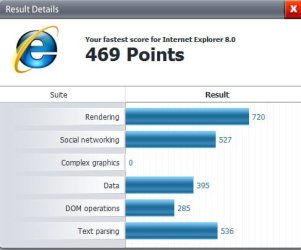
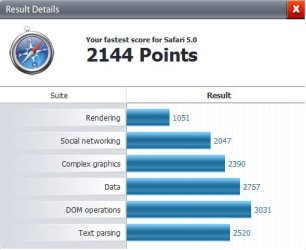
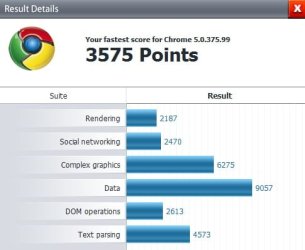
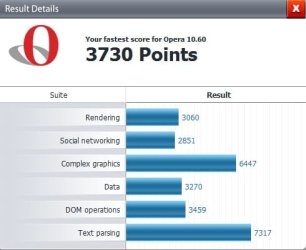
I did some comparisons with the major browsers on the web using the tests from Peacekeeper, the results are quite impressive for me, here are my system specs (poor :p) and the browsers I used to make this comparison:

Pentium T2310 1.46GHz dual-core
1GB Ram
Windows 7 Ultimate x64
120GB HD
Intel GMA965 Express

Browsers Used:
Internet Explorer 8.0 32-Bit
Internet Explorer 8.0 64-Bit
Firefox 3.6.6
Google Chrome 5
Apple Safari 5
Opera 10.60

The Results:
Internet Explorer 8.0 32-Bit:
ie x86.jpg
Internet Explorer 8.0 64-Bit:
ie x64.jpg
Mozilla Firefox 3.6.6:
firefox 3.6.6 x86.jpg
Apple Safari 5:
safari 5.0 x86.jpg
Google Chrome:
chrome x86.jpg
Opera 10.60:
opera 10.6 x86.jpg

I also did a line chart with all results:
browser graphic.jpg

So is Opera really the best browser? What you guys think?
 

My Computer

OS
7 Ultimate x64
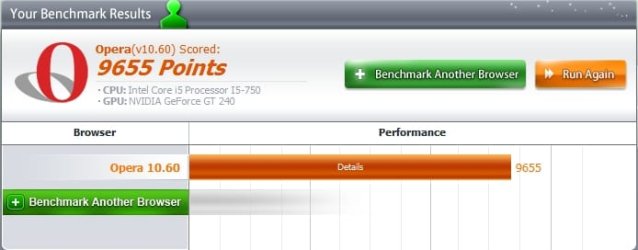
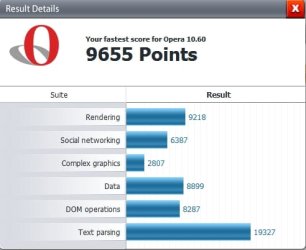
Well, it was best for you, on the Peacekeeper test. Doesn't mean it is the best browser for you. You'll decide that through use, and the "feel" of it. The functions, the addons if you need them, stability on your system. I personally use Opera 99% of the time. It does score best by far on Peacekeeper for me:

Opera.jpg

Opera2.jpg


But that isn't reason enough to decide it is best. Only you can decide, all the tests in the world will only show that on those tests the browser performed better or worse than others.

A Guy
 

My Computer

Computer type
PC/Desktop
OS
Windows 10 Home x64
CPU
INTEL Core i5-750 Quad-Core 3.37GHz
Motherboard
ASUS P7P55D
Memory
HyperX Fury Black Series 8GB (2 x 4GB) 1866Mhz
Graphics Card(s)
EVGA GeForce GTX 750 Superclocked 1GB 128-Bit GDDR5
Monitor(s) Displays
LG 32MA68HY 32" IPS
Screen Resolution
1920 x 1080
Hard Drives
Samsung 840 Evo 120GB, SEAGATE 500GB Barracuda® 7200.12, SATA 3 Gb/s, 7200 RPM, 16MB cache
PSU
ANTEC TruePower New TP-550, 80 PLUS, 550W
Case
ANTEC Three Hundred Illusion
Cooling
COOLER MASTER Hyper 212 Plus, 4 x 120mm 1 x 140mm Noctua's
Internet Speed
85 + Mbps
Antivirus
Avast
Browser
Vivaldi
You cannot use the results of one test to determine what is best overall. In today's Internet world, many, including your's truly, put security first, and for that, Opera consistently rates poorly. Speed is important, but I can afford to wait an extra second or two. Internet Explorer 8 has repeatedly proven itself to be nothing like previous versions of IE, and consistently, since its release, has proven itself to be tops, or near the top in all categories of security, and in many cases performance too.

2010 Internet Explorer 8 Wins Again - Security Watch - what is significant about this from PCMag is PCMag has a pretty consistent history of slamming Microsoft for security.

2009 IE8 best at blocking malware sites, says study - Computerworld

Certainly, Mozilla and Firefox fans can list a litany of tests that put them on top. And Google and Chrome fans can do the same for theirs.

The bottom line however, is the user. You can use just about any browser and be safe, as long as you keep your system fully updated and patched, use a good real-time anti-malware program, stay behind a firewall, and you avoid risky practices like opening attachments and downloads without scanning first, visiting illegal porn and gambling sites, or participating in illegal filesharing via torrents and P2P sites. In other words, if you practice safe computing and use common sense, you can use just about any browser and be safe.
 

My Computer

Computer Manufacturer/Model Number
BrightWorks Systems B4
OS
Windows 7 Profession 64-bit
CPU
Intel Core i7-860 Quad
Motherboard
Gigabyte P55-UD4P
Memory
Mushkin 4x2Gb PC12800
Graphics Card(s)
Gigabyte GTX260 896Mb
Sound Card
Integrated 7.1 HD Dolby
Monitor(s) Displays
2 Samsung 2220wm-HAS 22"
Screen Resolution
1680 x 1050 | 1680 x 1050
Hard Drives
WD HE 1Tb
PSU
Corsair TX-750W
Case
Ultra M998
Cooling
OEM
Keyboard
MS Wireless Comfort 5000
Mouse
MS Wireless 5000
Internet Speed
Cable and pretty darn fast
Digerati, you said:
In today's Internet world, many, including your's truly, put security first, and for that, Opera consistently rates poorly.

Can you expand on that? I've not ever heard Opera was less secure, and for quite some time Secunia has had IE 8 and Firefox with unpatched vulnerabilities, but Opera has always quickly patched any known vulnerabilities. If your statement is only referring to anti phishing elements, then that I have seen mentioned. But as I say, I have never seen Opera being mentioned as less secure. I personally don't count on any browser to protect me from malicious sites, but perhaps that is what you are referring to.

A Guy
 

My Computer

Computer type
PC/Desktop
OS
Windows 10 Home x64
CPU
INTEL Core i5-750 Quad-Core 3.37GHz
Motherboard
ASUS P7P55D
Memory
HyperX Fury Black Series 8GB (2 x 4GB) 1866Mhz
Graphics Card(s)
EVGA GeForce GTX 750 Superclocked 1GB 128-Bit GDDR5
Monitor(s) Displays
LG 32MA68HY 32" IPS
Screen Resolution
1920 x 1080
Hard Drives
Samsung 840 Evo 120GB, SEAGATE 500GB Barracuda® 7200.12, SATA 3 Gb/s, 7200 RPM, 16MB cache
PSU
ANTEC TruePower New TP-550, 80 PLUS, 550W
Case
ANTEC Three Hundred Illusion
Cooling
COOLER MASTER Hyper 212 Plus, 4 x 120mm 1 x 140mm Noctua's
Internet Speed
85 + Mbps
Antivirus
Avast
Browser
Vivaldi
I don't know how current the info is, or if it's what Digerati was referring too re security - but there are/were some potential vulnerabilities because of the Unite component.

Regardless of browser, common sense is still the best A/V.
 

My Computer

Computer type
PC/Desktop
Computer Manufacturer/Model Number
Systems by SmartEyeball
OS
8 Pro x64
CPU
i7 3770K 4.6GHz
Motherboard
ASUS P8Z77 WS
Memory
16GB G.Skill Trident X 2666mhz
Graphics Card(s)
x2 EVGA 780 Ti Superclocked SLI
Sound Card
SB X-FI Surround 5.1 PRO USB / ATH-AD900 Headphones
Monitor(s) Displays
x3 Dell U2410 / 58" Samsung
Screen Resolution
5760*1200/ 1920*1200
Hard Drives
2x Intel 520 240GB (RAID 0) * 2x WD Caviar Blacks 2TB (RAID 0) * 2TB WD Caviar Black * Sony Optirac DVD
PSU
Silverstone Strider Evolution 1200W
Case
Thermaltake Level 10 GT Snow Edition
Cooling
Noctua NH-D14
Keyboard
Topre Realforce // Ducky Shine MX Black // Filco Ninja TKL
Mouse
Thermaltake Theron (Highly Recommended) + Razer Imperator
Antivirus
MSE
Browser
IE, FF, WaterFox
Other Info
GT Extreme V2 Sim Racing Cockpit + 40" LCD and K/B Mouse stand ▼
Fanatec CSR Elite Wheel + Clubsport V1 Pedals + CSR shifter/7G-H ▼Saitek X52 Pro ▼ TrackIR 5 Pro
Buttkicker v2 Seat Rumbler with Dedicated 5.1 and Sub Woofer attached to frame ▼
=
Bloody Big Grin
A Guy said:
I've not ever heard Opera was less secure
Did you not check out the links I provided above to NSS Labs tests that showed two years in a row that Opera came in last? And, the tests have dates on them, BTW, the most recent from earlier this year. And note smarteyeball's comment about Opera's Unite, which, as one expert put it, Is One Incredibly Bad Idea.

Here's a link to NSS Labs latest report. NSS Labs - Web Browser Security February 2010. Note the Executive Summary, where the findings indicate,
Windows Internet Explorer 8 caught 85% of the live threats, an exceptional score which surpassed the next best browser (Apple Safari 4) by a 56% margin. Internet Explorer 8 improved 4% between the Q3 2009 and Q1 2010 tests, maintaining its leadership.

Apple Safari 4 caught 29% of the live threats, far fewer than Internet Explorer 8. Overall protection improved greatly from Q3 2009, with Safari providing 0.2% greater protection than Mozilla Firefox 3.5 in the current test.

Mozilla Firefox 3.5 caught 29% of live threats to put it in a statistical tie with Safari 4. Both Firefox 3.5 and Safari 4 achieved this protection while utilizing the Google Safe Browsing™ API.

Google Chrome 4 caught 17% of live threats, up 9% from the Q3 2009 tests.

Opera 10 caught less than 1% of the live threats, providing virtually no protection against socially-engineered malware.​
It is important to note here that Internet Explorer 8 is not the same old insecure Internet Explorer of yesteryear. And neither is Microsoft who is tired of being bashed and blamed for the actions of badguys!

As I indicated above, I have no doubt fans of any other browser can find test results and exceptions that put this browser down and their browser on top. My point to join this thread was to make the following point as I said above,
Digerati said:
The bottom line however, is the user. You can use just about any browser and be safe, as long as you keep your system fully updated and patched, use a good real-time anti-malware program, stay behind a firewall, and you avoid risky practices like opening attachments and downloads without scanning first, visiting illegal porn and gambling sites, or participating in illegal filesharing via torrents and P2P sites. In other words, if you practice safe computing and use common sense, you can use just about any browser and be safe.

I personally don't count on any browser to protect me from malicious sites
Exactly! Just as you should never count on just your anti-malware program, or just your firewall. None of those, alone or together, can save you from bad guys if you don't keep your operating system current or if you partake in risky practices.
 

My Computer

Computer Manufacturer/Model Number
BrightWorks Systems B4
OS
Windows 7 Profession 64-bit
CPU
Intel Core i7-860 Quad
Motherboard
Gigabyte P55-UD4P
Memory
Mushkin 4x2Gb PC12800
Graphics Card(s)
Gigabyte GTX260 896Mb
Sound Card
Integrated 7.1 HD Dolby
Monitor(s) Displays
2 Samsung 2220wm-HAS 22"
Screen Resolution
1680 x 1050 | 1680 x 1050
Hard Drives
WD HE 1Tb
PSU
Corsair TX-750W
Case
Ultra M998
Cooling
OEM
Keyboard
MS Wireless Comfort 5000
Mouse
MS Wireless 5000
Internet Speed
Cable and pretty darn fast
I'm simple so I will keep it simple. Use what ever browser you choose to. The first security of any computer system is the user. All programs for security are add-ons that should be used in conjunction with the user.
 

My Computer

Computer type
PC/Desktop
Computer Manufacturer/Model Number
Home made Desktop
OS
Windows 10 Pro. 64/ version 1709 Windows 7 Pro/64
CPU
Intel i7-6800K @ 4.3
Motherboard
ASUS X-99 Deluxe II
Memory
Corsair Platinum 16 gig @2400
Graphics Card(s)
EVGA GTX 1070 OC
Monitor(s) Displays
Asus 27" LED LCD/VE278Q
Screen Resolution
1920-1080 or 1280-720 HDMI
Hard Drives
INTEL SSD 730-240 Gb Sata 3.0/
PSU
EVGA Platium 1200W
Case
Phanteks Luxe Tempered Glass 8 fans/ one radiator
Cooling
XSPC/ Water Cooled CPU
Keyboard
Das 4 Professional
Mouse
Logitech M705/MX Anywhere 2-S
Internet Speed
100 mbits
Antivirus
Microsoft Security Essentials/ Malwarebytes Premium 3.0/ SAS
Browser
I.E. 11 default/Firefox/ ISP Time Warner Cable/Spectrum
Other Info
LG BluRay Burner/
Sound system-KLipsch-THX/
Icy Dock ssd Hot Swap bays.
Speaking of add-ons - many are great for making browsers insecure. Keep add-ons to a minimum. And always choose the custom install option for every program you install. Especially free ones. Even the best free programs need revenue so they often come loaded with fluff you don't need, such as toolbars, updaters, etc. So choose the custom install and pay careful attention to the options presented - they typically will foist stuff on you by default, unless you purposefully uncheck the option.

As a side benefit, I will note that most problems people encounter connecting to the Internet with IE and other browsers are frequently caused by wayward or conflicting add-ons. You can minimize connections problems by minimizing add-ons too.
 

My Computer

Computer Manufacturer/Model Number
BrightWorks Systems B4
OS
Windows 7 Profession 64-bit
CPU
Intel Core i7-860 Quad
Motherboard
Gigabyte P55-UD4P
Memory
Mushkin 4x2Gb PC12800
Graphics Card(s)
Gigabyte GTX260 896Mb
Sound Card
Integrated 7.1 HD Dolby
Monitor(s) Displays
2 Samsung 2220wm-HAS 22"
Screen Resolution
1680 x 1050 | 1680 x 1050
Hard Drives
WD HE 1Tb
PSU
Corsair TX-750W
Case
Ultra M998
Cooling
OEM
Keyboard
MS Wireless Comfort 5000
Mouse
MS Wireless 5000
Internet Speed
Cable and pretty darn fast
Browsers aren't about benchmarks. Software all revolves around preference of functionality, layout and performance. Stability has a major factor as well.

All (modern) browsers pretty much have pop-up blocking and tabs. As long as you are on broadband and not dial-up, your browser should be fast.

To me the major points would be it's download manager interface and ad-blocking.
 

My Computer

OS
Windows 7 Home Premium x64
CPU
Intel Core 2 Quad Q9450 @ 3.2GHz
Motherboard
Asus P5Q PRO Turbo
Memory
4GB DDR2-800
Graphics Card(s)
MSI Radeon HD 5850
Sound Card
Creative Labs Audigy2 ZS
Monitor(s) Displays
Samsung 225BW
Hard Drives
(2) 1TB Samsung F1, (2) 1.5TB Samsung F2, 1TB Samsung F2, 2TB Samsung F3
PSU
Corsair HX650
Case
Antec Nine Hundred
As long as you are on broadband and not dial-up, your browser should be fast.
To me the major points would be it's download manager interface and ad-blocking.
That is interesting criteria. Download managers are good for dial-up users, no doubt. But I feel if you have a good broadband connection, download managers are unnecessary - and often get in the way. Adobe DL manager is a perfect example and I make sure I avoid installing it (even though that takes some effort).

Ad-blocking is nice, but sadly, most browsers don't do a thorough job at that. Fortunately, there are decent add-ons for Chrome, FF, and IE for that. I expect the other alternatives have them available too.
 

My Computer

Computer Manufacturer/Model Number
BrightWorks Systems B4
OS
Windows 7 Profession 64-bit
CPU
Intel Core i7-860 Quad
Motherboard
Gigabyte P55-UD4P
Memory
Mushkin 4x2Gb PC12800
Graphics Card(s)
Gigabyte GTX260 896Mb
Sound Card
Integrated 7.1 HD Dolby
Monitor(s) Displays
2 Samsung 2220wm-HAS 22"
Screen Resolution
1680 x 1050 | 1680 x 1050
Hard Drives
WD HE 1Tb
PSU
Corsair TX-750W
Case
Ultra M998
Cooling
OEM
Keyboard
MS Wireless Comfort 5000
Mouse
MS Wireless 5000
Internet Speed
Cable and pretty darn fast
If you are used on it, use it. Its not the browsers, its your net connection, spare little bit more money on your bandwidth, and every browser will be fast. This is same as what OS is best and why. Everyone has different needs and way of work, so...
@OP: I don't now who told you that installing x64 OS while you are having 1 GB RAM is a good idea, but he was wrong
 

My Computer

Computer Manufacturer/Model Number
Micro-Star International/MS-7529
OS
Windows 7 Ultimate x32
CPU
DualCore Intel Pentium E2200, 2218 MHz (11 x 202)
Motherboard
MSI G31M3 V2 (MS-7529) (2 PCI, 1 PCI-E x16,2 DDR2 DIMM)
Memory
2 GB DDR2-800 DDR2 SDRAM
Graphics Card(s)
nVIDIA GeForce 9500GT 1GB
Sound Card
Realtek ALC888/1200 @ Intel 82801GB ICH7
Monitor(s) Displays
Samsung SyncMaster 2253BW (Digital) 22'' LCD
Screen Resolution
1680x1050
Hard Drives
SAMSUNG HD322IJ ATA Device (298 GB , IDE)
@OP: I don't now who told you that installing x64 OS while you are having 1 GB RAM is a good idea, but he was wrong
Ummm, (1) I don't see where the OP was asking anything about installing any OS, 64-bit or otherwise - are you confusing threads? And (2), there is nothing wrong with installing 64-bit with only 1Gb of RAM, you just don't take advantage of the benefits 64-bit has to offer. And while previous 64-bit versions of Windows consumed a little more resources than their 32-bit siblings, Ed Bott had 64-bit Win7 running with only 512Mb (How well does Windows 7 handle 512MB?). I see no reason NOT to install 64-bit these days, even if currently limited on resources. That makes the upgrade path easier.
 

My Computer

Computer Manufacturer/Model Number
BrightWorks Systems B4
OS
Windows 7 Profession 64-bit
CPU
Intel Core i7-860 Quad
Motherboard
Gigabyte P55-UD4P
Memory
Mushkin 4x2Gb PC12800
Graphics Card(s)
Gigabyte GTX260 896Mb
Sound Card
Integrated 7.1 HD Dolby
Monitor(s) Displays
2 Samsung 2220wm-HAS 22"
Screen Resolution
1680 x 1050 | 1680 x 1050
Hard Drives
WD HE 1Tb
PSU
Corsair TX-750W
Case
Ultra M998
Cooling
OEM
Keyboard
MS Wireless Comfort 5000
Mouse
MS Wireless 5000
Internet Speed
Cable and pretty darn fast
@OP: I don't now who told you that installing x64 OS while you are having 1 GB RAM is a good idea, but he was wrong
Ummm, (1) I don't see where the OP was asking anything about installing any OS, 64-bit or otherwise - are you confusing threads? And (2), there is nothing wrong with installing 64-bit with only 1Gb of RAM, you just don't take advantage of the benefits 64-bit has to offer. And while previous 64-bit versions of Windows consumed a little more resources than their 32-bit siblings, Ed Bott had 64-bit Win7 running with only 512Mb (How well does Windows 7 handle 512MB?). I see no reason NOT to install 64-bit these days, even if currently limited on resources. That makes the upgrade path easier.
1.No, I'm not confusing threads, its on his post, it was just an observation, and
2. English is NOT my native language, so sometimes I'm short on words, "bad idea" maybe is too strong, but I can see from your post, you know what I was "talking" about.
cheers
 

My Computer

Computer Manufacturer/Model Number
Micro-Star International/MS-7529
OS
Windows 7 Ultimate x32
CPU
DualCore Intel Pentium E2200, 2218 MHz (11 x 202)
Motherboard
MSI G31M3 V2 (MS-7529) (2 PCI, 1 PCI-E x16,2 DDR2 DIMM)
Memory
2 GB DDR2-800 DDR2 SDRAM
Graphics Card(s)
nVIDIA GeForce 9500GT 1GB
Sound Card
Realtek ALC888/1200 @ Intel 82801GB ICH7
Monitor(s) Displays
Samsung SyncMaster 2253BW (Digital) 22'' LCD
Screen Resolution
1680x1050
Hard Drives
SAMSUNG HD322IJ ATA Device (298 GB , IDE)
Okay. No problem.
 

My Computer

Computer Manufacturer/Model Number
BrightWorks Systems B4
OS
Windows 7 Profession 64-bit
CPU
Intel Core i7-860 Quad
Motherboard
Gigabyte P55-UD4P
Memory
Mushkin 4x2Gb PC12800
Graphics Card(s)
Gigabyte GTX260 896Mb
Sound Card
Integrated 7.1 HD Dolby
Monitor(s) Displays
2 Samsung 2220wm-HAS 22"
Screen Resolution
1680 x 1050 | 1680 x 1050
Hard Drives
WD HE 1Tb
PSU
Corsair TX-750W
Case
Ultra M998
Cooling
OEM
Keyboard
MS Wireless Comfort 5000
Mouse
MS Wireless 5000
Internet Speed
Cable and pretty darn fast
I did some comparisons with the major browsers on the web using the tests from Peacekeeper, the results are quite impressive for me
.
So is Opera really the best browser? What you guys think?

I have tried all the Browsers & Opera is definitely the best for me its so easy to configure.
I would still use it if it was the slowest but I'm glad its the fastest at least for this month lol.
Toms Hardware has just done a speed test of the Browsers
Conclusion : Web Browser Grand Prix 2: The Top 5 Tested And Ranked
The one test Opera failed on was the Page loading test.
Haavard posted an explanation about that on his Blog
Haavard - Some clarifications regarding Tom's Hardware's browser tests
 

Attachments

  • 10.7.JPG
    10.7.JPG
    204.9 KB · Views: 11

My Computer

Computer type
PC/Desktop
Computer Manufacturer/Model Number
self build
OS
Windows 7 Ultimate 64 bit
CPU
Intel Core i7 4770K overclocked to 4.7GHz Quad Core Haswell
Motherboard
Asus Z87 Pro (Socket 1150) ATX Motherboard
Memory
16GB Team Group Vulcan Gold 2133MHz
Graphics Card(s)
ATI Radeon HD 7880 Series Display adapter
Monitor(s) Displays
NEC LCD2690WUXi2
Screen Resolution
26" 1920 x 1200
Hard Drives
Samsung 500GB SSD 840 EVO SATA 6Gb/s
Samsung 250GB SSD 840 EVO SATA 6Gb/s
PSU
Corsair AX760 Platinum
Case
Cooler Master HAF X Gaming Tower
Cooling
XSPC RayStorm 750 RS360 Water cooling
Mouse
Razer Death Adder left handed
Internet Speed
126Mb download 11.5Mb up
Antivirus
Avast free
Browser
Opera
Other Info
Main Browser is Opera
Favorite software Adobe Lightroom & Photoshop
best plugins Nik software
Firewall : Private firewall 7
That is interesting criteria. Download managers are good for dial-up users, no doubt. But I feel if you have a good broadband connection, download managers are unnecessary - and often get in the way. Adobe DL manager is a perfect example and I make sure I avoid installing it (even though that takes some effort).

Ad-blocking is nice, but sadly, most browsers don't do a thorough job at that. Fortunately, there are decent add-ons for Chrome, FF, and IE for that. I expect the other alternatives have them available too.

I'd prefer the least number of Adobe products on my system as possible. It's bad enough that I have to use Flash.

Download managers are necessary to group downloads under a normal window, or not even need one. The better ones (in Firefox and Opera) can resume broken downloads. If you download with IE8? You get a separate window for each one so you could have 8-10 new windows open, etc. There is no resume for a broken download.

IE8 is also unstable. I had multiple crashes a couple weeks ago when I was looking to replace Firefox due to resource abuse. Only add-on I had for IE8 was Adobe Flash. Several times I had IE8 tabs crash on me. It does have built-in adblock though through InPrivate filtering. There's an XML file you can import that contains a heavy list of blocked filters.

I ended up switching to Opera 10.60 last week. By far leaps and bounds better than Firefox 3.6 and IE8.
 

My Computer

OS
Windows 7 Home Premium x64
CPU
Intel Core 2 Quad Q9450 @ 3.2GHz
Motherboard
Asus P5Q PRO Turbo
Memory
4GB DDR2-800
Graphics Card(s)
MSI Radeon HD 5850
Sound Card
Creative Labs Audigy2 ZS
Monitor(s) Displays
Samsung 225BW
Hard Drives
(2) 1TB Samsung F1, (2) 1.5TB Samsung F2, 1TB Samsung F2, 2TB Samsung F3
PSU
Corsair HX650
Case
Antec Nine Hundred
Back
Top