Solved Browser font has changed all of a sudden. Pls help restore it!

joe8489

New member
Local time
2:51 AM
Messages
2
It came about when I once installed some new fonts, but have since removed them. I seem to have followed all instructions correctly on how to remove it but i find im now at my wits end. Something so seemingly small is driving me batty (because the font is so thick, its hard to read, c's look like o's, i's look like l's etc).

I'd really appreciate if someone can help me. If you are confident in how to do this, i'd be happy for you to jump on team viewer and take over my PC because my patience is officially over.

http://i.imgur.com/3uqdYxJ.png
 

Attachments

  • New font driving me crazy2.png
    New font driving me crazy2.png
    455.8 KB · Views: 93

My Computer My Computer

At a glance

VIC
Computer type
PC/Desktop
OS
VIC
This page shows you how to change the text font on Google Chrome:
https://support.google.com/chrome/answer/95416?hl=en

Make sure you restart Google Chrome for the changes to take effect!

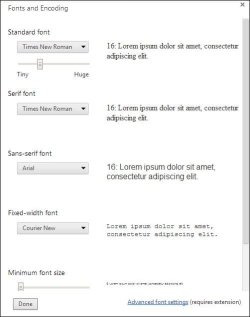
Here's a screen shot of my text font settings to help you change back to the default Google Chrome settings.

Capture.JPG

I hope this helps :).
 
Last edited:

My Computer My Computer

At a glance

Windows 7 64-bit SP1 (VM)Intel(R) Core(TM) i7-2670QM CPU @ 2.20GHz (8 ...4 GB (Expandable to 8 GB)NVIDIA GeForce GT 525M
Computer type
Laptop
Computer Manufacturer/Model Number
Toshiba, Satellite L750/0T1
OS
Windows 7 64-bit SP1 (VM)
CPU
Intel(R) Core(TM) i7-2670QM CPU @ 2.20GHz (8 CPUs), ~2.2GHz
Motherboard
Intel Corp, PSK2YA-0T102S, Sandy Bridge - 09
Memory
4 GB (Expandable to 8 GB)
Graphics Card(s)
NVIDIA GeForce GT 525M
Sound Card
Conexant SmartAudio HD & NVIDIA High Definition Audio
Monitor(s) Displays
2 (Mobile PC Display, Dell E2009W)
Screen Resolution
1366 x 768 & 1680 x 1050
Hard Drives
TOSHIBA MK7575GSX - 698GB (Main Hard Drive)
WD Elements - 1TB (External Hard Drive)
Keyboard
Standard PS/2 Keyboard & Dell SK-8165
Mouse
Synaptics PS/2 Port TouchPad, Logitech Wireless Mouse M185
Internet Speed
Download: 49 Mb/s, Upload: 2 Mb/s 'via Ethernet' (OOKLA)
Antivirus
AVG AntiVirus Free Edition (Outside VM)
Browser
Internet Explorer, Google Chrome
Other Info
Main OS:Windows 10 64-bit
the problem is now solved.

Thanks for your suggestion, but incidentally thats not what did it. I've followed those instructions before and it did nothing for me at the time. I tried it again this time and restarted Google, but still nothing (I had the exact same settings as the one your provided in your screen shot, but 'Franklin Gothic' font still managed to find its way onto certain webpages - not all).

What solved the problem was going into the fonts folder in control panel (Control Panel\Appearance and Personalization\Fonts) and deleting the culprit font. Then I restarted my computer. That seemed to work.

Frustratingly that was a solution i arrived at by chance and no-one had suggested it, im not sure how i did it and im also not sure why your suggestion didnt do solve it (as it made much more sense than what i did)

Thank you all the same
 

My Computer My Computer

At a glance

VIC
Computer type
PC/Desktop
OS
VIC
Your welcome!
Glad to hear your problem was solved :D.

I actually also tried changing those font settings from my screenshot in Google Chrome, and it didn't change the font at all :o. I'm sorry that I actually suggested that, I should have really tested it out to see if it actually worked!
Anyway, its great that it all worked out for you :D.
 
Last edited:

My Computer My Computer

At a glance

Windows 7 64-bit SP1 (VM)Intel(R) Core(TM) i7-2670QM CPU @ 2.20GHz (8 ...4 GB (Expandable to 8 GB)NVIDIA GeForce GT 525M
Computer type
Laptop
Computer Manufacturer/Model Number
Toshiba, Satellite L750/0T1
OS
Windows 7 64-bit SP1 (VM)
CPU
Intel(R) Core(TM) i7-2670QM CPU @ 2.20GHz (8 CPUs), ~2.2GHz
Motherboard
Intel Corp, PSK2YA-0T102S, Sandy Bridge - 09
Memory
4 GB (Expandable to 8 GB)
Graphics Card(s)
NVIDIA GeForce GT 525M
Sound Card
Conexant SmartAudio HD & NVIDIA High Definition Audio
Monitor(s) Displays
2 (Mobile PC Display, Dell E2009W)
Screen Resolution
1366 x 768 & 1680 x 1050
Hard Drives
TOSHIBA MK7575GSX - 698GB (Main Hard Drive)
WD Elements - 1TB (External Hard Drive)
Keyboard
Standard PS/2 Keyboard & Dell SK-8165
Mouse
Synaptics PS/2 Port TouchPad, Logitech Wireless Mouse M185
Internet Speed
Download: 49 Mb/s, Upload: 2 Mb/s 'via Ethernet' (OOKLA)
Antivirus
AVG AntiVirus Free Edition (Outside VM)
Browser
Internet Explorer, Google Chrome
Other Info
Main OS:Windows 10 64-bit
  • Like
Reactions: Arc
Same exact problem...

Like you, Chrome hijacked my previous sans serif font and replaced it with this nearly unreadable script that stubbornly refuses to budge. Based on your font analysis, I'd agree that it was Franklin Gothic.

However, I've followed all the instructions everyone here has suggested, including installing the advanced font settings extension for Chrome, deleting all Franklin Gothic font sets from my computer, emptying the cache, and restarting multiple times, but every time I open Chrome this pernicious font continues smiling into my strained corneas like an indignant child.

Any help would be greatly appreciated.
 

My Computer My Computer

At a glance

Windows 7 Professional x64
Computer type
PC/Desktop
OS
Windows 7 Professional x64
Apparently this problem is currently widespread

Users on Chromium are reporting problems with other fonts as well. Gill Sans is causing a particularly big headache. According to John Gruber, the problem stems from a bug in Chrome that hit when they switched the font renderer for Windows. The bug is at least as late as version 37.0.2062.103.
 

My Computer My Computer

At a glance

Windows 7 Professional x64
Computer type
PC/Desktop
OS
Windows 7 Professional x64
I am having a very similar problem. It seems like headline fonts across all browsers, Firefox, IE and Chrome, has changed to an open face style font. I'm note sure what font it is. I noticed this change somewhere after the beginning of September. There was a windows update KB 2993651 that corresponded to my issue. I did a system restore to a point previous to this update and the problem went away.

Today the problem returned. There have been no updates or changes made to my system.

See attached image.
 

Attachments

  • Capture.JPG
    Capture.JPG
    208.9 KB · Views: 3

My Computer My Computer

At a glance

windows 7 home professional 64 bit
Computer type
PC/Desktop
Computer Manufacturer/Model Number
HP
OS
windows 7 home professional 64 bit
Got another fix. This one worked for me, finally. Type "chrome://flags/#disable-direct-write" in your address bar, select "enable" under "disable directwrite", and then "restart chrome" at bottom.
 

My Computer My Computer

At a glance

Windows 7 Professional x64
Computer type
PC/Desktop
OS
Windows 7 Professional x64
Thank you BryanWay!

IT WORKED!!!!!!!
 

My Computer My Computer

At a glance

windows 7 home professional 64 bit
Computer type
PC/Desktop
Computer Manufacturer/Model Number
HP
OS
windows 7 home professional 64 bit
Well it worked in Chrome for obvious reasons, but Firefox and IE still looking exactly the same
 

My Computer My Computer

At a glance

windows 7 home professional 64 bit
Computer type
PC/Desktop
Computer Manufacturer/Model Number
HP
OS
windows 7 home professional 64 bit
Same problem for months now, though still unresolved. I've been stuck looking at a handful of websites, most notably Facebook, rendered entirely in NeutraFace for 5 months with no solution. It's a great typeface for headlines and Art Deco projects, but unfortunately not for reading display text.

I've tried resetting all the Chrome options to default, restarting, deleting the offending font from my font folder, enabling direct-draw, etc. etc. etc. Still nothing. I'll continue to search for answers and post any resolution I hopefully come across.
 

My Computer My Computer

At a glance

Windows 8.1 Update 1 x64
Computer type
Laptop
Computer Manufacturer/Model Number
Lenovo Y510p
OS
Windows 8.1 Update 1 x64
THANKS BryanWay!!!!...
I tried so many different ways to fix my Chrome browser font problem.
Your idea fixed it immediately. Huge gratitude!
 

My Computer My Computer

At a glance

Windows 7 (32 bit)
Computer type
Laptop
OS
Windows 7 (32 bit)
Hi! For me it was this update, KB3013455, that changed the font and affected both my chrome browser (whilst on facebook it was more obvious) and my default openoffice writer font to a hideous one that was almost transparent. So, i deleted it and got my old font back.
 

My Computer My Computer

At a glance

Vista
Computer type
PC/Desktop
OS
Vista
Back
Top