Solved Browser Problem - Graphics display gone

Ejay

New member
Local time
4:42 PM
Messages
4
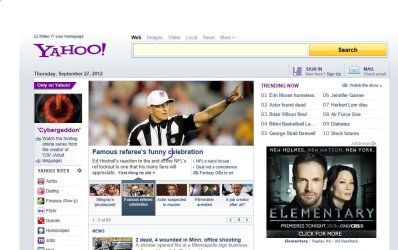
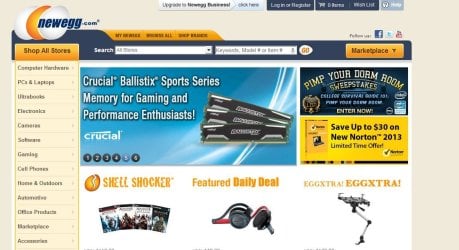
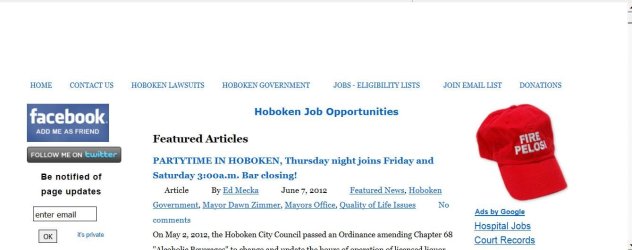
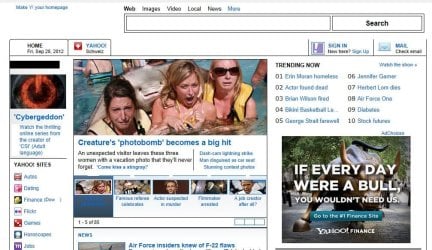
Browser IE9 and Firefox12 lost their ability to display webpage graphics while google chrome displays OK. (see screenshoot attachments)

Steps I have taken:

1) Attempted Internet Explorer reset Fix it http://go.microsoft.com/?linkid=9646978

2) Uninstalled and reinstalled IE.

Neither worked....

Created a new User Account which fixed the problem when using the new account.

Any sugestions as to fix the problem on the original user account?

Thanks!
 

Attachments
  • IE 9 - Yahoo_com.JPG
    IE 9 - Yahoo_com.JPG
    116.1 KB · Views: 6
  • Another win 7 Ultimate 64 - yahoo_com.JPG
    Another win 7 Ultimate 64 - yahoo_com.JPG
    111.6 KB · Views: 5
  • Firefix 12 - newegg.JPG
    Firefix 12 - newegg.JPG
    100.6 KB · Views: 4
  • Google Chrome - newegg.JPG
    Google Chrome - newegg.JPG
    104.1 KB · Views: 3
  • IE9 - newegg.JPG
    IE9 - newegg.JPG
    92.8 KB · Views: 3

My Computer

Computer Manufacturer/Model Number
Lenovo/x220
OS
Windows 7 Ultimate x64
Memory
8 GB
Welcome to Seven Forums Ejay. Do you have a System Restore Point from before the problem began? I would try that first.

http://www.sevenforums.com/tutorials/700-system-restore.html

The pictures seem to show not so much missing images, but looks like CSS (Cascading Style Sheet) info from the web pages. Let us know if SR does not correct the problem. If not, I'd try re-associating .css default association. Scroll down to .css on the list.

http://www.sevenforums.com/tutorials/19449-default-file-type-associations-restore.html

A Guy
 

My Computer

Computer type
PC/Desktop
OS
Windows 10 Home x64
CPU
INTEL Core i5-750 Quad-Core 3.37GHz
Motherboard
ASUS P7P55D
Memory
HyperX Fury Black Series 8GB (2 x 4GB) 1866Mhz
Graphics Card(s)
EVGA GeForce GTX 750 Superclocked 1GB 128-Bit GDDR5
Monitor(s) Displays
LG 32MA68HY 32" IPS
Screen Resolution
1920 x 1080
Hard Drives
Samsung 840 Evo 120GB, SEAGATE 500GB Barracuda® 7200.12, SATA 3 Gb/s, 7200 RPM, 16MB cache
PSU
ANTEC TruePower New TP-550, 80 PLUS, 550W
Case
ANTEC Three Hundred Illusion
Cooling
COOLER MASTER Hyper 212 Plus, 4 x 120mm 1 x 140mm Noctua's
Internet Speed
85 + Mbps
Antivirus
Avast
Browser
Vivaldi
A Guy;

Thanks for your response. I had applied SR when the problem first developed and it failed to correct the problem.

As for your second suggestion, the Default File Type Association utility. Definitely an excellent resource for future use, but it did not resolve my current problem.

I have also tried ie8 and had the same result.


In narrowing down the problem, you are correct that it is not so much a missing image problem. It is also that some of the remaining underlying "links" do not display correctly or not at all.

It appears to be displaying the html page in text mode. The attachments represent one of the better examples. The webpage displays correctly on my other WIN 7 machine using the IE9 browser.


Any additional suggestions would be appreciated.

Ejay
 

Attachments

  • ie 9.JPG
    ie 9.JPG
    69.6 KB · Views: 1
  • Google Chrome.JPG
    Google Chrome.JPG
    106.4 KB · Views: 1

My Computer

Computer Manufacturer/Model Number
Lenovo/x220
OS
Windows 7 Ultimate x64
Memory
8 GB
You don't possibly have a High contrast theme in use on your PC? Confirm you are using an Aero theme.

Do you use any add blocking addons in either/both browsers? If so, disable them to test.

Two things you can try. Start the PC in Safe mode with networking, and naviagate to a problem page.

http://www.sevenforums.com/tutorials/69585-safe-mode.html

Does it display correctly in safe mode? If so I would boot normally into windows, and Perform a clean start to see if you can find an incompatibility.

http://www.sevenforums.com/tutorial...ation-conflicts-performing-clean-startup.html

A Guy
 

My Computer

Computer type
PC/Desktop
OS
Windows 10 Home x64
CPU
INTEL Core i5-750 Quad-Core 3.37GHz
Motherboard
ASUS P7P55D
Memory
HyperX Fury Black Series 8GB (2 x 4GB) 1866Mhz
Graphics Card(s)
EVGA GeForce GTX 750 Superclocked 1GB 128-Bit GDDR5
Monitor(s) Displays
LG 32MA68HY 32" IPS
Screen Resolution
1920 x 1080
Hard Drives
Samsung 840 Evo 120GB, SEAGATE 500GB Barracuda® 7200.12, SATA 3 Gb/s, 7200 RPM, 16MB cache
PSU
ANTEC TruePower New TP-550, 80 PLUS, 550W
Case
ANTEC Three Hundred Illusion
Cooling
COOLER MASTER Hyper 212 Plus, 4 x 120mm 1 x 140mm Noctua's
Internet Speed
85 + Mbps
Antivirus
Avast
Browser
Vivaldi
Background theme is the standard aero. Ran the Aero troubleshoot utility and no problems were reported.

The only thing that hasn't changed is that the problem is in the "admin" user account and not in the "standard" user account.

I have an adminstrator account and a standard account. In the standard account, all webpages display corrrectly. In the admin account, the the web pages display missing graphics.

Same behavior repeated while in safe mode.

I compared the IE9 internet settings on the troubled machine with those of another win 7 system. No difference other than one displays correctly and the other does not....


I deleted JAVA, downloaded the installation package and reinstalled. The problem still persists.
 

My Computer

Computer Manufacturer/Model Number
Lenovo/x220
OS
Windows 7 Ultimate x64
Memory
8 GB
I'm trying to think of what it could be that is not browser specific since 2 browsers are both having the same problem. But at the same time, you have a 3rd browser that does not have the problem. The thing that comes to mind is that Chrome has it's own version of Flash. But flash would not explain missing colors or some images.

It almost has to be something system related as 2 browsers have the same problem. Can you think of anything you changed just before the problem began? Since one user works fine, it is some corruption in the system. I'd suggest running the System File Checker and see if it finds and corrects any issues.

http://www.sevenforums.com/tutorials/1538-sfc-scannow-command-system-file-checker.html

Note you may have to run it 3 times if it finds, but cannot correct problems.

If that does not help, I would suggest working your way through the steps in the following link using Firefox, see if anything helps that could be applied to IE as well.

Images or animations do not load - MozillaZine Knowledge Base

A Guy
 

My Computer

Computer type
PC/Desktop
OS
Windows 10 Home x64
CPU
INTEL Core i5-750 Quad-Core 3.37GHz
Motherboard
ASUS P7P55D
Memory
HyperX Fury Black Series 8GB (2 x 4GB) 1866Mhz
Graphics Card(s)
EVGA GeForce GTX 750 Superclocked 1GB 128-Bit GDDR5
Monitor(s) Displays
LG 32MA68HY 32" IPS
Screen Resolution
1920 x 1080
Hard Drives
Samsung 840 Evo 120GB, SEAGATE 500GB Barracuda® 7200.12, SATA 3 Gb/s, 7200 RPM, 16MB cache
PSU
ANTEC TruePower New TP-550, 80 PLUS, 550W
Case
ANTEC Three Hundred Illusion
Cooling
COOLER MASTER Hyper 212 Plus, 4 x 120mm 1 x 140mm Noctua's
Internet Speed
85 + Mbps
Antivirus
Avast
Browser
Vivaldi
  • Like
Reactions: Arc
A Guy:

The fix was going to Win 7 x64 "ease of access Center" and click on "Make the computer easier to see" option. UNCHECK the three box choices under "Choose a high contrast theme".

If the first box is checked, the keyboard combination for turning HIGH CONTRAST on and off is left ALT + left SHIFT + PRINT SCREEN.

You were correct that the problem may have been theme related.

I was able to find the exact description of the problem and the fix at IE and Firefox missing background/layout graphics on website .

Thanks for your help!
 

My Computer

Computer Manufacturer/Model Number
Lenovo/x220
OS
Windows 7 Ultimate x64
Memory
8 GB
Ahhh, good..I thought it looked like a High Contrast theme issue ;) Glad you got it sorted, you're welcome. A Guy
 

My Computer

Computer type
PC/Desktop
OS
Windows 10 Home x64
CPU
INTEL Core i5-750 Quad-Core 3.37GHz
Motherboard
ASUS P7P55D
Memory
HyperX Fury Black Series 8GB (2 x 4GB) 1866Mhz
Graphics Card(s)
EVGA GeForce GTX 750 Superclocked 1GB 128-Bit GDDR5
Monitor(s) Displays
LG 32MA68HY 32" IPS
Screen Resolution
1920 x 1080
Hard Drives
Samsung 840 Evo 120GB, SEAGATE 500GB Barracuda® 7200.12, SATA 3 Gb/s, 7200 RPM, 16MB cache
PSU
ANTEC TruePower New TP-550, 80 PLUS, 550W
Case
ANTEC Three Hundred Illusion
Cooling
COOLER MASTER Hyper 212 Plus, 4 x 120mm 1 x 140mm Noctua's
Internet Speed
85 + Mbps
Antivirus
Avast
Browser
Vivaldi
Back
Top