Browser problems after IE11 windows update

simon99

New member
Local time
7:00 PM
Messages
6
Hi -

I have browser problems after a windows update came along on 19 November. It turned out to be an IE11 upgrade to IE10. If it wasn't marked as a critical update I would not have bothered

Prior to the update all was well. Post update the IE11 has trouble connecting to some sites: eg Latest news, world news, sport and comment from the Guardian | theguardian.com | The Guardian and Free website | Free blog | Create a free website | Weebly fails to load and Home | Mail Online works fine.

The browser just reports that it is 'waiting for response from website'

So, I tried rolling back the machine to the restore point prior to the update. Now back to IE10, BUT the same problem persists.

Next, I unrestored the unrestore and reverted to IE11. I then tried uninstalling the update. Back to IE10 and same problem.

I tried turning off the windows firewall and disabling the virus scanner. Same problem. I checked the latest version of Flash is installed.

So, I downloaded and installed Chrome. Chrome has the same problem, except that if you stop the page loading it will render the page as far as it has got. Successive reloads and stop loading clicks will get most of the page.

Chrome is now my default browser. Funnily enough, Chrome seems to be getting better at getting web pages as it is used more. Seven forums has only just become usable!

Is there a fix for this ? Machine is w7 Pro SP1.

Simon
 

My Computer

Computer type
PC/Desktop
Computer Manufacturer/Model Number
dell vostro 460
OS
W7 Pro 64bit
CPU
Intel i7-2600 3.4Ghz
Memory
16 Gb
Graphics Card(s)
AMD Radeon HD 6600 series

My Computer

Computer type
PC/Desktop
Computer Manufacturer/Model Number
Custom Built
OS
Windows 10 Pro
CPU
AMD Ryzen 5 2400G Processor with Radeon RX Vega 11 Graphics
Motherboard
ASRock X470 Master SLI/AC AM4 AMD Promontory X470 SATA 6Gb/s
Memory
G.SKILL Ripjaws V Series 16GB (2 x 8GB) 288-Pin DDR4 SDRAM D
Graphics Card(s)
2047MB NVIDIA GeForce GTX 1060 6GB (EVGA)
Sound Card
Motherboard Built in
Monitor(s) Displays
Acer R240HY bidx 23.8-Inch IPS HDMI DVI VGA (1920 x 1080) Wi
Screen Resolution
1920 x 1080
Hard Drives
1TB Sandisk SSD PLUS (Main drive)
500 GB Seagate 7200 RPM (Games)
500 GB Western Digital 7200 RPM (Virtual Machines)
PSU
CORSAIR TX Series TX650M 650W 80+ Gold Modular Power Supply
Case
CORSAIR CARBIDE SPEC-02 Mid-Tower Gaming Case, Red LED Fan
Cooling
220mm, two 120mm, and four 60mm fans
Keyboard
Wired Dell keyboard
Mouse
Wireless Logitech mouse
Internet Speed
250mb down, 30mb up
Antivirus
Panda Cloud Antivirus
Browser
Chrome-ish x64
Other Info
Your awesome for reading this.
Not sure which Security suite you have installed please fill in the blanks,
Also see what this does,
Use No Add-ons mode/ Click the Start button and type in the search box,
Internet explorer
Start-no%20add-ons-7.jpg

Click on the suggestion (No Add-ons) or it’s located at,
Start/ All programs/ Accessories folder/ System tools folder/ No add-ons.
http://windows.microsoft.com/en-us/internet-explorer/manage-add-ons#ie=ie-10-win-7
If using ie10 the first link will apply to ie9 as well,
http://windows.microsoft.com/en-us/internet-explorer/ie-crashes-stops-working#ie=ie-10-win-7

If you have a 64 bit machine you can activate Enhanced protection mode to see if ie10 or 11 works any better,
http://www.sevenforums.com/tutorials/280434-internet-explorer-10-enable-32-bit-64-bit-ie10-windows-7-a.html#post2312336

Export Favorites to html file before resetting Internet explorer/ just to be safe.
http://www.sevenforums.com/tutorials/86795-internet-explorer-import-export-favorites.html

Tutorial of Resetting Internet explorer,
http://www.sevenforums.com/tutorials/1222-internet-explorer-reset.html
Accessing Internet Options from the Start menu search,
Reset process first opening Internet explorer
 

My Computer

Computer type
PC/Desktop
Computer Manufacturer/Model Number
Custom assembled by me :}
OS
Win-7-Pro64bit 7-H-Prem-64bit
CPU
i7-5930K 2nd i9-9940x both water blocked VRM's too
Motherboard
ASUS SABERTOOTH X99 2nd ASUS x299 Apex
Memory
Trident-z 3200C14 2nd Trident-z 3600C16
Graphics Card(s)
EVGA 1080ti ftw3 2nd Titan Xp both water blocked
Sound Card
Built-in Realtek
Monitor(s) Displays
1-AOC G2460PG 24"G-Sync 144Hz/ 2nd 1-ASUS VG248QE 24" 144Hz
Screen Resolution
1920 x 1080 144Hz
Hard Drives
2-Samsung M.2 Evo & Evo Plus
2-Samsung 850 EVO 500GB SSD's/ 3-2.5 W.D. Black 1tb-&3-1tb/3-3.5 WD Black 1tb hdd's
PSU
EVGA SuperNOVA 1000-P2 2nd 1200-P2
Case
2-Corsair Obsidian Series 450D Black ATX Mid Tower
Cooling
Custom water loops
Keyboard
Logitech G710+/ 2nd Logitech G910
Mouse
2-RedDragon M901 Perdition 16400 dpi Gaming mouse = wired
Internet Speed
Comcast Ping 19ms 89.31mbps download speed 6.12mbps upload
Antivirus
Malwarebytes Pro/ Superantispyware Pro
Browser
FireFox & Pale moon
Other Info
2nd ASUS X299 Apex/Intel i9-9940x with Custom water loop/7H-Prem-x64/Corsair 450D case/Ram Trident-z 3600C16 4x8gb / Samsung970Evo plus 500gb SSD/Dual ssd EZ swap evo/PSU EVGA SuperNova 1200w-P2 80+Platinum/GPU Titan Xp /8-ML-140 on push-pull on 2-280GTX rads
Thanks Andrew and Thrash for your replies:

1. Security suite is Trend Micro Titanium Maximum Security

2. System is 64bit

3. Using IE10 no add-ons mode - no change in symptoms

4. Using Enhanced Protection mode - no change in symptoms

5. Security suite found no viruses or spyware

6. I will try CCleaner and avast

7. I will try resetting IE10 - although given Chrome has similar but not as severe symptoms I would expect the issue to be deeper in the system than IE10 ?

As it happens (sods law) I have some work tasks I must get done the next few days. Rather than run the risk of destabilising the system further I will hold off doing 6 and 7 until I've got a bit more space. I'll get back to you with the results.

Thanks again - anything else quick worth trying ?

Simon
 

My Computer

Computer type
PC/Desktop
Computer Manufacturer/Model Number
dell vostro 460
OS
W7 Pro 64bit
CPU
Intel i7-2600 3.4Ghz
Memory
16 Gb
Graphics Card(s)
AMD Radeon HD 6600 series
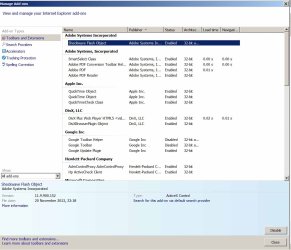
Post a screen shot of your All add-ons page,
There's a link above my signature picture if you need help in how to do this,
Shockwave-disable.JPG
 

My Computer

Computer type
PC/Desktop
Computer Manufacturer/Model Number
Custom assembled by me :}
OS
Win-7-Pro64bit 7-H-Prem-64bit
CPU
i7-5930K 2nd i9-9940x both water blocked VRM's too
Motherboard
ASUS SABERTOOTH X99 2nd ASUS x299 Apex
Memory
Trident-z 3200C14 2nd Trident-z 3600C16
Graphics Card(s)
EVGA 1080ti ftw3 2nd Titan Xp both water blocked
Sound Card
Built-in Realtek
Monitor(s) Displays
1-AOC G2460PG 24"G-Sync 144Hz/ 2nd 1-ASUS VG248QE 24" 144Hz
Screen Resolution
1920 x 1080 144Hz
Hard Drives
2-Samsung M.2 Evo & Evo Plus
2-Samsung 850 EVO 500GB SSD's/ 3-2.5 W.D. Black 1tb-&3-1tb/3-3.5 WD Black 1tb hdd's
PSU
EVGA SuperNOVA 1000-P2 2nd 1200-P2
Case
2-Corsair Obsidian Series 450D Black ATX Mid Tower
Cooling
Custom water loops
Keyboard
Logitech G710+/ 2nd Logitech G910
Mouse
2-RedDragon M901 Perdition 16400 dpi Gaming mouse = wired
Internet Speed
Comcast Ping 19ms 89.31mbps download speed 6.12mbps upload
Antivirus
Malwarebytes Pro/ Superantispyware Pro
Browser
FireFox & Pale moon
Other Info
2nd ASUS X299 Apex/Intel i9-9940x with Custom water loop/7H-Prem-x64/Corsair 450D case/Ram Trident-z 3600C16 4x8gb / Samsung970Evo plus 500gb SSD/Dual ssd EZ swap evo/PSU EVGA SuperNova 1200w-P2 80+Platinum/GPU Titan Xp /8-ML-140 on push-pull on 2-280GTX rads
Hi Thrash

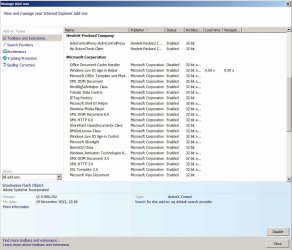
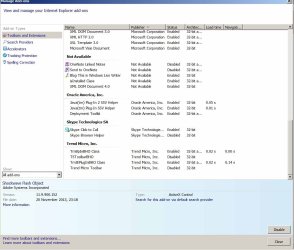
Here are three pages of all add-ons:
page_1.jpg

page_2.jpg

page_3.jpg
 

My Computer

Computer type
PC/Desktop
Computer Manufacturer/Model Number
dell vostro 460
OS
W7 Pro 64bit
CPU
Intel i7-2600 3.4Ghz
Memory
16 Gb
Graphics Card(s)
AMD Radeon HD 6600 series
Well the third is the one that pops out the most and it confirms your security suite has add-ons which are active or somewhat compatible for the 64 bit version/ Enhanced protection mode so that's most likely why ie fails to operate,,
Java is another problematic add-on which should be Uninstalled and development tool kit should be disabled,
http://www.java.com/en/download/faq/remove_olderversions.xml
http://www.java.com/en/download/help/uninstall_java.xml
Interesting reads,
http://securitygarden.blogspot.com/2013/01/java-zero-day-again-time-to.html

DIVX Plus is another one which is 64 bit and should be disabled.

Basically all of these objects should be Uninstalled,
The ones you actually use should be re-installed but one at a time to figure out which one is causing the issues.

I'm sticking with this, from Post #3
Export Favorites to html file before resetting Internet explorer/ just to be safe.
http://www.sevenforums.com/tutorials/86795-internet-explorer-import-export-favorites.html

Accessing Internet Options from the Start menu search with all open windows Closed,
Reset process first opening Internet explorer
After resetting using the above method see how many add-ons are still Enabled.

Review Jacee’s instructions to run Adwcleaner here,
Ignore the title of the thread,
http://www.sevenforums.com/system-security/309998-how-can-i-kill-avg-search.html
 
Last edited:

My Computer

Computer type
PC/Desktop
Computer Manufacturer/Model Number
Custom assembled by me :}
OS
Win-7-Pro64bit 7-H-Prem-64bit
CPU
i7-5930K 2nd i9-9940x both water blocked VRM's too
Motherboard
ASUS SABERTOOTH X99 2nd ASUS x299 Apex
Memory
Trident-z 3200C14 2nd Trident-z 3600C16
Graphics Card(s)
EVGA 1080ti ftw3 2nd Titan Xp both water blocked
Sound Card
Built-in Realtek
Monitor(s) Displays
1-AOC G2460PG 24"G-Sync 144Hz/ 2nd 1-ASUS VG248QE 24" 144Hz
Screen Resolution
1920 x 1080 144Hz
Hard Drives
2-Samsung M.2 Evo & Evo Plus
2-Samsung 850 EVO 500GB SSD's/ 3-2.5 W.D. Black 1tb-&3-1tb/3-3.5 WD Black 1tb hdd's
PSU
EVGA SuperNOVA 1000-P2 2nd 1200-P2
Case
2-Corsair Obsidian Series 450D Black ATX Mid Tower
Cooling
Custom water loops
Keyboard
Logitech G710+/ 2nd Logitech G910
Mouse
2-RedDragon M901 Perdition 16400 dpi Gaming mouse = wired
Internet Speed
Comcast Ping 19ms 89.31mbps download speed 6.12mbps upload
Antivirus
Malwarebytes Pro/ Superantispyware Pro
Browser
FireFox & Pale moon
Other Info
2nd ASUS X299 Apex/Intel i9-9940x with Custom water loop/7H-Prem-x64/Corsair 450D case/Ram Trident-z 3600C16 4x8gb / Samsung970Evo plus 500gb SSD/Dual ssd EZ swap evo/PSU EVGA SuperNova 1200w-P2 80+Platinum/GPU Titan Xp /8-ML-140 on push-pull on 2-280GTX rads
Hi -

I have done a bit more work on this:

1. Ran malwarebytes quick and full scans - nothing found, no change in browser behaviour (some sites not loading, both IE10 and Chrome)

2. Ran ccleaner and did the default clean - no change

3. reset IE10, only addons running are Shockwave Flash Object and Ms Silverlight. All others are disabled. IE10 works a little better (The guardian and independent websites work, but the weebly website builder still wont load). Annoyingly the windows.microsoft.com help pages don't load either.

Any ideas on what else to try ?

simon
 

My Computer

Computer type
PC/Desktop
Computer Manufacturer/Model Number
dell vostro 460
OS
W7 Pro 64bit
CPU
Intel i7-2600 3.4Ghz
Memory
16 Gb
Graphics Card(s)
AMD Radeon HD 6600 series
   Warning
Doing the following will reset internet explorer, and will lose all saved passwords and settings


1.) You can try this as another option:

Open :orb: Control panel. - Network and internet. - internet options - advanced - Reset - Check the box to delete personal settings - Click reset. Click ok. Restart the PC.
Open internet explorer. How does it act now?

2.) Did the malware scans find anything?
 

My Computer

Computer type
PC/Desktop
Computer Manufacturer/Model Number
Custom Built
OS
Windows 10 Pro
CPU
AMD Ryzen 5 2400G Processor with Radeon RX Vega 11 Graphics
Motherboard
ASRock X470 Master SLI/AC AM4 AMD Promontory X470 SATA 6Gb/s
Memory
G.SKILL Ripjaws V Series 16GB (2 x 8GB) 288-Pin DDR4 SDRAM D
Graphics Card(s)
2047MB NVIDIA GeForce GTX 1060 6GB (EVGA)
Sound Card
Motherboard Built in
Monitor(s) Displays
Acer R240HY bidx 23.8-Inch IPS HDMI DVI VGA (1920 x 1080) Wi
Screen Resolution
1920 x 1080
Hard Drives
1TB Sandisk SSD PLUS (Main drive)
500 GB Seagate 7200 RPM (Games)
500 GB Western Digital 7200 RPM (Virtual Machines)
PSU
CORSAIR TX Series TX650M 650W 80+ Gold Modular Power Supply
Case
CORSAIR CARBIDE SPEC-02 Mid-Tower Gaming Case, Red LED Fan
Cooling
220mm, two 120mm, and four 60mm fans
Keyboard
Wired Dell keyboard
Mouse
Wireless Logitech mouse
Internet Speed
250mb down, 30mb up
Antivirus
Panda Cloud Antivirus
Browser
Chrome-ish x64
Other Info
Your awesome for reading this.
Use Safe mode with networking,
Shut down your machine, Unplug-Hold the power button down for 30/45 seconds (Power Drain)
Power up and Tap the F8 key continuously until you see a black page with white text,
Use the down arrow key to toggle to safe mode with networking/ hit the enter key.
Login as usual
Other advanced methods,
http://www.sevenforums.com/tutorials/69585-safe-mode.html
http://windows.microsoft.com/en-US/windows7/Advanced-startup-options-including-safe-mode

Using Safe mode with networking refer to post #3 & 7 and download Adwcleaner run the scan and post the results,
Reset instructions are also on posts #3 and 7 after you use the Clean option in Adwcleaner.
 

My Computer

Computer type
PC/Desktop
Computer Manufacturer/Model Number
Custom assembled by me :}
OS
Win-7-Pro64bit 7-H-Prem-64bit
CPU
i7-5930K 2nd i9-9940x both water blocked VRM's too
Motherboard
ASUS SABERTOOTH X99 2nd ASUS x299 Apex
Memory
Trident-z 3200C14 2nd Trident-z 3600C16
Graphics Card(s)
EVGA 1080ti ftw3 2nd Titan Xp both water blocked
Sound Card
Built-in Realtek
Monitor(s) Displays
1-AOC G2460PG 24"G-Sync 144Hz/ 2nd 1-ASUS VG248QE 24" 144Hz
Screen Resolution
1920 x 1080 144Hz
Hard Drives
2-Samsung M.2 Evo & Evo Plus
2-Samsung 850 EVO 500GB SSD's/ 3-2.5 W.D. Black 1tb-&3-1tb/3-3.5 WD Black 1tb hdd's
PSU
EVGA SuperNOVA 1000-P2 2nd 1200-P2
Case
2-Corsair Obsidian Series 450D Black ATX Mid Tower
Cooling
Custom water loops
Keyboard
Logitech G710+/ 2nd Logitech G910
Mouse
2-RedDragon M901 Perdition 16400 dpi Gaming mouse = wired
Internet Speed
Comcast Ping 19ms 89.31mbps download speed 6.12mbps upload
Antivirus
Malwarebytes Pro/ Superantispyware Pro
Browser
FireFox & Pale moon
Other Info
2nd ASUS X299 Apex/Intel i9-9940x with Custom water loop/7H-Prem-x64/Corsair 450D case/Ram Trident-z 3600C16 4x8gb / Samsung970Evo plus 500gb SSD/Dual ssd EZ swap evo/PSU EVGA SuperNova 1200w-P2 80+Platinum/GPU Titan Xp /8-ML-140 on push-pull on 2-280GTX rads
Thanks Thrash and Andrew for your replies.

1. I went into safe mode+networking (via the msconfig route). I reset IE twice - via the IE gearbox route and also via Control Panel as Andrew suggested. I also uninstalled Java.

No change in symptoms: IE won't load parts of pages, 'waiting for ...' message. Chrome is not as bad (better heuristics I think) but still won't load some pages at all.

Here is the scan results from Adwcleaner:

View attachment AdwCleaner[R3]_safe mode.txt

I don't know what it means - clearly some registry keys it doesn't like. Any comments on what it has found ? I have not actually run the clean option yet, lacking a bit of nerve for it I'm afraid! Is there a tutorial on what precautions to take before letting a cleaner loose on the registry ?

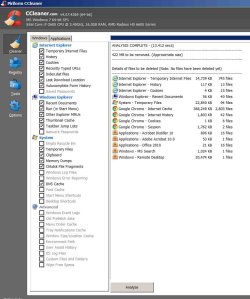
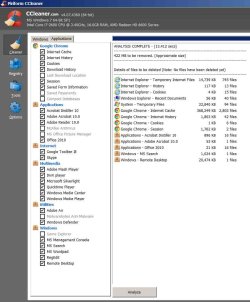
2. Here are the scan results from ccleaner (two pics so you can see the windows and application switches I used). It seems pretty harmless, but I haven't used the clean option again yet. I would rather not disturb Chrome at the moment.

page 1:

ccleaner_p1b.jpg

page 2:

ccleaner_p2b.jpg

3. Here is also the malware bytes log - it found nothing:
View attachment mbam-log-2013-12-09 (09-06-12).txt

Thanks for keeping up with this - is there a next step to try (go for the clean option in adwcleaner ?)

Simon
 

My Computer

Computer type
PC/Desktop
Computer Manufacturer/Model Number
dell vostro 460
OS
W7 Pro 64bit
CPU
Intel i7-2600 3.4Ghz
Memory
16 Gb
Graphics Card(s)
AMD Radeon HD 6600 series
The Cleanup in Adwcleaner should be used,
If you want more input on the actual files it found we would have to request a security specialist to look at the file,
Which isn't a big deal there but no idea when they might be able to give feedback ?
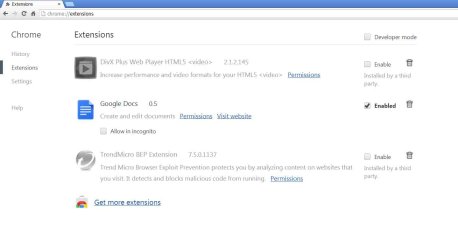
Open Chrome and see what is listed as Extensions,
chrome-apps%20run-a.jpg
 
Last edited:

My Computer

Computer type
PC/Desktop
Computer Manufacturer/Model Number
Custom assembled by me :}
OS
Win-7-Pro64bit 7-H-Prem-64bit
CPU
i7-5930K 2nd i9-9940x both water blocked VRM's too
Motherboard
ASUS SABERTOOTH X99 2nd ASUS x299 Apex
Memory
Trident-z 3200C14 2nd Trident-z 3600C16
Graphics Card(s)
EVGA 1080ti ftw3 2nd Titan Xp both water blocked
Sound Card
Built-in Realtek
Monitor(s) Displays
1-AOC G2460PG 24"G-Sync 144Hz/ 2nd 1-ASUS VG248QE 24" 144Hz
Screen Resolution
1920 x 1080 144Hz
Hard Drives
2-Samsung M.2 Evo & Evo Plus
2-Samsung 850 EVO 500GB SSD's/ 3-2.5 W.D. Black 1tb-&3-1tb/3-3.5 WD Black 1tb hdd's
PSU
EVGA SuperNOVA 1000-P2 2nd 1200-P2
Case
2-Corsair Obsidian Series 450D Black ATX Mid Tower
Cooling
Custom water loops
Keyboard
Logitech G710+/ 2nd Logitech G910
Mouse
2-RedDragon M901 Perdition 16400 dpi Gaming mouse = wired
Internet Speed
Comcast Ping 19ms 89.31mbps download speed 6.12mbps upload
Antivirus
Malwarebytes Pro/ Superantispyware Pro
Browser
FireFox & Pale moon
Other Info
2nd ASUS X299 Apex/Intel i9-9940x with Custom water loop/7H-Prem-x64/Corsair 450D case/Ram Trident-z 3600C16 4x8gb / Samsung970Evo plus 500gb SSD/Dual ssd EZ swap evo/PSU EVGA SuperNova 1200w-P2 80+Platinum/GPU Titan Xp /8-ML-140 on push-pull on 2-280GTX rads
@simon99

There is not a whole lot listed there that needs to be cleaned in ccleaner. You can safely run it. It won't hurt anything, and you can uncheck items you do not want it to clean.

As for adwcleaner,

Its a safe utility. I would run a scan and clean it up. Then restart the pc. We might have to look into more things to see if your machine is more infected then originally thought. It could also be a issue with your hosts file.

See here:

How can I reset the Hosts file back to the default?

You can run the fix it for me on the website.

I also suggest following ThrashZones advice.
 

My Computer

Computer type
PC/Desktop
Computer Manufacturer/Model Number
Custom Built
OS
Windows 10 Pro
CPU
AMD Ryzen 5 2400G Processor with Radeon RX Vega 11 Graphics
Motherboard
ASRock X470 Master SLI/AC AM4 AMD Promontory X470 SATA 6Gb/s
Memory
G.SKILL Ripjaws V Series 16GB (2 x 8GB) 288-Pin DDR4 SDRAM D
Graphics Card(s)
2047MB NVIDIA GeForce GTX 1060 6GB (EVGA)
Sound Card
Motherboard Built in
Monitor(s) Displays
Acer R240HY bidx 23.8-Inch IPS HDMI DVI VGA (1920 x 1080) Wi
Screen Resolution
1920 x 1080
Hard Drives
1TB Sandisk SSD PLUS (Main drive)
500 GB Seagate 7200 RPM (Games)
500 GB Western Digital 7200 RPM (Virtual Machines)
PSU
CORSAIR TX Series TX650M 650W 80+ Gold Modular Power Supply
Case
CORSAIR CARBIDE SPEC-02 Mid-Tower Gaming Case, Red LED Fan
Cooling
220mm, two 120mm, and four 60mm fans
Keyboard
Wired Dell keyboard
Mouse
Wireless Logitech mouse
Internet Speed
250mb down, 30mb up
Antivirus
Panda Cloud Antivirus
Browser
Chrome-ish x64
Other Info
Your awesome for reading this.
Another useful program you can run.

Please download Junkware Removal Tool to your desktop.
  • Shut down your protection software now to avoid potential conflicts.
  • Run the tool by double-clicking it. If you are using Windows Vista, 7, or 8; instead of double-clicking, right-mouse click JRT.exe and select "Run as Administrator".
  • The tool will open and start scanning your system.
  • Please be patient as this can take a while to complete depending on your system's specifications.
  • On completion, a log (JRT.txt) is saved to your desktop and will automatically open.
  • Post the contents of JRT.txt into your next message.
 

My Computer

Computer type
Laptop
Computer Manufacturer/Model Number
Packard Bell
OS
Windows 7 Home Premium 64Bit
CPU
AMD A6-3420M 1.5GHZ OC - 2.0GHZ
Memory
4GB DDR3 1600MHZ
Graphics Card(s)
AMD RADEON 6520G+AMD RADEON HD7470M 1GB DDR3
Screen Resolution
1366x768
Hard Drives
500GB SATA
Internet Speed
18Mb Unlimited
Antivirus
AVAST!
Browser
MOZILLA FIREFOX
My 2cents I as a general rule back up the reg to where it is now (if I am not sure) and just run ADW clean up - end of story and I have never had a problem with it or have had to resort to the backup reg.

I am wondering if a quick go over with this would help Free Malware Removal Tools scroll down to the TDSS Killer and run it and there are these if you get nowhere.

5 Bootable AntiVirus Rescue CD for Windows: Free Download
 

My Computer

Computer type
PC/Desktop
Computer Manufacturer/Model Number
Own build (new) Desk1 / Asus ROG Win 7 / Desk2 1st build
OS
Desk1 7 Home Prem / Desk2 10 Pro / Main lap Asus ROG 10 Pro 2 laptop Toshiba 7 Pro Asus P2520 7 & 10
CPU
Desk1 i5 3750K / Laptop i7 GTX 860M / Desk2 i5 2500
Motherboard
Desk1 Asus P877-V / Desk2 Gigabyte H67 UD3H / Laptop ?
Memory
Desk1 8GB (1866) / Desk2 16GB (1333) / Laptop 8Gb DDR3
Graphics Card(s)
Desk 1& 2NVidia GTX 650 & Laptops on board Intel
Sound Card
Desk 1 & 2 -XONAR DG Realtek High Def audio Laptop
Monitor(s) Displays
Desk 1 Benq HD 2450 / Desk2 Philips 24" / Laptop 17.5"
Screen Resolution
1920x1080 D1 & D2 & Laptop 1
Hard Drives
Desk1 Samsung 120GB 830 SSD
Asus ROG 256GB 850 Pro SSD
Desk2 Samsung 840 256 SSD
Toshiba 120GB EVO
PSU
Desk 1 Corsair HX 1050/ Laptop ? / Desk 2 Corsair HX 650
Case
Desk 1 Cooler HAF XM ? Toshiba laptop / Desk2 Coolermaster
Cooling
Fans on all Desk1 -2 Desk2 - all Coolermasters 5 Laptop ?
Keyboard
Desk 1 MS Sidewinder X6 Desk 2 MS Sidewinder X 4
Mouse
Desk 1&2 - Gigabyte MS 900 gamer - laptop - Logitec wireless
Internet Speed
ADSL2+
Other Info
One other Desktop (tester) and spare Toshba laptop both with SSD's
Running Kaspersky 2016 ISS on all machines config'd identically
Logitec audio stereo systems on each machine (x3)
Canon MG5250MFC
Router/modem TP-Link running WPA2SK
I had the DivX player and associated BS once and it played havoc with several sites. I suspect Quicktime can do the same thing but I've not used it. I would uninstall both and run the CCleaner registry cleaner and the Adwcleaner once more on Delete. It appears the FLEXnet is some sort of licensing program which pays developers and may be a PUP, Potentially Unwanted Program.

The free open source VLC player will play nearly any type of media file. http://www.videolan.org/vlc/index.html
 
Last edited:

My Computer

Computer type
PC/Desktop
Computer Manufacturer/Model Number
Home Built Desktop By DataTech
OS
Windows 7 Ultimate X64 SP1
CPU
Intel i5-2550K, Differing ~4.4-4.8GHz No built in GPU
Motherboard
ASUS P8Z68-V PRO/GEN3
Memory
16GB G.Skill Sniper 1866MHz @ 2133MHz 2x8GB
Graphics Card(s)
ASUS GTX650TIB-DC2OC-2GD5, (650TI Boost)
Sound Card
Onboard Realtek 5-1
Monitor(s) Displays
Samsung P2570HD
Screen Resolution
1920x1080
Hard Drives
Samsung 840 Pro 256GB SSD for OS, 500GB Seagate Constellation (Enterprise drive) for Data
PSU
Corsair HX650W
Case
Inwin Dragon Rider
Cooling
Hyper 212 EVO w/two Noctua fans, push-pull, @1300 RPM
Keyboard
E-Z Eyes, bright yellow keys with large characters
Mouse
steelseries SENSEI Laser Pro Gaming
Internet Speed
48-51Mbs Mbs down, 11 Mbs up Xfinity Cable
Antivirus
Norton Internet Security 2013
Browser
IE 10, Opera, Pale Moon if needed
Other Info
4 case fans, LG BluRay-RE, ASUS DVD-RW, Mr. Fusion power supply, 1.21 gigawatts.
Hi -

Thanks for all the advice. I created a restore point and went ahead with Adwcleaner cleanup. After the restart I scanned again. No change in IE or Chrome website loading issues - here is the Adwcleanerlog:

View attachment AdwCleaner[S1]_after clean.txt

The FLEX keys seem to have reinstalled themselves. I'm sure they were deleted but have come back. Googling them seems to show they are probably legit, but I have no idea what software they came with.

Here is the Chrome extensions page:

chrome extensions_131217.jpg

The Divx player is disabled but present. Otherwise Chrome is pretty much clear. I think Divx came in with Roxio Creator, a video editing package.

I will see if I can get some instructions on unloading the Divx extension just to settle this point.

I had a look at the hosts file - here is the text:

View attachment hosts_131214.txt

From what I've read, the hosts file looks as it should.

I will try the removal tools others have mentioned and uninstall the Divx player - any other ideas ? Could this be a network fault or configuration issue rather than a bit of malware ?

I have a windows virtual machine running with windows XP mode. I just use it to run excel2003 models and most of the time it is hibernated. Could there be some sort of interplay between W7 and the virtual machine that effects a browser in W7 - seems unlikely.

Simon
 

My Computer

Computer type
PC/Desktop
Computer Manufacturer/Model Number
dell vostro 460
OS
W7 Pro 64bit
CPU
Intel i7-2600 3.4Ghz
Memory
16 Gb
Graphics Card(s)
AMD Radeon HD 6600 series
See if this helps removing DivX. http://rovicorp.force.com/apex/Show...ge=en_US&url=How-do-I-uninstall-DivX-software

The hosts file is fine.

FLEXnet is a legit program, but I wouldn't want it. It seems to be for developers who want to sell their software to deploy it. If it can't be removed it's not a good thing. Did you also run the JRT tool? The Adwcleaner log seems to be only the scan part.

I don't think the VM with XP should cause problems. Did you install the XP Mode from MS with their VM?
http://www.microsoft.com/en-us/download/details.aspx?id=3702
 

My Computer

Computer type
PC/Desktop
Computer Manufacturer/Model Number
Home Built Desktop By DataTech
OS
Windows 7 Ultimate X64 SP1
CPU
Intel i5-2550K, Differing ~4.4-4.8GHz No built in GPU
Motherboard
ASUS P8Z68-V PRO/GEN3
Memory
16GB G.Skill Sniper 1866MHz @ 2133MHz 2x8GB
Graphics Card(s)
ASUS GTX650TIB-DC2OC-2GD5, (650TI Boost)
Sound Card
Onboard Realtek 5-1
Monitor(s) Displays
Samsung P2570HD
Screen Resolution
1920x1080
Hard Drives
Samsung 840 Pro 256GB SSD for OS, 500GB Seagate Constellation (Enterprise drive) for Data
PSU
Corsair HX650W
Case
Inwin Dragon Rider
Cooling
Hyper 212 EVO w/two Noctua fans, push-pull, @1300 RPM
Keyboard
E-Z Eyes, bright yellow keys with large characters
Mouse
steelseries SENSEI Laser Pro Gaming
Internet Speed
48-51Mbs Mbs down, 11 Mbs up Xfinity Cable
Antivirus
Norton Internet Security 2013
Browser
IE 10, Opera, Pale Moon if needed
Other Info
4 case fans, LG BluRay-RE, ASUS DVD-RW, Mr. Fusion power supply, 1.21 gigawatts.
I have had major issues with IE11 i read somewhere that the Add-ons are the cause

I happen to Disable mine and got a memory error hasn't happened since i enabled certain one's again

There is one Gawd awful that attaches itself to bing and it's a trojan Spigot.com M$ Has some explaining to do :sarc:
 

My Computer

Computer type
PC/Desktop
Computer Manufacturer/Model Number
CoreI7-6700K MrFingerIII Special Builds
OS
Windows 10 Home Premium 64bit sp1
CPU
Intel I7-6700K @ 4.6 Ghz 1.344 volts everyday OC
Motherboard
Asrock Fatality K6 Z170 Socket 1151
Memory
32GB G-Skill TridentZ 3200mhz 16-18-18-38 DDR4
Graphics Card(s)
Sli Gigabyte Windforce GTX 980 G1
Sound Card
AC97 Creative Rage Tactic 3D Headphones Bluetooth
Monitor(s) Displays
27" Asus ROG Swift PG278Q G-Sync 48" Vizio Smart HD TV
Screen Resolution
2560x1440p 27"- 48" Currently Gaming at 2560x1440p Res 2K
Hard Drives
250GB Samsung Evo840SSD Seagate baracuda 500 GB WD Mybook 500Gb 1TB Seagate Barracuda
PSU
HX1050w Corsair Silver 80plus certified crosfire/sli
Case
Enthod Pro Full Tower
Cooling
Corsair H110i GT 280 mm High Performance WaterBlock
Keyboard
Logitech wireless keyboard
Mouse
Logitech wireless mouse
Internet Speed
Cox Cable 100+ mb
Antivirus
WebRoot Spysweeper with Antivirus
Browser
IE-10, Chrome, Opera
Other Info
My Other Rig is a AMD FX8320E @4.6Ghz 16GB Ballistic Sport Ram
Mobo Asrock Fatality 990FX 120GB OCZ SSD 1TB Seagate Barracuda Corsair H75 Cooling PSU Corsair CX750
GPU GTX Gigabyte 970G1
I always hide anything Bing related even though MS offers it back all the time. You likely got a Trojan elsewhere and it's configured to attach to Bing as a stealth feature.
 

My Computer

Computer type
PC/Desktop
Computer Manufacturer/Model Number
Home Built Desktop By DataTech
OS
Windows 7 Ultimate X64 SP1
CPU
Intel i5-2550K, Differing ~4.4-4.8GHz No built in GPU
Motherboard
ASUS P8Z68-V PRO/GEN3
Memory
16GB G.Skill Sniper 1866MHz @ 2133MHz 2x8GB
Graphics Card(s)
ASUS GTX650TIB-DC2OC-2GD5, (650TI Boost)
Sound Card
Onboard Realtek 5-1
Monitor(s) Displays
Samsung P2570HD
Screen Resolution
1920x1080
Hard Drives
Samsung 840 Pro 256GB SSD for OS, 500GB Seagate Constellation (Enterprise drive) for Data
PSU
Corsair HX650W
Case
Inwin Dragon Rider
Cooling
Hyper 212 EVO w/two Noctua fans, push-pull, @1300 RPM
Keyboard
E-Z Eyes, bright yellow keys with large characters
Mouse
steelseries SENSEI Laser Pro Gaming
Internet Speed
48-51Mbs Mbs down, 11 Mbs up Xfinity Cable
Antivirus
Norton Internet Security 2013
Browser
IE 10, Opera, Pale Moon if needed
Other Info
4 case fans, LG BluRay-RE, ASUS DVD-RW, Mr. Fusion power supply, 1.21 gigawatts.
Back
Top