
Browser question

rev1775

New member
Local time
7:21 AM
Messages
79
I'm not sure the best place this but, since the discussion is browsers in general I will.

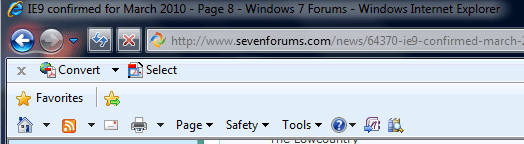
I would like to use a different browser at times but, as you can see from my pic here I use adobe cs4 and I adds the PDF buttons for conversion, print, conversion and email, conversion and add to existing pdf and the select button for just bits of a page..

Are these options available if I would happen to use a different browser does anyone know?

Feel free to shift this if there would be a better forum for asking~~
 

Attachments
  • Capture.PNG
    Capture.PNG
    12.1 KB · Views: 10

My Computer

Computer Manufacturer/Model Number
Home Built
OS
7-Pro-64
CPU
Intel Dual Core E5400 2.7
Motherboard
Asus P5Q Pro Turbo
Memory
2gig DDR2 800
Graphics Card(s)
XFX Radeon HD 4770 512MB
Sound Card
Onboard
Monitor(s) Displays
19" Wide screen
Screen Resolution
1440x900
Hard Drives
Seagate 320 Sata2 (2)
Seagate 750 Sata2 (1)
PSU
Corsair HX520W
Welcome

You could find out very easily. Go to search and type turn windows features on or off.
Then uncheck the IE8 box. Use the new browser, if you like it keep it, if not uninstall and check the box for IE8. Why trust us, to see if you will like it, try it for yourself.
 

My Computer

Computer type
PC/Desktop
Computer Manufacturer/Model Number
Dell XPS 420
OS
Windows 10, Home Clean Install
CPU
Intel Core2 processsor Q8200(2.33Ghz 1333FSB) Quad Core Tech
Motherboard
Dell
Memory
6 gb
Graphics Card(s)
ATI Radeon 256MB HD3650
Sound Card
Intergrated 7.1 Channel Audio
Monitor(s) Displays
Dell SP2009W 20"
Hard Drives
640 GB Serial ATA Hard drive
Cooling
Fan
Keyboard
Dell USB Keyboard
Mouse
Dell Premium Optical USB
Internet Speed
DSL 2.85
Thanks,
I know I can just install other browsers and see if I like them. I was just trying to check and see if anyone used CS4 or adobe writer with a different browser and whether the intrigrated pdf buttons are available with another browser at all. I don't like just installing and uninstalling programs if I don't have to ( especially for a possible toolbar ) if that makes sense. :)
 

My Computer

Computer Manufacturer/Model Number
Home Built
OS
7-Pro-64
CPU
Intel Dual Core E5400 2.7
Motherboard
Asus P5Q Pro Turbo
Memory
2gig DDR2 800
Graphics Card(s)
XFX Radeon HD 4770 512MB
Sound Card
Onboard
Monitor(s) Displays
19" Wide screen
Screen Resolution
1440x900
Hard Drives
Seagate 320 Sata2 (2)
Seagate 750 Sata2 (1)
PSU
Corsair HX520W
rev1775

What you are doing makes a lot of sense. I just wanted to make sure that you knew how easy it was to try another browser. I hope that someone comes along that can offer more support. Good Luck
 

My Computer

Computer type
PC/Desktop
Computer Manufacturer/Model Number
Dell XPS 420
OS
Windows 10, Home Clean Install
CPU
Intel Core2 processsor Q8200(2.33Ghz 1333FSB) Quad Core Tech
Motherboard
Dell
Memory
6 gb
Graphics Card(s)
ATI Radeon 256MB HD3650
Sound Card
Intergrated 7.1 Channel Audio
Monitor(s) Displays
Dell SP2009W 20"
Hard Drives
640 GB Serial ATA Hard drive
Cooling
Fan
Keyboard
Dell USB Keyboard
Mouse
Dell Premium Optical USB
Internet Speed
DSL 2.85
Thanks and I hope so as well.. I would think there must be some here that are using writer with other browsers.. THe adobe site was of little or no help~~
 

My Computer

Computer Manufacturer/Model Number
Home Built
OS
7-Pro-64
CPU
Intel Dual Core E5400 2.7
Motherboard
Asus P5Q Pro Turbo
Memory
2gig DDR2 800
Graphics Card(s)
XFX Radeon HD 4770 512MB
Sound Card
Onboard
Monitor(s) Displays
19" Wide screen
Screen Resolution
1440x900
Hard Drives
Seagate 320 Sata2 (2)
Seagate 750 Sata2 (1)
PSU
Corsair HX520W
Back
Top