Browser URL desktop icons display 14x14 on 40x40 white background

kassoe

New member
Local time
5:03 AM
Messages
5
The URL picture icons (the favicon designs) on my desktop display in size 14x14 pixels (tiny) on a 40x40 pixels white background. This is when I have medium size icons. Similar phenomena appears when scaling icon size up/down. I have searched extensively but not found the problem described elsewhere. System is Win 7 64 SP1 and newest browser versions as of today. It is quite annoying. Not really a good user experience on a small HD screen.

Further description:
- URL icons earlier displayed only as white "sheets of paper". I got to where I am now by refreshing each URL icon on the desktop by re-adding the icon to the desktop, dragging it from the FireFox URL line ('copy and replace'). I have tried same approach with IE 10 and Chrome while having each of these browsers as the default. They don't place any favicon designed URL icons on the desktop, only generic IE or Chrome icons - but in full size as they should be.
- I have tried deleting the icon cache. which makes no difference.
- Installed the program IconPackager and changed Windows default icons to something new and then back again. For someone this helped with a different icons issue. In this case it made no difference.
- Windows icons behave as they should. They are not getting smaller, nor are they displayed on white background.

Help on this issue will be appreciated.
 

My Computer My Computer

At a glance

Windows 7 Pro x64
OS
Windows 7 Pro x64
Create a new user account and see if that desktop has the same problem.
 

My Computer My Computer

At a glance

W7 Pro SP1 64biti78GBIntel HD Graphics
Computer type
Laptop
Computer Manufacturer/Model Number
Employer provided Dell Latitude
OS
W7 Pro SP1 64bit
CPU
i7
Memory
8GB
Graphics Card(s)
Intel HD Graphics
Hard Drives
crappy SSD
Antivirus
Employer mandated Symantec Endpoint Protection
Browser
Pale Moon 64bit, IE11 64bit & Chrome 64bit

My Computer My Computer

At a glance

Win 10 Pro 64Intel Core i7 960 @3.20 GHz24.0 GB DDR3EVGA GTX 750Ti
Computer type
PC/Desktop
Computer Manufacturer/Model Number
Custom Build
OS
Win 10 Pro 64
CPU
Intel Core i7 960 @3.20 GHz
Motherboard
MSI MS7522
Memory
24.0 GB DDR3
Graphics Card(s)
EVGA GTX 750Ti
Monitor(s) Displays
LG E2341 23 Inch
Screen Resolution
1920x1080
Hard Drives
1TB Western Dgital 1002FAEX-00Y9A0
1TB Hitachi HDS721010CLA322
PSU
700 Watt
Case
Haf 912
Cooling
Fans
Keyboard
Logitech MK710
Mouse
Logitech M705
Internet Speed
Cable
Antivirus
AIS 2015 .10.0.2225
Browser
Firefox 49
Other Info
MalwareBytes Anti-Rootkit utility
Thanks for these suggestions.
@UsernameIssues: No difference with new user account.
@Gary: Already tried that (as mentioned above).

I should maybe mention that the machine is freshly installed. Setup was made using Windows Easy Transfer from my other Win 7 installation which has all the URL icons displayed as 'sheet of paper' icons (no favicon icons). On that machine, however, the 'sheet of paper' icon cannot be replaced by overwriting it with a fresh one dragged from Firefox to the desktop.
 

My Computer My Computer

At a glance

Windows 7 Pro x64
OS
Windows 7 Pro x64
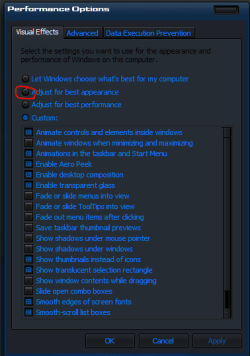
Look at the attached image and make your settings using the one circled in red
 

Attachments

  • po.PNG
    po.PNG
    13.1 KB · Views: 9

My Computer My Computer

At a glance

Win 10 Pro 64Intel Core i7 960 @3.20 GHz24.0 GB DDR3EVGA GTX 750Ti
Computer type
PC/Desktop
Computer Manufacturer/Model Number
Custom Build
OS
Win 10 Pro 64
CPU
Intel Core i7 960 @3.20 GHz
Motherboard
MSI MS7522
Memory
24.0 GB DDR3
Graphics Card(s)
EVGA GTX 750Ti
Monitor(s) Displays
LG E2341 23 Inch
Screen Resolution
1920x1080
Hard Drives
1TB Western Dgital 1002FAEX-00Y9A0
1TB Hitachi HDS721010CLA322
PSU
700 Watt
Case
Haf 912
Cooling
Fans
Keyboard
Logitech MK710
Mouse
Logitech M705
Internet Speed
Cable
Antivirus
AIS 2015 .10.0.2225
Browser
Firefox 49
Other Info
MalwareBytes Anti-Rootkit utility
Hi Gary. I changed and restarted (I had "Let Windows choose"). No change. I also tried to reset the URL file association value in the registry (linkfrom description of IconCache.db-reset which you linked to above). This is a tough one, it appears ...
 

My Computer My Computer

At a glance

Windows 7 Pro x64
OS
Windows 7 Pro x64
I do not place site or url Icons on my desktop,. I use bookmarks and the Bookmark toolbar for that. If they are just site Icons. Bookmark them and then remove them from your desktop.
 

My Computer My Computer

At a glance

Win 10 Pro 64Intel Core i7 960 @3.20 GHz24.0 GB DDR3EVGA GTX 750Ti
Computer type
PC/Desktop
Computer Manufacturer/Model Number
Custom Build
OS
Win 10 Pro 64
CPU
Intel Core i7 960 @3.20 GHz
Motherboard
MSI MS7522
Memory
24.0 GB DDR3
Graphics Card(s)
EVGA GTX 750Ti
Monitor(s) Displays
LG E2341 23 Inch
Screen Resolution
1920x1080
Hard Drives
1TB Western Dgital 1002FAEX-00Y9A0
1TB Hitachi HDS721010CLA322
PSU
700 Watt
Case
Haf 912
Cooling
Fans
Keyboard
Logitech MK710
Mouse
Logitech M705
Internet Speed
Cable
Antivirus
AIS 2015 .10.0.2225
Browser
Firefox 49
Other Info
MalwareBytes Anti-Rootkit utility
Gary, thanks for your suggestion. You may be right, could be a bit neater. However, then URL shortcuts don't work across browsers. Also, I sync the computer with another one and a cloud drive. Further, the approach I use enable me to build history that lives on, independently of computer/platform. Have done it this way for a very long time and would like to get it working with icons of a reasonable size.
 

My Computer My Computer

At a glance

Windows 7 Pro x64
OS
Windows 7 Pro x64
Back
Top