Browsers not connecting and Updates causing problems

Hylian

New member
Local time
6:06 PM
Messages
3
I've never made a thread before, but I've gone through every type of fix I could think of for the issues I'm having so I figured going onto a forum might help, so I could get advice from others who may know more than I do.

My issues are that :

1) My laptop was working just fine with minor issues until a bit over a day ago. I had my laptop off all day yesterday because I was at work. After I turn it on, I discover that even though I have full strength, I can't access the wifi that is linked to my laptop. No browsers will work, nor will any other programs that use the internet (such as Skype or Spotify. I don't use these much, they are more of just examples of what won't connect). Every time any of my browsers won't connect, it always says that I should check my firewall options to make sure the browser is a program that is allowed to access the internet. I did that. I turned off Windows Firewall, and it didn't do anything. I changed proxy settings in every browser and nothing changed.
All of my browsers work when my laptop is in safe mode with networking (which I am using to post on the thread). I tried updating, but that made things worse.

2) After I let Windows do 7 updates, one of them seems to cause my computer to not let me access anything. No programs will start and I can't even access the start menu. Even when it lets me, nothing on it works. I get errors every time I try and access the control panel. I couldn't even access "Run" or the restore option, or the ability to restart or shut down my computer properly. So I turned my laptop off by the power button and started it in safe mode. I restored my laptop to the last update prior to all my issues I have mentioned because safe mode let me access it, and I thought maybe it would fix my issues since it usually does. It fixed the issues with the programs, but the internet issue remained. I know it has nothing to do with the modem because it was reset, and every other laptop in the house is able to get on the internet just fine. Mine still has the same issue. I then thought that maybe my computer had a virus. I got a full scan done and not one virus was found. Nothing was found other than how many files I have.

I am at a loss for how to fix this. Any one have any ideas on what could be wrong?
 

My Computer

Computer type
Laptop
Computer Manufacturer/Model Number
HP pavilion g series
OS
Windows 7 home premium 64 bit
CPU
AMD A6-3420M APU with Radeon(tm) HD Graphics 1.50 GHz
Memory
Ram - 4gb (3.48 gb usable)
Hard Drives
Hitachi HTS547550A9E384 SATA Disk Device
Cooling
Logitech fan
Keyboard
Standard PS/2 Keyboard
Antivirus
Norton
Browser
Firefox, IE, Chrome
Hi Hylian welcome to Seven Forums

Lets see something

Click here DDS

Click on Download Now once your on the website
Double click the dds icon to run the tool.
Place a check next to attact.txt and click Start . When done, DDS will open two logs
DDS.txt
Attach.txt
Save two logs onto your desktop and upload them with your reply
 

My Computer

Computer Manufacturer/Model Number
Custom Built
OS
Windows 7 Ultimate 32-Bit & Windows 7 Ultimate 64-Bit
CPU
Intel Core i7 CPU 950 @ 3.07GHz
Motherboard
ASUS P6T DELUXE V2
Memory
OCZ 6GB (3 x 2GB) 240-Pin DDR3 SDRAM DDR3 1600 OCZ3X1600R2
Graphics Card(s)
ATI Radeon HD 5700 Series
Sound Card
OnBoard
Hard Drives
WD6400AACS-00M3B0 (640GB SATA )
PSU
CORSAIR 850w
Case
NZXT LEXA
Cooling
Intel Stock Heatsink Fan
Keyboard
Microsoft Wireless Laser Keyboard 7000
Mouse
Microsoft Wireless Laser Mouse 7000
Thank you for responding!

Here are the txt files


View attachment attach.zip
View attachment dds.txt

Oh and i randomly decided to check and see if something i did using cmd would help... I had my browser working for one minute afterwards then the same issue happened again
 
Last edited:

My Computer

Computer type
Laptop
Computer Manufacturer/Model Number
HP pavilion g series
OS
Windows 7 home premium 64 bit
CPU
AMD A6-3420M APU with Radeon(tm) HD Graphics 1.50 GHz
Memory
Ram - 4gb (3.48 gb usable)
Hard Drives
Hitachi HTS547550A9E384 SATA Disk Device
Cooling
Logitech fan
Keyboard
Standard PS/2 Keyboard
Antivirus
Norton
Browser
Firefox, IE, Chrome
Lets run AdwCleaner

Click here :ar: AdwCleaner

Click on Download Now button

:ar: Save to the Desktop

:ar: Right-click on adwcleaner.exe and choose Run as administrator

:ar: Click the Delete button

:ar: Upload the AdwCleaner[Sn].txt in your reply.

   Note
The log file is at C:\AdwCleaner[Sn].txt
 

My Computer

Computer Manufacturer/Model Number
Custom Built
OS
Windows 7 Ultimate 32-Bit & Windows 7 Ultimate 64-Bit
CPU
Intel Core i7 CPU 950 @ 3.07GHz
Motherboard
ASUS P6T DELUXE V2
Memory
OCZ 6GB (3 x 2GB) 240-Pin DDR3 SDRAM DDR3 1600 OCZ3X1600R2
Graphics Card(s)
ATI Radeon HD 5700 Series
Sound Card
OnBoard
Hard Drives
WD6400AACS-00M3B0 (640GB SATA )
PSU
CORSAIR 850w
Case
NZXT LEXA
Cooling
Intel Stock Heatsink Fan
Keyboard
Microsoft Wireless Laser Keyboard 7000
Mouse
Microsoft Wireless Laser Mouse 7000
I did that and here's the file!

View attachment AdwCleaner[S1].txt

I have now discovered that this Microsoft teredo tunnel device had the yellow sign with the exclamation point. The error is that it can't update or load the drivers so the device isn't working properly. I uninstalled it, and I'm about to restart my computer to see if it affected anything.

It did not change the connection. Now to reinstall it and see if that helps.

I am not able to reinstall no matter what I try to do in the device manager or with command prompt. When I try to reinstall I get this "An error occurred during the installation of the device. A device attached to the system is not functioning."

The same error for the teredo I now also have with the Microsoft ISATAP Adapter #4
 
Last edited:

My Computer

Computer type
Laptop
Computer Manufacturer/Model Number
HP pavilion g series
OS
Windows 7 home premium 64 bit
CPU
AMD A6-3420M APU with Radeon(tm) HD Graphics 1.50 GHz
Memory
Ram - 4gb (3.48 gb usable)
Hard Drives
Hitachi HTS547550A9E384 SATA Disk Device
Cooling
Logitech fan
Keyboard
Standard PS/2 Keyboard
Antivirus
Norton
Browser
Firefox, IE, Chrome
Hi Hylian

Can you give me a screen shot of the item's Detail tab . Right click the item with the the yellow circle . Choose properties click on the details tab. On the drop down menu choose hardware Ids and do a prnt screen .
 

My Computer

Computer Manufacturer/Model Number
Custom Built
OS
Windows 7 Ultimate 32-Bit & Windows 7 Ultimate 64-Bit
CPU
Intel Core i7 CPU 950 @ 3.07GHz
Motherboard
ASUS P6T DELUXE V2
Memory
OCZ 6GB (3 x 2GB) 240-Pin DDR3 SDRAM DDR3 1600 OCZ3X1600R2
Graphics Card(s)
ATI Radeon HD 5700 Series
Sound Card
OnBoard
Hard Drives
WD6400AACS-00M3B0 (640GB SATA )
PSU
CORSAIR 850w
Case
NZXT LEXA
Cooling
Intel Stock Heatsink Fan
Keyboard
Microsoft Wireless Laser Keyboard 7000
Mouse
Microsoft Wireless Laser Mouse 7000
I would try uninstalling Norton to see if the problem replicates with Microsoft Security Essentials . Use the Norton Removal Tool to uninstall your Norton product

The problem may be the inferior HP Factory Preinstalled Win7 with all of the bloatware and duplicate utiltiies which have better versions built into Win7. These throttle and corrupt Win7 native performance.

That's why most tech enthusiasts will not run such an install but instead Clean Reinstall - Factory OEM Windows 7. Everything is provided in the blue link tutorial.

So now would be a perfect opportunity to get a perfect reinstall with our help. At the minimum I'd Clean Up Factory Bloatware.

If this doesn't resolve performance problems, work through these Troubleshooting Steps for Windows 7.
 
Last edited:
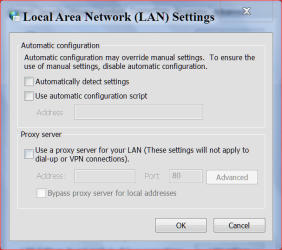
Could this be the problem? Post #1.

I changed proxy settings in every browser and nothing changed.

internet options.PNG
 

My Computer

Computer type
PC/Desktop
Computer Manufacturer/Model Number
Home made Desktop
OS
Windows 10 Pro. 64/ version 1709 Windows 7 Pro/64
CPU
Intel i7-6800K @ 4.3
Motherboard
ASUS X-99 Deluxe II
Memory
Corsair Platinum 16 gig @2400
Graphics Card(s)
EVGA GTX 1070 OC
Monitor(s) Displays
Asus 27" LED LCD/VE278Q
Screen Resolution
1920-1080 or 1280-720 HDMI
Hard Drives
INTEL SSD 730-240 Gb Sata 3.0/
PSU
EVGA Platium 1200W
Case
Phanteks Luxe Tempered Glass 8 fans/ one radiator
Cooling
XSPC/ Water Cooled CPU
Keyboard
Das 4 Professional
Mouse
Logitech M705/MX Anywhere 2-S
Internet Speed
100 mbits
Antivirus
Microsoft Security Essentials/ Malwarebytes Premium 3.0/ SAS
Browser
I.E. 11 default/Firefox/ ISP Time Warner Cable/Spectrum
Other Info
LG BluRay Burner/
Sound system-KLipsch-THX/
Icy Dock ssd Hot Swap bays.
I did that and here's the file!

View attachment 265860

I have now discovered that this Microsoft teredo tunnel device had the yellow sign with the exclamation point. The error is that it can't update or load the drivers so the device isn't working properly. I uninstalled it, and I'm about to restart my computer to see if it affected anything.

It did not change the connection. Now to reinstall it and see if that helps.

I am not able to reinstall no matter what I try to do in the device manager or with command prompt. When I try to reinstall I get this "An error occurred during the installation of the device. A device attached to the system is not functioning."

The same error for the teredo I now also have with the Microsoft ISATAP Adapter #4

I have a special file that fixes the terado and or tunnel adaptor problem, I would need to see the ipconfig/all form this machine before I can determine the cause of this problem.
 

My Computer

Computer type
PC/Desktop
Computer Manufacturer/Model Number
Home built
OS
Windows 7 Ult, Windows 8.1 Pro,
CPU
Q9650-4.275GHz, E8600 4.5GHz, E6750-3.8GHz
Motherboard
Evga 780i FTW
Memory
G.Skill PC2 9600 1200Mhz 5 5 5 15 2T
Graphics Card(s)
GTX480
Sound Card
Asus Xonar D2
Monitor(s) Displays
HannsG
Screen Resolution
1680X1050
Hard Drives
GSkill Phoenix Pro 120GB SSD
PSU
ThermalTake Toughpower 1000Watt modular
Case
ThermalTake XaserV
Cooling
Xigmatek S1283
Keyboard
Logitech G15
Mouse
Logitech G9
Internet Speed
T1
Do you by chance use Orbit Downloader? If so, uninstall and restart.

I have experienced similar problems on W7 and W8, recently, where none of my browsers will connect when Orbit runs. After uninstall and reboot all was well.
 

My Computer

Computer Manufacturer/Model Number
Home Built
OS
Windows 7 SP1 x64
CPU
AMD 9850 X4
Motherboard
ASUS
Memory
Corsair
Graphics Card(s)
ATI Radeon
Sound Card
Sigmatel
Monitor(s) Displays
Dell
Screen Resolution
1600X900
Hard Drives
(1) WD 1TB
Cooling
Corsair H60
Internet Speed
UVerse 12MB
Did you run iolo System Service just before all these problems started? Does iolo make back-ups?

I see a Trojan ...SARAID~1\AppData\Local\Temp\ReimagePackage.exe

Please download TFC by Old Timer http://www.geekstogo.com/forum/TFC-Temp-File-Cleaner-OldTimer-file187.html and save it to your desktop.
Save any unsaved work. TFC will close ALL open programs including your browser!
Double-click on TFC.exe to run it. If you are using Vista/Windows 7 right-click on the file and choose Run As Administrator.
Click the Start button to begin the cleaning process and let it run uninterrupted to completion.
Important! If TFC prompts you to reboot, please do so immediately. If not prompted, manually reboot the machine anyway to ensure a complete clean.

Next, I'd like you to scan your machine with ESET OnlineScan
  1. Hold down Control and click on the following link to open ESET OnlineScan in a new window.
    ESET OnlineScan
  2. Click the
    esetOnline.png
    button.
  3. For alternate browsers only: (Microsoft Internet Explorer users can skip these steps)
    1. Click on
      esetSmartInstall.png
      to download the ESET Smart Installer. Save it to your desktop.
    2. Double click on the
      esetSmartInstallDesktopIcon.png
      icon on your desktop.
  4. Check
    esetAcceptTerms.png
  5. Click the
    esetStart.png
    button.
  6. Accept any security warnings from your browser.
  7. Check
    esetScanArchives.png
  8. Push the Start button.
  9. ESET will then download updates for itself, install itself, and begin scanning your computer. Please be patient as this can take some time.
  10. When the scan completes, push
    esetListThreats.png
  11. Push
    esetExport.png
    , and save the file to your desktop using a unique name, such as ESETScan. Include the contents of this report in your next reply.
  12. Push the
    esetBack.png
    button.
  13. Push
    esetFinish.png
 

My Computer

Computer type
PC/Desktop
Computer Manufacturer/Model Number
Bruce ... somewhere in his 40's
OS
Windows 7 Ultimate 32bit SP1
CPU
Intel(R) Core(TM)2 Quad CPU @ 2.40GHz, 2400 MHz
Motherboard
INTEL/D975XBX2
Memory
4 GB
Graphics Card(s)
ATI Radeon HD 2600 Pro
Monitor(s) Displays
Samsung SyncMaster 914v
Screen Resolution
1280 x 1024
Hard Drives
2/500GB each ... ST3500630AS ATA Device.
One is not connected
PSU
Rocketfish 700 W
Case
G.Skill Gigabyte Chassis
Keyboard
Standard PS/2 Keyboard
Mouse
Microsoft PS/2 Mouse
Internet Speed
DSL
Antivirus
Avira Internet Security
Browser
IE 11
Other Info
ATI HDMI Audio
Back
Top