Browsing problems in DeviantArt

TheAslan

Banned
Local time
7:50 AM
Messages
25
Hiya!!

I'm so frustrated right now because i'm struggelin with endless browsing problems in DeviantArt, i have this problem in ever browser and every computer, i really don't know how to fix this very annoying problem, i already contacted DeviantArt support but it didn't help at all, i've also searhed a solution in numerous forums but haven't find a solution yet, so please help me!!

Here's the screenshot what i took while browsing DeviantArt
iyea14.jpg


Here's what i use at this moment:
Opera 10.53
Avast! Internet Security 2010 ( i allowed all connections made in Opera and then i put DeviantArt page on those sites what will never check )
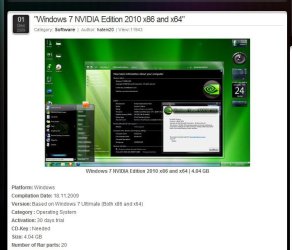
Windows 7 NVIDIA Edition 2010 x64
 

My Computer

Computer Manufacturer/Model Number
HP Pavilion DV7-3197.eo
OS
Windows 7 NVIDIA Edition x64
CPU
Intel Core i7 Q720 1,60GHZ @ 1,60GHZ
Memory
6GB DDR3
Graphics Card(s)
NVIDIA GeForce GT 230M
Screen Resolution
1600 x 900
Hard Drives
500GB + 1000GB
Internet Speed
10 megabyte ADSL
Other Info
Current Windows 7 visual style:

Dark Soft
Hi there,

What are the specs of the other computers on which you've visited DeviantArt, and which browsers did you use?

Cheers,

Walker
Windows Outreach Team
 

My Computer

Computer Manufacturer/Model Number
HP Pavilion dm3 (netbook) *** 27" iMac (Dual-Boot)
OS
Windows 7 Home Premium (64-bit) *** Windows XP SP3 (32-bit), OSX 10.6
CPU
AMD Athlon Neo X2 1.6GHz *** Intel Core i7 Quad Core 2.8GHz
Memory
4.00 GB *** 4.00 GB
Graphics Card(s)
ATI Radeon HD 3200, 384MB *** ATI Radeon HD 4850, 1GB
Sound Card
ATI High Definition Audio *** ATI High Definition Audio
Monitor(s) Displays
LG Flatron W2053TX
Screen Resolution
1600 x 900 (monitor), 1266 x 768 (laptop) *** 2560 x 1440
Hard Drives
300 GB SATA (internal), 500 GB HP SimpleSave (external) *** 1 TB SATA (internal), 160 GB LaCie (external)
Mouse
Logitech Cordless Optical Mouse for Notebooks
Internet Speed
Broadband

My Computer

Computer type
PC/Desktop
Computer Manufacturer/Model Number
Me
OS
Win 7 Ultimate x64
CPU
FX-8350 @ 4.6 GHz so far
Motherboard
Asus M5A97 EVO
Memory
ADATA XPG V1 Series Black 8GB DDR3 1600
Graphics Card(s)
Sapphire R9 270x Dual-X
Sound Card
Xonar DGX w/ Corsair Vengence 1300
Monitor(s) Displays
Acer S232HL Abid
Screen Resolution
1920x1080
Hard Drives
120 GB OCZ Vertex 3
500 GB Seagate 7200.12
PSU
Antec Earthwatts 650W Green
Case
Antec Three Hundred
Cooling
Cooler Master 212 EVO
Keyboard
Logitech G510
Mouse
Logitech G500s
Internet Speed
35000/3000

Attachments

  • nvidia.JPG
    nvidia.JPG
    58 KB · Views: 43

My Computer

Computer type
PC/Desktop
Computer Manufacturer/Model Number
Self Built
OS
Win 10 Pro x64
CPU
Intel I5-2500K @3.3GHz
Motherboard
Asrock P67 Extreme4
Memory
16GB G.Skill Ripjaws X (4x4GB)
Graphics Card(s)
EVGA GeForce 750 Ti SC 2GB
Sound Card
ASUS Xonar DG 5.1 Channels 24-bit 96KHz PCI Interface Sound
Monitor(s) Displays
auria eq2367
Screen Resolution
1920 x 1080
Hard Drives
250GB Samsung 850 EVO SSD
1TB WD Blue
1TB Hitachi
PSU
SeaSonic X 650W 80 Plus Gold
Case
Corsair Obsidian 750D
Cooling
Corsair H60, Three 140mm case fans
Keyboard
Logitech Wireless Keyboard K520
Mouse
Logitech Wireless Mouse M310
Internet Speed
Wave Broadband ~ 100 dn 5 up
Antivirus
Windows Defender, Malwarebytes Premium
Browser
Edge, IE11, Chrome
Other Info
Laptop specs: HP g7-1365dx /
CPU: AMD A6-3420M APU with Radeon(tm) HD Graphics /
RAM: Crucial 8Gb (2x4Gb) /
SSD: Crucial M4-CT128M4SSD2 ATA Device/ FW 000F /
GFX: AMD Radeon HD 6520G /
OS: Windows 10 Pro x64
Not sure if I'd try this

Makes two of us. I know all about that "Nvidia" edition, and ther eis also an "ATI" edition and a few others. Then to compound any problems the OP may have by running this "tweaked" version there is this,

http://www.sevenforums.com/software/88652-tuneup-utilities-2010-tuneup-disk-doctor-problem.html

Who knows what if any of the problem is caused by one, the other or both of those. It does make it rather difficult to try an diagnose a problem when that many things have been changed with no way to get back to a default config without installing using a clean disk.
 

My Computer

Computer type
PC/Desktop
Computer Manufacturer/Model Number
Me
OS
Win 7 Ultimate x64
CPU
FX-8350 @ 4.6 GHz so far
Motherboard
Asus M5A97 EVO
Memory
ADATA XPG V1 Series Black 8GB DDR3 1600
Graphics Card(s)
Sapphire R9 270x Dual-X
Sound Card
Xonar DGX w/ Corsair Vengence 1300
Monitor(s) Displays
Acer S232HL Abid
Screen Resolution
1920x1080
Hard Drives
120 GB OCZ Vertex 3
500 GB Seagate 7200.12
PSU
Antec Earthwatts 650W Green
Case
Antec Three Hundred
Cooling
Cooler Master 212 EVO
Keyboard
Logitech G510
Mouse
Logitech G500s
Internet Speed
35000/3000
Not sure if I'd try this

Makes two of us. I know all about that "Nvidia" edition, and ther eis also an "ATI" edition and a few others. Then to compound any problems the OP may have by running this "tweaked" version there is this,

http://www.sevenforums.com/software/88652-tuneup-utilities-2010-tuneup-disk-doctor-problem.html

Who knows what if any of the problem is caused by one, the other or both of those. It does make it rather difficult to try an diagnose a problem when that many things have been changed with no way to get back to a default config without installing using a clean disk.

Agreed. The list of changes on the page I got that screenshot from was about 100 specific tweaks or removed items. Where do you start to diagnose?:huh:
 

My Computer

Computer type
PC/Desktop
Computer Manufacturer/Model Number
Self Built
OS
Win 10 Pro x64
CPU
Intel I5-2500K @3.3GHz
Motherboard
Asrock P67 Extreme4
Memory
16GB G.Skill Ripjaws X (4x4GB)
Graphics Card(s)
EVGA GeForce 750 Ti SC 2GB
Sound Card
ASUS Xonar DG 5.1 Channels 24-bit 96KHz PCI Interface Sound
Monitor(s) Displays
auria eq2367
Screen Resolution
1920 x 1080
Hard Drives
250GB Samsung 850 EVO SSD
1TB WD Blue
1TB Hitachi
PSU
SeaSonic X 650W 80 Plus Gold
Case
Corsair Obsidian 750D
Cooling
Corsair H60, Three 140mm case fans
Keyboard
Logitech Wireless Keyboard K520
Mouse
Logitech Wireless Mouse M310
Internet Speed
Wave Broadband ~ 100 dn 5 up
Antivirus
Windows Defender, Malwarebytes Premium
Browser
Edge, IE11, Chrome
Other Info
Laptop specs: HP g7-1365dx /
CPU: AMD A6-3420M APU with Radeon(tm) HD Graphics /
RAM: Crucial 8Gb (2x4Gb) /
SSD: Crucial M4-CT128M4SSD2 ATA Device/ FW 000F /
GFX: AMD Radeon HD 6520G /
OS: Windows 10 Pro x64
Uninstall Opera and all the browser's folders in Program Files. Backup settings and bookmarks if necessary. Now install the latest build/stable release of Opera 10.5x/10.6.

Hope this helps.
 

My Computer

OS
Windows 7 Pro
Back
Top