BSOD 0x000000f4 when I'm playing games and happens randomly often

Ritzy

New member
Local time
11:40 AM
Messages
3
Yesterday my computer started BlueScreening often. It can't go three full hours without BlueScreening. Windows Explorer often stops working causing my home screen to disappear, which makes me have to restart my computer in order to get it to start working again. After it blue screens or Windows Explorer stops working I have to wait a little while in order for it to start properly again or it just says "disk read error" or something. It says press Ctrl+Alt+Del in order to restart the computer. I don't know what caused this or why this started, any and all help will be appreciated. Thank you!
 

My Computer My Computer

At a glance

Microsoft Windows 7 Ultimate 64-bit 7601 Mult...AMD FX(tm)-4100 Quad-Core ProcessorDDR3 800MHz 4GB RAMNVIDIA GeForce GTX 650
Computer type
PC/Desktop
Computer Manufacturer/Model Number
Custom Build
OS
Microsoft Windows 7 Ultimate 64-bit 7601 Multiprocessor Free Service Pack 1
CPU
AMD FX(tm)-4100 Quad-Core Processor
Motherboard
MSI 760GM-P23(FX) (MS-7641)
Memory
DDR3 800MHz 4GB RAM
Graphics Card(s)
NVIDIA GeForce GTX 650
Sound Card
Realtek High Definition Audio
Hard Drives
WB Blue 500GB WDC WD5000AAKX-00ERMA0 ATA Device
Antivirus
Advanced SystemCare Ultimate
Browser
Safari, Google Chrome
Based on what you posted it sounds like your HDD is dying, that coincides with the facts that no dumps are being recorded and the bug check code.

   Warning
The Following Method Should NOT Be Performed On An SSD!


Testing the HDD:


  1. Perform a Disk Check | Disk Check
  2. Then Post the results following | THIS METHOD
  3. Download SeaTools for DOS if you don't want to use a CD to test the HDD you can use YUMI – Multiboot USB Creator to create a bootable USB (instructions are found at the bottom of both pages).
  4. If SeaTools for Windows is unable to recognize your HDD visit HDDdiag and follow the instructions.
If SeaTools For DOS does not recognize the drive;
Boot into the BIOS using the *Fx key.
Look for an entry called SATA Mode (or something similar), it should be set to IDE / AHCI.
It's probably set to AHCI which is why SeaTools doesn't recognize them in the DOS environment.
Set it to IDE then save and exit usually by pressing the F10 key.
Now boot into SeaTools and it should detect the drives.
Start the Long Test and let it run.
Upon completion don't try to boot into Windows as it will only result in a BSOD, go back into the BIOS
and change the SATA setting back to what it was in the first place.


Post back with the results.
 

My Computer My Computer

At a glance

Windows 10Intel Core i5 3570K16GB 1600Mhz G.SkillGigabyte GTX 970 G1-Gaming
Computer type
PC/Desktop
OS
Windows 10
CPU
Intel Core i5 3570K
Motherboard
Asus P8Z77V-PRO
Memory
16GB 1600Mhz G.Skill
Graphics Card(s)
Gigabyte GTX 970 G1-Gaming
PSU
Seasonic 1000W Platinum
Case
Fractal Design Define R4
Cooling
Noctua NH-D14
Chkdsk results

Here's what I found in event viewer -
 

My Computer My Computer

At a glance

Microsoft Windows 7 Ultimate 64-bit 7601 Mult...AMD FX(tm)-4100 Quad-Core ProcessorDDR3 800MHz 4GB RAMNVIDIA GeForce GTX 650
Computer type
PC/Desktop
Computer Manufacturer/Model Number
Custom Build
OS
Microsoft Windows 7 Ultimate 64-bit 7601 Multiprocessor Free Service Pack 1
CPU
AMD FX(tm)-4100 Quad-Core Processor
Motherboard
MSI 760GM-P23(FX) (MS-7641)
Memory
DDR3 800MHz 4GB RAM
Graphics Card(s)
NVIDIA GeForce GTX 650
Sound Card
Realtek High Definition Audio
Hard Drives
WB Blue 500GB WDC WD5000AAKX-00ERMA0 ATA Device
Antivirus
Advanced SystemCare Ultimate
Browser
Safari, Google Chrome
I'm sorry but the disk check wasn't carried out correctly, the C: partition is in use so you need
to jump to execute OPTION 2 of the tutorial and using the /R switch.

Please try again and continue with the rest of the tests :) .

Also follow this tutorial to make sure you have a Kernel dump configured (which is the default setting).


Free up at least 5GB of space in your C:\ partition, you only have 1.36GB of free space.

May I ask what is partition A:\ used for?


Your page file needs to be reset to the default size again in order to generate a dump file.

Reset your Page File:

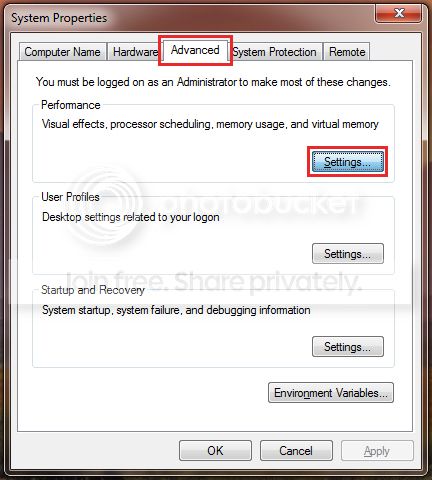
1. :orb:Start Menu> Run >type control.exe system
and press the Enter key.
A windows will open and on the Left hand side you will see Advanced system settings, click it.


2.
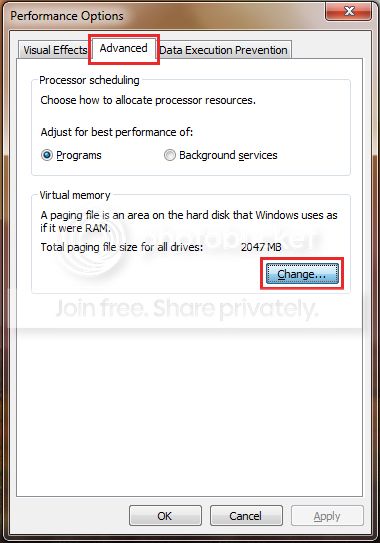
Next click on the Advanced tab and Settings which correspond to the Performance section;


3. Then the Advanced tab once more and click on the Change button;


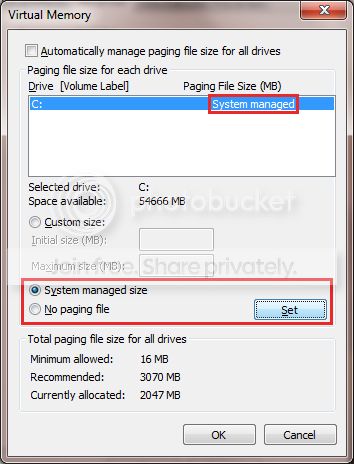
4. Untick the checkbox next to Automatically manage paging file size for all drives;


5. Select No paging file and Click on the Set button;


6. Confirm all the windows.

7.
Restart the PC.

8. Reverse the procedure, by following steps 1-3, only this time select System managed size
and click the Set button;


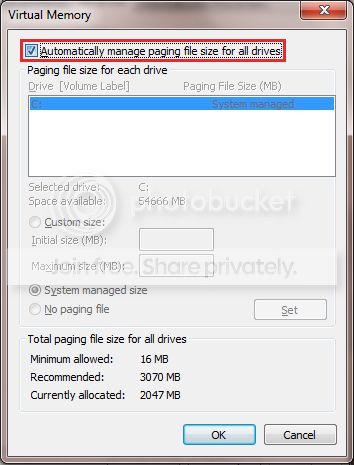
9. Recheck the box next to Automatically manage paging file size for all drives
and exit the windows by clicking the OK button;


10. Confirm all of the remaining windows by click the OK button
and restart once again to take affect.
 

My Computer My Computer

At a glance

Windows 10Intel Core i5 3570K16GB 1600Mhz G.SkillGigabyte GTX 970 G1-Gaming
Computer type
PC/Desktop
OS
Windows 10
CPU
Intel Core i5 3570K
Motherboard
Asus P8Z77V-PRO
Memory
16GB 1600Mhz G.Skill
Graphics Card(s)
Gigabyte GTX 970 G1-Gaming
PSU
Seasonic 1000W Platinum
Case
Fractal Design Define R4
Cooling
Noctua NH-D14
Thanks for all the help mate. I'll get to this as soon as I can, my computer is acting up a lot now. I just tried starting it again to do everything but I got another blue screen error this time, 0x0000007A. My brother said when he tried starting the computer before as well it said "missing OS." So again, I'll try to get to this if I can and if it's not too late for my HDD. Also, the reason I have two partitions is because my old hard drive was small and it began failing so my brother bought a 500GB and transferred all the files we had on the old drive to a C: partition and made a separate partition to hold any extra files we wanted. A: is used mostly for just big file downloads that aren't being able to be held in partition C:. Also, when I tried to do option 2 when the computer still functioned semi-decently it just gave me an error so I used option 1.
 

My Computer My Computer

At a glance

Microsoft Windows 7 Ultimate 64-bit 7601 Mult...AMD FX(tm)-4100 Quad-Core ProcessorDDR3 800MHz 4GB RAMNVIDIA GeForce GTX 650
Computer type
PC/Desktop
Computer Manufacturer/Model Number
Custom Build
OS
Microsoft Windows 7 Ultimate 64-bit 7601 Multiprocessor Free Service Pack 1
CPU
AMD FX(tm)-4100 Quad-Core Processor
Motherboard
MSI 760GM-P23(FX) (MS-7641)
Memory
DDR3 800MHz 4GB RAM
Graphics Card(s)
NVIDIA GeForce GTX 650
Sound Card
Realtek High Definition Audio
Hard Drives
WB Blue 500GB WDC WD5000AAKX-00ERMA0 ATA Device
Antivirus
Advanced SystemCare Ultimate
Browser
Safari, Google Chrome
Code:
STOP 0x0000007A: KERNEL_DATA_INPAGE_ERROR    (go to top of page)
Usual causes:  Memory, [U][B]Paging file corruption[/B][/U], [U][B]File system[/B][/U], [U][B]Hard drive[/B][/U], [U][B]Cabling[/B][/U], Virus infection, Improperly seated cards, BIOS, Bad motherboard, Missing Service Pack

Did you use an elevated command prompt to execute the CHKDSK command?

C: partition is in use so you need
to jump to execute OPTION 2 of the tutorial and using the /R switch.

Please try again and continue with the rest of the tests :) .

Free up at least 5GB of space in your C:\ partition, you only have 1.36GB of free space.


Reset your Page File:

1. :orb:Start Menu> Run >type control.exe system
and press the Enter key.
A windows will open and on the Left hand side you will see Advanced system settings, click it.


2.
Next click on the Advanced tab and Settings which correspond to the Performance section;


3. Then the Advanced tab once more and click on the Change button;


4. Untick the checkbox next to Automatically manage paging file size for all drives;

Select No paging file and Click on the Set button;


5. Confirm all the windows.

6.
Restart the PC.

7. Reverse the procedure, by following steps 1-3, only this time select System managed size
and click the Set button;


8. Recheck the box next to Automatically manage paging file size for all drives
and exit the windows by clicking the OK button;


9. Confirm all of the remaining windows by click the OK button
and restart the PC once again to take affect.
 

My Computer My Computer

At a glance

Windows 10Intel Core i5 3570K16GB 1600Mhz G.SkillGigabyte GTX 970 G1-Gaming
Computer type
PC/Desktop
OS
Windows 10
CPU
Intel Core i5 3570K
Motherboard
Asus P8Z77V-PRO
Memory
16GB 1600Mhz G.Skill
Graphics Card(s)
Gigabyte GTX 970 G1-Gaming
PSU
Seasonic 1000W Platinum
Case
Fractal Design Define R4
Cooling
Noctua NH-D14
Back
Top