Bsod 0x0a

Mano

New member
Member
Local time
6:03 PM
Messages
52
Open prototype 2 and i got bsod, cpu, vga, ram run at stock speed, no OC

080512-27237-01.dmp


updated
 
Last edited:

My Computer

OS
Windows 7
CPU
i7 920
Motherboard
Evga x58 SLI LE
Memory
2x2GB G.Skill 1333
Graphics Card(s)
Gigabyte GTX 670
Monitor(s) Displays
Dell 2711
Screen Resolution
2560x1440
PSU
Seasonic M12-620W
Case
naked
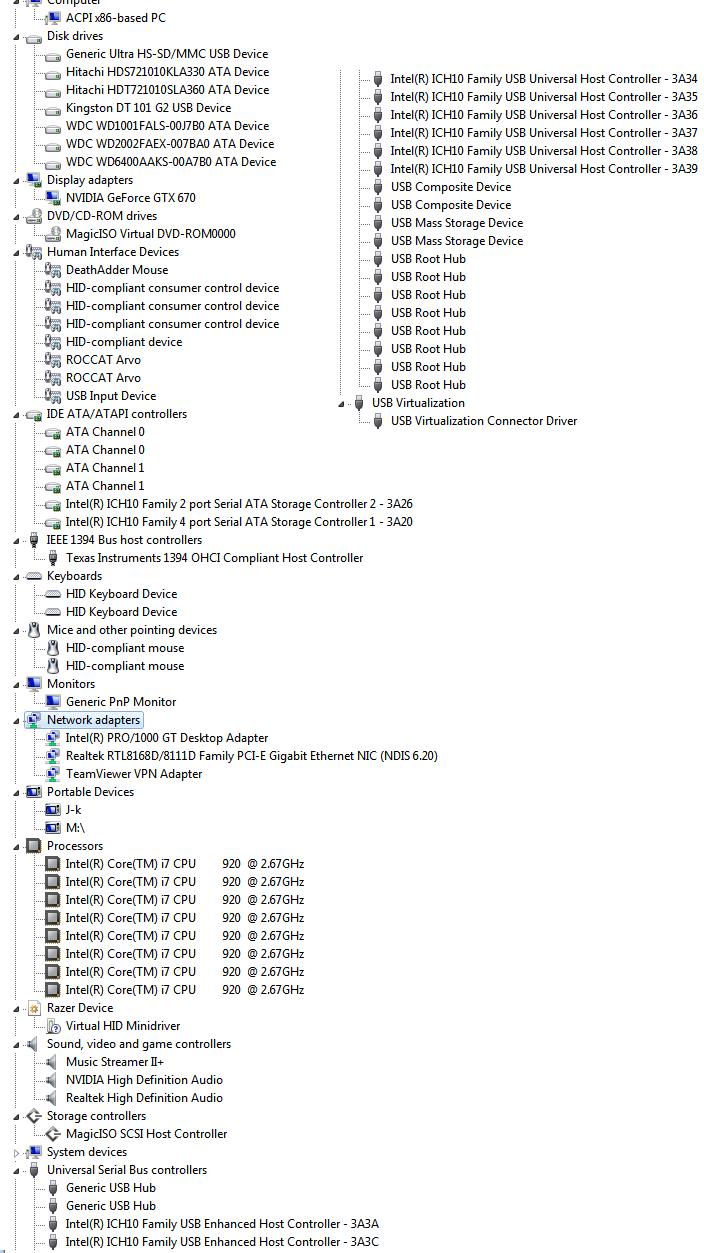
can anyone at least teach my how to read this dmp file?
 

My Computer

OS
Windows 7
CPU
i7 920
Motherboard
Evga x58 SLI LE
Memory
2x2GB G.Skill 1333
Graphics Card(s)
Gigabyte GTX 670
Monitor(s) Displays
Dell 2711
Screen Resolution
2560x1440
PSU
Seasonic M12-620W
Case
naked

My Computer

Computer Manufacturer/Model Number
Brewed
OS
Microsoft Windows 7 Ultimate: x64 (SP1)
CPU
Intel® Core™ i5-2500K Processor
Motherboard
ASUS P8Z68-V PRO
Memory
Kingston DDR3 HyperX 1600MHz 8GB
Graphics Card(s)
ASUS GTX 560 TI DirectCU II 900MHz
Sound Card
Realtek® ALC892 8-Channel High Definition Audio CODEC
Monitor(s) Displays
ACER LCD P246HBD 1920x1080 (24") - Dell 1280x800
Screen Resolution
ACER LCD P246HBD ~ [1920X1080] - DELL ~ [1280x800]
Hard Drives
500 GB WD Caviar SE116 7200rpm SATA2
PSU
Corsair 750W Power Supply
Case
Coolermaster CM Scout
Cooling
Zalman FS-C77 Fatal1ty CPU Cooler
Keyboard
Logitech G15
Mouse
Coolermaster Sentinel Advanced
Internet Speed
[↓ 10 MB/s DL] [↑ 1 MB/s UL]
Other Info
- ROCCAT™ Kave – Solid 5.1 Surround Sound Gaming Headset
- Not overclocking
thanks, updated at 1st post
 

My Computer

OS
Windows 7
CPU
i7 920
Motherboard
Evga x58 SLI LE
Memory
2x2GB G.Skill 1333
Graphics Card(s)
Gigabyte GTX 670
Monitor(s) Displays
Dell 2711
Screen Resolution
2560x1440
PSU
Seasonic M12-620W
Case
naked
Thank you. :)

BSOD Analyse

Devices

You have three devices that doesn't work properly. Unplug them / Uninstall them or update their driver. If you go to Device Manager, they should be marked with a :warn:.

Code:
adfs	ROOT\LEGACY_ADFS\0000	This device is not present, is not working properly, or does not have all its drivers installed.
archlp	ROOT\LEGACY_ARCHLP\0000	This device is not present, is not working properly, or does not have all its drivers installed.
archlp	ROOT\LEGACY_ARCSEC\0000	This device is not present, is not working properly, or does not have all its drivers installed.

Looking at your bugcheck it's likely that a memory corruption event was triggered. Though a driver could be causing the memory to be borked, but we're usually suggesting a memory test before moving forward. Do a scan with Memtest86+. Memtest is a scanner that'll check your sticks for errors.

   Warning
:info: Note that the below instructions may break your WARRANTY rules. If you're unsure check manuals, separated warranty papers, stickers on computer for secure permission.

To ensure that we'll know if it's the slots on the motherboard that's broken, or the sticks itself - we have a little procedure we'll recommend. Remove 1 stick, scan the other with Memtest in the current slot. After 7 passes, move the stick to another slot and scan, and so on and so forth until you've scanned all the sticks, and all the slots, one by one.

Memtest86+ - Advanced Memory Diagnostic Tool

Best Regards,
Frederik.
 

My Computer

Computer Manufacturer/Model Number
Brewed
OS
Microsoft Windows 7 Ultimate: x64 (SP1)
CPU
Intel® Core™ i5-2500K Processor
Motherboard
ASUS P8Z68-V PRO
Memory
Kingston DDR3 HyperX 1600MHz 8GB
Graphics Card(s)
ASUS GTX 560 TI DirectCU II 900MHz
Sound Card
Realtek® ALC892 8-Channel High Definition Audio CODEC
Monitor(s) Displays
ACER LCD P246HBD 1920x1080 (24") - Dell 1280x800
Screen Resolution
ACER LCD P246HBD ~ [1920X1080] - DELL ~ [1280x800]
Hard Drives
500 GB WD Caviar SE116 7200rpm SATA2
PSU
Corsair 750W Power Supply
Case
Coolermaster CM Scout
Cooling
Zalman FS-C77 Fatal1ty CPU Cooler
Keyboard
Logitech G15
Mouse
Coolermaster Sentinel Advanced
Internet Speed
[↓ 10 MB/s DL] [↑ 1 MB/s UL]
Other Info
- ROCCAT™ Kave – Solid 5.1 Surround Sound Gaming Headset
- Not overclocking
Thanks for the diagnostic, but i couldnt find the
warnsmall.png
device
PVVJK.png


Will post memtest result later.
 

My Computer

OS
Windows 7
CPU
i7 920
Motherboard
Evga x58 SLI LE
Memory
2x2GB G.Skill 1333
Graphics Card(s)
Gigabyte GTX 670
Monitor(s) Displays
Dell 2711
Screen Resolution
2560x1440
PSU
Seasonic M12-620W
Case
naked
Alright.

Still, in Device Manager, go on top and select View followed by Show hidden Devices. Are there any yellow triangle mark on the hidden devices? (:warn:)
Also I noticed that the so called Devices the NFO pointed, belongs to Adobe actually. Make sure to have your Reader, Flash, other Adobe Products' software updated.
There's also some Arcsoft products within the NFO points. It's basically legacies of software acting up, and telling you that they have problems.

Table

  • adfs-legacy
    • Yahoo Answers said:
      It's Adobe Drive File System.

      If you no longer have any Adobe products then they haven't properly unistalled.
      You can use REVO Uninstaller to get rid of the extra bits.

      If you still have an Adobe program then uninstall and reinstall it.
  • archlp-legacy
    • Microsoft Answers said:
      It's a file from Arcsoft (often Total Media Theatre or Total Media Extreme). I'd advise you to uninstall and thenreinstall any Arcsoft programs if you still want them and check for updates atwww.arcsoft.com.

Best Regards,
Frederik.
 

My Computer

Computer Manufacturer/Model Number
Brewed
OS
Microsoft Windows 7 Ultimate: x64 (SP1)
CPU
Intel® Core™ i5-2500K Processor
Motherboard
ASUS P8Z68-V PRO
Memory
Kingston DDR3 HyperX 1600MHz 8GB
Graphics Card(s)
ASUS GTX 560 TI DirectCU II 900MHz
Sound Card
Realtek® ALC892 8-Channel High Definition Audio CODEC
Monitor(s) Displays
ACER LCD P246HBD 1920x1080 (24") - Dell 1280x800
Screen Resolution
ACER LCD P246HBD ~ [1920X1080] - DELL ~ [1280x800]
Hard Drives
500 GB WD Caviar SE116 7200rpm SATA2
PSU
Corsair 750W Power Supply
Case
Coolermaster CM Scout
Cooling
Zalman FS-C77 Fatal1ty CPU Cooler
Keyboard
Logitech G15
Mouse
Coolermaster Sentinel Advanced
Internet Speed
[↓ 10 MB/s DL] [↑ 1 MB/s UL]
Other Info
- ROCCAT™ Kave – Solid 5.1 Surround Sound Gaming Headset
- Not overclocking
thanks you, saw the 3
warnsmall.png
devices. I had arcsoft total media theatre but since i cant make it runs (it keeps loading forever) i uninstalled it.
 

My Computer

OS
Windows 7
CPU
i7 920
Motherboard
Evga x58 SLI LE
Memory
2x2GB G.Skill 1333
Graphics Card(s)
Gigabyte GTX 670
Monitor(s) Displays
Dell 2711
Screen Resolution
2560x1440
PSU
Seasonic M12-620W
Case
naked
thanks you, saw the 3
warnsmall.png
devices. I had arcsoft total media theatre but since i cant make it runs (it keeps loading forever) i uninstalled it.

So the Show Hidden Devices manoeuvre worked?

Sweet. We got those fixed then.

Best Regards,
Frederik.
 

My Computer

Computer Manufacturer/Model Number
Brewed
OS
Microsoft Windows 7 Ultimate: x64 (SP1)
CPU
Intel® Core™ i5-2500K Processor
Motherboard
ASUS P8Z68-V PRO
Memory
Kingston DDR3 HyperX 1600MHz 8GB
Graphics Card(s)
ASUS GTX 560 TI DirectCU II 900MHz
Sound Card
Realtek® ALC892 8-Channel High Definition Audio CODEC
Monitor(s) Displays
ACER LCD P246HBD 1920x1080 (24") - Dell 1280x800
Screen Resolution
ACER LCD P246HBD ~ [1920X1080] - DELL ~ [1280x800]
Hard Drives
500 GB WD Caviar SE116 7200rpm SATA2
PSU
Corsair 750W Power Supply
Case
Coolermaster CM Scout
Cooling
Zalman FS-C77 Fatal1ty CPU Cooler
Keyboard
Logitech G15
Mouse
Coolermaster Sentinel Advanced
Internet Speed
[↓ 10 MB/s DL] [↑ 1 MB/s UL]
Other Info
- ROCCAT™ Kave – Solid 5.1 Surround Sound Gaming Headset
- Not overclocking
I used memtest fail-safe mode with both 2 ram stick slotted. Come back after about 10 hours testing and the result said there is no error detected.
 

My Computer

OS
Windows 7
CPU
i7 920
Motherboard
Evga x58 SLI LE
Memory
2x2GB G.Skill 1333
Graphics Card(s)
Gigabyte GTX 670
Monitor(s) Displays
Dell 2711
Screen Resolution
2560x1440
PSU
Seasonic M12-620W
Case
naked
Alright then, let's enable Driver Verifier.

Here's how
Using Driver Verifier is an iffy proposition. Most times it'll crash and it'll tell you what the driver is. But sometimes it'll crash and won't tell you the driver. Other times it'll crash before you can log in to Windows. If you can't get to Safe Mode, then you'll have to resort to offline editing of the registry to disable Driver Verifier.

So, I'd suggest that you first backup your stuff and then make sure you've got access to another computer so you can contact us if problems arise.
Then make a System Restore point (so you can restore the system using the Vista/Win7 Startup Repair feature) - and create a System Repair Disc (Win7) if you don't have a full installation DVD.
You can do this by going to Start...All Programs...Maintenance...Create a System Repair Disc (don't forget to test the disc to make sure it works).

For Vista, you can download the repair discs from different websites. If unable to locate them, shoot me a PM and I'll point you to them.
For Win8, BSOD's are different - and we'll have to adjust how we do this with them.

Also, to ensure that you can recover, here's another couple of additional steps:
- Get to the Safe Mode menu (rapidly tap F8 just before the Windows splash screen comes up). Scroll down to and select "Disable automatic restart on System Failure"
- Get the RED information from this picture (in particular we will need the name of the file that the error occurred in):
Picture of a BSOD

Then, here's the procedure to run Driver Verifier:
- Go to Start and type in "verifier" (without the quotes) and press Enter
- Select "Create custom settings (for code developers)" and click "Next"
- Select "Select individual settings from a full list" and click "Next"
- Select everything EXCEPT FOR "IRP Logging", "Force Pending I/O Requests" and "Low Resource Simulation" and click "Next" ("Special Pool" may be able to be used depending on amount of RAM and errors being seen. In situations with small amounts of RAM, DO NOT select it),
- Select "Select driver names from a list" and click "Next"
Then select all drivers NOT provided by Microsoft and click "Next"
- Select "Finish" on the next page.

Reboot the system and wait for it to crash to the Blue Screen. Continue to use your system normally, and if you know what causes the crash, do that repeatedly. The objective here is to get the system to crash because Driver Verifier is stressing the drivers out. If it doesn't crash for you, then let it run for at least 36 hours of continuous operation (an estimate on my part).

Reboot into Windows (after the crash) and locate the memory dump file. If present, turn off Driver Verifier by going back in and selecting "Delete existing settings" on the first page. Then, zip up the memory dump file(s) and upload them with your next post. If no dump files were generated, post back for further suggestions.

If you can't get into Windows because it crashes too soon, try it in Safe Mode.
If you can't get into Safe Mode, try using System Restore from your installation DVD to set the system back to the previous restore point that you created.

If that doesn't work, post back and we'll have to see about fixing the registry entry off-line:
Code:
Delete these registry keys to stop Driver Verifier from loading (works in XP, Vista, Win7):
        HKEY_LOCAL_MACHINE\SYSTEM\CurrentControlSet\Control\Session Manager\Memory Management\VerifyDrivers
        HKEY_LOCAL_MACHINE\SYSTEM\CurrentControlSet\Control\Session Manager\Memory Management\VerifyDriverLevel

Best Regards,
Frederik.
 

My Computer

Computer Manufacturer/Model Number
Brewed
OS
Microsoft Windows 7 Ultimate: x64 (SP1)
CPU
Intel® Core™ i5-2500K Processor
Motherboard
ASUS P8Z68-V PRO
Memory
Kingston DDR3 HyperX 1600MHz 8GB
Graphics Card(s)
ASUS GTX 560 TI DirectCU II 900MHz
Sound Card
Realtek® ALC892 8-Channel High Definition Audio CODEC
Monitor(s) Displays
ACER LCD P246HBD 1920x1080 (24") - Dell 1280x800
Screen Resolution
ACER LCD P246HBD ~ [1920X1080] - DELL ~ [1280x800]
Hard Drives
500 GB WD Caviar SE116 7200rpm SATA2
PSU
Corsair 750W Power Supply
Case
Coolermaster CM Scout
Cooling
Zalman FS-C77 Fatal1ty CPU Cooler
Keyboard
Logitech G15
Mouse
Coolermaster Sentinel Advanced
Internet Speed
[↓ 10 MB/s DL] [↑ 1 MB/s UL]
Other Info
- ROCCAT™ Kave – Solid 5.1 Surround Sound Gaming Headset
- Not overclocking
Back
Top