BSOD after installing Windows7 on a new SSD and an old XP-machine

YamYam

New member
Local time
3:08 PM
Messages
22
L.S.

I got a BSOD problem after installing Windows 7 on an old machine.
I installed Windows 7 on a new SSD, trying to gain some speed.
It's a dual boot, Win7 and WinXP are on different physical drives.

Could somebody help me?
 

Attachments

Last edited:

My Computer My Computer

At a glance

Windows 7Core i7 8604GbSapphire Radeon HD 5770
Computer Manufacturer/Model Number
Selfmade
OS
Windows 7
CPU
Core i7 860
Motherboard
Gigabyte GA-P55-UD3R
Memory
4Gb
Graphics Card(s)
Sapphire Radeon HD 5770
Sound Card
none
Monitor(s) Displays
Iiyama MM904UT
Hard Drives
Samsung Spinpoint F1 1TB SATA2 [HD103UJ]
You have some memory corruption, DirectX/Display driver issue, and a PCI IDE Bus Driver issue. This looks like a hardware issue; it is probably memory based on the memory access issues seen in the dump files. Try different memory configurations (use one stick at a time and check different slots) and run the boot version of http://www.sevenforums.com/tutorials/105647-ram-test-memtest86.html for at least five passes.

If the memory passes, do the following:
1. http://www.sevenforums.com/tutorials/615-backup-user-system-files.html?filter
2. http://www.sevenforums.com/tutorials/697-system-restore-point-create.html
3. if you do not have a Windows 7 DVD, http://www.sevenforums.com/tutorials/2083-system-repair-disc-create.html
4. run http://www.sevenforums.com/tutorials/101379-driver-verifier-enable-disable.html

If Windows cannot start in normal mode with driver verifier running, start in safe mode. If it cannot start in safe mode or normal mode, use the system restore point using http://www.sevenforums.com/tutorials/700-system-restore.html OPTION TWO
 

My Computer My Computer

At a glance

Windows 7 Home Premium 64 BitIntel(R) Core(TM)2 Quad CPU Q9550 @ 2.83GHz6.00 GB Hundai HMT125U6BFR8C-H9ATI Radeon HD 4850
Computer Manufacturer/Model Number
HP Pavilion e9110t
OS
Windows 7 Home Premium 64 Bit
CPU
Intel(R) Core(TM)2 Quad CPU Q9550 @ 2.83GHz
Motherboard
Pegatron IPIEL-LA3
Memory
6.00 GB Hundai HMT125U6BFR8C-H9
Graphics Card(s)
ATI Radeon HD 4850
Sound Card
Realtek High Definition Audio/ATI High Definition Audio
Monitor(s) Displays
Acer AL2216W
Screen Resolution
1680x1050
Hard Drives
Hitachi HDP725050GLA360 ATA Device 500 GB
PSU
Unknown/installed by HP
Case
HP generic case
Cooling
Intel Stock Cooling
Keyboard
HP Keyboard
Mouse
HP Mouse
Internet Speed
Download: 19.15 Mbps Upload: 1.67 Mbps
Other Info
Network Adapter Realtek RTL8168D/8111D Family PCI-E Gigabit Ethernet NIC (NDIS 6.20)
Network Adapter 802.11n Wireless PCI Express Card LAN Adapter
Reply to writhziden

Tnx,

I wil start testing and show the results...
- 4 slots, 4 cards (2x1Mb) : six passes without any problem
- 4x slot, 4x card : no problem

---
BTW : how can it be memory issue, when the system performed without any memory problems or BSOD's for 3 years, using Windows XP?
 
Last edited:

My Computer My Computer

At a glance

Windows 7Core i7 8604GbSapphire Radeon HD 5770
Computer Manufacturer/Model Number
Selfmade
OS
Windows 7
CPU
Core i7 860
Motherboard
Gigabyte GA-P55-UD3R
Memory
4Gb
Graphics Card(s)
Sapphire Radeon HD 5770
Sound Card
none
Monitor(s) Displays
Iiyama MM904UT
Hard Drives
Samsung Spinpoint F1 1TB SATA2 [HD103UJ]
When testing one stick/card at a time using Memtest86+, what you want to accomplish is the following:

Once you find a memory card that passes the test, you will know that card and that slot are good. Test the other slots with the good card to find any bad slots. Then use the good slots to test if any of the remaining cards are bad.
 

My Computer My Computer

At a glance

Windows 7 Home Premium 64 BitIntel(R) Core(TM)2 Quad CPU Q9550 @ 2.83GHz6.00 GB Hundai HMT125U6BFR8C-H9ATI Radeon HD 4850
Computer Manufacturer/Model Number
HP Pavilion e9110t
OS
Windows 7 Home Premium 64 Bit
CPU
Intel(R) Core(TM)2 Quad CPU Q9550 @ 2.83GHz
Motherboard
Pegatron IPIEL-LA3
Memory
6.00 GB Hundai HMT125U6BFR8C-H9
Graphics Card(s)
ATI Radeon HD 4850
Sound Card
Realtek High Definition Audio/ATI High Definition Audio
Monitor(s) Displays
Acer AL2216W
Screen Resolution
1680x1050
Hard Drives
Hitachi HDP725050GLA360 ATA Device 500 GB
PSU
Unknown/installed by HP
Case
HP generic case
Cooling
Intel Stock Cooling
Keyboard
HP Keyboard
Mouse
HP Mouse
Internet Speed
Download: 19.15 Mbps Upload: 1.67 Mbps
Other Info
Network Adapter Realtek RTL8168D/8111D Family PCI-E Gigabit Ethernet NIC (NDIS 6.20)
Network Adapter 802.11n Wireless PCI Express Card LAN Adapter
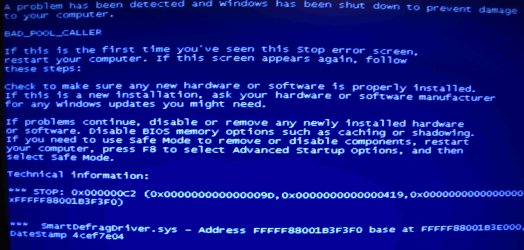
BSOD after starting driver verifier

Memory check showed no problems.
I also ran the windows check (on start up).

However:
After starting the driver verifier, I couldn't even start windows7.
After the initial Windows screen, I get a BSOD "BAD_POOL_CALLER'
I attached a print screen.

I had to start from an earlier restore point, so there are no minidump files anymore.
Therefore I started Windows7 again and did NOTHING (touched neither mouse nor keybord!)
After a while I got the BDOS again.
The minidump is enclosed.

YamYam
 

Attachments

Last edited:

My Computer My Computer

At a glance

Windows 7Core i7 8604GbSapphire Radeon HD 5770
Computer Manufacturer/Model Number
Selfmade
OS
Windows 7
CPU
Core i7 860
Motherboard
Gigabyte GA-P55-UD3R
Memory
4Gb
Graphics Card(s)
Sapphire Radeon HD 5770
Sound Card
none
Monitor(s) Displays
Iiyama MM904UT
Hard Drives
Samsung Spinpoint F1 1TB SATA2 [HD103UJ]
Hi -

Driver Verifier flagged -
Code:
[FONT=lucida console][COLOR=red]SmartDefrag[COLOR=black]Driver[/COLOR][/COLOR][COLOR=black].sys[/COLOR] Fri Nov 26 04:29:40 2010 (4CEF7E04)[/FONT]

Remove the offending app.


Prior dumps were all memory related.

See if updating Asus ATK0110 helps -
Code:
[FONT=lucida console]ASACPI.sys            Sun Mar 27 22:30:36 [COLOR=red]2005[/COLOR] (42476C4C)[/FONT]
http://www.sysnative.com/drivers/driver.php?id=asacpi.sys


Regards. . .

jcgriff2


`


BSOD SUMMARY
Code:
[FONT=lucida console]Loading Dump File [C:\Users\PalmDesert\_jcgriff2_\dbug\__Kernel__\112711-19749-01.dmp][/FONT]
[FONT=lucida console]Built by: 7601.17640.amd64fre.win7sp1_gdr.110622-1506[/FONT]
[FONT=lucida console]Debug session time: Sun Nov 27 09:57:04.264 2011 (GMT-5)[/FONT]
[FONT=lucida console]System Uptime: 0 days 0:55:41.981[/FONT]
[FONT=lucida console]Probably caused by : dxgmms1.sys ( dxgmms1!VIDMM_GLOBAL::ReferenceDmaBuffer+1e5 )[/FONT]
[FONT=lucida console]BUGCHECK_STR:  0x1a_41287[/FONT]
[FONT=lucida console]DEFAULT_BUCKET_ID:  VISTA_DRIVER_FAULT[/FONT]
[FONT=lucida console]PROCESS_NAME:  dwm.exe[/FONT]
[FONT=lucida console]FAILURE_BUCKET_ID:  X64_0x1a_41287_dxgmms1!VIDMM_GLOBAL::ReferenceDmaBuffer+1e5[/FONT]
[FONT=lucida console]Bugcheck code 0000001A[/FONT]
[FONT=lucida console]Arguments 00000000`00041287 00000000`00000030 00000000`00000000 00000000`00000000[/FONT]
[FONT=lucida console]BiosVersion = 0702   [/FONT]
[FONT=lucida console]BiosReleaseDate = 10/29/2008[/FONT]
[FONT=lucida console]SystemManufacturer = System manufacturer[/FONT]
[FONT=lucida console]SystemProductName = P5K-VM[/FONT]
[FONT=lucida console]MaxSpeed:     2530[/FONT]
[FONT=lucida console]CurrentSpeed: 2533[/FONT]
[FONT=lucida console]¨¨¨¨¨¨¨¨¨¨¨¨¨¨¨¨¨¨¨¨¨¨¨¨¨¨¨¨¨¨¨¨¨¨¨¨¨¨¨¨¨¨¨¨¨¨¨¨¨¨¨¨¨¨¨¨¨¨¨¨¨¨¨¨¨¨¨¨¨¨¨¨¨¨¨¨¨¨¨¨¨¨¨¨¨¨``[/FONT]
[FONT=lucida console]Loading Dump File [C:\Users\PalmDesert\_jcgriff2_\dbug\__Kernel__\112711-19983-01.dmp][/FONT]
[FONT=lucida console]Built by: 7601.17640.amd64fre.win7sp1_gdr.110622-1506[/FONT]
[FONT=lucida console]Debug session time: Sun Nov 27 09:00:32.779 2011 (GMT-5)[/FONT]
[FONT=lucida console]System Uptime: 0 days 0:05:01.496[/FONT]
[FONT=lucida console]Probably caused by : ntkrnlmp.exe ( nt! ?? ::FNODOBFM::`string'+3824b )[/FONT]
[FONT=lucida console]BUGCHECK_STR:  0x4E_7[/FONT]
[FONT=lucida console]DEFAULT_BUCKET_ID:  VISTA_DRIVER_FAULT[/FONT]
[FONT=lucida console]PROCESS_NAME:  avgrsa.exe[/FONT]
[FONT=lucida console]FAILURE_BUCKET_ID:  X64_0x4E_7_nt!_??_::FNODOBFM::_string_+3824b[/FONT]
[FONT=lucida console]Bugcheck code 0000004E[/FONT]
[FONT=lucida console]Arguments 00000000`00000007 00000000`00016ed8 00000000`00016f18 00000000`00000000[/FONT]
[FONT=lucida console]BiosVersion = 0702   [/FONT]
[FONT=lucida console]BiosReleaseDate = 10/29/2008[/FONT]
[FONT=lucida console]SystemManufacturer = System manufacturer[/FONT]
[FONT=lucida console]SystemProductName = P5K-VM[/FONT]
[FONT=lucida console]MaxSpeed:     2530[/FONT]
[FONT=lucida console]CurrentSpeed: 2533[/FONT]
[FONT=lucida console]¨¨¨¨¨¨¨¨¨¨¨¨¨¨¨¨¨¨¨¨¨¨¨¨¨¨¨¨¨¨¨¨¨¨¨¨¨¨¨¨¨¨¨¨¨¨¨¨¨¨¨¨¨¨¨¨¨¨¨¨¨¨¨¨¨¨¨¨¨¨¨¨¨¨¨¨¨¨¨¨¨¨¨¨¨¨``[/FONT]
[FONT=lucida console]Loading Dump File [C:\Users\PalmDesert\_jcgriff2_\dbug\__Kernel__\112711-47892-01.dmp][/FONT]
[FONT=lucida console]Built by: 7601.17640.amd64fre.win7sp1_gdr.110622-1506[/FONT]
[FONT=lucida console]Debug session time: Sun Nov 27 08:54:17.635 2011 (GMT-5)[/FONT]
[FONT=lucida console]System Uptime: 0 days 0:10:04.353[/FONT]
[FONT=lucida console]Probably caused by : PCIIDEX.SYS ( PCIIDEX!BmFlush+25 )[/FONT]
[FONT=lucida console]DEFAULT_BUCKET_ID:  VISTA_DRIVER_FAULT[/FONT]
[FONT=lucida console]BUGCHECK_STR:  0xA[/FONT]
[FONT=lucida console]PROCESS_NAME:  System[/FONT]
[FONT=lucida console]FAILURE_BUCKET_ID:  X64_0xA_PCIIDEX!BmFlush+25[/FONT]
[FONT=lucida console]Bugcheck code 0000000A[/FONT]
[FONT=lucida console]Arguments fffffba0`0df59d48 00000000`00000002 00000000`00000000 fffff800`02a6ffe7[/FONT]
[FONT=lucida console]BiosVersion = 0702   [/FONT]
[FONT=lucida console]BiosReleaseDate = 10/29/2008[/FONT]
[FONT=lucida console]SystemManufacturer = System manufacturer[/FONT]
[FONT=lucida console]SystemProductName = P5K-VM[/FONT]
[FONT=lucida console]MaxSpeed:     2530[/FONT]
[FONT=lucida console]CurrentSpeed: 2533[/FONT]
[FONT=lucida console]¨¨¨¨¨¨¨¨¨¨¨¨¨¨¨¨¨¨¨¨¨¨¨¨¨¨¨¨¨¨¨¨¨¨¨¨¨¨¨¨¨¨¨¨¨¨¨¨¨¨¨¨¨¨¨¨¨¨¨¨¨¨¨¨¨¨¨¨¨¨¨¨¨¨¨¨¨¨¨¨¨¨¨¨¨¨``[/FONT]
[FONT=lucida console]Loading Dump File [C:\Users\PalmDesert\_jcgriff2_\dbug\__Kernel__\112711-19687-01.dmp][/FONT]
[FONT=lucida console]Built by: 7601.17640.amd64fre.win7sp1_gdr.110622-1506[/FONT]
[FONT=lucida console]Debug session time: Sun Nov 27 08:42:42.282 2011 (GMT-5)[/FONT]
[FONT=lucida console]System Uptime: 0 days 0:37:30.999[/FONT]
[FONT=lucida console]Probably caused by : memory_corruption ( nt!MiSwapWslEntries+83 )[/FONT]
[FONT=lucida console]DEFAULT_BUCKET_ID:  VISTA_DRIVER_FAULT[/FONT]
[FONT=lucida console]BUGCHECK_STR:  0x50[/FONT]
[FONT=lucida console]PROCESS_NAME:  explorer.exe[/FONT]
[FONT=lucida console]FAILURE_BUCKET_ID:  X64_0x50_nt!MiSwapWslEntries+83[/FONT]
[FONT=lucida console]Bugcheck code 00000050[/FONT]
[FONT=lucida console]Arguments fffffc80`00057b78 00000000`00000000 fffff800`02ac9713 00000000`00000007[/FONT]
[FONT=lucida console]BiosVersion = 0702   [/FONT]
[FONT=lucida console]BiosReleaseDate = 10/29/2008[/FONT]
[FONT=lucida console]SystemManufacturer = System manufacturer[/FONT]
[FONT=lucida console]SystemProductName = P5K-VM[/FONT]
[FONT=lucida console]MaxSpeed:     2530[/FONT]
[FONT=lucida console]CurrentSpeed: 2533[/FONT]
[FONT=lucida console]¨¨¨¨¨¨¨¨¨¨¨¨¨¨¨¨¨¨¨¨¨¨¨¨¨¨¨¨¨¨¨¨¨¨¨¨¨¨¨¨¨¨¨¨¨¨¨¨¨¨¨¨¨¨¨¨¨¨¨¨¨¨¨¨¨¨¨¨¨¨¨¨¨¨¨¨¨¨¨¨¨¨¨¨¨¨``[/FONT]
 
 
[FONT=lucida console]by [COLOR=navy]jcgriff2     [/COLOR][/FONT]
 
[FONT=lucida console][COLOR=navy] J. C. Griffith, Microsoft MVP[/COLOR]   [/FONT]
 
[FONT=lucida console]   [URL="https://mvp.support.microsoft.com/profile/Griffith"][COLOR=#000055][U]https://mvp.support.microsoft.com/profile/Griffith[/U][/COLOR][/URL]   [/FONT]
 
 
[FONT=lucida console]   [URL="http://www.sysnative.com/"][COLOR=#000033][U]www.sysnative.com[/U][/COLOR][/URL][/FONT]
 
[FONT=lucida console]   [URL="http://www.jcgriff2.com/"][COLOR=#000055][U]www.jcgriff2.com[/U][/COLOR][/URL] [/FONT]
 
 
[FONT=lucida console]¨¨¨¨¨¨¨¨¨¨¨¨¨¨¨¨¨¨¨¨¨¨¨¨¨¨¨¨¨¨¨¨¨¨¨¨¨¨¨¨¨¨¨¨¨¨¨¨¨¨¨¨¨¨¨¨¨¨¨¨¨¨¨¨¨¨¨¨¨¨¨¨¨¨¨¨¨¨¨¨¨¨¨¨¨¨[/FONT]

 

My Computer My Computer

At a glance

Windows 7 - Vista
OS
Windows 7 - Vista

My Computer My Computer

At a glance

Win 8 Release candidate 8400[email protected]4 gigsNvidia 9600M
Computer Manufacturer/Model Number
HP Pavillion dv-7 1005 Tx
OS
Win 8 Release candidate 8400
CPU
[email protected]
Memory
4 gigs
Graphics Card(s)
Nvidia 9600M
Sound Card
HD built-in
Monitor(s) Displays
17" Wxga
Screen Resolution
1440x900
Cooling
none
Internet Speed
45Mb down 5Mb up
Thanks, but system still showed BSOD's and freezes.

Update :
- Smartdefragger (IOBIT) removed;
- could not replace or remove ASACPI.sys (2005 version);
- removed avast.

Then I turned on the system overnight and regarding the dump files, it rebooted 3 times (30-11-2011 00:20 / 1:06 / 1:21).
This morning the system was freezed at 03:00 (referring to the timer on the screen).

I don't know how te replace the ASACPI.sys.
The file is situated in the folder \DriverStore\FileRepository\atk2000.inf_amd64_neutral_a91abe245a6c41c8.
The motherboard is a ASUS P5K-VM/V (P5G33/DP).

Eclosed a the new dump files, System Health Report and BSOD Dump & System File Collection (111130.rar).
I also enclose the content of the directory : atk2000.inf_amd64_neutral_a91abe245a6c41c8.
 

Attachments

Last edited:

My Computer My Computer

At a glance

Windows 7Core i7 8604GbSapphire Radeon HD 5770
Computer Manufacturer/Model Number
Selfmade
OS
Windows 7
CPU
Core i7 860
Motherboard
Gigabyte GA-P55-UD3R
Memory
4Gb
Graphics Card(s)
Sapphire Radeon HD 5770
Sound Card
none
Monitor(s) Displays
Iiyama MM904UT
Hard Drives
Samsung Spinpoint F1 1TB SATA2 [HD103UJ]
The asacpi.sys is the most important thing to update. What sort of problems are you having?

Did you follow the instructions carefully?
 

My Computer My Computer

At a glance

Win 8 Release candidate 8400[email protected]4 gigsNvidia 9600M
Computer Manufacturer/Model Number
HP Pavillion dv-7 1005 Tx
OS
Win 8 Release candidate 8400
CPU
[email protected]
Memory
4 gigs
Graphics Card(s)
Nvidia 9600M
Sound Card
HD built-in
Monitor(s) Displays
17" Wxga
Screen Resolution
1440x900
Cooling
none
Internet Speed
45Mb down 5Mb up
This is what i did :

At the Asus website, I could not download the drivers for Win7 for my motherboard (ASUS Barebone V2-P5G33).
Instead I downloaded the "ASUS PC Probe II V1.04.47 for Windows 2000/XP/XP 64bit/vista/vista 64bit" and "Intel(R) Chipset Software Installation Utility V8.3.0.1013 for Windows XP & 64bit XP & 32/64bit Vista(WHQL)".
However, on installation I got the message "fail to install the ACPI driver" (using setup.exe) or "Does not support this OS: WNT_6.1.P_64_MCE" (using AsusSetup.exe).
 
Last edited:

My Computer My Computer

At a glance

Windows 7Core i7 8604GbSapphire Radeon HD 5770
Computer Manufacturer/Model Number
Selfmade
OS
Windows 7
CPU
Core i7 860
Motherboard
Gigabyte GA-P55-UD3R
Memory
4Gb
Graphics Card(s)
Sapphire Radeon HD 5770
Sound Card
none
Monitor(s) Displays
Iiyama MM904UT
Hard Drives
Samsung Spinpoint F1 1TB SATA2 [HD103UJ]
This is what i did :

At the Asus website, I could not download the drivers for Win7 for my motherboard (ASUS Barebone V2-P5G33).
Instead I downloaded the "ASUS PC Probe II V1.04.47 for Windows 2000/XP/XP 64bit/vista/vista 64bit" and "Intel(R) Chipset Software Installation Utility V8.3.0.1013 for Windows XP & 64bit XP & 32/64bit Vista(WHQL)".
However, on installation I got the message "fail to install the ACPI driver" (using setup.exe) or "Does not support this OS: WNT_6.1.P_64_MCE" (using AsusSetup.exe).


OS: WNT_6.1.P_64_MCE MCE editon(media center edition)? The above does not say win 7. You may need to install it in compatibility mode

(compat mode=right click the installer>properties>compatibility>chose OS)
 

My Computer My Computer

At a glance

Win 8 Release candidate 8400[email protected]4 gigsNvidia 9600M
Computer Manufacturer/Model Number
HP Pavillion dv-7 1005 Tx
OS
Win 8 Release candidate 8400
CPU
[email protected]
Memory
4 gigs
Graphics Card(s)
Nvidia 9600M
Sound Card
HD built-in
Monitor(s) Displays
17" Wxga
Screen Resolution
1440x900
Cooling
none
Internet Speed
45Mb down 5Mb up
This is what i did :

At the Asus website, I could not download the drivers for Win7 for my motherboard (ASUS Barebone V2-P5G33).
Instead I downloaded the "ASUS PC Probe II V1.04.47 for Windows 2000/XP/XP 64bit/vista/vista 64bit" and "Intel(R) Chipset Software Installation Utility V8.3.0.1013 for Windows XP & 64bit XP & 32/64bit Vista(WHQL)".
However, on installation I got the message "fail to install the ACPI driver" (using setup.exe) or "Does not support this OS: WNT_6.1.P_64_MCE" (using AsusSetup.exe).


OS: WNT_6.1.P_64_MCE MCE editon(media center edition)? The above does not say win 7. You may need to install it in compatibility mode

(compat mode=right click the installer>properties>compatibility>chose OS)

Are you sure, because I bought the Win7 ultimate edition !
I will try to chose the compatibility mode.
N.B. Searching for "WNT_6.1.P_64_MCE" I found the following site : http://www.viaarena.com/forums/showthread.php?t=39537
They suggested to change the ini-file. Should I do that ??

YamYam
 

My Computer My Computer

At a glance

Windows 7Core i7 8604GbSapphire Radeon HD 5770
Computer Manufacturer/Model Number
Selfmade
OS
Windows 7
CPU
Core i7 860
Motherboard
Gigabyte GA-P55-UD3R
Memory
4Gb
Graphics Card(s)
Sapphire Radeon HD 5770
Sound Card
none
Monitor(s) Displays
Iiyama MM904UT
Hard Drives
Samsung Spinpoint F1 1TB SATA2 [HD103UJ]
This is what i did :

At the Asus website, I could not download the drivers for Win7 for my motherboard (ASUS Barebone V2-P5G33).
Instead I downloaded the "ASUS PC Probe II V1.04.47 for Windows 2000/XP/XP 64bit/vista/vista 64bit" and "Intel(R) Chipset Software Installation Utility V8.3.0.1013 for Windows XP & 64bit XP & 32/64bit Vista(WHQL)".
However, on installation I got the message "fail to install the ACPI driver" (using setup.exe) or "Does not support this OS: WNT_6.1.P_64_MCE" (using AsusSetup.exe).


OS: WNT_6.1.P_64_MCE MCE editon(media center edition)? The above does not say win 7. You may need to install it in compatibility mode

(compat mode=right click the installer>properties>compatibility>chose OS)

Are you sure, because I bought the Win7 ultimate edition !
I will try to chose the compatibility mode.
N.B. Searching for "WNT_6.1.P_64_MCE" I found the following site : ASUS + Windows 7 + VT1708S - Easy way to install Vista driver AND deck. - VIA Forums
They suggested to change the ini-file. Should I do that ??

YamYam

It appears to just allow you to install the driver on non supported versions. I would not do that unless absolutely necessary, and then only if I had a backup and restore point.
 

My Computer My Computer

At a glance

Win 8 Release candidate 8400[email protected]4 gigsNvidia 9600M
Computer Manufacturer/Model Number
HP Pavillion dv-7 1005 Tx
OS
Win 8 Release candidate 8400
CPU
[email protected]
Memory
4 gigs
Graphics Card(s)
Nvidia 9600M
Sound Card
HD built-in
Monitor(s) Displays
17" Wxga
Screen Resolution
1440x900
Cooling
none
Internet Speed
45Mb down 5Mb up
OK thanks.
The computer is now in use (Win XP mode), but I wil try your suggestion tomorrow!
 

My Computer My Computer

At a glance

Windows 7Core i7 8604GbSapphire Radeon HD 5770
Computer Manufacturer/Model Number
Selfmade
OS
Windows 7
CPU
Core i7 860
Motherboard
Gigabyte GA-P55-UD3R
Memory
4Gb
Graphics Card(s)
Sapphire Radeon HD 5770
Sound Card
none
Monitor(s) Displays
Iiyama MM904UT
Hard Drives
Samsung Spinpoint F1 1TB SATA2 [HD103UJ]
OK thanks.
The computer is now in use (Win XP mode), but I wil try your suggestion tomorrow!


Let us know if you need help.
 

My Computer My Computer

At a glance

Win 8 Release candidate 8400[email protected]4 gigsNvidia 9600M
Computer Manufacturer/Model Number
HP Pavillion dv-7 1005 Tx
OS
Win 8 Release candidate 8400
CPU
[email protected]
Memory
4 gigs
Graphics Card(s)
Nvidia 9600M
Sound Card
HD built-in
Monitor(s) Displays
17" Wxga
Screen Resolution
1440x900
Cooling
none
Internet Speed
45Mb down 5Mb up
OK thanks.
The computer is now in use (Win XP mode), but I wil try your suggestion tomorrow!


Let us know if you need help.

Installation now OK!
I checked all (!) the exe files as run in compatibility mode (Vista SP2) and as run as administrator
The system is restarted again and i'm waiting.........
 

My Computer My Computer

At a glance

Windows 7Core i7 8604GbSapphire Radeon HD 5770
Computer Manufacturer/Model Number
Selfmade
OS
Windows 7
CPU
Core i7 860
Motherboard
Gigabyte GA-P55-UD3R
Memory
4Gb
Graphics Card(s)
Sapphire Radeon HD 5770
Sound Card
none
Monitor(s) Displays
Iiyama MM904UT
Hard Drives
Samsung Spinpoint F1 1TB SATA2 [HD103UJ]
Within 15 minutes, another BSOD !
I enclose the dump files and system health files.
Timestamp of the asacpi is 19-10-2006 (1.532) and the old asacpi still exist !

YamYam
 

Attachments

My Computer My Computer

At a glance

Windows 7Core i7 8604GbSapphire Radeon HD 5770
Computer Manufacturer/Model Number
Selfmade
OS
Windows 7
CPU
Core i7 860
Motherboard
Gigabyte GA-P55-UD3R
Memory
4Gb
Graphics Card(s)
Sapphire Radeon HD 5770
Sound Card
none
Monitor(s) Displays
Iiyama MM904UT
Hard Drives
Samsung Spinpoint F1 1TB SATA2 [HD103UJ]
Last edited:

My Computer My Computer

At a glance

Win 7 Ultimate 64-bit. SP1.Intel i7 -720QM.[1.6GHz Turbo Boost 2.8GHz. 6...8 DDR 3 RAM. 1066MHZATI 1024 MB. DDR3. Radeon HD5650
Computer Manufacturer/Model Number
LAPTOP. HP Pavilion dv7-4010TX .
OS
Win 7 Ultimate 64-bit. SP1.
CPU
Intel i7 -720QM.[1.6GHz Turbo Boost 2.8GHz. 6MB Cache.]
Memory
8 DDR 3 RAM. 1066MHZ
Graphics Card(s)
ATI 1024 MB. DDR3. Radeon HD5650
Monitor(s) Displays
17.3" High Definition Brightview LCD. LED Backlit.
Screen Resolution
1600 x 900.
Hard Drives
640GB
Case
Laptop / notebook.
Mouse
Logitech Anywhere mouse. MX.
Internet Speed
ADSL [ but too slow ]
Sorry, might be foolish, but I don't know how to remove the wrong asacpi.sys.
After I installed the ASUS drivers (see my comment #16/#17) the wrong asacpi.sys stays in the directory \DriverStore\FileRepository\atk2000.inf_amd64_neutral_a91abe245a6c41c.
There is also a new asacpi.sys in the directory \DriverStore\FileRepository\asacpi.inf_amd64_neutral_9fe33cbdd27308a4.

As you suggested I now also removed AVG and installed MSE.
 
Last edited:

My Computer My Computer

At a glance

Windows 7Core i7 8604GbSapphire Radeon HD 5770
Computer Manufacturer/Model Number
Selfmade
OS
Windows 7
CPU
Core i7 860
Motherboard
Gigabyte GA-P55-UD3R
Memory
4Gb
Graphics Card(s)
Sapphire Radeon HD 5770
Sound Card
none
Monitor(s) Displays
Iiyama MM904UT
Hard Drives
Samsung Spinpoint F1 1TB SATA2 [HD103UJ]
Is asacpi.sys in \windows\system32\drivers?

If so, what is the timestamp?
 

My Computer My Computer

At a glance

Windows 7 - Vista
OS
Windows 7 - Vista
Back
Top