Solved BSOD after Ubuntu installation, 0x0000007B error

sniffer55

New member
Local time
9:07 PM
Messages
10
I was having well working Windows 7 OS, but I wanted to try out Ubuntu 12.04. So I make some free space and created separate ext primary partition using Gparted utility of Ubuntu live CD and modified partition table and installed Ubuntu successfully. But After Ubuntu installation I cant boot into Windows 7. It gives 0x0000007B error on windows logo animation.

Below are points I noticed and tried after searching on some forums. But still cant find any solution. :cry:

1. I tried with system recovery option of windows 7 but my Windows 7 is not listed in System Recovery Options.

2. Below is result I get when i run diskpart. Its showing my disk status as Invalid. :cry:

DISKPART>list disk

Disk ### Status Size Free Dyn
-------- ------------- -------- ------- ---
Disk 0 Invalid 465 GB 0 B *
Disk 1 Online 7740 MB 0 B
Disk 2 No Media 0 B 0 B
Disk 3 No Media 0 B 0 B

DISKPART>select disk 0
Disk 0 is now the selected
DISKPART>list partition

Partition ### Type Size Offset
------------- ----------------- ---------- --------
Partition 1 Dynamic Data 75 GB 31 KB
Partition 2 Dynamic Data 100 MB 75 GB
Partition 3 Dynamic Data 100 GB 75 GB
Partition 4 Primary 48 GB 417 GB

DISKPART>select partition 1
Virtual Disk Service error:
This operation is not allowed on an invalid disk. The disk may be invalid because it is corrupted or failing, or it may be invalid becuase it is OFFLINE.

3. I am not able to run chkdsk as it is not able to detect my harddisk partition I guess.

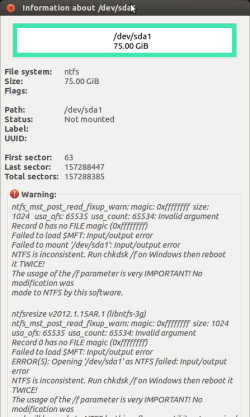
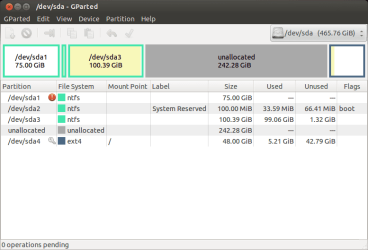
4. I am able to boot Ubuntu well and working fine but in Ubuntu I can mount one windows partition on which windows 7 is installed but not another one which is just used for data. here is screen shot of gparted result.

attachment.php


And its showing some kind of warning for first partition sda1 as shown in screen shot.

attachment.php


I want help in booting my windows 7 and in anycase want to recover data of partition which I am not able to mount in Ubuntu.

Thanks in Advance.
 

Attachments
  • gparted1.png
    gparted1.png
    18.8 KB · Views: 108
  • gparted2.png
    gparted2.png
    26 KB · Views: 107

My Computer My Computer

OS
Windows 7 Ultimate
Ironicly, your question relates to mine, but I don't have an answer; just a question. Are you using grub? Also, have you ran boot info script?
 

My Computer My Computer

OS
Windows 7 Ultimate x64
yes I am using grub.
No. I dint run boot info script.
 

My Computer My Computer

OS
Windows 7 Ultimate
Hi,

In this case 0x0000007B means inaccessible boot device. Presumably you are booting Windows 7 from the GRUB2 bootloader screen?

Regards,
Golden
 

My Computer My Computer

Computer type
PC/Desktop
Computer Manufacturer/Model Number
Golden Mk. I.4
OS
Windows 10 Pro x64 ; Xubuntu x64
CPU
Intel i7 860 @ 2.80 GHz O/C'ed to 4.0GHz
Motherboard
Gigabyte P55A-UD3R Rev.1. Award BIOS F13
Memory
16GB Corsair Vengance DDR3 @ 661 MHz Dual Channel (9-9-9-24)
Graphics Card(s)
EVGA NVidia GTX 560 1024MB
Sound Card
Realtek Integrated
Monitor(s) Displays
Dual Samsung SyncMaster 2494HS
Screen Resolution
1920*1080 and 1920*1080
Hard Drives
1*Samsung 840 EVO 120GB SSD;
1*OCZ Vertex 2 60GB SSD;
2*Samsung F3 SpinPoint 1TB in RAID0;
1*Samsung F1 SpinPoint 1TB;
2*Western Digital 1TB External USB 3.0
1*Western Digital 500GB External USB 3.0
1*Seagate 500GB External USB 2.0
PSU
Thermaltake ToughPower QFan 750W
Case
Thermaltake Element S VK60001W2Z
Cooling
Corsair H60 Water Cooling, 2*230mm and 2*80mm case fans
Keyboard
Logitech G110
Mouse
Logitech MX518
Hi,

In this case 0x0000007B means inaccessible boot device. Presumably you are booting Windows 7 from the GRUB2 bootloader screen?

Regards,
Golden

Yes, After installing Ubuntu my main bootloader was replaced by GRUB2 and came with Ubuntu and Windows 7 options. Ubuntu works well but Windows 7 gives error on logo animation as I mentioned earlier.
 

My Computer My Computer

OS
Windows 7 Ultimate

My Computer My Computer

Computer type
PC/Desktop
Computer Manufacturer/Model Number
Golden Mk. I.4
OS
Windows 10 Pro x64 ; Xubuntu x64
CPU
Intel i7 860 @ 2.80 GHz O/C'ed to 4.0GHz
Motherboard
Gigabyte P55A-UD3R Rev.1. Award BIOS F13
Memory
16GB Corsair Vengance DDR3 @ 661 MHz Dual Channel (9-9-9-24)
Graphics Card(s)
EVGA NVidia GTX 560 1024MB
Sound Card
Realtek Integrated
Monitor(s) Displays
Dual Samsung SyncMaster 2494HS
Screen Resolution
1920*1080 and 1920*1080
Hard Drives
1*Samsung 840 EVO 120GB SSD;
1*OCZ Vertex 2 60GB SSD;
2*Samsung F3 SpinPoint 1TB in RAID0;
1*Samsung F1 SpinPoint 1TB;
2*Western Digital 1TB External USB 3.0
1*Western Digital 500GB External USB 3.0
1*Seagate 500GB External USB 2.0
PSU
Thermaltake ToughPower QFan 750W
Case
Thermaltake Element S VK60001W2Z
Cooling
Corsair H60 Water Cooling, 2*230mm and 2*80mm case fans
Keyboard
Logitech G110
Mouse
Logitech MX518
Mmmm. OK. It sounds like GRUB really stuffed the Windows bootloader. Hindsight is always a good thing, but next time do it this way:

Ubuntu - EasyBCD - NeoSmart Technologies Wiki

For now, please try this and lets see if the Windows bootloader can be fixed:

http://www.sevenforums.com/tutorial...ool-how-use-windows-recovery-environment.html

it gives following result on first command of the post u mentioned,

X:\sources>bcdedit /export C:\BCD_backup

The store export operation has failed.
The requested system device cannot be found.
 

My Computer My Computer

OS
Windows 7 Ultimate
OK. We need a bit more help with this - I'll find someone to take a look.
 

My Computer My Computer

Computer type
PC/Desktop
Computer Manufacturer/Model Number
Golden Mk. I.4
OS
Windows 10 Pro x64 ; Xubuntu x64
CPU
Intel i7 860 @ 2.80 GHz O/C'ed to 4.0GHz
Motherboard
Gigabyte P55A-UD3R Rev.1. Award BIOS F13
Memory
16GB Corsair Vengance DDR3 @ 661 MHz Dual Channel (9-9-9-24)
Graphics Card(s)
EVGA NVidia GTX 560 1024MB
Sound Card
Realtek Integrated
Monitor(s) Displays
Dual Samsung SyncMaster 2494HS
Screen Resolution
1920*1080 and 1920*1080
Hard Drives
1*Samsung 840 EVO 120GB SSD;
1*OCZ Vertex 2 60GB SSD;
2*Samsung F3 SpinPoint 1TB in RAID0;
1*Samsung F1 SpinPoint 1TB;
2*Western Digital 1TB External USB 3.0
1*Western Digital 500GB External USB 3.0
1*Seagate 500GB External USB 2.0
PSU
Thermaltake ToughPower QFan 750W
Case
Thermaltake Element S VK60001W2Z
Cooling
Corsair H60 Water Cooling, 2*230mm and 2*80mm case fans
Keyboard
Logitech G110
Mouse
Logitech MX518
So it uses grub as bootmanger now? You select win7 and it (should) start win7 bootmgr?

Code:
diskpart
list vol
exit

You see volume with problems...what is drive letter? Do a chkdsk of all volumes (expect DVD)

Code:
chdsk/f c:
chdsk/f d:
chdsk/f e:
 

My Computer My Computer

Computer type
Laptop
Computer Manufacturer/Model Number
ACER ASPIRE 5742G
OS
Microsoft Windows 7 Home Premium 64-bits 7601 Multiprocessor Free Service Pack 1
CPU
Intel(R) Core(TM) i3 CPU M 370 @ 2.40GHz
Motherboard
Acer Aspire 5742G
Memory
4,00 GB
Graphics Card(s)
ATI Mobility Radeon HD 5400 Series
Sound Card
(1) AMD High Definition Audio Device (2) Realtek High Defi
Screen Resolution
1366 x 768 x 32 bits (4294967296 colors) @ 60 Hz
Hard Drives
WDC WD5000BEVT-22ZAT0
in linux:

Code:
sudo  ntfsfix  /dev/sda1

post results

in winre
Code:
bcdedit/store C:\boot\bcd

post output. Maybe you have to replace C by D
 

My Computer My Computer

Computer type
Laptop
Computer Manufacturer/Model Number
ACER ASPIRE 5742G
OS
Microsoft Windows 7 Home Premium 64-bits 7601 Multiprocessor Free Service Pack 1
CPU
Intel(R) Core(TM) i3 CPU M 370 @ 2.40GHz
Motherboard
Acer Aspire 5742G
Memory
4,00 GB
Graphics Card(s)
ATI Mobility Radeon HD 5400 Series
Sound Card
(1) AMD High Definition Audio Device (2) Realtek High Defi
Screen Resolution
1366 x 768 x 32 bits (4294967296 colors) @ 60 Hz
Hard Drives
WDC WD5000BEVT-22ZAT0
So it uses grub as bootmanger now? You select win7 and it (should) start win7 bootmgr?

Code:
diskpart
list vol
exit

You see volume with problems...what is drive letter? Do a chkdsk of all volumes (expect DVD)

Code:
chdsk/f c:
chdsk/f d:
chdsk/f e:

Here is result of list vol
Code:
Volume ###    Ltr    Label          Fs        Type      Status     Info
----------    ----  ---------     ------    --------   ---------   --------
Volume 0       D     Gx88 v1.1     CDFS     DVD_ROM     Healthy
Volume 1       C                   NTFS     Removable   Healthy
Volume 2       E                            Removable   No Media

I think it is not recognizing my harddisk volumes at all. So cant run chkdsk for that. :(
 

My Computer My Computer

OS
Windows 7 Ultimate
in linux:

Code:
sudo  ntfsfix  /dev/sda1

post results

in winre
Code:
bcdedit/store C:\boot\bcd

post output. Maybe you have to replace C by D

Result of sudo ntfsfix /dev/sda1
Code:
Mounting volume... ntfs_mst_post_read_fixup_warn: magic: 0xffffffff  size: 1024   usa_ofs: 65535  usa_count: 65534: Invalid argument
Record 0 has no FILE magic (0xffffffff)
Failed to load $MFT: Input/output error
FAILED
Attempting to correct errors... ntfs_mst_post_read_fixup_warn: magic: 0xffffffff  size: 1024   usa_ofs: 65535  usa_count: 65534: Invalid argument
Record 0 has no FILE magic (0xffffffff)
Failed to load $MFT: Input/output error
FAILED
Failed to startup volume: Input/output error
Checking for self-located MFT segment... ntfs_mst_post_read_fixup_warn: magic: 0xffffffff  size: 1024   usa_ofs: 65535  usa_count: 65534: Invalid argument
OK
ntfs_mst_post_read_fixup_warn: magic: 0xffffffff  size: 1024   usa_ofs: 65535  usa_count: 65534: Invalid argument
Record 0 has no FILE magic (0xffffffff)
Failed to load $MFT: Input/output error
Volume is corrupt. You should run chkdsk.

Result of bcdedit/store C:\boot\bcd
Code:
The store export operation has failed.
The requested system device cannot be found.
 

My Computer My Computer

OS
Windows 7 Ultimate
Code:
diskpart
sel disk 0
detail disk
exit
post output
Code:
diskpart
list vol
exit
You see C and E. C is NTFS and removable. Do you have an usb stick attached?

Code:
diskpart
sel vol c
det part
sel vol e
det part
exit
Post output.

The only problem is OS partition is corrupt! Did you resize OS partition using GPARTED? Changed start sector?
 

My Computer My Computer

Computer type
Laptop
Computer Manufacturer/Model Number
ACER ASPIRE 5742G
OS
Microsoft Windows 7 Home Premium 64-bits 7601 Multiprocessor Free Service Pack 1
CPU
Intel(R) Core(TM) i3 CPU M 370 @ 2.40GHz
Motherboard
Acer Aspire 5742G
Memory
4,00 GB
Graphics Card(s)
ATI Mobility Radeon HD 5400 Series
Sound Card
(1) AMD High Definition Audio Device (2) Realtek High Defi
Screen Resolution
1366 x 768 x 32 bits (4294967296 colors) @ 60 Hz
Hard Drives
WDC WD5000BEVT-22ZAT0
The problem is that you converted your HD to Dynamic which is only meant to be used to span a partition across multiple HD's.
Partition ### Type Size Offset
------------- ----------------- ---------- --------
Partition 1 Dynamic Data 75 GB 31 KB
Partition 2 Dynamic Data 100 MB 75 GB
Partition 3 Dynamic Data 100 GB 75 GB
Partition 4 Primary 48 GB 417 GB

Apparently you didn't see the warning message.

The solution to solve this non-destructively is to boot free Partition Wizard CD version 4.2 which is the last one which offers this as a free feature: pw422.zip ISO - Windows Live.

Download the ISO, rightclick to burn it to CD using Windows Image Burner, or use ImgBurn.

Boot CD. You will need to delete any extra partition(s) you created which tipped it to convert to Dynamic before it will convert back to Basic. You may have only four Primary partitions before needing to convert one to Logical to add more.

Then follow these video steps: How to convert dynamic disk to basic disk with Partition Wizard?

After conversion you may need to repair the OS to get it to boot by using PW CD to Modify>Set to Active the 100mb System Reservd partition, then run Rebuild MBR. If Win7 doesn't start run http://www.sevenforums.com/tutorials/105541-startup-repair-run-3-separate-times.html from Win7 DVD or Repair CD.
 
Code:
diskpart
sel disk 0
detail disk
exit
post output
Code:
diskpart
list vol
exit
You see C and E. C is NTFS and removable. Do you have an usb stick attached?

Code:
diskpart
sel vol c
det part
sel vol e
det part
exit
Post output.

The only problem is OS partition is corrupt! Did you resize OS partition using GPARTED? Changed start sector?

yes I had usb stick attached.
No I dint resize OS paritition.
by start sector you mean MBR?
 

My Computer My Computer

OS
Windows 7 Ultimate
The problem is that you converted your HD to Dynamic which is only meant to be used to span a partition across multiple HD's.
Partition ### Type Size Offset
------------- ----------------- ---------- --------
Partition 1 Dynamic Data 75 GB 31 KB
Partition 2 Dynamic Data 100 MB 75 GB
Partition 3 Dynamic Data 100 GB 75 GB
Partition 4 Primary 48 GB 417 GB

Apparently you didn't see the warning message.

The solution to solve this non-destructively is to boot free Partition Wizard CD version 4.2 which is the last one which offers this as a free feature: pw422.zip ISO - Windows Live.

Download the ISO, rightclick to burn it to CD using Windows Image Burner, or use ImgBurn.

Boot CD. You will need to delete any extra partition(s) you created which tipped it to convert to Dynamic before it will convert back to Basic. You may have only four Primary partitions before needing to convert one to Logical to add more.

Then follow these video steps: How to convert dynamic disk to basic disk with Partition Wizard?

After conversion you may need to repair the OS to get it to boot by using PW CD to Modify>Set to Active the 100mb System Reservd partition, then run Rebuild MBR. If Win7 doesn't start run http://www.sevenforums.com/tutorials/105541-startup-repair-run-3-separate-times.html from Win7 DVD or Repair CD.


thanks for reply .. I will try and check and post results
 

My Computer My Computer

OS
Windows 7 Ultimate
Code:
diskpart
sel disk 0
detail disk
exit
post output
Code:
diskpart
list vol
exit
You see C and E. C is NTFS and removable. Do you have an usb stick attached?

Code:
diskpart
sel vol c
det part
sel vol e
det part
exit
Post output.

The only problem is OS partition is corrupt! Did you resize OS partition using GPARTED? Changed start sector?

yes I had usb stick attached.
No I dint resize OS paritition.
by start sector you mean MBR?

What is C and what is E??? By start sector I mean "did you move OS partition on physical disk" so it starts at another point. Do what greg told you to do
 

My Computer My Computer

Computer type
Laptop
Computer Manufacturer/Model Number
ACER ASPIRE 5742G
OS
Microsoft Windows 7 Home Premium 64-bits 7601 Multiprocessor Free Service Pack 1
CPU
Intel(R) Core(TM) i3 CPU M 370 @ 2.40GHz
Motherboard
Acer Aspire 5742G
Memory
4,00 GB
Graphics Card(s)
ATI Mobility Radeon HD 5400 Series
Sound Card
(1) AMD High Definition Audio Device (2) Realtek High Defi
Screen Resolution
1366 x 768 x 32 bits (4294967296 colors) @ 60 Hz
Hard Drives
WDC WD5000BEVT-22ZAT0
I followed the way greg mentioned and now I am able to login to windows :)
But unfortunately I had to delete my linux partition.
Anyways I got my windows partition data back :)
Thanks to you guys :) :D
 

My Computer My Computer

OS
Windows 7 Ultimate
Back
Top