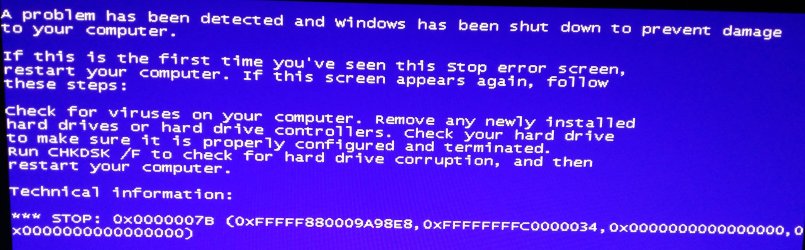
I replaced my CPU, RAM & MOBO but upon reboot (just as I was expecting the Desktop to appear) I get the message attached.
I thought this might be a driver issue so I booted into Safe Mode but got the same result.
There is nothing wrong with this drive because Windows boots up as normal using the old components.
I've also tried a different SATA cable, just in case.
Really not sure what else I can do other than try to reinstall OS. Very annoying though since the OS works fine although can understand if it was a driver issue being new components but then it should've booted into Safe Mode. Also tried looking in BIOS for anything that might cause this issue. Can't be a 64-Bit issue surely?
Thanks and hope you can help.
Attachments
2015-10-04 04.34.27.jpg
514.5 KB
· Views: 4
My Computer
At a glance
Windows 7 Pro 64-BitIntel Pentium G3258 CPU Dual Core 3.20GHz, So...HyperX Savage 8 GB (2 x 4 GB) 2400 MHz DDR3 C...ASUS HD6870 1GB
Computer type
PC/Desktop
Computer Manufacturer/Model Number
Custom build
OS
Windows 7 Pro 64-Bit
CPU
Intel Pentium G3258 CPU Dual Core 3.20GHz, Socket H3 LGA-11
Motherboard
Mod 1150 ASRock Z97 Pro3 ATX
Memory
HyperX Savage 8 GB (2 x 4 GB) 2400 MHz DDR3 CL11 DIMM XMP
Sprog the copy of Windows what are you using the original retail DVD or a new retail or OEM one?
I ask because the retail version is the only one that will install on another MB an OEM is bound to the original board and unless you get permission from Microsoft to reinstall the original Windows OEM to the new board - they are usually helpful to a point.
My Computer
At a glance
Desk1 7 Home Prem / Desk2 10 Pro / Main lap A...Desk1 i5 3750K / Laptop i7 GTX 860M / Desk2 i...Desk1 8GB (1866) / Desk2 16GB (1333) / Laptop...Desk 1& 2NVidia GTX 650 & Laptops on board Intel
Computer type
PC/Desktop
Computer Manufacturer/Model Number
Own build (new) Desk1 / Asus ROG Win 7 / Desk2 1st build
OS
Desk1 7 Home Prem / Desk2 10 Pro / Main lap Asus ROG 10 Pro 2 laptop Toshiba 7 Pro Asus P2520 7 & 10
One other Desktop (tester) and spare Toshba laptop both with SSD's
Running Kaspersky 2016 ISS on all machines config'd identically
Logitec audio stereo systems on each machine (x3)
Canon MG5250MFC
Router/modem TP-Link running WPA2SK
It was an OEM disc I think that I bought from Ebuyer (stuck it on a USB stick now) although it didn't come with a PC. I've had it for years now and have successfully changed my components before. I don't think it's tied to a specific brand or model. If it was then shouldn't it say it's not compatible instead of the BSOD? Thanks.
My Computer
At a glance
Windows 7 Pro 64-BitIntel Pentium G3258 CPU Dual Core 3.20GHz, So...HyperX Savage 8 GB (2 x 4 GB) 2400 MHz DDR3 C...ASUS HD6870 1GB
Computer type
PC/Desktop
Computer Manufacturer/Model Number
Custom build
OS
Windows 7 Pro 64-Bit
CPU
Intel Pentium G3258 CPU Dual Core 3.20GHz, Socket H3 LGA-11
Motherboard
Mod 1150 ASRock Z97 Pro3 ATX
Memory
HyperX Savage 8 GB (2 x 4 GB) 2400 MHz DDR3 CL11 DIMM XMP
Well mate an OEM is tied to the very first board it goes on and while not genuine doesn't mean it would throw a BSOD it is usually something within the software or the hardware if changed or if it is breaking down that will.
Look if you can get the machine going follow these mate they will tell us what is probably causing that BSOD.
One other Desktop (tester) and spare Toshba laptop both with SSD's
Running Kaspersky 2016 ISS on all machines config'd identically
Logitec audio stereo systems on each machine (x3)
Canon MG5250MFC
Router/modem TP-Link running WPA2SK
One other Desktop (tester) and spare Toshba laptop both with SSD's
Running Kaspersky 2016 ISS on all machines config'd identically
Logitec audio stereo systems on each machine (x3)
Canon MG5250MFC
Router/modem TP-Link running WPA2SK