BSOD after upgrading RAM

bheller21

New member
Local time
10:01 AM
Messages
11
Hi,

I recently upgraded to Windows 7 64bit from Windows Vista 32bit. My computer, SONY VGC-LT18E All-in-One Desktop, came pre-installed with two 1GB DDR2 - 667MHz; I bought two 2GB DDR2 - 667MHz. I already returned once because it could have been an issue with the packaging and scanners at post office.

However, this came packed very well and when I install the new sticks, it gives me the BSOD.

How can I diagnose this issue?
 

Attachments
  • BSOD.JPG
    BSOD.JPG
    164.5 KB · Views: 28
Last edited:

My Computer

Computer Manufacturer/Model Number
SONY VGC-LT18E
OS
Windows 7 Home Ultimate 64bit
CPU
Intel Core 2 DUO T7500 2.20GHz
Memory
2GB
Graphics Card(s)
NVIDIA Geforce 8400m
The memory dump found in "C:\Windows\Minidump\" is the first place to look for the dump file as well as taking notes on the error code displayed on the BSOD(dreaded "Blue Screen Of Death") for futher reference as looking up just what the error code is pointing at.

A fast look at the memory dump file created Nirsoft has a nice little freebie called BlueScreenView which will display the information contained in the memory dump file. If the new memory is the correct type and speed and wasn't mixed with the 1gb of OEM memory you are likely dealing with a device driver problem more then anything else.
 

My Computers

System One System Two

  • Computer type
    PC/Desktop
    Computer Manufacturer/Model Number
    Custom builds = 2
    OS
    W7 Ultimate x64/W10 Pro x64/W11 Pro Triple Boot - Main PC W7 Remote PC Micro ATX W7 Pro x64/W11 Pro
    CPU
    AMD Phenom II X4 975 Deneb 3.6ghz - 965 2nd remote pc
    Motherboard
    Gigabyte GA-790XTA-UD4-Gigabyte GA-880GM-D2H remote pc
    Memory
    Kingston Hyper X DDR3 1600 1.5v 16gb - Hyper X Fury 8gb 2nd
    Graphics Card(s)
    MSI HD Radeon 5750 1gb - MSI HD Radeon 6450 on mini tower
    Sound Card
    Creative Labs X-Fi Xtreme Audio P - Realtek onooard 2nd case
    Monitor(s) Displays
    ASUS VW199T-P 19" HP 2082a Main-HP 2082a 20" remote pc
    Screen Resolution
    Asus 1440x900 - HP 1600x900
    Hard Drives
    WD Black 1TB HD per OS W7, W10, and pending W11 presently on 500gb OS Drive - Pending Triple 1TB HDs for Spanned Storage/backup volume
    Single 2TB external USB enclosure, single 1TB System 7 Host/Boot drive, Pending 8TB external HD for system image b
    PSU
    Corsair 750TX - primary / Corsair CX600 - second
    Case
    Antec 900-2 - SSD compatible / NZXT Vulcan mini tower
    Cooling
    Zalman CNPS9900A
    Keyboard
    AZIO L70 Backlit Letters Gaming - ONN Cordless/USB
    Mouse
    MSI DS200 Programmable, Logitech Cordless
    Internet Speed
    30mbps upgrade - primary hard wired - mini tower usb WiFi
    Antivirus
    GFI VIPRE Internet Security 2014 on W7 2016 beta on W10,
    Browser
    Cyberfox, WaterFox 64bit FF variants, FireFox x64, Pale Moon
    Other Info
    Accomdata fan cooled usb 2.0 PIDE/Sata II, III external enclosure.
    Sambient usb/eSata PATA/Sata II, III external enclosure.
  • Computer type
    PC/Desktop
    System Manufacturer/Model Number
    CUSTOM ASSEMBLY
    OS
    W7 Pro x64/W11 Pro
    CPU
    AMD Deneb 3.6ghz - 965
    Motherboard
    Gigabyte GA-880GM-D2H remote pc
    Memory
    Kingston Hyper X Fury 8gb
    Graphics Card(s)
    MSI HD Radeon 6450 DVI Output
    Sound Card
    Realtek onooard Creative or Other separate PENDING
    Monitor(s) Displays
    VIZIO 32" LCD TV Separate LCD Pending
    Screen Resolution
    1600x1080
    Hard Drives
    WD 500GB OS Host/Boot WD Green 1TB Storage/Backup
    PSU
    Corsair 600W - THERMALTAKE 600W spare case
    Case
    NZXT Vulcan mini tower
    Cooling
    Twin 120mm Top Fans - 240mm Side Cover
    Keyboard
    ONN Cordless/USB Logitech Cordless
    Mouse
    ONN USB/Cordless - Logitech Cordless
    Internet Speed
    DSL 5G
    Browser
    MS Edge, FireFox, WaterFox x64, FireFox Nightly
    Other Info
    OS Testing-Remote Access to Main TeamViewer
Can you give us the make, model, and part number of the new 2X2GB RAM?
Will it boot up with one 2GB ram card installed?

Check for the memory dump files where Night Hawk mentioned in the above post.
If there are none then follow these instructions to enable them.

To ensure minidumps are enabled:
* Go to Start, in the Search Box type: sysdm.cpl, press Enter.
* Under the Advanced tab, click on the Startup and Recovery Settings... button.
* Ensure that Automatically restart is unchecked.
* Under the Write Debugging Information header select Small memory dump (256 kB) in the dropdown box (the 256kb varies).
* Ensure that the Small Dump Directory is listed as %systemroot%\Minidump.
* OK your way out.
* Reboot if changes have been made.

If they are in the location mentioned above then follow these instructions and post the information requested.
Blue Screen of Death (BSOD) Posting Instructions
When posting a new crash dump, include all System File Collection and health reports. They contain valuable information that we can use to find the cause of the crashes.
 

My Computer

Computer type
PC/Desktop
Computer Manufacturer/Model Number
76~2.0
OS
Windows 7 Ult x64 - SP1/ Windows 8 Pro x64
CPU
Intel Core i5-3570K 4.6GHz
Motherboard
Gigabyte GA-Z77X UD3H, f18
Memory
8GB (2X4GB) DDR3 1600 Corsair Vengeance CL8 1.5v
Graphics Card(s)
Sapphire HD 7770 Vapor-X OC 1GB DDR5
Sound Card
Onboard VIA VT2021
Monitor(s) Displays
22" LCD Dell
Screen Resolution
1680x1050
Hard Drives
Samsung 840Pro 128GB SSD,
Seagate Barracuda 500GB SATA2 7200rpm 32MB cache, Seagate Barracuda 1TB SATA2 7200rpm 32MB cache,
PSU
Corsair HX650W
Case
Cooler Master Storm Scout
Cooling
Corsair H80 2x12cm Noctua NF P12 , 2x14cm case fans
Keyboard
Logitech Wave
Mouse
CM Sentinel
Internet Speed
Dismal
Antivirus
Avast
Browser
Opera Next
Other Info
Haswell laptop: HP Envy 17t-j, i7-4700MQ, GeForce 740M 2GB DDR3, 17.3" Full HD 1920x1080, 16GB RAM, Samsung 840 Pro 128GB, 1TB Hitachi 7200 HDD,
Desktop: eSATA ports,
External eSATA Seagate 500GB SATA2 7200rpm,
External WD USB 500GB
I purchased the Memory from GB Ram Technologies on Ebay.
2GB DDR-II 667Mhz
A06520C 101100

It will crash before it boots.

**FYI** I am still missing drivers on my install and have been extremely unsuccessful in locating and updating** It could be a bios issue but I don't know.
I am running Windows 7 x64
Original install from factory is Windows Vista 32bit, this came preinstalled on the system.
I bought this computer back in 2007. I just installed Windows 7 x64 a month ago and have only had a tremendous amount of problems.

Screenshot added to original post.
 
Last edited:

My Computer

Computer Manufacturer/Model Number
SONY VGC-LT18E
OS
Windows 7 Home Ultimate 64bit
CPU
Intel Core 2 DUO T7500 2.20GHz
Memory
2GB
Graphics Card(s)
NVIDIA Geforce 8400m
I can see two possible and likely factors for the BSODs and any other problems you are running into. 1) You bought the wrong type of memory despite getting the correct speed. That would be installing performance memory on a portable that only takes standard ram.

2) When deciding to switch from the 32bit anything to the 64bit 7 did you first look to see if the manufacturer's support site offered 64bit support for at least the 64bit Vista? If that model only saw the 32bit Windows for some reason finding the correct drivers will be a hunt around the web!
 

My Computers

System One System Two

  • Computer type
    PC/Desktop
    Computer Manufacturer/Model Number
    Custom builds = 2
    OS
    W7 Ultimate x64/W10 Pro x64/W11 Pro Triple Boot - Main PC W7 Remote PC Micro ATX W7 Pro x64/W11 Pro
    CPU
    AMD Phenom II X4 975 Deneb 3.6ghz - 965 2nd remote pc
    Motherboard
    Gigabyte GA-790XTA-UD4-Gigabyte GA-880GM-D2H remote pc
    Memory
    Kingston Hyper X DDR3 1600 1.5v 16gb - Hyper X Fury 8gb 2nd
    Graphics Card(s)
    MSI HD Radeon 5750 1gb - MSI HD Radeon 6450 on mini tower
    Sound Card
    Creative Labs X-Fi Xtreme Audio P - Realtek onooard 2nd case
    Monitor(s) Displays
    ASUS VW199T-P 19" HP 2082a Main-HP 2082a 20" remote pc
    Screen Resolution
    Asus 1440x900 - HP 1600x900
    Hard Drives
    WD Black 1TB HD per OS W7, W10, and pending W11 presently on 500gb OS Drive - Pending Triple 1TB HDs for Spanned Storage/backup volume
    Single 2TB external USB enclosure, single 1TB System 7 Host/Boot drive, Pending 8TB external HD for system image b
    PSU
    Corsair 750TX - primary / Corsair CX600 - second
    Case
    Antec 900-2 - SSD compatible / NZXT Vulcan mini tower
    Cooling
    Zalman CNPS9900A
    Keyboard
    AZIO L70 Backlit Letters Gaming - ONN Cordless/USB
    Mouse
    MSI DS200 Programmable, Logitech Cordless
    Internet Speed
    30mbps upgrade - primary hard wired - mini tower usb WiFi
    Antivirus
    GFI VIPRE Internet Security 2014 on W7 2016 beta on W10,
    Browser
    Cyberfox, WaterFox 64bit FF variants, FireFox x64, Pale Moon
    Other Info
    Accomdata fan cooled usb 2.0 PIDE/Sata II, III external enclosure.
    Sambient usb/eSata PATA/Sata II, III external enclosure.
  • Computer type
    PC/Desktop
    System Manufacturer/Model Number
    CUSTOM ASSEMBLY
    OS
    W7 Pro x64/W11 Pro
    CPU
    AMD Deneb 3.6ghz - 965
    Motherboard
    Gigabyte GA-880GM-D2H remote pc
    Memory
    Kingston Hyper X Fury 8gb
    Graphics Card(s)
    MSI HD Radeon 6450 DVI Output
    Sound Card
    Realtek onooard Creative or Other separate PENDING
    Monitor(s) Displays
    VIZIO 32" LCD TV Separate LCD Pending
    Screen Resolution
    1600x1080
    Hard Drives
    WD 500GB OS Host/Boot WD Green 1TB Storage/Backup
    PSU
    Corsair 600W - THERMALTAKE 600W spare case
    Case
    NZXT Vulcan mini tower
    Cooling
    Twin 120mm Top Fans - 240mm Side Cover
    Keyboard
    ONN Cordless/USB Logitech Cordless
    Mouse
    ONN USB/Cordless - Logitech Cordless
    Internet Speed
    DSL 5G
    Browser
    MS Edge, FireFox, WaterFox x64, FireFox Nightly
    Other Info
    OS Testing-Remote Access to Main TeamViewer
Does it still run with the original 2X1GB RAM installed?

The CPU appears to be 64bit capable.
Intel® Core™2 Duo Processor T7500
Didn't find much info on the Sony site.
The 64bit drivers may be hard to find, as Night Hawk mentioned.
 

My Computer

Computer type
PC/Desktop
Computer Manufacturer/Model Number
76~2.0
OS
Windows 7 Ult x64 - SP1/ Windows 8 Pro x64
CPU
Intel Core i5-3570K 4.6GHz
Motherboard
Gigabyte GA-Z77X UD3H, f18
Memory
8GB (2X4GB) DDR3 1600 Corsair Vengeance CL8 1.5v
Graphics Card(s)
Sapphire HD 7770 Vapor-X OC 1GB DDR5
Sound Card
Onboard VIA VT2021
Monitor(s) Displays
22" LCD Dell
Screen Resolution
1680x1050
Hard Drives
Samsung 840Pro 128GB SSD,
Seagate Barracuda 500GB SATA2 7200rpm 32MB cache, Seagate Barracuda 1TB SATA2 7200rpm 32MB cache,
PSU
Corsair HX650W
Case
Cooler Master Storm Scout
Cooling
Corsair H80 2x12cm Noctua NF P12 , 2x14cm case fans
Keyboard
Logitech Wave
Mouse
CM Sentinel
Internet Speed
Dismal
Antivirus
Avast
Browser
Opera Next
Other Info
Haswell laptop: HP Envy 17t-j, i7-4700MQ, GeForce 740M 2GB DDR3, 17.3" Full HD 1920x1080, 16GB RAM, Samsung 840 Pro 128GB, 1TB Hitachi 7200 HDD,
Desktop: eSATA ports,
External eSATA Seagate 500GB SATA2 7200rpm,
External WD USB 500GB
Yes, as of right now I only have the original 2X1GB RAM installed.

Could you further clarify the below,

1) You bought the wrong type of memory despite getting the correct speed. That would be installing performance memory on a portable that only takes standard ram.

Also note that this desktop uses a mobile graphics card, specifically GeForece 8400m m(not sure if this even matters).

How would I know if its using standard vs portable?
 

My Computer

Computer Manufacturer/Model Number
SONY VGC-LT18E
OS
Windows 7 Home Ultimate 64bit
CPU
Intel Core 2 DUO T7500 2.20GHz
Memory
2GB
Graphics Card(s)
NVIDIA Geforce 8400m
On a good number of OEM machines(desktops and laptops alike) the memory used is referred to as Standard memory. If you went out and bought performance/gaming type memory generally seeing faster timings, different voltage requirements the laptop wouldn't run right to start with. Generally manufacturers will specify the memory type on the product specifications as well as memory supported list.

The blue screens however can have any number of causes most often device driver if not system file related. If you are trying to run the laptop with some mismatched drivers or something saw a bad install that can end up seeing BSODs.

The first thing usually required at a support site when going to download any drivers available is the OS selector for which Windows version as well as whether it is 32bit or 64bit. The onboard graphics would be listed among the rest for whichever version and kernel you are running provided the 64bit sees support.

In other words if that model only saw support for the 32bit Vista Home Premium it came with since each model series typically sees a fast turnover for some newer line you would want to verify 64bit drivers are available. Most 64bit Vista drivers fortunately will work on 7 as well.

The key to solving this however besides going to the support site to see if they have the drivers needed is what is shown on any blue screen as far the error code(s) and any memory dump files created. That will point out the hardware or software problem you are seeing.
 

My Computers

System One System Two

  • Computer type
    PC/Desktop
    Computer Manufacturer/Model Number
    Custom builds = 2
    OS
    W7 Ultimate x64/W10 Pro x64/W11 Pro Triple Boot - Main PC W7 Remote PC Micro ATX W7 Pro x64/W11 Pro
    CPU
    AMD Phenom II X4 975 Deneb 3.6ghz - 965 2nd remote pc
    Motherboard
    Gigabyte GA-790XTA-UD4-Gigabyte GA-880GM-D2H remote pc
    Memory
    Kingston Hyper X DDR3 1600 1.5v 16gb - Hyper X Fury 8gb 2nd
    Graphics Card(s)
    MSI HD Radeon 5750 1gb - MSI HD Radeon 6450 on mini tower
    Sound Card
    Creative Labs X-Fi Xtreme Audio P - Realtek onooard 2nd case
    Monitor(s) Displays
    ASUS VW199T-P 19" HP 2082a Main-HP 2082a 20" remote pc
    Screen Resolution
    Asus 1440x900 - HP 1600x900
    Hard Drives
    WD Black 1TB HD per OS W7, W10, and pending W11 presently on 500gb OS Drive - Pending Triple 1TB HDs for Spanned Storage/backup volume
    Single 2TB external USB enclosure, single 1TB System 7 Host/Boot drive, Pending 8TB external HD for system image b
    PSU
    Corsair 750TX - primary / Corsair CX600 - second
    Case
    Antec 900-2 - SSD compatible / NZXT Vulcan mini tower
    Cooling
    Zalman CNPS9900A
    Keyboard
    AZIO L70 Backlit Letters Gaming - ONN Cordless/USB
    Mouse
    MSI DS200 Programmable, Logitech Cordless
    Internet Speed
    30mbps upgrade - primary hard wired - mini tower usb WiFi
    Antivirus
    GFI VIPRE Internet Security 2014 on W7 2016 beta on W10,
    Browser
    Cyberfox, WaterFox 64bit FF variants, FireFox x64, Pale Moon
    Other Info
    Accomdata fan cooled usb 2.0 PIDE/Sata II, III external enclosure.
    Sambient usb/eSata PATA/Sata II, III external enclosure.
  • Computer type
    PC/Desktop
    System Manufacturer/Model Number
    CUSTOM ASSEMBLY
    OS
    W7 Pro x64/W11 Pro
    CPU
    AMD Deneb 3.6ghz - 965
    Motherboard
    Gigabyte GA-880GM-D2H remote pc
    Memory
    Kingston Hyper X Fury 8gb
    Graphics Card(s)
    MSI HD Radeon 6450 DVI Output
    Sound Card
    Realtek onooard Creative or Other separate PENDING
    Monitor(s) Displays
    VIZIO 32" LCD TV Separate LCD Pending
    Screen Resolution
    1600x1080
    Hard Drives
    WD 500GB OS Host/Boot WD Green 1TB Storage/Backup
    PSU
    Corsair 600W - THERMALTAKE 600W spare case
    Case
    NZXT Vulcan mini tower
    Cooling
    Twin 120mm Top Fans - 240mm Side Cover
    Keyboard
    ONN Cordless/USB Logitech Cordless
    Mouse
    ONN USB/Cordless - Logitech Cordless
    Internet Speed
    DSL 5G
    Browser
    MS Edge, FireFox, WaterFox x64, FireFox Nightly
    Other Info
    OS Testing-Remote Access to Main TeamViewer
Thanks Nighthawk.

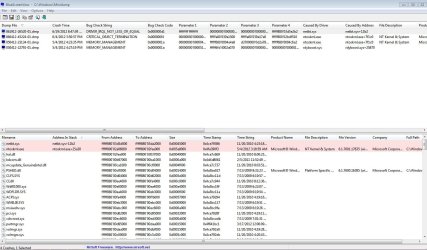
Did you happen to see the BSOD viewer screenshot I added in my original message? Does that say anything?
 

My Computer

Computer Manufacturer/Model Number
SONY VGC-LT18E
OS
Windows 7 Home Ultimate 64bit
CPU
Intel Core 2 DUO T7500 2.20GHz
Memory
2GB
Graphics Card(s)
NVIDIA Geforce 8400m
I recently went through a series of OS freeze ups when having 7 as a boot option in the Windows 8 Release Preview boot options which resulted in the "ntoskimi.exe" problem without blue screens however. First 8 locked up solid before you could even do anything like open a browser window.

Then due to booting into 7 from the 8 boot option 7 also started locking up with a fresh install of 7 having just been put on! With 7 however a run of the DiskCheck tool was able to clear up the ntoskmi.exe problem in one shot!

In the report you ended up with the readyboost and netboost drivers are trying to load into system reserved memory addresses. Installing the wrong driver set for a few things can also bring on the blue screens unfortunately. This is why the error code info on any BSOD is also a large help at times in debugging things.

With a look at the screen you added in I would have to say the 7 install or some of it didn't go on so well and why you are running into the blue screen wonders! You can try a run of "chkdsk /r" as well as running the System File Checker "sfc /scannow" at the Start>Run command or open a command prompt to see if these will clean it up for you.

But you might still end up needing to start over. You'll know once the blue screens are gone how well the programs run afterwards. If things are bit draggy and programs start hanging up to easily the clean install will be needed again! :(

One main reason would likely be due to only having reformatted the original OEM C primary rather then seeing it nuked off the drive entirely to see a brand new 7 primary replace it. Reformatted OEM primaries never seem to see good clean installs of any version for some reason. Even reinstalling Vista on a Vista laptop recently ran into the same headaches as far as not running well.
 

My Computers

System One System Two

  • Computer type
    PC/Desktop
    Computer Manufacturer/Model Number
    Custom builds = 2
    OS
    W7 Ultimate x64/W10 Pro x64/W11 Pro Triple Boot - Main PC W7 Remote PC Micro ATX W7 Pro x64/W11 Pro
    CPU
    AMD Phenom II X4 975 Deneb 3.6ghz - 965 2nd remote pc
    Motherboard
    Gigabyte GA-790XTA-UD4-Gigabyte GA-880GM-D2H remote pc
    Memory
    Kingston Hyper X DDR3 1600 1.5v 16gb - Hyper X Fury 8gb 2nd
    Graphics Card(s)
    MSI HD Radeon 5750 1gb - MSI HD Radeon 6450 on mini tower
    Sound Card
    Creative Labs X-Fi Xtreme Audio P - Realtek onooard 2nd case
    Monitor(s) Displays
    ASUS VW199T-P 19" HP 2082a Main-HP 2082a 20" remote pc
    Screen Resolution
    Asus 1440x900 - HP 1600x900
    Hard Drives
    WD Black 1TB HD per OS W7, W10, and pending W11 presently on 500gb OS Drive - Pending Triple 1TB HDs for Spanned Storage/backup volume
    Single 2TB external USB enclosure, single 1TB System 7 Host/Boot drive, Pending 8TB external HD for system image b
    PSU
    Corsair 750TX - primary / Corsair CX600 - second
    Case
    Antec 900-2 - SSD compatible / NZXT Vulcan mini tower
    Cooling
    Zalman CNPS9900A
    Keyboard
    AZIO L70 Backlit Letters Gaming - ONN Cordless/USB
    Mouse
    MSI DS200 Programmable, Logitech Cordless
    Internet Speed
    30mbps upgrade - primary hard wired - mini tower usb WiFi
    Antivirus
    GFI VIPRE Internet Security 2014 on W7 2016 beta on W10,
    Browser
    Cyberfox, WaterFox 64bit FF variants, FireFox x64, Pale Moon
    Other Info
    Accomdata fan cooled usb 2.0 PIDE/Sata II, III external enclosure.
    Sambient usb/eSata PATA/Sata II, III external enclosure.
  • Computer type
    PC/Desktop
    System Manufacturer/Model Number
    CUSTOM ASSEMBLY
    OS
    W7 Pro x64/W11 Pro
    CPU
    AMD Deneb 3.6ghz - 965
    Motherboard
    Gigabyte GA-880GM-D2H remote pc
    Memory
    Kingston Hyper X Fury 8gb
    Graphics Card(s)
    MSI HD Radeon 6450 DVI Output
    Sound Card
    Realtek onooard Creative or Other separate PENDING
    Monitor(s) Displays
    VIZIO 32" LCD TV Separate LCD Pending
    Screen Resolution
    1600x1080
    Hard Drives
    WD 500GB OS Host/Boot WD Green 1TB Storage/Backup
    PSU
    Corsair 600W - THERMALTAKE 600W spare case
    Case
    NZXT Vulcan mini tower
    Cooling
    Twin 120mm Top Fans - 240mm Side Cover
    Keyboard
    ONN Cordless/USB Logitech Cordless
    Mouse
    ONN USB/Cordless - Logitech Cordless
    Internet Speed
    DSL 5G
    Browser
    MS Edge, FireFox, WaterFox x64, FireFox Nightly
    Other Info
    OS Testing-Remote Access to Main TeamViewer
This is the only RAM match I found, GB Ram Technologies on Ebay site.
Return the RAM for refund if you are still within the 30 days money back period.
There are a few reasons why this RAM may not be working, one being it is just bad RAM, size of memory chips on the card, not much info on that site to use in determining what it is exactly.

4GB Sony Vaio VGC-LT15E VGC-LT16E VGC-LT18E Memory RAM
Item specifics
Condition: New: A brand-new, unused, unopened, undamaged item in its original packaging (where packaging is ... Read moreabout the condition Number of Pins: 200
Capacity: 4GB Kit (2 x 2GB) Speed: PC2-5300 at 667MHz
Warranty: Lifetime Memory Type: DDR2

Recommend to get your RAM from one of the major vendors, Crucial guarantees their RAM to work with many OEMs including Sony.

Crucial® Memory Advisor results for the Sony VAIO VGC-LT18E Desktop/PC.

4GB kit (2GBx2)
DDR2 PC2-5300 • CL=5 • Unbuffered • NON-ECC • DDR2-667 • 1.8V • 256Meg x 64 • • Part #: CT742936

For $9 more, you'll get good quality RAM.
 

My Computer

Computer type
PC/Desktop
Computer Manufacturer/Model Number
76~2.0
OS
Windows 7 Ult x64 - SP1/ Windows 8 Pro x64
CPU
Intel Core i5-3570K 4.6GHz
Motherboard
Gigabyte GA-Z77X UD3H, f18
Memory
8GB (2X4GB) DDR3 1600 Corsair Vengeance CL8 1.5v
Graphics Card(s)
Sapphire HD 7770 Vapor-X OC 1GB DDR5
Sound Card
Onboard VIA VT2021
Monitor(s) Displays
22" LCD Dell
Screen Resolution
1680x1050
Hard Drives
Samsung 840Pro 128GB SSD,
Seagate Barracuda 500GB SATA2 7200rpm 32MB cache, Seagate Barracuda 1TB SATA2 7200rpm 32MB cache,
PSU
Corsair HX650W
Case
Cooler Master Storm Scout
Cooling
Corsair H80 2x12cm Noctua NF P12 , 2x14cm case fans
Keyboard
Logitech Wave
Mouse
CM Sentinel
Internet Speed
Dismal
Antivirus
Avast
Browser
Opera Next
Other Info
Haswell laptop: HP Envy 17t-j, i7-4700MQ, GeForce 740M 2GB DDR3, 17.3" Full HD 1920x1080, 16GB RAM, Samsung 840 Pro 128GB, 1TB Hitachi 7200 HDD,
Desktop: eSATA ports,
External eSATA Seagate 500GB SATA2 7200rpm,
External WD USB 500GB
Nighthawk, I'm sad to say a clean install may be in the cards.
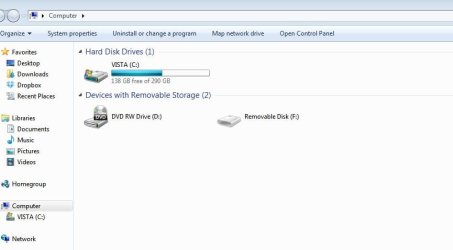
I also forgot to let another cat out of the bag, when I open up computer, clearly I'm running Win 7 and it populates as Windows Vista.

Also everytime I boot the computer it makes me hit a key to continue loading.

Do you have any links/suggestions I should use when trying to keep my files?
 

Attachments

  • 7-vista.JPG
    7-vista.JPG
    34.5 KB · Views: 5

My Computer

Computer Manufacturer/Model Number
SONY VGC-LT18E
OS
Windows 7 Home Ultimate 64bit
CPU
Intel Core 2 DUO T7500 2.20GHz
Memory
2GB
Graphics Card(s)
NVIDIA Geforce 8400m
The main drive is labeled as Vista. That doesn't show which version is on it however since you can change the volume label to anything.

After a clean install of any version of Windows you will see C "local disk". To know which version you are running you can right click on the Computer icon if set to shown on the desktop or go into the Control Panel>System for the information displayed there.

As for backing up all of your files do you have an external hard drive or usb enclosure to put a drive in? If the laptop has room as many of the larger models will have a second spot to add a second HD in would take care of backing things up. For simply using the upgrade option without wiping C entirely the Windows installer will simply pack things up into the Windows.old folder.

When not having an external drive available an external enclosure allows you to transfer files from the main drive onto another machine for temp storage in order to see a complete wipe and fresh start. Also if you have an external drive but can't boot into Windows which seems to be the case you can try booting from a live Linux cd(or live flash drive) in order use the other OS's file browser to copy and paste files over to the external drive as a last resort.

There are several but limited options when not able to stay booted in Windows in order to see your files backed up. And the need for some place to back them up to is also needed as well.

Meanwhile you will want to look at what Dave76 found for your memory situation since getting the hardware straightened out might just save you the need for another Windows install. I know what it's like needing to go back out and buy new ram.

When first getting the present build together the recommended memory list for Gigabyte showed the OCZ Gold memory was suitable except the board backclocked the 1.9v memory down from 1600mhz to 1066mhz! The board itself took 1.5v according to the user manual when first having a chance to go over that!
(fortunately the OCZ memory found a new home on another 7 HP case in the works! :D )
 

My Computers

System One System Two

  • Computer type
    PC/Desktop
    Computer Manufacturer/Model Number
    Custom builds = 2
    OS
    W7 Ultimate x64/W10 Pro x64/W11 Pro Triple Boot - Main PC W7 Remote PC Micro ATX W7 Pro x64/W11 Pro
    CPU
    AMD Phenom II X4 975 Deneb 3.6ghz - 965 2nd remote pc
    Motherboard
    Gigabyte GA-790XTA-UD4-Gigabyte GA-880GM-D2H remote pc
    Memory
    Kingston Hyper X DDR3 1600 1.5v 16gb - Hyper X Fury 8gb 2nd
    Graphics Card(s)
    MSI HD Radeon 5750 1gb - MSI HD Radeon 6450 on mini tower
    Sound Card
    Creative Labs X-Fi Xtreme Audio P - Realtek onooard 2nd case
    Monitor(s) Displays
    ASUS VW199T-P 19" HP 2082a Main-HP 2082a 20" remote pc
    Screen Resolution
    Asus 1440x900 - HP 1600x900
    Hard Drives
    WD Black 1TB HD per OS W7, W10, and pending W11 presently on 500gb OS Drive - Pending Triple 1TB HDs for Spanned Storage/backup volume
    Single 2TB external USB enclosure, single 1TB System 7 Host/Boot drive, Pending 8TB external HD for system image b
    PSU
    Corsair 750TX - primary / Corsair CX600 - second
    Case
    Antec 900-2 - SSD compatible / NZXT Vulcan mini tower
    Cooling
    Zalman CNPS9900A
    Keyboard
    AZIO L70 Backlit Letters Gaming - ONN Cordless/USB
    Mouse
    MSI DS200 Programmable, Logitech Cordless
    Internet Speed
    30mbps upgrade - primary hard wired - mini tower usb WiFi
    Antivirus
    GFI VIPRE Internet Security 2014 on W7 2016 beta on W10,
    Browser
    Cyberfox, WaterFox 64bit FF variants, FireFox x64, Pale Moon
    Other Info
    Accomdata fan cooled usb 2.0 PIDE/Sata II, III external enclosure.
    Sambient usb/eSata PATA/Sata II, III external enclosure.
  • Computer type
    PC/Desktop
    System Manufacturer/Model Number
    CUSTOM ASSEMBLY
    OS
    W7 Pro x64/W11 Pro
    CPU
    AMD Deneb 3.6ghz - 965
    Motherboard
    Gigabyte GA-880GM-D2H remote pc
    Memory
    Kingston Hyper X Fury 8gb
    Graphics Card(s)
    MSI HD Radeon 6450 DVI Output
    Sound Card
    Realtek onooard Creative or Other separate PENDING
    Monitor(s) Displays
    VIZIO 32" LCD TV Separate LCD Pending
    Screen Resolution
    1600x1080
    Hard Drives
    WD 500GB OS Host/Boot WD Green 1TB Storage/Backup
    PSU
    Corsair 600W - THERMALTAKE 600W spare case
    Case
    NZXT Vulcan mini tower
    Cooling
    Twin 120mm Top Fans - 240mm Side Cover
    Keyboard
    ONN Cordless/USB Logitech Cordless
    Mouse
    ONN USB/Cordless - Logitech Cordless
    Internet Speed
    DSL 5G
    Browser
    MS Edge, FireFox, WaterFox x64, FireFox Nightly
    Other Info
    OS Testing-Remote Access to Main TeamViewer
Back
Top