BSOD Analysis - Getting Started

For us non-escalation engineers, we need to find work arounds. It will take years to get the knowledge to use all the commands, in the end it comes to a lot of guess work.
Use usasma's sites I linked above, it has a lot of info links.
Search the stop codes to see what others are recommending.
A lot of crashes are cause by faulty hardware, old drivers (lmntsm command, for Win7 anything older than 14 July 09 needs updated), check the event logs for clues (use the find function 'errors').
As Vir Gnarus said a lot of the time the debugger can't tell you exactly what the problem cause is, it gives clues.
Get more information from the OP, Driver Verifier helps in a lot of situations.

Then, there a lot of different crashes pointing in several directions, several pages later, it's a bad mouse.

Like Vir Gnarus said, it's a detective game, chase the clues.
 

My Computer

Computer type
PC/Desktop
Computer Manufacturer/Model Number
76~2.0
OS
Windows 7 Ult x64 - SP1/ Windows 8 Pro x64
CPU
Intel Core i5-3570K 4.6GHz
Motherboard
Gigabyte GA-Z77X UD3H, f18
Memory
8GB (2X4GB) DDR3 1600 Corsair Vengeance CL8 1.5v
Graphics Card(s)
Sapphire HD 7770 Vapor-X OC 1GB DDR5
Sound Card
Onboard VIA VT2021
Monitor(s) Displays
22" LCD Dell
Screen Resolution
1680x1050
Hard Drives
Samsung 840Pro 128GB SSD,
Seagate Barracuda 500GB SATA2 7200rpm 32MB cache, Seagate Barracuda 1TB SATA2 7200rpm 32MB cache,
PSU
Corsair HX650W
Case
Cooler Master Storm Scout
Cooling
Corsair H80 2x12cm Noctua NF P12 , 2x14cm case fans
Keyboard
Logitech Wave
Mouse
CM Sentinel
Internet Speed
Dismal
Antivirus
Avast
Browser
Opera Next
Other Info
Haswell laptop: HP Envy 17t-j, i7-4700MQ, GeForce 740M 2GB DDR3, 17.3" Full HD 1920x1080, 16GB RAM, Samsung 840 Pro 128GB, 1TB Hitachi 7200 HDD,
Desktop: eSATA ports,
External eSATA Seagate 500GB SATA2 7200rpm,
External WD USB 500GB
Yes, I don't want to end up hating it, that for sure.

I can see that !analyse -v can spit out the start for me, so now I've just got to learn the steps required to get to this point - the ultimate goal: (an example)

Code:
Usual causes:  Defective hardware (particularly memory - but not just RAM), Faulty system service, Antivirus,  Device driver, NTFS corruption, BIOS Probably caused by : memory_corruption ( nt!MiEmptyPageAccessLog+dc )
 

My Computer

Computer type
PC/Desktop
Computer Manufacturer/Model Number
Golden Mk. I.4
OS
Windows 10 Pro x64 ; Xubuntu x64
CPU
Intel i7 860 @ 2.80 GHz O/C'ed to 4.0GHz
Motherboard
Gigabyte P55A-UD3R Rev.1. Award BIOS F13
Memory
16GB Corsair Vengance DDR3 @ 661 MHz Dual Channel (9-9-9-24)
Graphics Card(s)
EVGA NVidia GTX 560 1024MB
Sound Card
Realtek Integrated
Monitor(s) Displays
Dual Samsung SyncMaster 2494HS
Screen Resolution
1920*1080 and 1920*1080
Hard Drives
1*Samsung 840 EVO 120GB SSD;
1*OCZ Vertex 2 60GB SSD;
2*Samsung F3 SpinPoint 1TB in RAID0;
1*Samsung F1 SpinPoint 1TB;
2*Western Digital 1TB External USB 3.0
1*Western Digital 500GB External USB 3.0
1*Seagate 500GB External USB 2.0
PSU
Thermaltake ToughPower QFan 750W
Case
Thermaltake Element S VK60001W2Z
Cooling
Corsair H60 Water Cooling, 2*230mm and 2*80mm case fans
Keyboard
Logitech G110
Mouse
Logitech MX518
^Thanks Dave. I've had a look at those.

Really, for me (not even an informal qualification in IT, never mind escalators) its a case of working out some logical steps I can use. For example:

!analyse
google bugcheck etc.
!lmv etc.
etc.
etc.

Once I've worked that out, I'm stumble through anything, so I'll keep referring back through those links until its more familiar to me.

I found this, so I might have a play with that too:
http://windbg.info/apps/46-crashme.html
 

My Computer

Computer type
PC/Desktop
Computer Manufacturer/Model Number
Golden Mk. I.4
OS
Windows 10 Pro x64 ; Xubuntu x64
CPU
Intel i7 860 @ 2.80 GHz O/C'ed to 4.0GHz
Motherboard
Gigabyte P55A-UD3R Rev.1. Award BIOS F13
Memory
16GB Corsair Vengance DDR3 @ 661 MHz Dual Channel (9-9-9-24)
Graphics Card(s)
EVGA NVidia GTX 560 1024MB
Sound Card
Realtek Integrated
Monitor(s) Displays
Dual Samsung SyncMaster 2494HS
Screen Resolution
1920*1080 and 1920*1080
Hard Drives
1*Samsung 840 EVO 120GB SSD;
1*OCZ Vertex 2 60GB SSD;
2*Samsung F3 SpinPoint 1TB in RAID0;
1*Samsung F1 SpinPoint 1TB;
2*Western Digital 1TB External USB 3.0
1*Western Digital 500GB External USB 3.0
1*Seagate 500GB External USB 2.0
PSU
Thermaltake ToughPower QFan 750W
Case
Thermaltake Element S VK60001W2Z
Cooling
Corsair H60 Water Cooling, 2*230mm and 2*80mm case fans
Keyboard
Logitech G110
Mouse
Logitech MX518
That's how most of us start, stumble along as best we can.

When you get stuck, ask for help. It won't take long to learn the direction to stumble in ;)
 

My Computer

Computer type
PC/Desktop
Computer Manufacturer/Model Number
76~2.0
OS
Windows 7 Ult x64 - SP1/ Windows 8 Pro x64
CPU
Intel Core i5-3570K 4.6GHz
Motherboard
Gigabyte GA-Z77X UD3H, f18
Memory
8GB (2X4GB) DDR3 1600 Corsair Vengeance CL8 1.5v
Graphics Card(s)
Sapphire HD 7770 Vapor-X OC 1GB DDR5
Sound Card
Onboard VIA VT2021
Monitor(s) Displays
22" LCD Dell
Screen Resolution
1680x1050
Hard Drives
Samsung 840Pro 128GB SSD,
Seagate Barracuda 500GB SATA2 7200rpm 32MB cache, Seagate Barracuda 1TB SATA2 7200rpm 32MB cache,
PSU
Corsair HX650W
Case
Cooler Master Storm Scout
Cooling
Corsair H80 2x12cm Noctua NF P12 , 2x14cm case fans
Keyboard
Logitech Wave
Mouse
CM Sentinel
Internet Speed
Dismal
Antivirus
Avast
Browser
Opera Next
Other Info
Haswell laptop: HP Envy 17t-j, i7-4700MQ, GeForce 740M 2GB DDR3, 17.3" Full HD 1920x1080, 16GB RAM, Samsung 840 Pro 128GB, 1TB Hitachi 7200 HDD,
Desktop: eSATA ports,
External eSATA Seagate 500GB SATA2 7200rpm,
External WD USB 500GB
The common steps people use here like !analyze -v followed by lm and its variants (lmsm, lmvm) is a good start, but obviously a very limited approach, about the same as just getting a driver list with timestamps for the drivers. Don't forget that you're only going this route for the time being until you learn more, in which case you'll start using more commands and extensions to further your exploration. Don't get trapped into just doing it this way (in fact, some scripts people have made do it automatically!) as you'll end up stunting your growth.

Btw, if you or anyone has any questions like generating a hypothesis on the cause of a certain crash but don't know how to verify the hypothesis with the crashdump, don't hesitate to ask me. Also stuff like not understanding a certain output, how such-n-such works, etc., all that I'm willing to answer - to the best of my knowledge, of course. TBH, I would much rather get asked these questions than people asking me personally for assistance to solving a case. Better to teach them to fish than to give them food.
 

My Computer

OS
Windows 7 64-bit
Where can I find a list of commands.
 

My Computer

Computer type
PC/Desktop
Computer Manufacturer/Model Number
Home made Desktop
OS
Windows 10 Pro. 64/ version 1709 Windows 7 Pro/64
CPU
Intel i7-6800K @ 4.3
Motherboard
ASUS X-99 Deluxe II
Memory
Corsair Platinum 16 gig @2400
Graphics Card(s)
EVGA GTX 1070 OC
Monitor(s) Displays
Asus 27" LED LCD/VE278Q
Screen Resolution
1920-1080 or 1280-720 HDMI
Hard Drives
INTEL SSD 730-240 Gb Sata 3.0/
PSU
EVGA Platium 1200W
Case
Phanteks Luxe Tempered Glass 8 fans/ one radiator
Cooling
XSPC/ Water Cooled CPU
Keyboard
Das 4 Professional
Mouse
Logitech M705/MX Anywhere 2-S
Internet Speed
100 mbits
Antivirus
Microsoft Security Essentials/ Malwarebytes Premium 3.0/ SAS
Browser
I.E. 11 default/Firefox/ ISP Time Warner Cable/Spectrum
Other Info
LG BluRay Burner/
Sound system-KLipsch-THX/
Icy Dock ssd Hot Swap bays.
All WinDBG commands and extensions (aside from 3rd-party ones) are documented in the WinDBG help manual included with the application. You can open it up right from inside WinDBG. In fact, you can even type the command .hh <search term> right in the WinDBG prompt to open up the article closest in match to <search term>. For information to help use commands (prefixed with a period '.') you can type .help (the /D switch will also provide a DHTML alphabetical header to help find the command you want), and then when you find the command you desire, type .help <command> for info on it. This obviously does not apply to extensions (prefixed with a bang '!').
 

My Computer

OS
Windows 7 64-bit
Thank you Vir Gnarus for the information.
 

My Computer

Computer type
PC/Desktop
Computer Manufacturer/Model Number
Home made Desktop
OS
Windows 10 Pro. 64/ version 1709 Windows 7 Pro/64
CPU
Intel i7-6800K @ 4.3
Motherboard
ASUS X-99 Deluxe II
Memory
Corsair Platinum 16 gig @2400
Graphics Card(s)
EVGA GTX 1070 OC
Monitor(s) Displays
Asus 27" LED LCD/VE278Q
Screen Resolution
1920-1080 or 1280-720 HDMI
Hard Drives
INTEL SSD 730-240 Gb Sata 3.0/
PSU
EVGA Platium 1200W
Case
Phanteks Luxe Tempered Glass 8 fans/ one radiator
Cooling
XSPC/ Water Cooled CPU
Keyboard
Das 4 Professional
Mouse
Logitech M705/MX Anywhere 2-S
Internet Speed
100 mbits
Antivirus
Microsoft Security Essentials/ Malwarebytes Premium 3.0/ SAS
Browser
I.E. 11 default/Firefox/ ISP Time Warner Cable/Spectrum
Other Info
LG BluRay Burner/
Sound system-KLipsch-THX/
Icy Dock ssd Hot Swap bays.
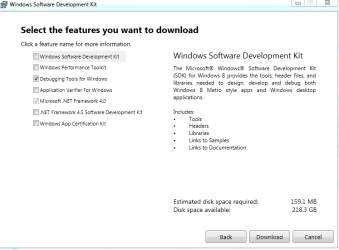
How can I downoad just the Windbg program? When I go to this link, it asks me to download the whole Windows SDK, which is of 1.2GB.
 

My Computer

Computer Manufacturer/Model Number
Samsung NP530U4B-S02IN
OS
Windows® 8 Pro (64-bit)
CPU
Intel® Core™ i5 Processor 2467M (1.60GHz, 3MB L3 Cache)
Motherboard
Samsung Electronics
Memory
6GB DDR3 System Memory at 1,333MHz (on BD 4GB + 2GB x 1)
Graphics Card(s)
AMD Radeon™ HD7550M 1GB DDR3 (Ext. Graphic)
Sound Card
Realtek High Definition Audio
Monitor(s) Displays
35.56cm (14.0) SuperBright 300nit HD LED Display
Screen Resolution
1366x768
Hard Drives
1TB S-ATA II Hard Drive (5400RPM) with ExpressCache 16GB SSD
Internet Speed
sucks
Antivirus
Microsoft Security Essentials
Browser
Google Chrome (Sync enabled)
Scroll down to this part:
Install Debugging Tools for Windows as Part of the Windows SDK

If you don’t need the WDK but you do need the Windows SDK, you can install Debugging Tools for Windows as part of the Windows SDK. In the installation wizard, be sure to select Debugging Tools.
  • Install Debugging Tools for Windows as part of the SDK
Which gives this link:
Download the sdksetup.exe
Quick Details

Version: Windows SDK for Windows 8
Windows ACK Version: 2.2
Date published: November 15, 2012
File name: sdksetup.exe

Installation file should take you to a page like this (See attachment):

Capture.PNG

Deselect everything except the debugging tools for windows.

Make sure you have net framework 4.5 installed.
 

My Computer

Computer type
PC/Desktop
Computer Manufacturer/Model Number
Self assembled
OS
Windows 10 Home 64Bit
CPU
Intel Core i5 10400 @ 2.90GHz
Motherboard
Intel Corporation DG41WV (PROCESSOR)
Memory
8.00GB Single-Channel Unknown @ 1329MHz (16-20-20-38)
Sound Card
Realtek High Definition Audio
Monitor(s) Displays
DELL E170S
Screen Resolution
1280x1024 pixels
Hard Drives
931GB TOSHIBA DT01ACA100 (SATA)
238GB TEAM TM8PS7256G (SATA SSD)
Case
Nothing Fancy
Cooling
Fans
Keyboard
A4 Tech Co LTD
Mouse
A4 Tech Co Ltd/Logitech
Internet Speed
25 Mbps
Scroll down to this part:
Install Debugging Tools for Windows as Part of the Windows SDK

If you don’t need the WDK but you do need the Windows SDK, you can install Debugging Tools for Windows as part of the Windows SDK. In the installation wizard, be sure to select Debugging Tools.
  • Install Debugging Tools for Windows as part of the SDK
Which gives this link:
Download the sdksetup.exe
Quick Details

Version: Windows SDK for Windows 8
Windows ACK Version: 2.2
Date published: November 15, 2012
File name: sdksetup.exe

Installation file should take you to a page like this (See attachment):

View attachment 249747

Deselect everything except the debugging tools for windows.

Make sure you have net framework 4.5 installed.
Oh, that's nice. I never went till the final page thinking that it will download the entire 1.2GB.
Downloading now.. :)
 
Last edited:

My Computer

Computer Manufacturer/Model Number
Samsung NP530U4B-S02IN
OS
Windows® 8 Pro (64-bit)
CPU
Intel® Core™ i5 Processor 2467M (1.60GHz, 3MB L3 Cache)
Motherboard
Samsung Electronics
Memory
6GB DDR3 System Memory at 1,333MHz (on BD 4GB + 2GB x 1)
Graphics Card(s)
AMD Radeon™ HD7550M 1GB DDR3 (Ext. Graphic)
Sound Card
Realtek High Definition Audio
Monitor(s) Displays
35.56cm (14.0) SuperBright 300nit HD LED Display
Screen Resolution
1366x768
Hard Drives
1TB S-ATA II Hard Drive (5400RPM) with ExpressCache 16GB SSD
Internet Speed
sucks
Antivirus
Microsoft Security Essentials
Browser
Google Chrome (Sync enabled)
Back
Top