
BSOD and display driver crashing

Deathgazer

New member
Local time
8:25 PM
Messages
29
Alright, so I used to randomly get the whole 'Display driver has stopped working but has successfully recovered' message, but not too often. It always 'seemed' like it happened during a youtube video. Now, I have since upgraded to a 2 monitor setup, and the display driver crashing seems more frequent. Again, it seems to me as if it occurs during a youtube/flash video (I tend to have a -lot- of browser tabs open, a lot being youtube. Well I had a few display driver crashes and succesfully recovers (screen just goes black for a second then goes back to the desktop with that message), followed by a BSOD this time. The rest of my info is on my System Specs tab. Any help is greatly appreciated, thanks! Note: I think during the BSOD it said something along the lines of atikmpag.
 

My Computer

Computer Manufacturer/Model Number
Custom
OS
Windows 7 64-bit OEM
CPU
i7 920 (stock)
Motherboard
Asus Sabertooth x58
Memory
6GB Triple Channel
Graphics Card(s)
XFX HD 6870
Monitor(s) Displays
Asus 23.6" x2
Screen Resolution
3960x1080
Hard Drives
1TB
PSU
1200 watt
Case
Lancool Lian Li
Cooling
Good air cooling
Keyboard
G510
Mouse
G9x
Internet Speed
Cable
Other Info
Last format: February 3, 2012
Antivirus: Avast Internet Security
"It's not a true crash, in the sense that the bluescreen was initiated only because the combination of video driver and video hardware was being unresponsive, and not because of any synchronous processing exception".

Since Vista, the "Timeout Detection and Recovery" (TDR) components of the OS video subsystem have been capable of doing some truly impressive things to try to recover from issues which would have caused earlier OSs like XP to crash.

As a last resort, the TDR subsystem sends the video driver a "please restart yourself now!" command and waits a few seconds.

If there's no response, the OS concludes that the video driver/hardware combo has truly collapsed in a heap, and it fires off that stop 0x116 BSOD.

If playing with video driver versions hasn't helped, make sure the box is not overheating.

Try removing a side panel and aiming a big mains fan straight at the motherboard and GPU.

Run it like that for a few hours or days - long enough to ascertain whether cooler temperatures make a difference.

If so, it might be as simple as dust buildup and subsequently inadequate cooling.

I would download cpu-z and gpu-z (both free) and keep an eye on the video temps

http://www.sevenforums.com/crash-lo...op-0x116-video_tdr_error-troubleshooting.html
 

My Computer

Computer Manufacturer/Model Number
LAPTOP. HP Pavilion dv7-4010TX .
OS
Win 7 Ultimate 64-bit. SP1.
CPU
Intel i7 -720QM.[1.6GHz Turbo Boost 2.8GHz. 6MB Cache.]
Memory
8 DDR 3 RAM. 1066MHZ
Graphics Card(s)
ATI 1024 MB. DDR3. Radeon HD5650
Monitor(s) Displays
17.3" High Definition Brightview LCD. LED Backlit.
Screen Resolution
1600 x 900.
Hard Drives
640GB
Case
Laptop / notebook.
Mouse
Logitech Anywhere mouse. MX.
Internet Speed
ADSL [ but too slow ]
I have the side paneled removed, and the case/components are very clean. I just blew it out with an air compressor just a few days ago, so I wouldn't think it would be dirt.. Not gaming, just all my 30ish browser tabs, I idle at around 58C according to GPU-Z. After a round of Modern Warfare 3 I was at ~72C. I'm not sure it'd be overheating, but it really feels like adobe flash videos are crashing/making the display driver crash with it, then the BSOD occasionally after.
 

My Computer

Computer Manufacturer/Model Number
Custom
OS
Windows 7 64-bit OEM
CPU
i7 920 (stock)
Motherboard
Asus Sabertooth x58
Memory
6GB Triple Channel
Graphics Card(s)
XFX HD 6870
Monitor(s) Displays
Asus 23.6" x2
Screen Resolution
3960x1080
Hard Drives
1TB
PSU
1200 watt
Case
Lancool Lian Li
Cooling
Good air cooling
Keyboard
G510
Mouse
G9x
Internet Speed
Cable
Other Info
Last format: February 3, 2012
Antivirus: Avast Internet Security
Remove and then reseat the graphics card.
Assuming it has aluminum electrolytics, check these for swelling or leakage.
If it's a very expensive card, recapping might be worth it.
Then, yes, agreement with the last step given in the link: consider replacing the card.
 

My Computer

OS
Windows 2000 Pro SP4+ / Windows 7 Pro SP1 (both 32-bit)
... I idle at around 58C according to GPU-Z. ...
Anyone think this is a bit high? I idle at about 15ºC less, with a fanless card, in a full-size case. Heat can prematurely age aluminum electrolytics.

Are you by any chance running this card in a 'toaster':sarc: (otherwise known as a compact case)?
 

My Computer

OS
Windows 2000 Pro SP4+ / Windows 7 Pro SP1 (both 32-bit)
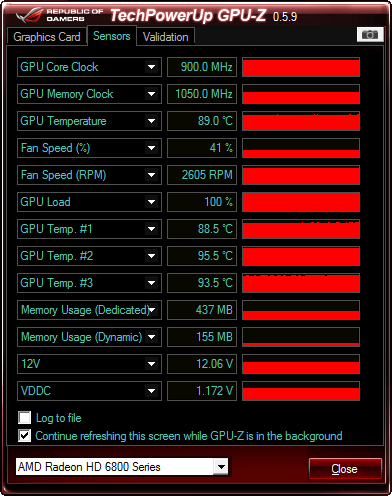
It's this card.

It got up to 89C with FurMark, stayed around there for awhile with no instability or artifacts.
bea.png


Also attached the results for the GIMPS stress test, ran it for about 17 hours, everything 'passed'.

Anyone think this is a bit high? I idle at about 15ºC less, with a fanless card, in a full-size case. Heat can prematurely age aluminum electrolytics.

Are you by any chance running this card in a 'toaster':sarc: (otherwise known as a compact case)?

Running it in a nice midsize case with the side window open, It's pretty roomy/clean.

Remove and then reseat the graphics card.
Assuming it has aluminum electrolytics, check these for swelling or leakage.
If it's a very expensive card, recapping might be worth it.
Then, yes, agreement with the last step given in the link: consider replacing the card.

I'll try this next, and take a picture of the card, but as far as I can see it looks fine, but I'm no pro at this kind of stuff either.
 

My Computer

Computer Manufacturer/Model Number
Custom
OS
Windows 7 64-bit OEM
CPU
i7 920 (stock)
Motherboard
Asus Sabertooth x58
Memory
6GB Triple Channel
Graphics Card(s)
XFX HD 6870
Monitor(s) Displays
Asus 23.6" x2
Screen Resolution
3960x1080
Hard Drives
1TB
PSU
1200 watt
Case
Lancool Lian Li
Cooling
Good air cooling
Keyboard
G510
Mouse
G9x
Internet Speed
Cable
Other Info
Last format: February 3, 2012
Antivirus: Avast Internet Security
Here's a picture of the GPU.


fcihcz.jpg
 

My Computer

Computer Manufacturer/Model Number
Custom
OS
Windows 7 64-bit OEM
CPU
i7 920 (stock)
Motherboard
Asus Sabertooth x58
Memory
6GB Triple Channel
Graphics Card(s)
XFX HD 6870
Monitor(s) Displays
Asus 23.6" x2
Screen Resolution
3960x1080
Hard Drives
1TB
PSU
1200 watt
Case
Lancool Lian Li
Cooling
Good air cooling
Keyboard
G510
Mouse
G9x
Internet Speed
Cable
Other Info
Last format: February 3, 2012
Antivirus: Avast Internet Security
I take back what I suggested, about recapping it ... I see your card has a 'limited' lifetime guarantee (not sure what's limited, though). So even if you suspect the caps, or a bad solder joint, you don't want to do anything that would void the warranty.

Does audio continue, even for a short while, when the video display cuts out? That would point to a hardware malfunction on the card, rather than somewhere on the motherboard.

With that guarantee, I would guess you'd like to be able to say, with some certainty, whether or not it's the graphic card itself, that's responsible for this.

If the cut-outs are frequent enough so (several times a day, and not once a month) then if the malfunction continues when running any one of the 'live' GNU/Linux boot disks, then it's got to be in the hardware. If it stops, then it could be a software problem (but I don't think so).

The operating system should be configured not to restart following a crash. If you walk away and it crashes, then restarts itself, what happened won't be obvious. Unless, of course, you examine the error logs. I get the impression you're already set-up this way, because you were able to read the driver's name on the bluescreen.

I think it's the card bringing down the driver when you see the error message that mentions the driver, rather than the driver bringing down the card. Especially true, if you've answered yes to the question about the audio.

If you can get a 'loaner' graphics card from somewhere (for example, if you or a friend have an unused computer?) and the problem stops, then you can go ahead with your guarantee replacement, for sure.

I see it's a very recent and high-quality card so I would be surprised if the caps were bad, already. It may even have it the higher-grade ones with the polyethylene dielectric.

Hope it all goes back to normal after you reseat the card in the socket. You may even want to wipe the contacts with electronic contact cleaner, just to make sure. Wiggle any cable connectors, to make sure they're tight, also.
 

My Computer

OS
Windows 2000 Pro SP4+ / Windows 7 Pro SP1 (both 32-bit)
... I idle at around 58C according to GPU-Z. ...
Anyone think this is a bit high? I idle at about 15ºC less, with a fanless card, in a full-size case. Heat can prematurely age aluminum electrolytics.

Are you by any chance running this card in a 'toaster':sarc: (otherwise known as a compact case)?

Do you run two monitors? Idle temperatures tend to increase when multiple monitors are used.


As to the OP, have you done the graphics card memory test? Reseating the graphics card? Let us know how the system is responding.
 

My Computer

Computer Manufacturer/Model Number
HP Pavilion e9110t
OS
Windows 7 Home Premium 64 Bit
CPU
Intel(R) Core(TM)2 Quad CPU Q9550 @ 2.83GHz
Motherboard
Pegatron IPIEL-LA3
Memory
6.00 GB Hundai HMT125U6BFR8C-H9
Graphics Card(s)
ATI Radeon HD 4850
Sound Card
Realtek High Definition Audio/ATI High Definition Audio
Monitor(s) Displays
Acer AL2216W
Screen Resolution
1680x1050
Hard Drives
Hitachi HDP725050GLA360 ATA Device 500 GB
PSU
Unknown/installed by HP
Case
HP generic case
Cooling
Intel Stock Cooling
Keyboard
HP Keyboard
Mouse
HP Mouse
Internet Speed
Download: 19.15 Mbps Upload: 1.67 Mbps
Other Info
Network Adapter Realtek RTL8168D/8111D Family PCI-E Gigabit Ethernet NIC (NDIS 6.20)
Network Adapter 802.11n Wireless PCI Express Card LAN Adapter
Back
Top