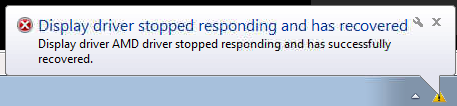
BSOD at random times after driver crash/recovery ati graphics related

jclookey

New member
Local time
1:09 PM
Messages
2
The title pretty much says it all... i do also get the catalyst control center crashing everytime i boot the machine but as it never seemed to have any effect in the past i've mostly ignored it. logs are attached in .zip format.
 

My Computer My Computer

At a glance

Windows 7 Home Premium 64 bit
Computer type
PC/Desktop
Computer Manufacturer/Model Number
Dell
OS
Windows 7 Home Premium 64 bit
From the title it seems so ... still asking ... have you faced any such notification popup?
videodriverhascrashed.png

The display chip is a ATI Mobility Radeon HD 4670. And all the random dumps (from the latest to the earliest) I have checked, it shows a very old display driver, and the same one allover.
Code:
    Image name: atikmpag.sys
[COLOR=Red]    Timestamp:        Fri Jan 22 18:37:54 2010 [/COLOR]
Such an old driver may fail by itself only.

Have you ever updated the display driver? If not, install the CCC 14.4 WHQL.

Let us know for any further BSOD after doing it. The reporting will be important, because there may be some more things causing display failure influencing the BSODs.
_________________________________________________
Code:
BugCheck 116, {fffffa80076a84e0, fffff88003e10c98, 0, 2}

*** WARNING: Unable to verify timestamp for atikmpag.sys
*** ERROR: Module load completed but symbols could not be loaded for atikmpag.sys
Probably caused by : atikmpag.sys ( atikmpag+5c98 )

Followup: MachineOwner
---------

2: kd> !analyze -v
*******************************************************************************
*                                                                             *
*                        Bugcheck Analysis                                    *
*                                                                             *
*******************************************************************************

VIDEO_TDR_FAILURE (116)
Attempt to reset the display driver and recover from timeout failed.
Arguments:
Arg1: fffffa80076a84e0, Optional pointer to internal TDR recovery context (TDR_RECOVERY_CONTEXT).
Arg2: fffff88003e10c98, The pointer into responsible device driver module (e.g. owner tag).
Arg3: 0000000000000000, Optional error code (NTSTATUS) of the last failed operation.
Arg4: 0000000000000002, Optional internal context dependent data.

Debugging Details:
------------------


FAULTING_IP: 
atikmpag+5c98
fffff880`03e10c98 4883ec28        sub     rsp,28h

DEFAULT_BUCKET_ID:  GRAPHICS_DRIVER_TDR_FAULT

CUSTOMER_CRASH_COUNT:  1

BUGCHECK_STR:  0x116

PROCESS_NAME:  System

CURRENT_IRQL:  0

ANALYSIS_VERSION: 6.3.9600.17237 (debuggers(dbg).140716-0327) amd64fre

STACK_TEXT:  
fffff880`037ed308 fffff880`03e94134 : 00000000`00000116 fffffa80`076a84e0 fffff880`03e10c98 00000000`00000000 : nt!KeBugCheckEx
fffff880`037ed310 fffff880`03e93e3e : fffff880`03e10c98 fffffa80`076a84e0 fffffa80`0d72d280 fffffa80`08208410 : dxgkrnl!TdrBugcheckOnTimeout+0xec
fffff880`037ed350 fffff880`04f1df13 : fffffa80`076a84e0 00000000`00000000 fffffa80`0d72d280 fffffa80`08208410 : dxgkrnl!TdrIsRecoveryRequired+0x1a2
fffff880`037ed380 fffff880`04f4bed6 : fffffa80`ffffffff 00000000`0003a427 fffff880`037ed4d0 00000000`00000002 : dxgmms1!VidSchiReportHwHang+0x40b
fffff880`037ed460 fffff880`04f31ce9 : fffffa80`09b1e000 ffffffff`feced300 00000000`00000002 fffff880`037ed7d8 : dxgmms1!VidSchWaitForCompletionEvent+0x196
fffff880`037ed4a0 fffff880`04f34be7 : 00000000`000001f9 00000000`00000000 fffffa80`06d6ba80 fffff8a0`0e35a720 : dxgmms1!VIDMM_GLOBAL::xWaitForAllEngines+0x1e9
fffff880`037ed5a0 fffff880`04f332d8 : fffff8a0`0e35a720 00000000`00000000 fffffa80`09b1e000 00000000`00000001 : dxgmms1!VIDMM_GLOBAL::SetupForBuildPagingBuffer+0xd7
fffff880`037ed5e0 fffff880`04f3322e : 00000000`00000000 00000000`00000001 fffffa80`09b1e000 fffff880`04f31b56 : dxgmms1!VIDMM_GLOBAL::UnmapVideoApertureSegmentInternal+0x34
fffff880`037ed770 fffff880`04f3c77e : fffffa80`09808a60 00000000`00000001 00000000`00000001 fffff800`030e20f2 : dxgmms1!VIDMM_GLOBAL::UnmapVideoApertureSegment+0x13e
fffff880`037ed7e0 fffff880`04f3c527 : fffff8a0`0e35a720 00000000`00001000 fffffa80`09808a60 fffff8a0`0e35a720 : dxgmms1!VIDMM_APERTURE_SEGMENT::UnmapApertureRange+0x7a
fffff880`037ed830 fffff880`04f3becb : fffff8a0`0e35a720 fffffa80`09b1ec80 00000000`00000000 fffffa80`09b1ec80 : dxgmms1!VIDMM_APERTURE_SEGMENT::UnmapTemporaryResource+0x9b
fffff880`037ed890 fffff880`04f2f8a4 : fffffa80`09b1e000 fffffa80`09b1e000 fffffa80`09b1ec80 fffffa80`09b1e000 : dxgmms1!VIDMM_APERTURE_SEGMENT::ReleaseTemporaryResource+0xcf
fffff880`037ed8d0 fffff880`04f2c257 : 00000000`c0000001 00000000`00000000 00000000`00000006 fffffa80`09b1e000 : dxgmms1!VIDMM_GLOBAL::EvictTemporaryAllocations+0xbc
fffff880`037ed910 fffff880`04f467d9 : 00000000`00000000 fffff8a0`0ec519d0 fffffa80`00000002 fffffa80`07929d40 : dxgmms1!VIDMM_GLOBAL::PrepareDmaBuffer+0x69f
fffff880`037edae0 fffff880`04f46514 : fffff800`04415080 fffff880`04f45f00 fffffa80`00000000 fffffa80`00000000 : dxgmms1!VidSchiSubmitRenderCommand+0x241
fffff880`037edcd0 fffff880`04f46012 : 00000000`00000000 fffffa80`06d4f7f0 00000000`00000080 fffffa80`08208410 : dxgmms1!VidSchiSubmitQueueCommand+0x50
fffff880`037edd00 fffff800`0337bb8a : 00000000`fffffc32 fffffa80`09809b50 fffffa80`06d17890 fffffa80`09809b50 : dxgmms1!VidSchiWorkerThread+0xd6
fffff880`037edd40 fffff800`030ce8e6 : fffff800`03259e80 fffffa80`09809b50 fffff800`03267cc0 fffffa80`07c4fe70 : nt!PspSystemThreadStartup+0x5a
fffff880`037edd80 00000000`00000000 : 00000000`00000000 00000000`00000000 00000000`00000000 00000000`00000000 : nt!KxStartSystemThread+0x16


STACK_COMMAND:  .bugcheck ; kb

FOLLOWUP_IP: 
atikmpag+5c98
fffff880`03e10c98 4883ec28        sub     rsp,28h

SYMBOL_NAME:  atikmpag+5c98

FOLLOWUP_NAME:  MachineOwner

MODULE_NAME: atikmpag

IMAGE_NAME:  atikmpag.sys

DEBUG_FLR_IMAGE_TIMESTAMP:  4b59a32a

FAILURE_BUCKET_ID:  X64_0x116_IMAGE_atikmpag.sys

BUCKET_ID:  X64_0x116_IMAGE_atikmpag.sys

ANALYSIS_SOURCE:  KM

FAILURE_ID_HASH_STRING:  km:x64_0x116_image_atikmpag.sys

FAILURE_ID_HASH:  {83e844bc-fe68-2042-4230-7f5d3e90b48a}

Followup: MachineOwner
---------

2: kd> lmvm atikmpag
start             end                 module name
fffff880`03e0b000 fffff880`03e37000   atikmpag T (no symbols)           
    Loaded symbol image file: atikmpag.sys
    Image path: \SystemRoot\system32\DRIVERS\atikmpag.sys
    Image name: atikmpag.sys
    Timestamp:        Fri Jan 22 18:37:54 2010 (4B59A32A)
    CheckSum:         000279B5
    ImageSize:        0002C000
    Translations:     0000.04b0 0000.04e4 0409.04b0 0409.04e4
 

My Computer My Computer

At a glance

Microsoft Windows 10 Pro Insider Preview 64-bitIntel(R) Core(TM) i3-4130 CPU @ 3.40GHzCorsair Vengence 4GB x2 (8.00GB Dual-Channel ...2047MB GeForce GTS 450 (ZOTAC International)
Computer type
PC/Desktop
Computer Manufacturer/Model Number
Self Assembled
OS
Microsoft Windows 10 Pro Insider Preview 64-bit
CPU
Intel(R) Core(TM) i3-4130 CPU @ 3.40GHz
Motherboard
Gigabyte Technology Co., Ltd. B85M-D3H
Memory
Corsair Vengence 4GB x2 (8.00GB Dual-Channel DDR3 @ 798MHz)
Graphics Card(s)
2047MB GeForce GTS 450 (ZOTAC International)
Sound Card
Onboard (Realtek High Definition Audio)
Monitor(s) Displays
LG Flatron E2040T
Screen Resolution
1600x900
Hard Drives
Western Digital 1 TB
Seagate 500 GB
PSU
Corsair VS550
Case
Cooler Master K380
Cooling
Cooler Master Seidon 120V Plus
Keyboard
Logitech MK260r
Mouse
Logitech MK260r
Internet Speed
PMPL Broadband
Antivirus
Windows Defender + MBAM
Browser
Firefox
Other Info
Dell Studio 15" Laptop
Every time I start I get the below error for Catalyst control main, and the install of the new version failed... i uninstalled the old version but still no luck installing new.. as for updating the driver I have only done what windows update does so likely not.


Problem signature:
Problem Event Name: APPCRASH
Application Name: BrCtrlCntr.exe
Application Version: 4.1.268.1
Application Timestamp: 503c3313
Fault Module Name: dlbktwds.ds
Fault Module Version: 3.107.0.0
Fault Module Timestamp: 45df4d5a
Exception Code: c0000005
Exception Offset: 00004da2
OS Version: 6.1.7601.2.1.0.768.3
Locale ID: 1033
Additional Information 1: 0a9e
Additional Information 2: 0a9e372d3b4ad19135b953a78882e789
Additional Information 3: 0a9e
Additional Information 4: 0a9e372d3b4ad19135b953a78882e789

Read our privacy statement online:
Windows 7 Privacy Statement - Microsoft Windows

If the online privacy statement is not available, please read our privacy statement offline:
C:\Windows\system32\en-US\erofflps.txt

 

My Computer My Computer

At a glance

Windows 7 Home Premium 64 bit
Computer type
PC/Desktop
Computer Manufacturer/Model Number
Dell
OS
Windows 7 Home Premium 64 bit
That event log is an appcrash, the crashed app is Brother Control Center, a software bundled with Brother printer. Update to the printer software might be needed there, also you should not let it allow to auto-start Brother Control Center alongwith windows. Remove it from startup.

Asking again .... have you got any such message as a popup balloon?
videodriverhascrashed.png

And, if you go to Download Drivers, what is the suggested driver for you?
 

My Computer My Computer

At a glance

Microsoft Windows 10 Pro Insider Preview 64-bitIntel(R) Core(TM) i3-4130 CPU @ 3.40GHzCorsair Vengence 4GB x2 (8.00GB Dual-Channel ...2047MB GeForce GTS 450 (ZOTAC International)
Computer type
PC/Desktop
Computer Manufacturer/Model Number
Self Assembled
OS
Microsoft Windows 10 Pro Insider Preview 64-bit
CPU
Intel(R) Core(TM) i3-4130 CPU @ 3.40GHz
Motherboard
Gigabyte Technology Co., Ltd. B85M-D3H
Memory
Corsair Vengence 4GB x2 (8.00GB Dual-Channel DDR3 @ 798MHz)
Graphics Card(s)
2047MB GeForce GTS 450 (ZOTAC International)
Sound Card
Onboard (Realtek High Definition Audio)
Monitor(s) Displays
LG Flatron E2040T
Screen Resolution
1600x900
Hard Drives
Western Digital 1 TB
Seagate 500 GB
PSU
Corsair VS550
Case
Cooler Master K380
Cooling
Cooler Master Seidon 120V Plus
Keyboard
Logitech MK260r
Mouse
Logitech MK260r
Internet Speed
PMPL Broadband
Antivirus
Windows Defender + MBAM
Browser
Firefox
Other Info
Dell Studio 15" Laptop
Back
Top