BSOD at random times, STOP 0x0000003B dxgmms1.sys

Showsni

New member
Local time
10:27 AM
Messages
7
I've been receiving BSODs on my desktop PC. Originally I accidentally knocked the tower unit; the computer froze, so I tried to reset. It gave a message about "Overclocking Failed" and reset into a screen with information about temperature and fan speeds and things; I hadn't been aware I was trying to Overclock at all, so I just hit the default button on that screen and then it reset into Windows. Since then I've had several BSODs at random times, the most recent saying

SYSTEM_SERVICE_EXCEPTION
STOP: 0x0000003B (0x000000000C000001D, 0xFFFFF880049BD8C6, 0xFFFFF8800C6F36F0, 0x0000000000000000)
dxgmms1.sys

Edit to say I've had several more crashes since then, most with different messages. I'm adding a new dump file.

See attached zip file.
 
Last edited:

My Computer My Computer

At a glance

Windows 7 Professional 64 bitIntel Core i5-2500K CPU @3.30 GHz8GB KINGSTON HYPER-X GENESIS DUAL-DDR3 1600MH...AMD Radeon HD 7800
Computer type
PC/Desktop
Computer Manufacturer/Model Number
PC Specialist Ltd
OS
Windows 7 Professional 64 bit
CPU
Intel Core i5-2500K CPU @3.30 GHz
Motherboard
ASUS® P8Z77-V LX: USB 3.0, SATA 6GBs, ATI®CrossFireX
Memory
8GB KINGSTON HYPER-X GENESIS DUAL-DDR3 1600MHz, X.M.P (2 x 4
Graphics Card(s)
AMD Radeon HD 7800
Sound Card
ONBOARD 6 CHANNEL (5.1) HIGH DEF AUDIO (AS STANDARD)
Hard Drives
750GB WD CAVIAR BLACK WD7502AAEX, SATA 6 Gb/s, 64MB CACHE (7200rpm)
PSU
CORSAIR 650W ENTHUSIAST SERIES™ TX650 V2-80 PLUS® BRONZE
Case
InWIN BLACK DRAGON RIDER GAMING CASE
Cooling
SUPER QUIET 22dBA TRIPLE COPPER HEATPIPE INTEL CPU COOLER
Browser
Chrome
hello Showsni, and welcome to the forums. I will try to help you. Would you try to tell me what you mean by 'knocking the tower' please. How hard did you knock it and did it fall over? Also, how comfortable are you working inside a computer?

Here is what your dump files say.

Code:
Use !analyze -v to get detailed debugging information.
BugCheck D1, {fffffa7fb7a47ed4, 2, 0, fffff8800478a87e}
[COLOR=red]Probably caused by : usbehci.sys[/COLOR] ( usbehci!EHCI_sMode_Transfer+25a )
Followup: MachineOwner

That is a EHCI eUSB Miniport Driver

Most of them say this

Code:
Use !analyze -v to get detailed debugging information.
BugCheck 3B, {c000001d, fffff880049bd8c6, fffff8800b5d36f0, 0}
Probably caused by : [COLOR=red]hardware ( dxgmms1!VIDMM[/COLOR]_GLOBAL::OpenLocalAllocation+39e )
Followup: MachineOwner

That of course is your Graphics card

Code:
MEMORY_MANAGEMENT (1a)
    # Any other values for parameter 1 must be individually examined.
Arguments:
Arg1: 0000000000000411, The subtype of the bugcheck.
Arg2: fffff68000051800
Arg3: d250000074a35800
Arg4: fffff8a012b033c9

To hopefully save you some trouble, I would check all of my electrical connections inside the computer and make sure they are fully seated, then I would remove the ram and reseat it, and do the same with the Graphics card. Just remove it and put it back and plug the connections back in. If you are lucky, the bump unseated something or loosened something. Besure to check the cable connections to the hard drive, on both ends of the cable.

Please let me know what you find and what results you get from that. Make sure to turn the power off from the switch on the back of the PSU and hold down the power button on the tower for about 30 seconds to drain any residual power from the system before working inside the computer. If you don't have an anti static strap to wear, make sure you hold on to the metal case every few minutes to avoid building up static electricity.

Also, please go into BIOS and tell me the values of the +12V, +5V and +3.3V
 

My Computers My Computers

  • At a glance

    Windows 11 ProRyzen 9 5900X32GB G Skill DDR4-3600EVGA RTX 3080 FTW 3 Ultra
    Computer type
    PC/Desktop
    Computer Manufacturer/Model Number
    ALWAYS UNDER CONSTRUCTION
    OS
    Windows 11 Pro
    CPU
    Ryzen 9 5900X
    Motherboard
    Asus X570 Crosshair Viii Hero
    Memory
    32GB G Skill DDR4-3600
    Graphics Card(s)
    EVGA RTX 3080 FTW 3 Ultra
    Sound Card
    On Board/Sennheiser PC37X Headset
    Monitor(s) Displays
    3 X Asus 27"
    Screen Resolution
    2560x1440
    Hard Drives
    2 X 1 TB NVME drives
    PSU
    EVGA 850
    Case
    Phanteks Eclipse P400A
    Cooling
    EVGA 280 AIO
    Keyboard
    Logitech G510s/ Logitech G13
    Mouse
    Logitech G502
    Internet Speed
    24/1
    Antivirus
    ESET/MBAM Pro/SAS Pro
    Browser
    Chrome/ Firefox/ Edge
  • At a glance

    Windows 11 ProIntel Ultra 9 288V32 GB LPDDR5X 8533
    Computer type
    Laptop
    System Manufacturer/Model Number
    Dell 16 Plus
    OS
    Windows 11 Pro
    CPU
    Intel Ultra 9 288V
    Memory
    32 GB LPDDR5X 8533
    Monitor(s) Displays
    16" Mini-LED HDR600 Touch 90 Hz
    Screen Resolution
    2560X1600
    Hard Drives
    1 TB NVME
Thanks for helping! Have reseated the components, so fingers crossed that helps. The values were

+12V: 12.00
+5V: 5.080
+3.3V: 3.344

Noticed a few more oddities before I did the reseating - twice Shockwave flash crashed with no warning, twice Google Chrome did, and two or three times my sound died completely. without giving a full BSOD.
 

My Computer My Computer

At a glance

Windows 7 Professional 64 bitIntel Core i5-2500K CPU @3.30 GHz8GB KINGSTON HYPER-X GENESIS DUAL-DDR3 1600MH...AMD Radeon HD 7800
Computer type
PC/Desktop
Computer Manufacturer/Model Number
PC Specialist Ltd
OS
Windows 7 Professional 64 bit
CPU
Intel Core i5-2500K CPU @3.30 GHz
Motherboard
ASUS® P8Z77-V LX: USB 3.0, SATA 6GBs, ATI®CrossFireX
Memory
8GB KINGSTON HYPER-X GENESIS DUAL-DDR3 1600MHz, X.M.P (2 x 4
Graphics Card(s)
AMD Radeon HD 7800
Sound Card
ONBOARD 6 CHANNEL (5.1) HIGH DEF AUDIO (AS STANDARD)
Hard Drives
750GB WD CAVIAR BLACK WD7502AAEX, SATA 6 Gb/s, 64MB CACHE (7200rpm)
PSU
CORSAIR 650W ENTHUSIAST SERIES™ TX650 V2-80 PLUS® BRONZE
Case
InWIN BLACK DRAGON RIDER GAMING CASE
Cooling
SUPER QUIET 22dBA TRIPLE COPPER HEATPIPE INTEL CPU COOLER
Browser
Chrome
The voltages look good. Let us know if the problems continue. We'll take it from there, if necessary.
 

My Computers My Computers

  • At a glance

    Windows 11 ProRyzen 9 5900X32GB G Skill DDR4-3600EVGA RTX 3080 FTW 3 Ultra
    Computer type
    PC/Desktop
    Computer Manufacturer/Model Number
    ALWAYS UNDER CONSTRUCTION
    OS
    Windows 11 Pro
    CPU
    Ryzen 9 5900X
    Motherboard
    Asus X570 Crosshair Viii Hero
    Memory
    32GB G Skill DDR4-3600
    Graphics Card(s)
    EVGA RTX 3080 FTW 3 Ultra
    Sound Card
    On Board/Sennheiser PC37X Headset
    Monitor(s) Displays
    3 X Asus 27"
    Screen Resolution
    2560x1440
    Hard Drives
    2 X 1 TB NVME drives
    PSU
    EVGA 850
    Case
    Phanteks Eclipse P400A
    Cooling
    EVGA 280 AIO
    Keyboard
    Logitech G510s/ Logitech G13
    Mouse
    Logitech G502
    Internet Speed
    24/1
    Antivirus
    ESET/MBAM Pro/SAS Pro
    Browser
    Chrome/ Firefox/ Edge
  • At a glance

    Windows 11 ProIntel Ultra 9 288V32 GB LPDDR5X 8533
    Computer type
    Laptop
    System Manufacturer/Model Number
    Dell 16 Plus
    OS
    Windows 11 Pro
    CPU
    Intel Ultra 9 288V
    Memory
    32 GB LPDDR5X 8533
    Monitor(s) Displays
    16" Mini-LED HDR600 Touch 90 Hz
    Screen Resolution
    2560X1600
    Hard Drives
    1 TB NVME
Still having crashes, unfortunately. Have attached another log file. Still noticing random applications crashing occasionally too - Ad blocker, Flash, Chrome and Desktop Manager, from what I've noticed.
 

My Computer My Computer

At a glance

Windows 7 Professional 64 bitIntel Core i5-2500K CPU @3.30 GHz8GB KINGSTON HYPER-X GENESIS DUAL-DDR3 1600MH...AMD Radeon HD 7800
Computer type
PC/Desktop
Computer Manufacturer/Model Number
PC Specialist Ltd
OS
Windows 7 Professional 64 bit
CPU
Intel Core i5-2500K CPU @3.30 GHz
Motherboard
ASUS® P8Z77-V LX: USB 3.0, SATA 6GBs, ATI®CrossFireX
Memory
8GB KINGSTON HYPER-X GENESIS DUAL-DDR3 1600MHz, X.M.P (2 x 4
Graphics Card(s)
AMD Radeon HD 7800
Sound Card
ONBOARD 6 CHANNEL (5.1) HIGH DEF AUDIO (AS STANDARD)
Hard Drives
750GB WD CAVIAR BLACK WD7502AAEX, SATA 6 Gb/s, 64MB CACHE (7200rpm)
PSU
CORSAIR 650W ENTHUSIAST SERIES™ TX650 V2-80 PLUS® BRONZE
Case
InWIN BLACK DRAGON RIDER GAMING CASE
Cooling
SUPER QUIET 22dBA TRIPLE COPPER HEATPIPE INTEL CPU COOLER
Browser
Chrome
Showsni, Please go into BIOS and look to see what your sata controller is set to (IDE, AHCI or Raid) the set optimized defaults, confirm that is what you want to do, then set your sata controller to what it is right now, set your Ram to manufacturer's specs, set your Boot order, save and exit.

Your system specs list one 750Gb WD Black. Please run the long and short test with Data Lifeguard Diagnostics for DOS WD Support / Downloads / SATA & SAS / WD Black Then

Please Run Memtest86+
picture.php

   Information
Please download from this site only http://www.memtest.org/ in the middle of the page are the Download links, you can download the ISO.zip or the Auto USB Flash Drive installer.zip

Extract the Zip file. If you chose the ISO image, burn it to a CD using Windows Disk Image Burner or any Image burner you may have. If you downloaded the Auto USB installer, extract it, insert your USB 2.0 Flash Drive and take note of the drive letter. Run the installer, select the Flash Drive Letter, check the format box and press next. It will install memtest86+ to a flash drive. You can use either V4.20 or V5.01. Boot from your selected media. If you use V5.01 it will tell you to press certain buttons at the start, please press no buttons. The test will begin on it's own and continue to run until you stop it. It needs to run for 8 complete passes or until you receive an error. If you receive an error, stop the test. Even 1 error is a fail. Each pass tests a different part of the ram and each of the 10 tests in each pass tests something different. It takes a minimum of 8 passes to completely test the ram, more passes are better. It is quite a long test and will take several hours depending on how much ram you have. Due to the time length it is best to run overnight. If you have any questions, please do not hesitate to ask​

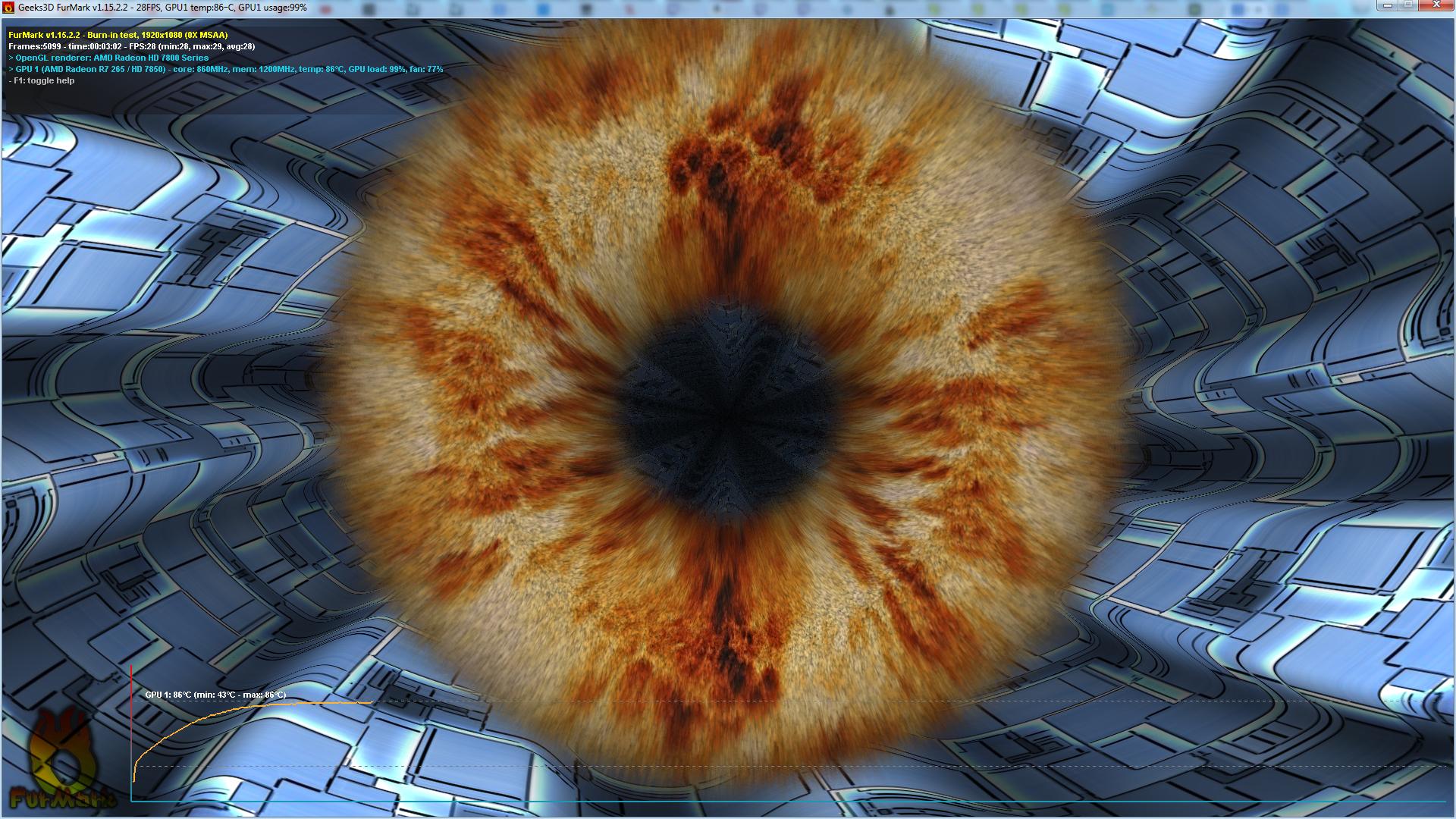
Before running Memtest please make sure you have a good GPU temp monitoring program and run Furmark (http://www.sevenforums.com/tutorials/100356-video-card-stress-test-furmark.html). I don't recommend Speedfan. Keep a close watch on your temps. They will rise very high and very rapidly. If they get too high, stop the test. Let it run until the point where the temps stop increasing and stabilize. Then stop the test. Please post a screenshot of the test in progress just before you stop it. http://www.sevenforums.com/tutorials/9733-screenshots-files-upload-post-seven-forums.html
 

My Computers My Computers

  • At a glance

    Windows 11 ProRyzen 9 5900X32GB G Skill DDR4-3600EVGA RTX 3080 FTW 3 Ultra
    Computer type
    PC/Desktop
    Computer Manufacturer/Model Number
    ALWAYS UNDER CONSTRUCTION
    OS
    Windows 11 Pro
    CPU
    Ryzen 9 5900X
    Motherboard
    Asus X570 Crosshair Viii Hero
    Memory
    32GB G Skill DDR4-3600
    Graphics Card(s)
    EVGA RTX 3080 FTW 3 Ultra
    Sound Card
    On Board/Sennheiser PC37X Headset
    Monitor(s) Displays
    3 X Asus 27"
    Screen Resolution
    2560x1440
    Hard Drives
    2 X 1 TB NVME drives
    PSU
    EVGA 850
    Case
    Phanteks Eclipse P400A
    Cooling
    EVGA 280 AIO
    Keyboard
    Logitech G510s/ Logitech G13
    Mouse
    Logitech G502
    Internet Speed
    24/1
    Antivirus
    ESET/MBAM Pro/SAS Pro
    Browser
    Chrome/ Firefox/ Edge
  • At a glance

    Windows 11 ProIntel Ultra 9 288V32 GB LPDDR5X 8533
    Computer type
    Laptop
    System Manufacturer/Model Number
    Dell 16 Plus
    OS
    Windows 11 Pro
    CPU
    Intel Ultra 9 288V
    Memory
    32 GB LPDDR5X 8533
    Monitor(s) Displays
    16" Mini-LED HDR600 Touch 90 Hz
    Screen Resolution
    2560X1600
    Hard Drives
    1 TB NVME
Hi, apologies for taking a while to reply. Here's the Furmark outcome:


Both Data Lifeguard tests gave no errors, and memtest gave no errors after 12 passes.
 

My Computer My Computer

At a glance

Windows 7 Professional 64 bitIntel Core i5-2500K CPU @3.30 GHz8GB KINGSTON HYPER-X GENESIS DUAL-DDR3 1600MH...AMD Radeon HD 7800
Computer type
PC/Desktop
Computer Manufacturer/Model Number
PC Specialist Ltd
OS
Windows 7 Professional 64 bit
CPU
Intel Core i5-2500K CPU @3.30 GHz
Motherboard
ASUS® P8Z77-V LX: USB 3.0, SATA 6GBs, ATI®CrossFireX
Memory
8GB KINGSTON HYPER-X GENESIS DUAL-DDR3 1600MHz, X.M.P (2 x 4
Graphics Card(s)
AMD Radeon HD 7800
Sound Card
ONBOARD 6 CHANNEL (5.1) HIGH DEF AUDIO (AS STANDARD)
Hard Drives
750GB WD CAVIAR BLACK WD7502AAEX, SATA 6 Gb/s, 64MB CACHE (7200rpm)
PSU
CORSAIR 650W ENTHUSIAST SERIES™ TX650 V2-80 PLUS® BRONZE
Case
InWIN BLACK DRAGON RIDER GAMING CASE
Cooling
SUPER QUIET 22dBA TRIPLE COPPER HEATPIPE INTEL CPU COOLER
Browser
Chrome

My Computers My Computers

  • At a glance

    Windows 11 ProRyzen 9 5900X32GB G Skill DDR4-3600EVGA RTX 3080 FTW 3 Ultra
    Computer type
    PC/Desktop
    Computer Manufacturer/Model Number
    ALWAYS UNDER CONSTRUCTION
    OS
    Windows 11 Pro
    CPU
    Ryzen 9 5900X
    Motherboard
    Asus X570 Crosshair Viii Hero
    Memory
    32GB G Skill DDR4-3600
    Graphics Card(s)
    EVGA RTX 3080 FTW 3 Ultra
    Sound Card
    On Board/Sennheiser PC37X Headset
    Monitor(s) Displays
    3 X Asus 27"
    Screen Resolution
    2560x1440
    Hard Drives
    2 X 1 TB NVME drives
    PSU
    EVGA 850
    Case
    Phanteks Eclipse P400A
    Cooling
    EVGA 280 AIO
    Keyboard
    Logitech G510s/ Logitech G13
    Mouse
    Logitech G502
    Internet Speed
    24/1
    Antivirus
    ESET/MBAM Pro/SAS Pro
    Browser
    Chrome/ Firefox/ Edge
  • At a glance

    Windows 11 ProIntel Ultra 9 288V32 GB LPDDR5X 8533
    Computer type
    Laptop
    System Manufacturer/Model Number
    Dell 16 Plus
    OS
    Windows 11 Pro
    CPU
    Intel Ultra 9 288V
    Memory
    32 GB LPDDR5X 8533
    Monitor(s) Displays
    16" Mini-LED HDR600 Touch 90 Hz
    Screen Resolution
    2560X1600
    Hard Drives
    1 TB NVME

My Computer My Computer

At a glance

Windows 7 Professional 64 bitIntel Core i5-2500K CPU @3.30 GHz8GB KINGSTON HYPER-X GENESIS DUAL-DDR3 1600MH...AMD Radeon HD 7800
Computer type
PC/Desktop
Computer Manufacturer/Model Number
PC Specialist Ltd
OS
Windows 7 Professional 64 bit
CPU
Intel Core i5-2500K CPU @3.30 GHz
Motherboard
ASUS® P8Z77-V LX: USB 3.0, SATA 6GBs, ATI®CrossFireX
Memory
8GB KINGSTON HYPER-X GENESIS DUAL-DDR3 1600MHz, X.M.P (2 x 4
Graphics Card(s)
AMD Radeon HD 7800
Sound Card
ONBOARD 6 CHANNEL (5.1) HIGH DEF AUDIO (AS STANDARD)
Hard Drives
750GB WD CAVIAR BLACK WD7502AAEX, SATA 6 Gb/s, 64MB CACHE (7200rpm)
PSU
CORSAIR 650W ENTHUSIAST SERIES™ TX650 V2-80 PLUS® BRONZE
Case
InWIN BLACK DRAGON RIDER GAMING CASE
Cooling
SUPER QUIET 22dBA TRIPLE COPPER HEATPIPE INTEL CPU COOLER
Browser
Chrome
That's probably OK then. I wouldn't think you would ever see that temp in real work or games. Are you still getting BSODs? If so upload the BSOD posting instructions again.
 

My Computers My Computers

  • At a glance

    Windows 11 ProRyzen 9 5900X32GB G Skill DDR4-3600EVGA RTX 3080 FTW 3 Ultra
    Computer type
    PC/Desktop
    Computer Manufacturer/Model Number
    ALWAYS UNDER CONSTRUCTION
    OS
    Windows 11 Pro
    CPU
    Ryzen 9 5900X
    Motherboard
    Asus X570 Crosshair Viii Hero
    Memory
    32GB G Skill DDR4-3600
    Graphics Card(s)
    EVGA RTX 3080 FTW 3 Ultra
    Sound Card
    On Board/Sennheiser PC37X Headset
    Monitor(s) Displays
    3 X Asus 27"
    Screen Resolution
    2560x1440
    Hard Drives
    2 X 1 TB NVME drives
    PSU
    EVGA 850
    Case
    Phanteks Eclipse P400A
    Cooling
    EVGA 280 AIO
    Keyboard
    Logitech G510s/ Logitech G13
    Mouse
    Logitech G502
    Internet Speed
    24/1
    Antivirus
    ESET/MBAM Pro/SAS Pro
    Browser
    Chrome/ Firefox/ Edge
  • At a glance

    Windows 11 ProIntel Ultra 9 288V32 GB LPDDR5X 8533
    Computer type
    Laptop
    System Manufacturer/Model Number
    Dell 16 Plus
    OS
    Windows 11 Pro
    CPU
    Intel Ultra 9 288V
    Memory
    32 GB LPDDR5X 8533
    Monitor(s) Displays
    16" Mini-LED HDR600 Touch 90 Hz
    Screen Resolution
    2560X1600
    Hard Drives
    1 TB NVME
Still having crashes, yeah. I've uploaded the latest zip file.

Some more information: Most of the crashes tend to occur as I'm opening a new video on the internet, using youtube or twitch (ie flash videos), especially if I have other programmes or videos running, and the chances of a crash seem to increase the longer I spend using the PC. I'll also often get a repeating audio sound when the crash occurs. Sometimes rather than a full crash a single application or plugin will crash - I've had shockwave flash plugin and Adblocker plugins crash, Chrome and/or Firefox crash, Microsoft Security Essentials crash, Desktop Visual Display crash and the entire audio stop working (until I do net stop audiosrv then net start audiosrv in a command prompt).
 

My Computer My Computer

At a glance

Windows 7 Professional 64 bitIntel Core i5-2500K CPU @3.30 GHz8GB KINGSTON HYPER-X GENESIS DUAL-DDR3 1600MH...AMD Radeon HD 7800
Computer type
PC/Desktop
Computer Manufacturer/Model Number
PC Specialist Ltd
OS
Windows 7 Professional 64 bit
CPU
Intel Core i5-2500K CPU @3.30 GHz
Motherboard
ASUS® P8Z77-V LX: USB 3.0, SATA 6GBs, ATI®CrossFireX
Memory
8GB KINGSTON HYPER-X GENESIS DUAL-DDR3 1600MHz, X.M.P (2 x 4
Graphics Card(s)
AMD Radeon HD 7800
Sound Card
ONBOARD 6 CHANNEL (5.1) HIGH DEF AUDIO (AS STANDARD)
Hard Drives
750GB WD CAVIAR BLACK WD7502AAEX, SATA 6 Gb/s, 64MB CACHE (7200rpm)
PSU
CORSAIR 650W ENTHUSIAST SERIES™ TX650 V2-80 PLUS® BRONZE
Case
InWIN BLACK DRAGON RIDER GAMING CASE
Cooling
SUPER QUIET 22dBA TRIPLE COPPER HEATPIPE INTEL CPU COOLER
Browser
Chrome
Update to say I disabled some of the default options in bios relating to the graphics card, and it seems to have made things more stable. Fingers crossed!
 

My Computer My Computer

At a glance

Windows 7 Professional 64 bitIntel Core i5-2500K CPU @3.30 GHz8GB KINGSTON HYPER-X GENESIS DUAL-DDR3 1600MH...AMD Radeon HD 7800
Computer type
PC/Desktop
Computer Manufacturer/Model Number
PC Specialist Ltd
OS
Windows 7 Professional 64 bit
CPU
Intel Core i5-2500K CPU @3.30 GHz
Motherboard
ASUS® P8Z77-V LX: USB 3.0, SATA 6GBs, ATI®CrossFireX
Memory
8GB KINGSTON HYPER-X GENESIS DUAL-DDR3 1600MHz, X.M.P (2 x 4
Graphics Card(s)
AMD Radeon HD 7800
Sound Card
ONBOARD 6 CHANNEL (5.1) HIGH DEF AUDIO (AS STANDARD)
Hard Drives
750GB WD CAVIAR BLACK WD7502AAEX, SATA 6 Gb/s, 64MB CACHE (7200rpm)
PSU
CORSAIR 650W ENTHUSIAST SERIES™ TX650 V2-80 PLUS® BRONZE
Case
InWIN BLACK DRAGON RIDER GAMING CASE
Cooling
SUPER QUIET 22dBA TRIPLE COPPER HEATPIPE INTEL CPU COOLER
Browser
Chrome
Good, I hope it continues for you.
 

My Computers My Computers

  • At a glance

    Windows 11 ProRyzen 9 5900X32GB G Skill DDR4-3600EVGA RTX 3080 FTW 3 Ultra
    Computer type
    PC/Desktop
    Computer Manufacturer/Model Number
    ALWAYS UNDER CONSTRUCTION
    OS
    Windows 11 Pro
    CPU
    Ryzen 9 5900X
    Motherboard
    Asus X570 Crosshair Viii Hero
    Memory
    32GB G Skill DDR4-3600
    Graphics Card(s)
    EVGA RTX 3080 FTW 3 Ultra
    Sound Card
    On Board/Sennheiser PC37X Headset
    Monitor(s) Displays
    3 X Asus 27"
    Screen Resolution
    2560x1440
    Hard Drives
    2 X 1 TB NVME drives
    PSU
    EVGA 850
    Case
    Phanteks Eclipse P400A
    Cooling
    EVGA 280 AIO
    Keyboard
    Logitech G510s/ Logitech G13
    Mouse
    Logitech G502
    Internet Speed
    24/1
    Antivirus
    ESET/MBAM Pro/SAS Pro
    Browser
    Chrome/ Firefox/ Edge
  • At a glance

    Windows 11 ProIntel Ultra 9 288V32 GB LPDDR5X 8533
    Computer type
    Laptop
    System Manufacturer/Model Number
    Dell 16 Plus
    OS
    Windows 11 Pro
    CPU
    Intel Ultra 9 288V
    Memory
    32 GB LPDDR5X 8533
    Monitor(s) Displays
    16" Mini-LED HDR600 Touch 90 Hz
    Screen Resolution
    2560X1600
    Hard Drives
    1 TB NVME
This is your last BSOD

Code:
*******************************************************************************
*                                                                             *
*                        Bugcheck Analysis                                    *
*                                                                             *
*******************************************************************************
Use !analyze -v to get detailed debugging information.
BugCheck 50, {fffffffffffedb42, 0, fffff8800144d87e, 0}
Could not read faulting driver name
[COLOR=red]Probably caused by : fltmgr.sys[/COLOR] ( fltmgr!FltpPassThroughFastIo+9e )
Followup: MachineOwner

That usually have something to do with your Hard drive, I believe. It is a Windows Update. Are your Windows Updates up to date? What Anti Virus are you using?
 

My Computers My Computers

  • At a glance

    Windows 11 ProRyzen 9 5900X32GB G Skill DDR4-3600EVGA RTX 3080 FTW 3 Ultra
    Computer type
    PC/Desktop
    Computer Manufacturer/Model Number
    ALWAYS UNDER CONSTRUCTION
    OS
    Windows 11 Pro
    CPU
    Ryzen 9 5900X
    Motherboard
    Asus X570 Crosshair Viii Hero
    Memory
    32GB G Skill DDR4-3600
    Graphics Card(s)
    EVGA RTX 3080 FTW 3 Ultra
    Sound Card
    On Board/Sennheiser PC37X Headset
    Monitor(s) Displays
    3 X Asus 27"
    Screen Resolution
    2560x1440
    Hard Drives
    2 X 1 TB NVME drives
    PSU
    EVGA 850
    Case
    Phanteks Eclipse P400A
    Cooling
    EVGA 280 AIO
    Keyboard
    Logitech G510s/ Logitech G13
    Mouse
    Logitech G502
    Internet Speed
    24/1
    Antivirus
    ESET/MBAM Pro/SAS Pro
    Browser
    Chrome/ Firefox/ Edge
  • At a glance

    Windows 11 ProIntel Ultra 9 288V32 GB LPDDR5X 8533
    Computer type
    Laptop
    System Manufacturer/Model Number
    Dell 16 Plus
    OS
    Windows 11 Pro
    CPU
    Intel Ultra 9 288V
    Memory
    32 GB LPDDR5X 8533
    Monitor(s) Displays
    16" Mini-LED HDR600 Touch 90 Hz
    Screen Resolution
    2560X1600
    Hard Drives
    1 TB NVME
Back
Top