BSOD at Startup "bad_system_config_info" and operating system unknown

ninja987

New member
Local time
8:50 AM
Messages
8
BSOD at Startup "bad_system_config_info" and operating system unknown

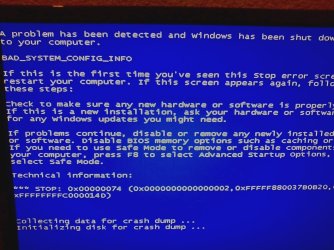
Last night i was watching a few videos on youtube and turned off my computer. on the next day i went to school and when i got back i turned on my computer and started normaly until it got to the windows 7 logo where it whould go to the BSOD screen saying "bad_system_config_info"....i tried restarting several times..after that i went to my system restore screen and it seems as if it can not detect my hard drive i gues and find windows 7 and i also get "Operating system:Unknown on Unknown local disk" on the system restore ....i have tried many other forums but that still did not work..can someone please guide me into getting my computer back..and whould screenshots of the bsod and system recovery be good?
 

My Computer My Computer

At a glance

Windows 7 x64AMD phenom II x6 1100t 3.3ghz8gb ddr3 1600mhzAMD radeon HD6950 2gb ddr5
OS
Windows 7 x64
CPU
AMD phenom II x6 1100t 3.3ghz
Memory
8gb ddr3 1600mhz
Graphics Card(s)
AMD radeon HD6950 2gb ddr5
Hard Drives
500gb SATA 3
PSU
950 watt
I suggest you replace your registry hives from the backup.

You need windows boot media of some kind - the installation disc, or the win7 repair disc you ran off will do fine.

There is a tutorial explaining one method of doing here:

Startup Repair Infinite Loop Recovery
 

My Computers My Computers

  • At a glance

    7 X64i5 84002x8gb 3200mhz
    Computer type
    PC/Desktop
    OS
    7 X64
    CPU
    i5 8400
    Motherboard
    gigabyte b365m ds3h
    Memory
    2x8gb 3200mhz
    Hard Drives
    various
    PSU
    pure power 11 400w cm
    Case
    Coolermaster
    Cooling
    cryorig m9i
  • At a glance

    7x64g54008gb ddr4 2400
    Computer type
    PC/Desktop
    OS
    7x64
    CPU
    g5400
    Motherboard
    ga b365m ds3h
    Memory
    8gb ddr4 2400
    PSU
    xfx pro 450w
I tried the command promt thing but every time i tried to type the first step wich is c: or d: or e: and so on.....i got The system cannot find the drive specified..... and im sure my drive was C or D....
 

My Computer My Computer

At a glance

Windows 7 x64AMD phenom II x6 1100t 3.3ghz8gb ddr3 1600mhzAMD radeon HD6950 2gb ddr5
OS
Windows 7 x64
CPU
AMD phenom II x6 1100t 3.3ghz
Memory
8gb ddr3 1600mhz
Graphics Card(s)
AMD radeon HD6950 2gb ddr5
Hard Drives
500gb SATA 3
PSU
950 watt
Oh i whould also like to point out that when i am at the system recovery option.....when i click load drivers ...and click computer...i see that this hard drive i never seen befor is on it wich is called "boot (x:)" ...when i open it it seems to have the setup for windows 7 but it still wont work
 

My Computer My Computer

At a glance

Windows 7 x64AMD phenom II x6 1100t 3.3ghz8gb ddr3 1600mhzAMD radeon HD6950 2gb ddr5
OS
Windows 7 x64
CPU
AMD phenom II x6 1100t 3.3ghz
Memory
8gb ddr3 1600mhz
Graphics Card(s)
AMD radeon HD6950 2gb ddr5
Hard Drives
500gb SATA 3
PSU
950 watt
X is the drive you are in now.

It is the letter the recovery environment assigns itself. It is not a real hard drive - it is in memory only.

The best way to find your drives is to open the command prompt, type:

diskpart

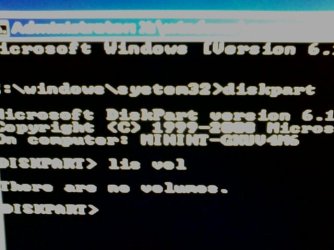
lis vol

That should all the volumes it can see.

You will have to recognize which is your win7 drive from either the label ( name ) you gave it, or from the size.

That is because drive letters are different from the recovery environment.

When you find the letter the recovery environment has assigned to you windows 7 partition - use it to follow the instructions in the tutorial.
 

My Computers My Computers

  • At a glance

    7 X64i5 84002x8gb 3200mhz
    Computer type
    PC/Desktop
    OS
    7 X64
    CPU
    i5 8400
    Motherboard
    gigabyte b365m ds3h
    Memory
    2x8gb 3200mhz
    Hard Drives
    various
    PSU
    pure power 11 400w cm
    Case
    Coolermaster
    Cooling
    cryorig m9i
  • At a glance

    7x64g54008gb ddr4 2400
    Computer type
    PC/Desktop
    OS
    7x64
    CPU
    g5400
    Motherboard
    ga b365m ds3h
    Memory
    8gb ddr4 2400
    PSU
    xfx pro 450w
ok i did Dispart and Lis vol ...but i come up with "There are no volumes." thanks for replying ive been waiting for a while now ...at least your trying to help,haha
 

My Computer My Computer

At a glance

Windows 7 x64AMD phenom II x6 1100t 3.3ghz8gb ddr3 1600mhzAMD radeon HD6950 2gb ddr5
OS
Windows 7 x64
CPU
AMD phenom II x6 1100t 3.3ghz
Memory
8gb ddr3 1600mhz
Graphics Card(s)
AMD radeon HD6950 2gb ddr5
Hard Drives
500gb SATA 3
PSU
950 watt
whould screenshots help you find out what is going on?
 

My Computer My Computer

At a glance

Windows 7 x64AMD phenom II x6 1100t 3.3ghz8gb ddr3 1600mhzAMD radeon HD6950 2gb ddr5
OS
Windows 7 x64
CPU
AMD phenom II x6 1100t 3.3ghz
Memory
8gb ddr3 1600mhz
Graphics Card(s)
AMD radeon HD6950 2gb ddr5
Hard Drives
500gb SATA 3
PSU
950 watt
Does diskpart find anything at all?

You had better try a Linux boot disc of some kind - they usually have a file manger - you can use that to copy the hives ( hives have no file extensions and are called Default, Software, System ) from windows\system32\config\regback - into windows\system32\config.

You can post a screenie if you like - but we probably won't get much from it
 

My Computers My Computers

  • At a glance

    7 X64i5 84002x8gb 3200mhz
    Computer type
    PC/Desktop
    OS
    7 X64
    CPU
    i5 8400
    Motherboard
    gigabyte b365m ds3h
    Memory
    2x8gb 3200mhz
    Hard Drives
    various
    PSU
    pure power 11 400w cm
    Case
    Coolermaster
    Cooling
    cryorig m9i
  • At a glance

    7x64g54008gb ddr4 2400
    Computer type
    PC/Desktop
    OS
    7x64
    CPU
    g5400
    Motherboard
    ga b365m ds3h
    Memory
    8gb ddr4 2400
    PSU
    xfx pro 450w
i attached 4 pics of some of the erros signs and other stuff....
Theres a photo of the bsod i get after the logo of windows apears....
theres a photo of the error sign i get when i click the recover image option
theres a photo of the cmd promt of when i type diskpart and lis vol
and theres a photo of the system recovery options
 

Attachments

  • 0107121859.jpeg
    0107121859.jpeg
    49.6 KB · Views: 22
  • 0107121901.jpeg
    0107121901.jpeg
    56.7 KB · Views: 19
  • 0107121903_01.jpeg
    0107121903_01.jpeg
    171.4 KB · Views: 28
  • 0107121904_01.jpeg
    0107121904_01.jpeg
    71 KB · Views: 16

My Computer My Computer

At a glance

Windows 7 x64AMD phenom II x6 1100t 3.3ghz8gb ddr3 1600mhzAMD radeon HD6950 2gb ddr5
OS
Windows 7 x64
CPU
AMD phenom II x6 1100t 3.3ghz
Memory
8gb ddr3 1600mhz
Graphics Card(s)
AMD radeon HD6950 2gb ddr5
Hard Drives
500gb SATA 3
PSU
950 watt
Looks like a problem with the HD.

If you are lucky it may just be a loose sata connector.

Try replugging it to make sure.
 

My Computers My Computers

  • At a glance

    7 X64i5 84002x8gb 3200mhz
    Computer type
    PC/Desktop
    OS
    7 X64
    CPU
    i5 8400
    Motherboard
    gigabyte b365m ds3h
    Memory
    2x8gb 3200mhz
    Hard Drives
    various
    PSU
    pure power 11 400w cm
    Case
    Coolermaster
    Cooling
    cryorig m9i
  • At a glance

    7x64g54008gb ddr4 2400
    Computer type
    PC/Desktop
    OS
    7x64
    CPU
    g5400
    Motherboard
    ga b365m ds3h
    Memory
    8gb ddr4 2400
    PSU
    xfx pro 450w
ok i have sata 3 ima unplug and plug all the cables...il respond in a min
 

My Computer My Computer

At a glance

Windows 7 x64AMD phenom II x6 1100t 3.3ghz8gb ddr3 1600mhzAMD radeon HD6950 2gb ddr5
OS
Windows 7 x64
CPU
AMD phenom II x6 1100t 3.3ghz
Memory
8gb ddr3 1600mhz
Graphics Card(s)
AMD radeon HD6950 2gb ddr5
Hard Drives
500gb SATA 3
PSU
950 watt
ok i unplugged and plugged almost all of the 2 hard drives that are in raid 0 and i also tried unplugging the cdrom and plugging it back in.....and i still got the same message...and i also forgot to say that i took off all 3 of my ram sticks except one and tried to run it but it still got me the bsod...
 

My Computer My Computer

At a glance

Windows 7 x64AMD phenom II x6 1100t 3.3ghz8gb ddr3 1600mhzAMD radeon HD6950 2gb ddr5
OS
Windows 7 x64
CPU
AMD phenom II x6 1100t 3.3ghz
Memory
8gb ddr3 1600mhz
Graphics Card(s)
AMD radeon HD6950 2gb ddr5
Hard Drives
500gb SATA 3
PSU
950 watt
Back
Top