BSOD Atikmdag.sys 0x0000007E

smjm1209

New member
Local time
6:36 AM
Messages
3
Location
England, UK
My computer BSODs whilst doing several things (but at very random moments), most frequently when watching YouTube videos or videos of any other kind, also when doing things which use a lot of CPU power like editing a video with Adobe Premier Pro, etc. My computer can crash 10 minutes after booting, 1 hour after booting, 2 hours after booting, etc... seemingly at random.

The following message comes up when my computer BSODs:
"Technical information:
*** STOP: 0x0000007E (0xFFFFFFFFC0000005, 0xFFFFF880112FCFDB, 0xFFFFF880062E8828,
0xFFFFF880062E7A80)

*** atikmdag.sys - Address FFFFF880112FCFDB base at FFFFF88011238000, DateStamp 533bca5c"

I have uploaded the ZIP file generated by "dm log collector.exe", as advised, to this post.

System Spec:
CPU = AMD A10-7850K Radeon R7, 12 Compute Cores 4C+8G
Motherboard = ASUSTeK COMPUTER INC. A88XM-E
BIOS = BIOS Date: 04/01/14 13:02:55 Ver: 04.01
Memory = Total - 8.00GB, Usable - 6.94GB
HDD = TOSHIBA DT01ACA100 SATA Disk Device
Sound Card = (1) AMD High Definition Audio Device (2) Realtek High Definition Audio
Graphics Card = AMD Radeon R7 Series
OS = Microsoft Windows 7 Ultimate 64-bit 7601 Multiprocessor Free Service Pack 1
 

My Computer

Computer type
PC/Desktop
OS
Windows 7 Ultimate x64
CPU
AMD A10-7850K
Motherboard
ASUSTeK COMPUTER INC. A88XM-E
Memory
8.00GB (6.94GB usable)
Graphics Card(s)
AMD Radeon R7
Monitor(s) Displays
BenQ Gaming RL2455HM - 24" LED Monitor
Screen Resolution
1920 x 1080
Hard Drives
TOSHIBA DT01ACA100 SATA Disk Drive
Cooling
Fan
Browser
Firefox
Hello smjm1209 and welcome to Sevenforums :)

I took a quick peek at your post and the first thing I remembered about the 0x7E was that sometimes the BIOS would have a play in the error, and in your listed system specs the BIOS version is quite old, yours is 2 years old.

So I would recommend that you visit the Asus Support Download page and download the latest BIOS version:
ASUS A88XME HelpDesk Download/

First you'll have to select your OS and then there will be a list of links, click the BIOS one.

Cheers, Boris :)
 

My Computer

Computer type
PC/Desktop
Computer Manufacturer/Model Number
Custom build
OS
Windows 7 Home Premium
CPU
i5-3570k
Motherboard
ASUS Sabertooth z77
Memory
16 GB DDR3 G Skill Sniper
Graphics Card(s)
GIGABYTE GeForce GTX 970 GV-N970WF3OC-4GD
Monitor(s) Displays
ASUS ROG PG278Q
Screen Resolution
2560x1440@60Hz/120Hz/144Hz
Hard Drives
56GB KINGSTON SVP200S37A60G
512GB Crucial MX100
1863GB Seagate ST2000DM001-1CH164
2795GB Seagate ST3000DM001-9YN166
PSU
Corsair GS800
Case
Storm Trooper Stryker White
Keyboard
Logitech G910 Orion Spark
Mouse
Logitech G502
Antivirus
MSE
Browser
Firefox/Chrome
Other Info
Logitech G633
Logitech Mouse Matt
Thanks!

Thank you very much BorisTheAnimal for your reply. I shall go and download the latest BIOS version for my system now and report back in a couple of days as to whether the BSODs have ceased or not.
 

My Computer

Computer type
PC/Desktop
OS
Windows 7 Ultimate x64
CPU
AMD A10-7850K
Motherboard
ASUSTeK COMPUTER INC. A88XM-E
Memory
8.00GB (6.94GB usable)
Graphics Card(s)
AMD Radeon R7
Monitor(s) Displays
BenQ Gaming RL2455HM - 24" LED Monitor
Screen Resolution
1920 x 1080
Hard Drives
TOSHIBA DT01ACA100 SATA Disk Drive
Cooling
Fan
Browser
Firefox
Hmm... Boris, I seem to have run into a problem. After downloading the latest BIOS file, "A88XM-E BIOS 2001", I have realized it is a ".cap" file. I do not know how to use this file to update my BIOS.
 

My Computer

Computer type
PC/Desktop
OS
Windows 7 Ultimate x64
CPU
AMD A10-7850K
Motherboard
ASUSTeK COMPUTER INC. A88XM-E
Memory
8.00GB (6.94GB usable)
Graphics Card(s)
AMD Radeon R7
Monitor(s) Displays
BenQ Gaming RL2455HM - 24" LED Monitor
Screen Resolution
1920 x 1080
Hard Drives
TOSHIBA DT01ACA100 SATA Disk Drive
Cooling
Fan
Browser
Firefox
Hmm... Boris, I seem to have run into a problem. After downloading the latest BIOS file, "A88XM-E BIOS 2001", I have realized it is a ".cap" file. I do not know how to use this file to update my BIOS.

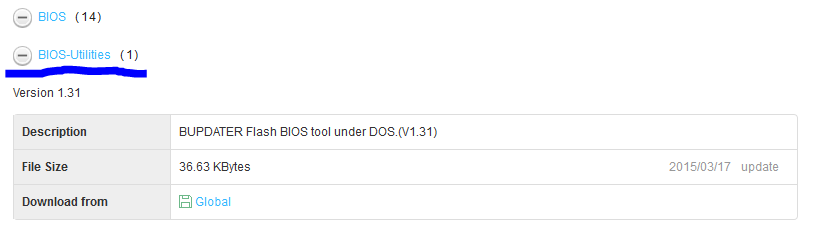
Alrighty, did you happen to grab the BIOS-utility that was under the BIOS link/list on the support page?

IC0iX30.png
 

My Computer

Computer type
PC/Desktop
Computer Manufacturer/Model Number
Custom build
OS
Windows 7 Home Premium
CPU
i5-3570k
Motherboard
ASUS Sabertooth z77
Memory
16 GB DDR3 G Skill Sniper
Graphics Card(s)
GIGABYTE GeForce GTX 970 GV-N970WF3OC-4GD
Monitor(s) Displays
ASUS ROG PG278Q
Screen Resolution
2560x1440@60Hz/120Hz/144Hz
Hard Drives
56GB KINGSTON SVP200S37A60G
512GB Crucial MX100
1863GB Seagate ST2000DM001-1CH164
2795GB Seagate ST3000DM001-9YN166
PSU
Corsair GS800
Case
Storm Trooper Stryker White
Keyboard
Logitech G910 Orion Spark
Mouse
Logitech G502
Antivirus
MSE
Browser
Firefox/Chrome
Other Info
Logitech G633
Logitech Mouse Matt
Back
Top