BSOD Attacks

bshunter

New member
Local time
12:52 PM
Messages
21
So, in the past few weeks, I had BSOD attacks.
When it started, first there were random attacks, sometimes the blue screen with message about win32k.sys, sometimes my monitor just turns off. It's been 6 months since I reinstalled windows.
I installed many programs to fix windows registers, like CCleaner.. Everything's been fine for a few days, and then when I opened some youtube clip, my monitor turns off again. This was happening for a past two~ weeks, everytime I open some random youtube clip, it's not for every clip but let's say for half youtube clips, like this one NONONO - Pumpin Blood (Official Video) - YouTube .
Yesterday, I reinstalled win7, and it happend again, the same problem monitor turns off, with the same clip as a test.
I've read some topics around, that I should clean the pc and take out each component and return it back. And it happend again.
 

My Computer

Computer type
PC/Desktop
OS
Microsoft Windows 7 Professional 32-bit 7601 Multiprocessor Free Service Pack 1
CPU
Intel(R) Core(TM)2 Duo CPU E7400 @ 2.80GHz
Motherboard
BIOSTAR Group P43-A7
Memory
3.00 GB
Graphics Card(s)
NVIDIA GeForce 9800 GT (Microsoft Corporation - WDDM v1.1)
Sound Card
(1) High Definition Audio Device (2) USB Audio Device
Screen Resolution
1680 x 1050 x 32 bits (4294967296 colors) @ 59 Hz
Hard Drives
WDC WD3200AAKS-00L9A0 ATA Device

My Computer

Computer type
PC/Desktop
Computer Manufacturer/Model Number
Own build (new) Desk1 / Asus ROG Win 7 / Desk2 1st build
OS
Desk1 7 Home Prem / Desk2 10 Pro / Main lap Asus ROG 10 Pro 2 laptop Toshiba 7 Pro Asus P2520 7 & 10
CPU
Desk1 i5 3750K / Laptop i7 GTX 860M / Desk2 i5 2500
Motherboard
Desk1 Asus P877-V / Desk2 Gigabyte H67 UD3H / Laptop ?
Memory
Desk1 8GB (1866) / Desk2 16GB (1333) / Laptop 8Gb DDR3
Graphics Card(s)
Desk 1& 2NVidia GTX 650 & Laptops on board Intel
Sound Card
Desk 1 & 2 -XONAR DG Realtek High Def audio Laptop
Monitor(s) Displays
Desk 1 Benq HD 2450 / Desk2 Philips 24" / Laptop 17.5"
Screen Resolution
1920x1080 D1 & D2 & Laptop 1
Hard Drives
Desk1 Samsung 120GB 830 SSD
Asus ROG 256GB 850 Pro SSD
Desk2 Samsung 840 256 SSD
Toshiba 120GB EVO
PSU
Desk 1 Corsair HX 1050/ Laptop ? / Desk 2 Corsair HX 650
Case
Desk 1 Cooler HAF XM ? Toshiba laptop / Desk2 Coolermaster
Cooling
Fans on all Desk1 -2 Desk2 - all Coolermasters 5 Laptop ?
Keyboard
Desk 1 MS Sidewinder X6 Desk 2 MS Sidewinder X 4
Mouse
Desk 1&2 - Gigabyte MS 900 gamer - laptop - Logitec wireless
Internet Speed
ADSL2+
Other Info
One other Desktop (tester) and spare Toshba laptop both with SSD's
Running Kaspersky 2016 ISS on all machines config'd identically
Logitec audio stereo systems on each machine (x3)
Canon MG5250MFC
Router/modem TP-Link running WPA2SK
CPU: Intel(R) Core(TM)2 Duo CPU E7400 @ 2.80GHz
Motherboard: BIOSTAR Group P43-A7
BIOS: Default System BIOS
Total memory: 3.00 GB Usable: 3.00GB
HDD: WDC WD3200AAKS-00L9A0 ATA Device
Sound card: (1) USB Audio Device (2) High Definition Audio Device (3) NVIDIA Virtual Audio Device (Wave Extensible) (WDM)
Graphics card: NVIDIA GeForce 9800 GT
OS: Microsoft Windows 7 Ultimate 32-bit 7601 Multiprocessor Free Service Pack 1

http://www.bleepingcomputer.com/download/adwcleaner/

download from bleeping computer – delete any rubbish these find.

So you think that my system is infected with adware ?
 

My Computer

Computer type
PC/Desktop
OS
Microsoft Windows 7 Professional 32-bit 7601 Multiprocessor Free Service Pack 1
CPU
Intel(R) Core(TM)2 Duo CPU E7400 @ 2.80GHz
Motherboard
BIOSTAR Group P43-A7
Memory
3.00 GB
Graphics Card(s)
NVIDIA GeForce 9800 GT (Microsoft Corporation - WDDM v1.1)
Sound Card
(1) High Definition Audio Device (2) USB Audio Device
Screen Resolution
1680 x 1050 x 32 bits (4294967296 colors) @ 59 Hz
Hard Drives
WDC WD3200AAKS-00L9A0 ATA Device
Another one...
 

My Computer

Computer type
PC/Desktop
OS
Microsoft Windows 7 Professional 32-bit 7601 Multiprocessor Free Service Pack 1
CPU
Intel(R) Core(TM)2 Duo CPU E7400 @ 2.80GHz
Motherboard
BIOSTAR Group P43-A7
Memory
3.00 GB
Graphics Card(s)
NVIDIA GeForce 9800 GT (Microsoft Corporation - WDDM v1.1)
Sound Card
(1) High Definition Audio Device (2) USB Audio Device
Screen Resolution
1680 x 1050 x 32 bits (4294967296 colors) @ 59 Hz
Hard Drives
WDC WD3200AAKS-00L9A0 ATA Device
And again I open some youtube link...
 

My Computer

Computer type
PC/Desktop
OS
Microsoft Windows 7 Professional 32-bit 7601 Multiprocessor Free Service Pack 1
CPU
Intel(R) Core(TM)2 Duo CPU E7400 @ 2.80GHz
Motherboard
BIOSTAR Group P43-A7
Memory
3.00 GB
Graphics Card(s)
NVIDIA GeForce 9800 GT (Microsoft Corporation - WDDM v1.1)
Sound Card
(1) High Definition Audio Device (2) USB Audio Device
Screen Resolution
1680 x 1050 x 32 bits (4294967296 colors) @ 59 Hz
Hard Drives
WDC WD3200AAKS-00L9A0 ATA Device

My Computer

Computer type
PC/Desktop
OS
Microsoft Windows 7 Professional 32-bit 7601 Multiprocessor Free Service Pack 1
CPU
Intel(R) Core(TM)2 Duo CPU E7400 @ 2.80GHz
Motherboard
BIOSTAR Group P43-A7
Memory
3.00 GB
Graphics Card(s)
NVIDIA GeForce 9800 GT (Microsoft Corporation - WDDM v1.1)
Sound Card
(1) High Definition Audio Device (2) USB Audio Device
Screen Resolution
1680 x 1050 x 32 bits (4294967296 colors) @ 59 Hz
Hard Drives
WDC WD3200AAKS-00L9A0 ATA Device
bump
 

My Computer

Computer type
PC/Desktop
OS
Microsoft Windows 7 Professional 32-bit 7601 Multiprocessor Free Service Pack 1
CPU
Intel(R) Core(TM)2 Duo CPU E7400 @ 2.80GHz
Motherboard
BIOSTAR Group P43-A7
Memory
3.00 GB
Graphics Card(s)
NVIDIA GeForce 9800 GT (Microsoft Corporation - WDDM v1.1)
Sound Card
(1) High Definition Audio Device (2) USB Audio Device
Screen Resolution
1680 x 1050 x 32 bits (4294967296 colors) @ 59 Hz
Hard Drives
WDC WD3200AAKS-00L9A0 ATA Device
Sorry late reply BS I think I will ask for help on this mate if that is ok with you?
 

My Computer

Computer type
PC/Desktop
Computer Manufacturer/Model Number
Own build (new) Desk1 / Asus ROG Win 7 / Desk2 1st build
OS
Desk1 7 Home Prem / Desk2 10 Pro / Main lap Asus ROG 10 Pro 2 laptop Toshiba 7 Pro Asus P2520 7 & 10
CPU
Desk1 i5 3750K / Laptop i7 GTX 860M / Desk2 i5 2500
Motherboard
Desk1 Asus P877-V / Desk2 Gigabyte H67 UD3H / Laptop ?
Memory
Desk1 8GB (1866) / Desk2 16GB (1333) / Laptop 8Gb DDR3
Graphics Card(s)
Desk 1& 2NVidia GTX 650 & Laptops on board Intel
Sound Card
Desk 1 & 2 -XONAR DG Realtek High Def audio Laptop
Monitor(s) Displays
Desk 1 Benq HD 2450 / Desk2 Philips 24" / Laptop 17.5"
Screen Resolution
1920x1080 D1 & D2 & Laptop 1
Hard Drives
Desk1 Samsung 120GB 830 SSD
Asus ROG 256GB 850 Pro SSD
Desk2 Samsung 840 256 SSD
Toshiba 120GB EVO
PSU
Desk 1 Corsair HX 1050/ Laptop ? / Desk 2 Corsair HX 650
Case
Desk 1 Cooler HAF XM ? Toshiba laptop / Desk2 Coolermaster
Cooling
Fans on all Desk1 -2 Desk2 - all Coolermasters 5 Laptop ?
Keyboard
Desk 1 MS Sidewinder X6 Desk 2 MS Sidewinder X 4
Mouse
Desk 1&2 - Gigabyte MS 900 gamer - laptop - Logitec wireless
Internet Speed
ADSL2+
Other Info
One other Desktop (tester) and spare Toshba laptop both with SSD's
Running Kaspersky 2016 ISS on all machines config'd identically
Logitec audio stereo systems on each machine (x3)
Canon MG5250MFC
Router/modem TP-Link running WPA2SK
Sure, just a.s.a.p please.
Thank you!
 

My Computer

Computer type
PC/Desktop
OS
Microsoft Windows 7 Professional 32-bit 7601 Multiprocessor Free Service Pack 1
CPU
Intel(R) Core(TM)2 Duo CPU E7400 @ 2.80GHz
Motherboard
BIOSTAR Group P43-A7
Memory
3.00 GB
Graphics Card(s)
NVIDIA GeForce 9800 GT (Microsoft Corporation - WDDM v1.1)
Sound Card
(1) High Definition Audio Device (2) USB Audio Device
Screen Resolution
1680 x 1050 x 32 bits (4294967296 colors) @ 59 Hz
Hard Drives
WDC WD3200AAKS-00L9A0 ATA Device
Well you are only uploading a single dump each time instead of using the tool as mentioned here,

http://www.sevenforums.com/bsod-help-support/96879-blue-screen-death-bsod-posting-instructions.html

They all point to hardware though,

Code:
BugCheck 124, {0, 85f808fc, 0, 0}

Probably caused by : hardware

Followup: MachineOwner

You can start with this till some hardware guys get here,

   Information
MemTest86+

Run a minimum of 8 passes, preferably overnight, or until errors occur using MemTest86+.

Use this tutorial to help you use MemTest86+:
RAM - Test with MemTest86+
 

My Computer

Computer type
PC/Desktop
Computer Manufacturer/Model Number
Self Built
OS
Win 10 Pro x64
CPU
Intel I5-2500K @3.3GHz
Motherboard
Asrock P67 Extreme4
Memory
16GB G.Skill Ripjaws X (4x4GB)
Graphics Card(s)
EVGA GeForce 750 Ti SC 2GB
Sound Card
ASUS Xonar DG 5.1 Channels 24-bit 96KHz PCI Interface Sound
Monitor(s) Displays
auria eq2367
Screen Resolution
1920 x 1080
Hard Drives
250GB Samsung 850 EVO SSD
1TB WD Blue
1TB Hitachi
PSU
SeaSonic X 650W 80 Plus Gold
Case
Corsair Obsidian 750D
Cooling
Corsair H60, Three 140mm case fans
Keyboard
Logitech Wireless Keyboard K520
Mouse
Logitech Wireless Mouse M310
Internet Speed
Wave Broadband ~ 100 dn 5 up
Antivirus
Windows Defender, Malwarebytes Premium
Browser
Edge, IE11, Chrome
Other Info
Laptop specs: HP g7-1365dx /
CPU: AMD A6-3420M APU with Radeon(tm) HD Graphics /
RAM: Crucial 8Gb (2x4Gb) /
SSD: Crucial M4-CT128M4SSD2 ATA Device/ FW 000F /
GFX: AMD Radeon HD 6520G /
OS: Windows 10 Pro x64
Well you are only uploading a single dump each time instead of using the tool as mentioned here,

http://www.sevenforums.com/bsod-help-support/96879-blue-screen-death-bsod-posting-instructions.html

They all point to hardware though,

Code:
BugCheck 124, {0, 85f808fc, 0, 0}

Probably caused by : hardware

Followup: MachineOwner

You can start with this till some hardware guys get here,

   Information
MemTest86+

Run a minimum of 8 passes, preferably overnight, or until errors occur using MemTest86+.

Use this tutorial to help you use MemTest86+:
RAM - Test with MemTest86+

I'm sorry for not following your instructions. You may now download a new zip file in a attachment.
 

My Computer

Computer type
PC/Desktop
OS
Microsoft Windows 7 Professional 32-bit 7601 Multiprocessor Free Service Pack 1
CPU
Intel(R) Core(TM)2 Duo CPU E7400 @ 2.80GHz
Motherboard
BIOSTAR Group P43-A7
Memory
3.00 GB
Graphics Card(s)
NVIDIA GeForce 9800 GT (Microsoft Corporation - WDDM v1.1)
Sound Card
(1) High Definition Audio Device (2) USB Audio Device
Screen Resolution
1680 x 1050 x 32 bits (4294967296 colors) @ 59 Hz
Hard Drives
WDC WD3200AAKS-00L9A0 ATA Device
bump
 

My Computer

Computer type
PC/Desktop
OS
Microsoft Windows 7 Professional 32-bit 7601 Multiprocessor Free Service Pack 1
CPU
Intel(R) Core(TM)2 Duo CPU E7400 @ 2.80GHz
Motherboard
BIOSTAR Group P43-A7
Memory
3.00 GB
Graphics Card(s)
NVIDIA GeForce 9800 GT (Microsoft Corporation - WDDM v1.1)
Sound Card
(1) High Definition Audio Device (2) USB Audio Device
Screen Resolution
1680 x 1050 x 32 bits (4294967296 colors) @ 59 Hz
Hard Drives
WDC WD3200AAKS-00L9A0 ATA Device
No need to bump after only a few hours.

Those are still the same dumps, but the other logs are appreciated.

Having a complete list of your system hardware specifications makes it far easier to troubleshoot issues. Use this to help gather that information:

System Info - See Your System Specs

You made no mention of running MemTest86+ as suggested.
 

My Computer

Computer type
PC/Desktop
Computer Manufacturer/Model Number
Self Built
OS
Win 10 Pro x64
CPU
Intel I5-2500K @3.3GHz
Motherboard
Asrock P67 Extreme4
Memory
16GB G.Skill Ripjaws X (4x4GB)
Graphics Card(s)
EVGA GeForce 750 Ti SC 2GB
Sound Card
ASUS Xonar DG 5.1 Channels 24-bit 96KHz PCI Interface Sound
Monitor(s) Displays
auria eq2367
Screen Resolution
1920 x 1080
Hard Drives
250GB Samsung 850 EVO SSD
1TB WD Blue
1TB Hitachi
PSU
SeaSonic X 650W 80 Plus Gold
Case
Corsair Obsidian 750D
Cooling
Corsair H60, Three 140mm case fans
Keyboard
Logitech Wireless Keyboard K520
Mouse
Logitech Wireless Mouse M310
Internet Speed
Wave Broadband ~ 100 dn 5 up
Antivirus
Windows Defender, Malwarebytes Premium
Browser
Edge, IE11, Chrome
Other Info
Laptop specs: HP g7-1365dx /
CPU: AMD A6-3420M APU with Radeon(tm) HD Graphics /
RAM: Crucial 8Gb (2x4Gb) /
SSD: Crucial M4-CT128M4SSD2 ATA Device/ FW 000F /
GFX: AMD Radeon HD 6520G /
OS: Windows 10 Pro x64
No need to bump after only a few hours.

Those are still the same dumps, but the other logs are appreciated.

Having a complete list of your system hardware specifications makes it far easier to troubleshoot issues. Use this to help gather that information:

System Info - See Your System Specs

You made no mention of running MemTest86+ as suggested.

I don't have enough time right now to do that. However,
thing about the dump files, it seems that now when I open clip on the youtube, it doesn't even show anymore the blue screen, my monitor just turns off saying that "No input video" just like before but with out BS, and when I restart the computer, it doesn't save anymore those dump files nor gives any additional information about the problem when I start up the windows.
 

My Computer

Computer type
PC/Desktop
OS
Microsoft Windows 7 Professional 32-bit 7601 Multiprocessor Free Service Pack 1
CPU
Intel(R) Core(TM)2 Duo CPU E7400 @ 2.80GHz
Motherboard
BIOSTAR Group P43-A7
Memory
3.00 GB
Graphics Card(s)
NVIDIA GeForce 9800 GT (Microsoft Corporation - WDDM v1.1)
Sound Card
(1) High Definition Audio Device (2) USB Audio Device
Screen Resolution
1680 x 1050 x 32 bits (4294967296 colors) @ 59 Hz
Hard Drives
WDC WD3200AAKS-00L9A0 ATA Device
BS mate you need to run that memtest I know t takes a while but it needs to be don.

I notice too you have 3GB RAM - any reason?
 

My Computer

Computer type
PC/Desktop
Computer Manufacturer/Model Number
Own build (new) Desk1 / Asus ROG Win 7 / Desk2 1st build
OS
Desk1 7 Home Prem / Desk2 10 Pro / Main lap Asus ROG 10 Pro 2 laptop Toshiba 7 Pro Asus P2520 7 & 10
CPU
Desk1 i5 3750K / Laptop i7 GTX 860M / Desk2 i5 2500
Motherboard
Desk1 Asus P877-V / Desk2 Gigabyte H67 UD3H / Laptop ?
Memory
Desk1 8GB (1866) / Desk2 16GB (1333) / Laptop 8Gb DDR3
Graphics Card(s)
Desk 1& 2NVidia GTX 650 & Laptops on board Intel
Sound Card
Desk 1 & 2 -XONAR DG Realtek High Def audio Laptop
Monitor(s) Displays
Desk 1 Benq HD 2450 / Desk2 Philips 24" / Laptop 17.5"
Screen Resolution
1920x1080 D1 & D2 & Laptop 1
Hard Drives
Desk1 Samsung 120GB 830 SSD
Asus ROG 256GB 850 Pro SSD
Desk2 Samsung 840 256 SSD
Toshiba 120GB EVO
PSU
Desk 1 Corsair HX 1050/ Laptop ? / Desk 2 Corsair HX 650
Case
Desk 1 Cooler HAF XM ? Toshiba laptop / Desk2 Coolermaster
Cooling
Fans on all Desk1 -2 Desk2 - all Coolermasters 5 Laptop ?
Keyboard
Desk 1 MS Sidewinder X6 Desk 2 MS Sidewinder X 4
Mouse
Desk 1&2 - Gigabyte MS 900 gamer - laptop - Logitec wireless
Internet Speed
ADSL2+
Other Info
One other Desktop (tester) and spare Toshba laptop both with SSD's
Running Kaspersky 2016 ISS on all machines config'd identically
Logitec audio stereo systems on each machine (x3)
Canon MG5250MFC
Router/modem TP-Link running WPA2SK
I don't have enough time right now to do that.
There is no short cut to diagnosing 0x124 hardware bugchecks, so I would suggest trying to make time to solve this.

Start by running MemTest86+ for a minimum of 8 passes - it will take several hours, so run it overnight when you are asleep.
 

My Computer

Computer type
PC/Desktop
Computer Manufacturer/Model Number
Golden Mk. I.4
OS
Windows 10 Pro x64 ; Xubuntu x64
CPU
Intel i7 860 @ 2.80 GHz O/C'ed to 4.0GHz
Motherboard
Gigabyte P55A-UD3R Rev.1. Award BIOS F13
Memory
16GB Corsair Vengance DDR3 @ 661 MHz Dual Channel (9-9-9-24)
Graphics Card(s)
EVGA NVidia GTX 560 1024MB
Sound Card
Realtek Integrated
Monitor(s) Displays
Dual Samsung SyncMaster 2494HS
Screen Resolution
1920*1080 and 1920*1080
Hard Drives
1*Samsung 840 EVO 120GB SSD;
1*OCZ Vertex 2 60GB SSD;
2*Samsung F3 SpinPoint 1TB in RAID0;
1*Samsung F1 SpinPoint 1TB;
2*Western Digital 1TB External USB 3.0
1*Western Digital 500GB External USB 3.0
1*Seagate 500GB External USB 2.0
PSU
Thermaltake ToughPower QFan 750W
Case
Thermaltake Element S VK60001W2Z
Cooling
Corsair H60 Water Cooling, 2*230mm and 2*80mm case fans
Keyboard
Logitech G110
Mouse
Logitech MX518
Along with,

Having a complete list of your system hardware specifications makes it far easier to troubleshoot issues. Use this to help gather that information:

System Info - See Your System Specs

Can you also post this,

Please perform the following:

1. Download and save this tool to your desktop:
http://go.microsoft.com/fwlink/?linkid=52012

2. Run the tool, and then click Copy - ignore any errors if they appear

3. Use CTRL+V to paste the unedited results of the tool here in your next reply.
 

My Computer

Computer type
PC/Desktop
Computer Manufacturer/Model Number
Self Built
OS
Win 10 Pro x64
CPU
Intel I5-2500K @3.3GHz
Motherboard
Asrock P67 Extreme4
Memory
16GB G.Skill Ripjaws X (4x4GB)
Graphics Card(s)
EVGA GeForce 750 Ti SC 2GB
Sound Card
ASUS Xonar DG 5.1 Channels 24-bit 96KHz PCI Interface Sound
Monitor(s) Displays
auria eq2367
Screen Resolution
1920 x 1080
Hard Drives
250GB Samsung 850 EVO SSD
1TB WD Blue
1TB Hitachi
PSU
SeaSonic X 650W 80 Plus Gold
Case
Corsair Obsidian 750D
Cooling
Corsair H60, Three 140mm case fans
Keyboard
Logitech Wireless Keyboard K520
Mouse
Logitech Wireless Mouse M310
Internet Speed
Wave Broadband ~ 100 dn 5 up
Antivirus
Windows Defender, Malwarebytes Premium
Browser
Edge, IE11, Chrome
Other Info
Laptop specs: HP g7-1365dx /
CPU: AMD A6-3420M APU with Radeon(tm) HD Graphics /
RAM: Crucial 8Gb (2x4Gb) /
SSD: Crucial M4-CT128M4SSD2 ATA Device/ FW 000F /
GFX: AMD Radeon HD 6520G /
OS: Windows 10 Pro x64
Ok, I will run MemTest86+ until tonight or overnight and provide you with more additional info. I'm a bit busy now with the homeworks...
 

My Computer

Computer type
PC/Desktop
OS
Microsoft Windows 7 Professional 32-bit 7601 Multiprocessor Free Service Pack 1
CPU
Intel(R) Core(TM)2 Duo CPU E7400 @ 2.80GHz
Motherboard
BIOSTAR Group P43-A7
Memory
3.00 GB
Graphics Card(s)
NVIDIA GeForce 9800 GT (Microsoft Corporation - WDDM v1.1)
Sound Card
(1) High Definition Audio Device (2) USB Audio Device
Screen Resolution
1680 x 1050 x 32 bits (4294967296 colors) @ 59 Hz
Hard Drives
WDC WD3200AAKS-00L9A0 ATA Device
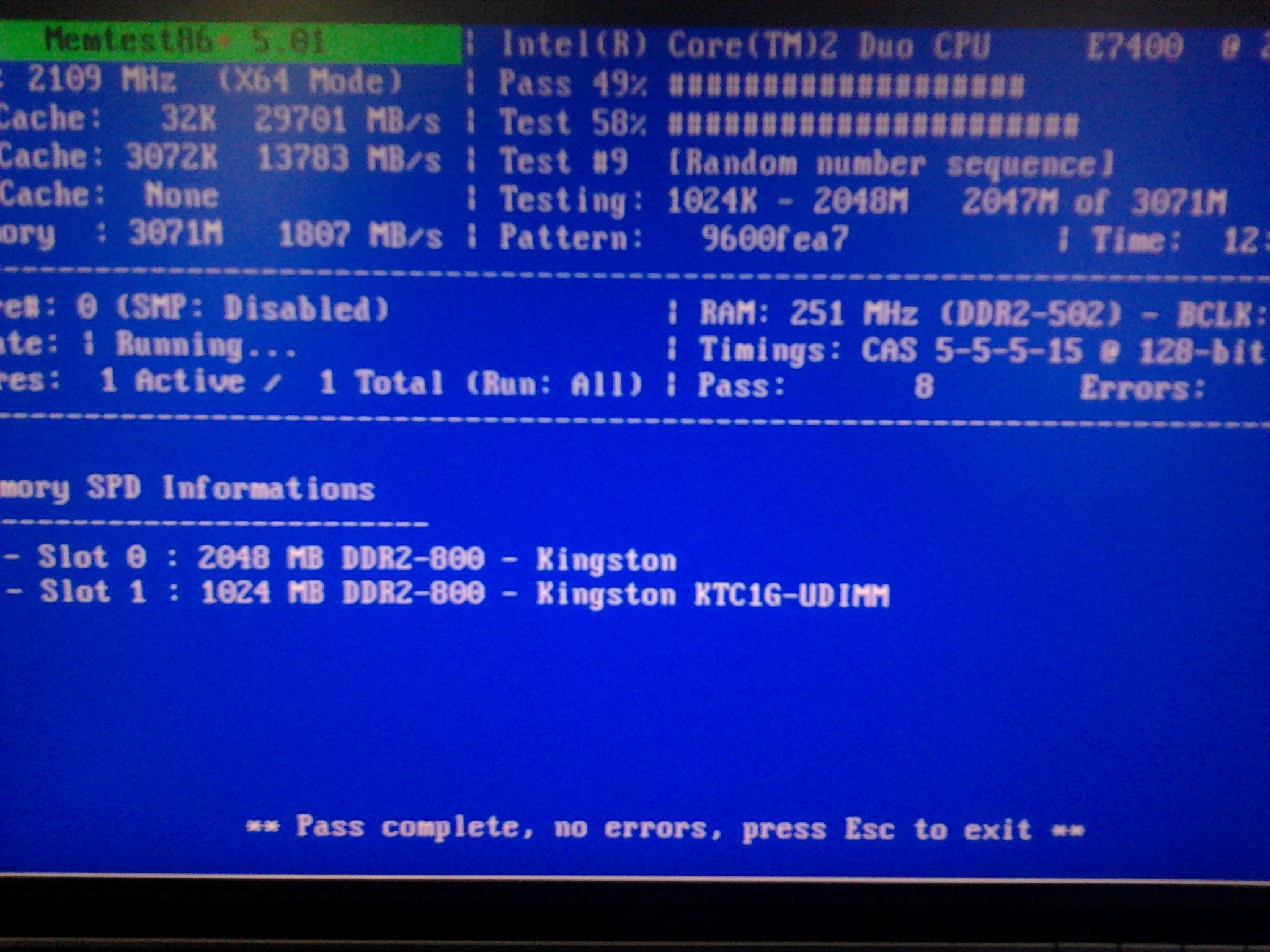
I've done things you've said to me:

- Updated my profile with system info.

- MGADiag:

Code:
Diagnostic Report (1.9.0027.0):
-----------------------------------------
Windows Validation Data-->

Validation Code: 0
Cached Online Validation Code: N/A, hr = 0xc004f012
Windows Product Key: *****-*****-X92GV-V7DCV-P4K27
Windows Product Key Hash: aU2z1/fnhnLHmhBm699qYZT2E6s=
Windows Product ID: 00426-OEM-8992662-00400
Windows Product ID Type: 2
Windows License Type: OEM SLP
Windows OS version: 6.1.7601.2.00010100.1.0.001
ID: {0406F925-5202-49B7-8DB3-873E26B3F69E}(1)
Is Admin: Yes
TestCab: 0x0
LegitcheckControl ActiveX: N/A, hr = 0x80070002
Signed By: N/A, hr = 0x80070002
Product Name: Windows 7 Ultimate
Architecture: 0x00000000
Build lab: 7601.win7sp1_gdr.130318-1533
TTS Error: 
Validation Diagnostic: 
Resolution Status: N/A

Vista WgaER Data-->
ThreatID(s): N/A, hr = 0x80070002
Version: N/A, hr = 0x80070002

Windows XP Notifications Data-->
Cached Result: N/A, hr = 0x80070002
File Exists: No
Version: N/A, hr = 0x80070002
WgaTray.exe Signed By: N/A, hr = 0x80070002
WgaLogon.dll Signed By: N/A, hr = 0x80070002

OGA Notifications Data-->
Cached Result: N/A, hr = 0x80070002
Version: N/A, hr = 0x80070002
OGAExec.exe Signed By: N/A, hr = 0x80070002
OGAAddin.dll Signed By: N/A, hr = 0x80070002

OGA Data-->
Office Status: 109 N/A
OGA Version: N/A, 0x80070002
Signed By: N/A, hr = 0x80070002
Office Diagnostics: 025D1FF3-364-80041010_025D1FF3-229-80041010_025D1FF3-230-1_025D1FF3-517-80040154_025D1FF3-237-80040154_025D1FF3-238-2_025D1FF3-244-80070002_025D1FF3-258-3

Browser Data-->
Proxy settings: N/A
User Agent: Mozilla/4.0 (compatible; MSIE 8.0; Win32)
Default Browser: C:\Program Files\Google\Chrome\Application\chrome.exe
Download signed ActiveX controls: Prompt
Download unsigned ActiveX controls: Disabled
Run ActiveX controls and plug-ins: Allowed
Initialize and script ActiveX controls not marked as safe: Disabled
Allow scripting of Internet Explorer Webbrowser control: Disabled
Active scripting: Allowed
Script ActiveX controls marked as safe for scripting: Allowed

File Scan Data-->
File Mismatch: C:\Windows\system32\wat\watadminsvc.exe[Hr = 0x80070003]
File Mismatch: C:\Windows\system32\wat\npwatweb.dll[Hr = 0x80070003]
File Mismatch: C:\Windows\system32\wat\watux.exe[Hr = 0x80070003]
File Mismatch: C:\Windows\system32\wat\watweb.dll[Hr = 0x80070003]

Other data-->
Office Details: <GenuineResults><MachineData><UGUID>{0406F925-5202-49B7-8DB3-873E26B3F69E}</UGUID><Version>1.9.0027.0</Version><OS>6.1.7601.2.00010100.1.0.001</OS><Architecture>x32</Architecture><PKey>*****-*****-*****-*****-P4K27</PKey><PID>00426-OEM-8992662-00400</PID><PIDType>2</PIDType><SID>S-1-5-21-81984835-2313123688-158028873</SID><SYSTEM><Manufacturer>BIOSTAR Group</Manufacturer><Model>P43-A7</Model></SYSTEM><BIOS><Manufacturer>American Megatrends Inc.</Manufacturer><Version>080015 </Version><SMBIOSVersion major="2" minor="5"/><Date>20080715000000.000000+000</Date></BIOS><HWID>7D8A3F07018400F8</HWID><UserLCID>0409</UserLCID><SystemLCID>0409</SystemLCID><TimeZone>Central Europe Standard Time(GMT+01:00)</TimeZone><iJoin>0</iJoin><SBID><stat>3</stat><msppid></msppid><name></name><model></model></SBID><OEM><OEMID>DELL  </OEMID><OEMTableID>QA09   </OEMTableID></OEM><GANotification/></MachineData><Software><Office><Result>109</Result><Products/><Applications/></Office></Software></GenuineResults>  

Spsys.log Content: 0x80070002

Licensing Data-->
Software licensing service version: 6.1.7601.17514

Name: Windows(R) 7, Ultimate edition
Description: Windows Operating System - Windows(R) 7, OEM_SLP channel
Activation ID: 7cfd4696-69a9-4af7-af36-ff3d12b6b6c8
Application ID: 55c92734-d682-4d71-983e-d6ec3f16059f
Extended PID: 00426-00178-926-600400-02-1033-7600.0000-0612014
Installation ID: 008942194072373010290492863783811486465733828685118303
Processor Certificate URL: http://go.microsoft.com/fwlink/?LinkID=88338
Machine Certificate URL: http://go.microsoft.com/fwlink/?LinkID=88339
Use License URL: http://go.microsoft.com/fwlink/?LinkID=88341
Product Key Certificate URL: http://go.microsoft.com/fwlink/?LinkID=88340
Partial Product Key: P4K27
License Status: Licensed
Remaining Windows rearm count: 4
Trusted time: 09-Mar-14 1:18:09 PM

Windows Activation Technologies-->
HrOffline: 0x00000000
HrOnline: N/A
HealthStatus: 0x0000000000000000
Event Time Stamp: N/A
ActiveX: Not Registered - 0x80040154
Admin Service: Not Registered - 0x80040154
HealthStatus Bitmask Output:


HWID Data-->
HWID Hash Current: NgAAAAEABgABAAEAAAACAAAAAQABAAEAeqgQeHZc8gZGvNqe4l/KzYQ0Yo4O6SIj5aHA5kbK

OEM Activation 1.0 Data-->
N/A

OEM Activation 2.0 Data-->
BIOS valid for OA 2.0: yes
Windows marker version: 0x20001
OEMID and OEMTableID Consistent: yes
BIOS Information: 
  ACPI Table Name	OEMID Value	OEMTableID Value
  APIC			071508		APIC1628
  FACP			071508		FACP1628
  MCFG			071508		OEMMCFG 
  OEMB			071508		OEMB1628
  SLIC			DELL  		QA09



- MemTest86+

vTJMdtm.jpg


By the way, yesterday I tried to open again some youtube clip, it's just turn off the monitor and then turn it back on, with message like this:

54PRu.png


This isn't my screenshot, but just to be clear.
However, after that, I had that chance again to watch the youtube clips, until I turned off the computer again.
 
Last edited:

My Computer

Computer type
PC/Desktop
OS
Microsoft Windows 7 Professional 32-bit 7601 Multiprocessor Free Service Pack 1
CPU
Intel(R) Core(TM)2 Duo CPU E7400 @ 2.80GHz
Motherboard
BIOSTAR Group P43-A7
Memory
3.00 GB
Graphics Card(s)
NVIDIA GeForce 9800 GT (Microsoft Corporation - WDDM v1.1)
Sound Card
(1) High Definition Audio Device (2) USB Audio Device
Screen Resolution
1680 x 1050 x 32 bits (4294967296 colors) @ 59 Hz
Hard Drives
WDC WD3200AAKS-00L9A0 ATA Device

Hello BS Hunter mate I am not sure but that driver you listed looks a to bean old one and I think this is the one you want. http://www.geforce.com/drivers

But before you do that reseat all cards and cables and as you do this beforereseating try this

SLOTCLEANING

Now as for the slots to clean them use astrip of old credit card about 1/2 inch wide nip the corners off one end - preferably round them off hold apiece of thin lint free cloth over the end dab on some form of alcohol - isopropyl alcohol (what we swab the skin with before an injection) is good and GENTLY swipe along the slots.

This can also be done for the GPU slot/s.
 

My Computer

Computer type
PC/Desktop
Computer Manufacturer/Model Number
Own build (new) Desk1 / Asus ROG Win 7 / Desk2 1st build
OS
Desk1 7 Home Prem / Desk2 10 Pro / Main lap Asus ROG 10 Pro 2 laptop Toshiba 7 Pro Asus P2520 7 & 10
CPU
Desk1 i5 3750K / Laptop i7 GTX 860M / Desk2 i5 2500
Motherboard
Desk1 Asus P877-V / Desk2 Gigabyte H67 UD3H / Laptop ?
Memory
Desk1 8GB (1866) / Desk2 16GB (1333) / Laptop 8Gb DDR3
Graphics Card(s)
Desk 1& 2NVidia GTX 650 & Laptops on board Intel
Sound Card
Desk 1 & 2 -XONAR DG Realtek High Def audio Laptop
Monitor(s) Displays
Desk 1 Benq HD 2450 / Desk2 Philips 24" / Laptop 17.5"
Screen Resolution
1920x1080 D1 & D2 & Laptop 1
Hard Drives
Desk1 Samsung 120GB 830 SSD
Asus ROG 256GB 850 Pro SSD
Desk2 Samsung 840 256 SSD
Toshiba 120GB EVO
PSU
Desk 1 Corsair HX 1050/ Laptop ? / Desk 2 Corsair HX 650
Case
Desk 1 Cooler HAF XM ? Toshiba laptop / Desk2 Coolermaster
Cooling
Fans on all Desk1 -2 Desk2 - all Coolermasters 5 Laptop ?
Keyboard
Desk 1 MS Sidewinder X6 Desk 2 MS Sidewinder X 4
Mouse
Desk 1&2 - Gigabyte MS 900 gamer - laptop - Logitec wireless
Internet Speed
ADSL2+
Other Info
One other Desktop (tester) and spare Toshba laptop both with SSD's
Running Kaspersky 2016 ISS on all machines config'd identically
Logitec audio stereo systems on each machine (x3)
Canon MG5250MFC
Router/modem TP-Link running WPA2SK
Back
Top