BSOD BCCode 124 - Not sure what triggers it yet

bmjslider

New member
Local time
7:55 PM
Messages
12
Here is my SF Diagnostic Tool results: http://ge.tt/1gSLIfn/v/0?c

Edit: I'm not sure what triggers this yet, but I do see an increase in frequency if I am gaming or have Netflix running, so possibly something to do with graphics???

Is anyone able to help me identify the reason why my computer continues to BSOD? I did a pretty large upgrade recently, chipset to haswell, 16 to 32gb of ram, gtx580 to gtx680 classified, 850w to 1000w psu, added new case fans, got an h80i for my cpu. That being said, I'm not sure where to start.

I've checked airflow and temperatures, I don't believe it has anything to do with that. H80i is preforming well, case fans are moving air nicely through my HAF X case, and the fan on my GPU is confirmed spinning.

I've gone through my wiring completely ensuring everything is properly connected. I have reseated my RAM to ensure it was working properly. GPU has been removed and reseated, and any non essential periphs have been removed.

Here is a WhoCrashed report of my last half dozen BSODs or so.


Code:
--------------------------------------------------------------------------------
System Information (local)
--------------------------------------------------------------------------------

computer name: BRENDAN-PC
windows version: Windows 7 Service Pack 1, 6.1, build: 7601
windows dir: C:\Windows
CPU: GenuineIntel Intel(R) Core(TM) i7-4770K CPU @ 3.50GHz Intel586, level: 6
8 logical processors, active mask: 255
RAM: 34300112896 total
VM: 2147352576, free: 1922113536
Code:
--------------------------------------------------------------------------------
Crash Dump Analysis
--------------------------------------------------------------------------------
Crash dump directory: C:\Windows\Minidump
Crash dumps are enabled on your computer.

On Fri 8/2/2013 8:39:19 AM  GMT your computer crashed
crash dump file:  C:\Windows\Minidump\080213-13993-01.dmp
This was probably caused by the  following module: [URL="http://www.google.com/search?q=ntoskrnl.exe"]ntoskrnl.exe[/URL] (nt+0x4ADE0C) 
Bugcheck code: 0x124  (0x0, 0xFFFFFA8019EEB8F8, 0x0, 0x0)
Error: [URL="http://www.google.com/search?q=MSDN+bugcheck+WHEA_UNCORRECTABLE_ERROR"]WHEA_UNCORRECTABLE_ERROR[/URL]
file path:  C:\Windows\system32\ntoskrnl.exe
product: [URL="http://www.google.com/search?q=Microsoft® Windows® Operating System"]Microsoft® Windows® Operating System[/URL]
company: [URL="http://www.google.com/search?q=Microsoft Corporation"]Microsoft Corporation[/URL]
description: NT Kernel &  System
Bug check description: This bug check indicates that a fatal hardware  error has occurred. This bug check uses the error data that is provided by the  Windows Hardware Error Architecture (WHEA). 
This is likely to be caused by a  hardware problem problem. This problem might be caused by a thermal issue.  
The crash took place in the Windows kernel. Possibly this problem is caused  by another driver that cannot be identified at this time.  

On  Thu 8/1/2013 12:10:58 PM GMT your computer crashed
crash dump file:  C:\Windows\Minidump\080113-17097-01.dmp
This was probably caused by the  following module: [URL="http://www.google.com/search?q=hal.dll"]hal.dll[/URL]  (hal+0x12A3B) 
Bugcheck code: 0x124 (0x0, 0xFFFFFA801A04A028, 0xB2000000,  0x10014)
Error: [URL="http://www.google.com/search?q=MSDN+bugcheck+WHEA_UNCORRECTABLE_ERROR"]WHEA_UNCORRECTABLE_ERROR[/URL]
file path:  C:\Windows\system32\hal.dll
product: [URL="http://www.google.com/search?q=Microsoft® Windows® Operating System"]Microsoft® Windows® Operating System[/URL]
company: [URL="http://www.google.com/search?q=Microsoft Corporation"]Microsoft Corporation[/URL]
description: Hardware  Abstraction Layer DLL
Bug check description: This bug check indicates that a  fatal hardware error has occurred. This bug check uses the error data that is  provided by the Windows Hardware Error Architecture (WHEA). 
This is likely  to be caused by a hardware problem problem. This problem might be caused by a  thermal issue. 
The crash took place in a standard Microsoft module. Your  system configuration may be incorrect. Possibly this problem is caused by  another driver on your system that cannot be identified at this time. 

On Wed 7/31/2013 7:57:45 AM GMT your computer crashed
crash dump file: C:\Windows\Minidump\073113-16972-01.dmp
This was probably caused by the following module: hal.dll (hal+0x12A3B) 
Bugcheck code: 0x124 (0x0, 0xFFFFFA801A046028, 0xBF800000, 0x124)
Error: WHEA_UNCORRECTABLE_ERROR
file path: C:\Windows\system32\hal.dll
product: Microsoft® Windows® Operating System
company: Microsoft Corporation
description: Hardware Abstraction Layer DLL
Bug check description: This bug check indicates that a fatal hardware  error has occurred. This bug check uses the error data that is provided  by the Windows Hardware Error Architecture (WHEA). 
This is likely to be caused by a hardware problem problem. This problem might be caused by a thermal issue. 
The crash took place in a standard Microsoft module. Your system  configuration may be incorrect. Possibly this problem is caused by  another driver on your system that cannot be identified at this time. 

On Thu 7/25/2013 6:34:26 AM GMT your computer crashed
crash dump file: C:\Windows\Minidump\072413-15896-01.dmp
This was probably caused by the following module: ntoskrnl.exe (nt+0x75C00) 
Bugcheck code: 0xC2 (0x7, 0x109B, 0xC050005, 0xFFFFFA8015BD0B60)
Error: BAD_POOL_CALLER
file path: C:\Windows\system32\ntoskrnl.exe
product: Microsoft® Windows® Operating System
company: Microsoft Corporation
description: NT Kernel & System
Bug check description: This indicates that the current thread is making a bad pool request.
This appears to be a typical software driver bug and is not likely to be caused by a hardware problem. 
The crash took place in the Windows kernel. Possibly this problem is  caused by another driver that cannot be identified at this time.
Code:
--------------------------------------------------------------------------------
MGADiag Results:
--------------------------------------------------------------------------------
Diagnostic Report (1.9.0027.0):
-----------------------------------------
Windows Validation Data-->

Validation Code: 0
Cached Online Validation Code: N/A, hr = 0xc004f012
Windows Product Key: *****-*****-7Y7BR-F3C3J-79FJM
Windows Product Key Hash: RwQ9CC8mJOzsuF2DIQLD5zCoI5E=
Windows Product ID: 00426-069-6033101-86121
Windows Product ID Type: 5
Windows License Type: Retail
Windows OS version: 6.1.7601.2.00010100.1.0.001
ID: {1CBFF676-9549-4E1E-998E-912642F07F3E}(1)
Is Admin: Yes
TestCab: 0x0
LegitcheckControl ActiveX: N/A, hr = 0x80070002
Signed By: N/A, hr = 0x80070002
Product Name: Windows 7 Ultimate
Architecture: 0x00000009
Build lab: 7601.win7sp1_gdr.130318-1533
TTS Error: 
Validation Diagnostic: 
Resolution Status: N/A

Vista WgaER Data-->
ThreatID(s): N/A, hr = 0x80070002
Version: N/A, hr = 0x80070002

Windows XP Notifications Data-->
Cached Result: N/A, hr = 0x80070002
File Exists: No
Version: N/A, hr = 0x80070002
WgaTray.exe Signed By: N/A, hr = 0x80070002
WgaLogon.dll Signed By: N/A, hr = 0x80070002

OGA Notifications Data-->
Cached Result: N/A, hr = 0x80070002
Version: N/A, hr = 0x80070002
OGAExec.exe Signed By: N/A, hr = 0x80070002
OGAAddin.dll Signed By: N/A, hr = 0x80070002

OGA Data-->
Office Status: 109 N/A
OGA Version: N/A, 0x80070002
Signed By: N/A, hr = 0x80070002
Office Diagnostics: 025D1FF3-364-80041010_025D1FF3-229-80041010_025D1FF3-230-1_025D1FF3-517-80040154_025D1FF3-237-80040154_025D1FF3-238-2_025D1FF3-244-80070002_025D1FF3-258-3

Browser Data-->
Proxy settings: N/A
User Agent: Mozilla/4.0 (compatible; MSIE 8.0; Win32)
Default Browser: C:\Program Files (x86)\Mozilla Firefox\firefox.exe
Download signed ActiveX controls: Prompt
Download unsigned ActiveX controls: Disabled
Run ActiveX controls and plug-ins: Allowed
Initialize and script ActiveX controls not marked as safe: Disabled
Allow scripting of Internet Explorer Webbrowser control: Disabled
Active scripting: Allowed
Script ActiveX controls marked as safe for scripting: Allowed

File Scan Data-->

Other data-->
Office Details: <GenuineResults><MachineData><UGUID>{1CBFF676-9549-4E1E-998E-912642F07F3E}</UGUID><Version>1.9.0027.0</Version><OS>6.1.7601.2.00010100.1.0.001</OS><Architecture>x64</Architecture><PKey>*****-*****-*****-*****-79FJM</PKey><PID>00426-069-6033101-86121</PID><PIDType>5</PIDType><SID>S-1-5-21-3939738928-2136701780-1335742161</SID><SYSTEM><Manufacturer>MSI</Manufacturer><Model>MS-7815</Model></SYSTEM><BIOS><Manufacturer>American Megatrends Inc.</Manufacturer><Version>V1.2</Version><SMBIOSVersion major="2" minor="7"/><Date>20130607000000.000000+000</Date></BIOS><HWID>F32D3F07018400F4</HWID><UserLCID>0409</UserLCID><SystemLCID>0409</SystemLCID><TimeZone>Pacific Standard Time(GMT-08:00)</TimeZone><iJoin>0</iJoin><SBID><stat>3</stat><msppid></msppid><name></name><model></model></SBID><OEM/><GANotification/></MachineData><Software><Office><Result>109</Result><Products/><Applications/></Office></Software></GenuineResults>  

Spsys.log Content: 0x80070002

Licensing Data-->
Software licensing service version: 6.1.7601.17514

Name: Windows(R) 7, Ultimate edition
Description: Windows Operating System - Windows(R) 7, RETAIL channel
Activation ID: a0cde89c-3304-4157-b61c-c8ad785d1fad
Application ID: 55c92734-d682-4d71-983e-d6ec3f16059f
Extended PID: 00426-00172-069-603310-00-1033-7601.0000-2132013
Installation ID: 007540313541813626125762206953088886206680976873411620
Processor Certificate URL: [URL]http://go.microsoft.com/fwlink/?LinkID=88338[/URL]
Machine Certificate URL: [URL]http://go.microsoft.com/fwlink/?LinkID=88339[/URL]
Use License URL: [URL]http://go.microsoft.com/fwlink/?LinkID=88341[/URL]
Product Key Certificate URL: [URL]http://go.microsoft.com/fwlink/?LinkID=88340[/URL]
Partial Product Key: 79FJM
License Status: Licensed
Remaining Windows rearm count: 3
Trusted time: 8/2/2013 2:11:01 AM

Windows Activation Technologies-->
HrOffline: 0x00000000
HrOnline: N/A
HealthStatus: 0x0000000000000000
Event Time Stamp: N/A
ActiveX: Registered, Version: 7.1.7600.16395
Admin Service: Not Registered - 0x80070005
HealthStatus Bitmask Output:


HWID Data-->
HWID Hash Current: OgAAAAEABAABAAEAAAADAAAABAABAAEAhFEsXGgRdMTWXsIbELmMCDLOqMnyq7Fscoq+QR8cFbzI9g==

OEM Activation 1.0 Data-->
N/A

OEM Activation 2.0 Data-->
BIOS valid for OA 2.0: yes, but no SLIC table
Windows marker version: N/A
OEMID and OEMTableID Consistent: N/A
BIOS Information: 
  ACPI Table Name    OEMID Value    OEMTableID Value
  APIC            ALASKA        A M I
  FACP            ALASKA        A M I
  HPET            ALASKA        A M I
  MCFG            ALASKA        A M I
  FPDT            ALASKA        A M I
  ASF!            INTEL          HCG
  SSDT            PmRef        Cpu0Ist
  SSDT            PmRef        Cpu0Ist
  SSDT            PmRef        Cpu0Ist
  SSDT            PmRef        Cpu0Ist
  DMAR            INTEL         HSW 
  SSDT            PmRef        Cpu0Ist


Here is my SF Diagnostic Tool results: http://ge.tt/1gSLIfn/v/0?c
 
Last edited:

My Computer My Computer

At a glance

Windows 7 Ultimate x64i7-4770k32gb G.SkillGTX 680 Classified
Computer type
PC/Desktop
Computer Manufacturer/Model Number
MSI
OS
Windows 7 Ultimate x64
CPU
i7-4770k
Motherboard
MSI Z87 MPower Max
Memory
32gb G.Skill
Graphics Card(s)
GTX 680 Classified
Monitor(s) Displays
2x Samsung 24"
Screen Resolution
1920x1200
Hard Drives
Samsung 840 Pro 256gb
Crucial M4 128gb
WD Black 2tb x4
PSU
EVGA Supernova v2 1000w
Case
HAF-X
Cooling
H80i
Keyboard
saitek eclipse II
Mouse
R.A.T. 7
Internet Speed
100mbps
Antivirus
Comodo
Browser
FireFox
Other Info
4x 200mm case fans

My Computer My Computer

At a glance

Windows 10 Pro x64 ; Xubuntu x64Intel i7 860 @ 2.80 GHz O/C'ed to 4.0GHz16GB Corsair Vengance DDR3 @ 661 MHz Dual Cha...EVGA NVidia GTX 560 1024MB
Computer type
PC/Desktop
Computer Manufacturer/Model Number
Golden Mk. I.4
OS
Windows 10 Pro x64 ; Xubuntu x64
CPU
Intel i7 860 @ 2.80 GHz O/C'ed to 4.0GHz
Motherboard
Gigabyte P55A-UD3R Rev.1. Award BIOS F13
Memory
16GB Corsair Vengance DDR3 @ 661 MHz Dual Channel (9-9-9-24)
Graphics Card(s)
EVGA NVidia GTX 560 1024MB
Sound Card
Realtek Integrated
Monitor(s) Displays
Dual Samsung SyncMaster 2494HS
Screen Resolution
1920*1080 and 1920*1080
Hard Drives
1*Samsung 840 EVO 120GB SSD;
1*OCZ Vertex 2 60GB SSD;
2*Samsung F3 SpinPoint 1TB in RAID0;
1*Samsung F1 SpinPoint 1TB;
2*Western Digital 1TB External USB 3.0
1*Western Digital 500GB External USB 3.0
1*Seagate 500GB External USB 2.0
PSU
Thermaltake ToughPower QFan 750W
Case
Thermaltake Element S VK60001W2Z
Cooling
Corsair H60 Water Cooling, 2*230mm and 2*80mm case fans
Keyboard
Logitech G110
Mouse
Logitech MX518
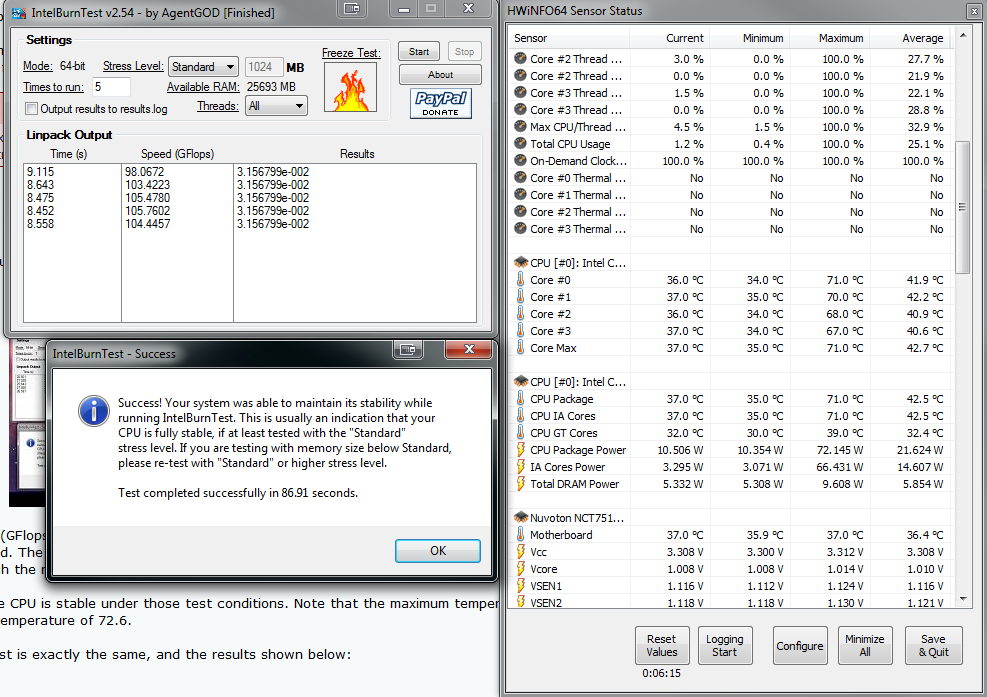
My max CPU temp is ~72.5 C.
I ran the 'standard' test and while it generally stayed around ~45-50 C, it had random spikes that would hit ~70 C.


lC80lpN.png


I don't know if I should proceed with the more intensive testing with those random heat spikes?
 
Last edited:

My Computer My Computer

At a glance

Windows 7 Ultimate x64i7-4770k32gb G.SkillGTX 680 Classified
Computer type
PC/Desktop
Computer Manufacturer/Model Number
MSI
OS
Windows 7 Ultimate x64
CPU
i7-4770k
Motherboard
MSI Z87 MPower Max
Memory
32gb G.Skill
Graphics Card(s)
GTX 680 Classified
Monitor(s) Displays
2x Samsung 24"
Screen Resolution
1920x1200
Hard Drives
Samsung 840 Pro 256gb
Crucial M4 128gb
WD Black 2tb x4
PSU
EVGA Supernova v2 1000w
Case
HAF-X
Cooling
H80i
Keyboard
saitek eclipse II
Mouse
R.A.T. 7
Internet Speed
100mbps
Antivirus
Comodo
Browser
FireFox
Other Info
4x 200mm case fans
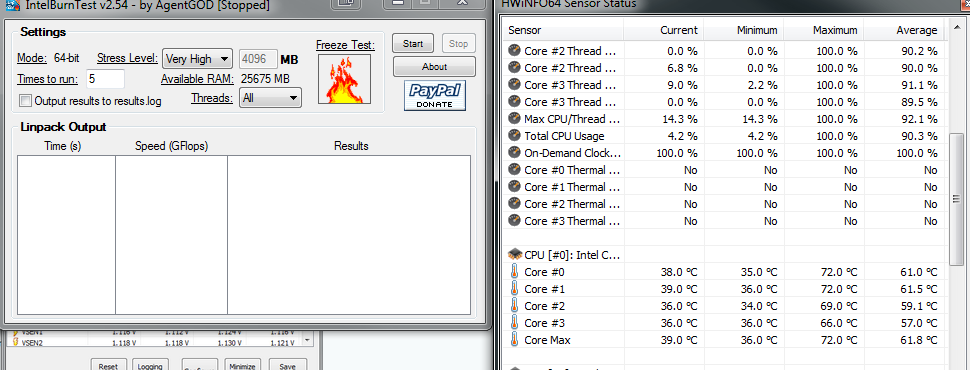
I ran the test on Very High for ~1 minute before halting it.
Temps were almost always ~65C or higher.

z2Rds7F.png


Is it safe to assume my CPU is failing, or can it still be my motherboard?
 

My Computer My Computer

At a glance

Windows 7 Ultimate x64i7-4770k32gb G.SkillGTX 680 Classified
Computer type
PC/Desktop
Computer Manufacturer/Model Number
MSI
OS
Windows 7 Ultimate x64
CPU
i7-4770k
Motherboard
MSI Z87 MPower Max
Memory
32gb G.Skill
Graphics Card(s)
GTX 680 Classified
Monitor(s) Displays
2x Samsung 24"
Screen Resolution
1920x1200
Hard Drives
Samsung 840 Pro 256gb
Crucial M4 128gb
WD Black 2tb x4
PSU
EVGA Supernova v2 1000w
Case
HAF-X
Cooling
H80i
Keyboard
saitek eclipse II
Mouse
R.A.T. 7
Internet Speed
100mbps
Antivirus
Comodo
Browser
FireFox
Other Info
4x 200mm case fans

My Computer My Computer

At a glance

Windows 10 Pro x64 ; Xubuntu x64Intel i7 860 @ 2.80 GHz O/C'ed to 4.0GHz16GB Corsair Vengance DDR3 @ 661 MHz Dual Cha...EVGA NVidia GTX 560 1024MB
Computer type
PC/Desktop
Computer Manufacturer/Model Number
Golden Mk. I.4
OS
Windows 10 Pro x64 ; Xubuntu x64
CPU
Intel i7 860 @ 2.80 GHz O/C'ed to 4.0GHz
Motherboard
Gigabyte P55A-UD3R Rev.1. Award BIOS F13
Memory
16GB Corsair Vengance DDR3 @ 661 MHz Dual Channel (9-9-9-24)
Graphics Card(s)
EVGA NVidia GTX 560 1024MB
Sound Card
Realtek Integrated
Monitor(s) Displays
Dual Samsung SyncMaster 2494HS
Screen Resolution
1920*1080 and 1920*1080
Hard Drives
1*Samsung 840 EVO 120GB SSD;
1*OCZ Vertex 2 60GB SSD;
2*Samsung F3 SpinPoint 1TB in RAID0;
1*Samsung F1 SpinPoint 1TB;
2*Western Digital 1TB External USB 3.0
1*Western Digital 500GB External USB 3.0
1*Seagate 500GB External USB 2.0
PSU
Thermaltake ToughPower QFan 750W
Case
Thermaltake Element S VK60001W2Z
Cooling
Corsair H60 Water Cooling, 2*230mm and 2*80mm case fans
Keyboard
Logitech G110
Mouse
Logitech MX518
I'm using rather high grade thermal paste in combination with my new H80i water cooler.
I ran the same stress test using my i7-2600k and average temps were higher than the i7-4770k, but I never had massive heat spikes like I did with the 4770k. I'll run the memtest now.
 

My Computer My Computer

At a glance

Windows 7 Ultimate x64i7-4770k32gb G.SkillGTX 680 Classified
Computer type
PC/Desktop
Computer Manufacturer/Model Number
MSI
OS
Windows 7 Ultimate x64
CPU
i7-4770k
Motherboard
MSI Z87 MPower Max
Memory
32gb G.Skill
Graphics Card(s)
GTX 680 Classified
Monitor(s) Displays
2x Samsung 24"
Screen Resolution
1920x1200
Hard Drives
Samsung 840 Pro 256gb
Crucial M4 128gb
WD Black 2tb x4
PSU
EVGA Supernova v2 1000w
Case
HAF-X
Cooling
H80i
Keyboard
saitek eclipse II
Mouse
R.A.T. 7
Internet Speed
100mbps
Antivirus
Comodo
Browser
FireFox
Other Info
4x 200mm case fans
Just completed test #8 of memtest86+ as I hit the 1 hour point of the test. No errors to report so far.
Should I continue with this test or move on to the next step?

Edit:
Ran for a little over 2 hours with no errors. I stopped for now because I can't afford not to work right now, but I'll run a full 6 hour+ memtest while I sleep. I'm going to run the CPU stress testing again when I have a chance, just to see if I get those same hot temperatures. The BSOD's are becoming more frequent though. Where they used to be spaced out over a few days, they are now occurring multiple times a day.

Edit2:
Ran the IntelBurnTest on high again.
Immediately each core shot up to 68-70 degrees. I wanted to end it there, but let it go a bit further. After 15 seconds everything balanced out in the mid 50's, and I was gaining faith. Then... BSOD. 124.
Safe to say it's the CPU yet? I can only assume any normal 4770k would complete that test with ease.
Also is there a way to differentiate if it's the CPU or the Motherboard causing the issue?
 
Last edited:

My Computer My Computer

At a glance

Windows 7 Ultimate x64i7-4770k32gb G.SkillGTX 680 Classified
Computer type
PC/Desktop
Computer Manufacturer/Model Number
MSI
OS
Windows 7 Ultimate x64
CPU
i7-4770k
Motherboard
MSI Z87 MPower Max
Memory
32gb G.Skill
Graphics Card(s)
GTX 680 Classified
Monitor(s) Displays
2x Samsung 24"
Screen Resolution
1920x1200
Hard Drives
Samsung 840 Pro 256gb
Crucial M4 128gb
WD Black 2tb x4
PSU
EVGA Supernova v2 1000w
Case
HAF-X
Cooling
H80i
Keyboard
saitek eclipse II
Mouse
R.A.T. 7
Internet Speed
100mbps
Antivirus
Comodo
Browser
FireFox
Other Info
4x 200mm case fans

My Computer My Computer

At a glance

Windows 10 Pro x64 ; Xubuntu x64Intel i7 860 @ 2.80 GHz O/C'ed to 4.0GHz16GB Corsair Vengance DDR3 @ 661 MHz Dual Cha...EVGA NVidia GTX 560 1024MB
Computer type
PC/Desktop
Computer Manufacturer/Model Number
Golden Mk. I.4
OS
Windows 10 Pro x64 ; Xubuntu x64
CPU
Intel i7 860 @ 2.80 GHz O/C'ed to 4.0GHz
Motherboard
Gigabyte P55A-UD3R Rev.1. Award BIOS F13
Memory
16GB Corsair Vengance DDR3 @ 661 MHz Dual Channel (9-9-9-24)
Graphics Card(s)
EVGA NVidia GTX 560 1024MB
Sound Card
Realtek Integrated
Monitor(s) Displays
Dual Samsung SyncMaster 2494HS
Screen Resolution
1920*1080 and 1920*1080
Hard Drives
1*Samsung 840 EVO 120GB SSD;
1*OCZ Vertex 2 60GB SSD;
2*Samsung F3 SpinPoint 1TB in RAID0;
1*Samsung F1 SpinPoint 1TB;
2*Western Digital 1TB External USB 3.0
1*Western Digital 500GB External USB 3.0
1*Seagate 500GB External USB 2.0
PSU
Thermaltake ToughPower QFan 750W
Case
Thermaltake Element S VK60001W2Z
Cooling
Corsair H60 Water Cooling, 2*230mm and 2*80mm case fans
Keyboard
Logitech G110
Mouse
Logitech MX518
Code:
[COLOR=Red]BugCheck 124[/COLOR], {[COLOR=Blue]0[/COLOR], [COLOR=SeaGreen]fffffa8019eeb8f8[/COLOR], 0, 0}

Probably caused by : GenuineIntel
Code:
4: kd> [COLOR=SeaGreen]!errrec fffffa8019eeb8f8[/COLOR]
===============================================================================
Common Platform Error Record @ fffffa8019eeb8f8
-------------------------------------------------------------------------------
Record Id     : 01ce8f5bc4ca5f64
Severity      : Fatal (1)
Length        : 928
Creator       : Microsoft
Notify Type   : Machine Check Exception
Timestamp     : 8/2/2013 8:39:19 (UTC)
Flags         : 0x00000002 PreviousError

===============================================================================
Section 0     : Processor Generic
-------------------------------------------------------------------------------
Descriptor    @ fffffa8019eeb978
Section       @ fffffa8019eeba50
Offset        : 344
Length        : 192
Flags         : 0x00000001 Primary
Severity      : Fatal

Proc. Type    : x86/x64
Instr. Set    : x64
Error Type    : [COLOR=Red]Cache error[/COLOR]
Operation     : Generic
Flags         : 0x00
Level         : 0
CPU Version   : 0x00000000000306c3
Processor ID  : 0x0000000000000002

===============================================================================
Section 1     : x86/x64 Processor Specific
-------------------------------------------------------------------------------
Descriptor    @ fffffa8019eeb9c0
Section       @ fffffa8019eebb10
Offset        : 536
Length        : 128
Flags         : 0x00000000
Severity      : Fatal

Local APIC Id : 0x0000000000000002
CPU Id        : c3 06 03 00 00 08 10 02 - bf fb da 7f ff fb eb bf
                00 00 00 00 00 00 00 00 - 00 00 00 00 00 00 00 00
                00 00 00 00 00 00 00 00 - 00 00 00 00 00 00 00 00

Proc. Info 0  @ fffffa8019eebb10

===============================================================================
Section 2     : x86/x64 MCA
-------------------------------------------------------------------------------
Descriptor    @ fffffa8019eeba08
Section       @ fffffa8019eebb90
Offset        : 664
Length        : 264
Flags         : 0x00000000
Severity      : [COLOR=Red]Fatal[/COLOR]

Error         : [COLOR=Red]DCACHEL0_WR_ERR (Proc 2 Bank 1)[/COLOR]
  Status      : 0xff80000000000124
  Address     : 0x000000081b9fd900
  Misc.       : 0x0000000000000086
It appears to be a cache write error, raised by the CPU with a Machine Check Exception.

Another dump revealed, a TLB error (Translation Lookaside Buffer), which is essentially another cache itself for virtual address translation, since virtual to physical address translation is a expensive process, the most recently translated addresses are stored in a buffer.

Code:
===============================================================================
Section 2     : x86/x64 MCA
-------------------------------------------------------------------------------
Descriptor    @ fffffa801a04a138
Section       @ fffffa801a04a2c0
Offset        : 664
Length        : 264
Flags         : 0x00000000
Severity      : Fatal

Error         : [COLOR=Red]DTLBL0_ERR (Proc 3 Bank 2)[/COLOR]
  Status      : 0xb200000000010014

A note for other debuggers, you may notice in some call stacks, particularly Stop 0x101's, a Flush TLB function being called, this is a standard maintenance procedure of flushing the TLB to ensure it's still valid.

With the Prime95, run the Small FFT's, Large FFT's and Blend test for a few hours, I'm particularly interested in the results of the Small FFT's test.
 

My Computer My Computer

Computer type
Laptop
With a water cooler, I'd be very surprised its spiking like that. Have you checked the thermal paste?

I would run some tests using Prime95 now.

http://www.sevenforums.com/tutorials/100352-hardware-stress-test-prime95.html

I'll ask some hardware guru's to comment on the results so far, and I'll ask Arc to have a detailed look at your BSOD's.

Unless too much paste can cause spikes like that, that shouldn't be the issue. I had to grab the warranty off the chip earlier and it was covered fully, forcing me to wipe it off, and upon putting everything back into place, I put a fresh coat on, covering everything.


With the Prime95, run the Small FFT's, Large FFT's and Blend test for a few hours, I'm particularly interested in the results of the Small FFT's test.

I'm 15 minutes into the Small FFT's test. Temps have maintain high 50's to low 60's so far, but with 85% of the test still to go, we'll see.
 

My Computer My Computer

At a glance

Windows 7 Ultimate x64i7-4770k32gb G.SkillGTX 680 Classified
Computer type
PC/Desktop
Computer Manufacturer/Model Number
MSI
OS
Windows 7 Ultimate x64
CPU
i7-4770k
Motherboard
MSI Z87 MPower Max
Memory
32gb G.Skill
Graphics Card(s)
GTX 680 Classified
Monitor(s) Displays
2x Samsung 24"
Screen Resolution
1920x1200
Hard Drives
Samsung 840 Pro 256gb
Crucial M4 128gb
WD Black 2tb x4
PSU
EVGA Supernova v2 1000w
Case
HAF-X
Cooling
H80i
Keyboard
saitek eclipse II
Mouse
R.A.T. 7
Internet Speed
100mbps
Antivirus
Comodo
Browser
FireFox
Other Info
4x 200mm case fans
20 minutes into the test temps went from an average of 56-61 degrees to 60-65 degrees.
25 minutes into the test I get a BSOD.

Should I start again?
 

My Computer My Computer

At a glance

Windows 7 Ultimate x64i7-4770k32gb G.SkillGTX 680 Classified
Computer type
PC/Desktop
Computer Manufacturer/Model Number
MSI
OS
Windows 7 Ultimate x64
CPU
i7-4770k
Motherboard
MSI Z87 MPower Max
Memory
32gb G.Skill
Graphics Card(s)
GTX 680 Classified
Monitor(s) Displays
2x Samsung 24"
Screen Resolution
1920x1200
Hard Drives
Samsung 840 Pro 256gb
Crucial M4 128gb
WD Black 2tb x4
PSU
EVGA Supernova v2 1000w
Case
HAF-X
Cooling
H80i
Keyboard
saitek eclipse II
Mouse
R.A.T. 7
Internet Speed
100mbps
Antivirus
Comodo
Browser
FireFox
Other Info
4x 200mm case fans
Upload the dump file, usually if it BSODs during the test, then it indicates hardware failure. I would attempt to run the test again.
 

My Computer My Computer

Computer type
Laptop
After 3 attempts at running Prime95, no attempt exceeded 1 hour before I was hit with a bsod.

I ran the entire SF Diagnostic Tool again, here are my results: bmjslider.rar

I have also attached the results to this post.
 

My Computer My Computer

At a glance

Windows 7 Ultimate x64i7-4770k32gb G.SkillGTX 680 Classified
Computer type
PC/Desktop
Computer Manufacturer/Model Number
MSI
OS
Windows 7 Ultimate x64
CPU
i7-4770k
Motherboard
MSI Z87 MPower Max
Memory
32gb G.Skill
Graphics Card(s)
GTX 680 Classified
Monitor(s) Displays
2x Samsung 24"
Screen Resolution
1920x1200
Hard Drives
Samsung 840 Pro 256gb
Crucial M4 128gb
WD Black 2tb x4
PSU
EVGA Supernova v2 1000w
Case
HAF-X
Cooling
H80i
Keyboard
saitek eclipse II
Mouse
R.A.T. 7
Internet Speed
100mbps
Antivirus
Comodo
Browser
FireFox
Other Info
4x 200mm case fans
Code:
===============================================================================
Section 2     : x86/x64 MCA
-------------------------------------------------------------------------------
Descriptor    @ fffffa801a02b138
Section       @ fffffa801a02b2c0
Offset        : 664
Length        : 264
Flags         : 0x00000000
Severity      :[COLOR=Red] Fatal[/COLOR]

Error         : [COLOR=Red]DCACHEL0_WR_ERR (Proc 3 Bank 1)[/COLOR]
  Status      : 0xbf80000000000124
  Address     : 0x0000000817cdfd00
  Misc.       : 0x0000000000000086

Code:
===============================================================================
Section 2     : x86/x64 MCA
-------------------------------------------------------------------------------
Descriptor    @ fffffa8019ed9a08
Section       @ fffffa8019ed9b90
Offset        : 664
Length        : 264
Flags         : 0x00000000
Severity      : [COLOR=Red]Fatal[/COLOR]

Error         : [COLOR=Red]DCACHEL0_WR_ERR (Proc 2 Bank 1)[/COLOR]
  Status      : 0xff80000000000124
  Address     : 0x00000001071bfc80
  Misc.       : 0x0000000000000086

Code:
===============================================================================
Section 2     : x86/x64 MCA
-------------------------------------------------------------------------------
Descriptor    @ fffffa801a065138
Section       @ fffffa801a0652c0
Offset        : 664
Length        : 264
Flags         : 0x00000000
Severity      : [COLOR=Red]Fatal[/COLOR]

Error         : [COLOR=Red]DCACHEL0_WR_ERR (Proc 3 Bank 1)[/COLOR]
  Status      : 0xbf80000000000124
  Address     : 0x00000008181cf9c0
  Misc.       : 0x0000000000000086

All the crashes are consistent with the same Stop 0x124 bugcheck code, and same consistent error. It seems you have a bad CPU.
 

My Computer My Computer

Computer type
Laptop
Alright, I really appreciate the help both of you have given me, I'll begin the RMA process ASAP.
Do either of you accept donations? Either via Bitcoin or PayPal, I'd love to show some form of gratitude for the time you guys have given me.
 

My Computer My Computer

At a glance

Windows 7 Ultimate x64i7-4770k32gb G.SkillGTX 680 Classified
Computer type
PC/Desktop
Computer Manufacturer/Model Number
MSI
OS
Windows 7 Ultimate x64
CPU
i7-4770k
Motherboard
MSI Z87 MPower Max
Memory
32gb G.Skill
Graphics Card(s)
GTX 680 Classified
Monitor(s) Displays
2x Samsung 24"
Screen Resolution
1920x1200
Hard Drives
Samsung 840 Pro 256gb
Crucial M4 128gb
WD Black 2tb x4
PSU
EVGA Supernova v2 1000w
Case
HAF-X
Cooling
H80i
Keyboard
saitek eclipse II
Mouse
R.A.T. 7
Internet Speed
100mbps
Antivirus
Comodo
Browser
FireFox
Other Info
4x 200mm case fans
I don't think we do anymore, but everyone accepts a simple thank you as more than enough :)
 

My Computer My Computer

Computer type
Laptop
Well thank you :)
I really do appreciate it.

And if you guys come across a donation link of sorts at some point, toss it here and I'd be more than happy to show my appreciation that way as well!
 

My Computer My Computer

At a glance

Windows 7 Ultimate x64i7-4770k32gb G.SkillGTX 680 Classified
Computer type
PC/Desktop
Computer Manufacturer/Model Number
MSI
OS
Windows 7 Ultimate x64
CPU
i7-4770k
Motherboard
MSI Z87 MPower Max
Memory
32gb G.Skill
Graphics Card(s)
GTX 680 Classified
Monitor(s) Displays
2x Samsung 24"
Screen Resolution
1920x1200
Hard Drives
Samsung 840 Pro 256gb
Crucial M4 128gb
WD Black 2tb x4
PSU
EVGA Supernova v2 1000w
Case
HAF-X
Cooling
H80i
Keyboard
saitek eclipse II
Mouse
R.A.T. 7
Internet Speed
100mbps
Antivirus
Comodo
Browser
FireFox
Other Info
4x 200mm case fans
Excellent work Harry...thanks.
 

My Computer My Computer

At a glance

Windows 10 Pro x64 ; Xubuntu x64Intel i7 860 @ 2.80 GHz O/C'ed to 4.0GHz16GB Corsair Vengance DDR3 @ 661 MHz Dual Cha...EVGA NVidia GTX 560 1024MB
Computer type
PC/Desktop
Computer Manufacturer/Model Number
Golden Mk. I.4
OS
Windows 10 Pro x64 ; Xubuntu x64
CPU
Intel i7 860 @ 2.80 GHz O/C'ed to 4.0GHz
Motherboard
Gigabyte P55A-UD3R Rev.1. Award BIOS F13
Memory
16GB Corsair Vengance DDR3 @ 661 MHz Dual Channel (9-9-9-24)
Graphics Card(s)
EVGA NVidia GTX 560 1024MB
Sound Card
Realtek Integrated
Monitor(s) Displays
Dual Samsung SyncMaster 2494HS
Screen Resolution
1920*1080 and 1920*1080
Hard Drives
1*Samsung 840 EVO 120GB SSD;
1*OCZ Vertex 2 60GB SSD;
2*Samsung F3 SpinPoint 1TB in RAID0;
1*Samsung F1 SpinPoint 1TB;
2*Western Digital 1TB External USB 3.0
1*Western Digital 500GB External USB 3.0
1*Seagate 500GB External USB 2.0
PSU
Thermaltake ToughPower QFan 750W
Case
Thermaltake Element S VK60001W2Z
Cooling
Corsair H60 Water Cooling, 2*230mm and 2*80mm case fans
Keyboard
Logitech G110
Mouse
Logitech MX518
Just in case you wanted to know.
Received the new i7-4770k last night. Installed it this morning, everything is running fantastically.
Again, I really appreciate the help in narrowing down what the issue was.
 

My Computer My Computer

At a glance

Windows 7 Ultimate x64i7-4770k32gb G.SkillGTX 680 Classified
Computer type
PC/Desktop
Computer Manufacturer/Model Number
MSI
OS
Windows 7 Ultimate x64
CPU
i7-4770k
Motherboard
MSI Z87 MPower Max
Memory
32gb G.Skill
Graphics Card(s)
GTX 680 Classified
Monitor(s) Displays
2x Samsung 24"
Screen Resolution
1920x1200
Hard Drives
Samsung 840 Pro 256gb
Crucial M4 128gb
WD Black 2tb x4
PSU
EVGA Supernova v2 1000w
Case
HAF-X
Cooling
H80i
Keyboard
saitek eclipse II
Mouse
R.A.T. 7
Internet Speed
100mbps
Antivirus
Comodo
Browser
FireFox
Other Info
4x 200mm case fans
Back
Top