BSOD before log in to windows & during use

xxgiga

New member
Local time
5:19 AM
Messages
4
Hello, this past week I have difficulties to start windows, i had to force restart multiple times just to get into desktop. The first time I can easily got into desktop, but when I point my kursor on the taskbar, the loading icon came up. And so I cant click on anything like Start button etc. And everything else is lagging. So I had to restart using the power button.
After restarting, sometimes there's bsod showing up, and the monitor went black & the cpu restaring itself.
After restarting again, the monitor went black and there's only my kursor, it doesnt show anything, and the machine restarting it self.
There are times the black monitor will show "Reboot and Select proper Boot device or insert Boot Media in selected boot devuce and press a key." I've checked he boot in bios and there's nothing wrong, my first boot is my harddisk.
BTW i have 2 harddisk.

And now while I'm typing this, the pc suddenly shows BSOD & restarting itself, and it's really difficult to get back to desktop again.... Fyi I just got my pc formatted like 2 weeks ago.

Please help, thank you.
 

My Computer My Computer

Computer type
PC/Desktop
Computer Manufacturer/Model Number
ECS
OS
windows 7 Ultimate x64
Motherboard
H61H2-M12
Memory
DDR3 4Gb
Graphics Card(s)
NVIDIA GeForce 210
Antivirus
Avast Premiere
Browser
Mozilla Firefox, Google Chrome
Hi xxgiga.

This info is obtained from your event log: A couple of times .....
Event[22043]:
Log Name: System
Source: Service Control Manager
Date: 2014-05-03T12:09:15.262
Event ID: 7026
Task: N/A
Level: Error
Opcode: N/A
Keyword: Classic
User: N/A
User Name: N/A
Computer: Lydia-PC
Description:
The following boot-start or system-start driver(s) failed to load:
AFD
aswFW
aswRdr
aswSnx
aswSP
aswTdi

cdrom
CSC
DfsC
discache
NetBIOS
NetBT
nsiproxy
Psched
rdbss
spldr
tdx
Wanarpv6
WfpLwf
{f9d2f209-1697-4837-85f2-d88e4c9f7c81}Gw64
And this one .... a number of times .....
Event[22301]:
Log Name: System
Source: Service Control Manager
Date: 2014-05-03T13:24:04.762
Event ID: 7026
Task: N/A
Level: Error
Opcode: N/A
Keyword: Classic
User: N/A
User Name: N/A
Computer: Lydia-PC
Description:
The following boot-start or system-start driver(s) failed to load:
cdrom
Five drivers marked in red are drivers from Avast antivirus. They may cause an issue during boot. That is detectable, with a little risk of security; by disabling avast in startup.
Free up the startup.

  1. Click on the Start button
  2. Type “msconfig (without quotes), click the resulting link. It will open the System Configuration window.Click the "startup" tab.
    • Click "Disable all" > Apply > OK.Click on "services" tab.
    • Check the "Hide all Microsoft Services"; Click "Disable all" > Apply > OK
  3. Accept then restart.
Then try to boot again normally. Is it failing still?

If not, then Avast may have something to do with the BSODs.

But if still the result is the same, we have to concentrate on the CDROM part. First of all, make it sure that there is no disc in the Optical Disc Drive.

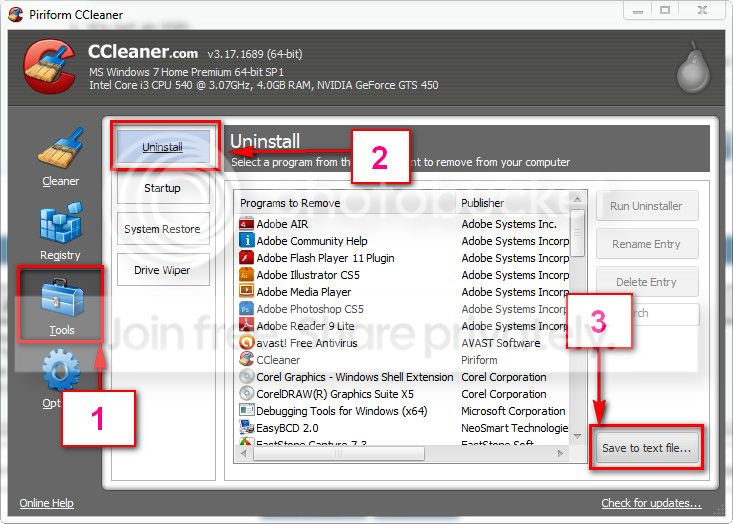
Then boot into safe mode with networking, and Download and install CCleaner. Then run it.
Go to "Tools" .... by default it will open the "uninstall" tab.
Click on save as text file. Save it on your desktop.
Upload the text file for us.
2012-11-02_224417.jpg
 

My Computer My Computer

Computer type
PC/Desktop
Computer Manufacturer/Model Number
Self Assembled
OS
Microsoft Windows 10 Pro Insider Preview 64-bit
CPU
Intel(R) Core(TM) i3-4130 CPU @ 3.40GHz
Motherboard
Gigabyte Technology Co., Ltd. B85M-D3H
Memory
Corsair Vengence 4GB x2 (8.00GB Dual-Channel DDR3 @ 798MHz)
Graphics Card(s)
2047MB GeForce GTS 450 (ZOTAC International)
Sound Card
Onboard (Realtek High Definition Audio)
Monitor(s) Displays
LG Flatron E2040T
Screen Resolution
1600x900
Hard Drives
Western Digital 1 TB
Seagate 500 GB
PSU
Corsair VS550
Case
Cooler Master K380
Cooling
Cooler Master Seidon 120V Plus
Keyboard
Logitech MK260r
Mouse
Logitech MK260r
Internet Speed
PMPL Broadband
Antivirus
Windows Defender + MBAM
Browser
Firefox
Other Info
Dell Studio 15" Laptop
Hi Arc, first of all coincidentally this morning i could turn on my computer nicely without any problem (this 'nice thing' happens once/twice sometimes, like a russian roullette) but I still try your suggestion to disable all in startup and restarting, it turned out just okay and I can enter desktop. And then I restarted again to go into safe mode with networking, and do what you said. I uploaded the text file from CC cleaner already.
also fyi, I dont have any cd/dvd rom in my cpu. I just didnt buy it in the first place.... so it's weird that the cdrom showed up in the error log..?

Btw when is the services at startup can be enabled again? is it okay being disabled like this?
 
Last edited:

My Computer My Computer

Computer type
PC/Desktop
Computer Manufacturer/Model Number
ECS
OS
windows 7 Ultimate x64
Motherboard
H61H2-M12
Memory
DDR3 4Gb
Graphics Card(s)
NVIDIA GeForce 210
Antivirus
Avast Premiere
Browser
Mozilla Firefox, Google Chrome
Yes, I checked in depth.

You dont have any optical disc drive. cdrom.sys is disabled there. No program is installed that can emaluate a cd rom virtually. So definitely it is odd.

If you keep the services and programs disabled in startup, it will not hamper anything. The antivirus is the only program that should not be kept disabled. It should run alongwith windows.
But apparently the antivirus is probleming at startup.
Plus, a disabled driver is also probleming, which is odd.

Scan the computer using Kaspersky Rescue Disk. Kill all the threats, if found. Then enable Avast back with startup.

It it starts to BSOD again, let us know. :)
 

My Computer My Computer

Computer type
PC/Desktop
Computer Manufacturer/Model Number
Self Assembled
OS
Microsoft Windows 10 Pro Insider Preview 64-bit
CPU
Intel(R) Core(TM) i3-4130 CPU @ 3.40GHz
Motherboard
Gigabyte Technology Co., Ltd. B85M-D3H
Memory
Corsair Vengence 4GB x2 (8.00GB Dual-Channel DDR3 @ 798MHz)
Graphics Card(s)
2047MB GeForce GTS 450 (ZOTAC International)
Sound Card
Onboard (Realtek High Definition Audio)
Monitor(s) Displays
LG Flatron E2040T
Screen Resolution
1600x900
Hard Drives
Western Digital 1 TB
Seagate 500 GB
PSU
Corsair VS550
Case
Cooler Master K380
Cooling
Cooler Master Seidon 120V Plus
Keyboard
Logitech MK260r
Mouse
Logitech MK260r
Internet Speed
PMPL Broadband
Antivirus
Windows Defender + MBAM
Browser
Firefox
Other Info
Dell Studio 15" Laptop
Okay I will try this one.

BTW Do you think this could probably happened because my RAM failed me? My computer is around 1.5 years old, but my RAM was given by a friend and it's pretty much older.
 

My Computer My Computer

Computer type
PC/Desktop
Computer Manufacturer/Model Number
ECS
OS
windows 7 Ultimate x64
Motherboard
H61H2-M12
Memory
DDR3 4Gb
Graphics Card(s)
NVIDIA GeForce 210
Antivirus
Avast Premiere
Browser
Mozilla Firefox, Google Chrome
A RAM failure can cause any issue.

First make it sure that the RAM is compatible. ECS Web Site > H61H2-M12 (V1.0)

If not, we have got the result. But if supported, test your RAM modules for possible errors.
How to Test and Diagnose RAM Issues with Memtest86+
Run memtest for at least 8 passes, preferably overnight.

If it start showing errors/red lines, stop testing. A single error is enough to determine that something is going bad there.
 

My Computer My Computer

Computer type
PC/Desktop
Computer Manufacturer/Model Number
Self Assembled
OS
Microsoft Windows 10 Pro Insider Preview 64-bit
CPU
Intel(R) Core(TM) i3-4130 CPU @ 3.40GHz
Motherboard
Gigabyte Technology Co., Ltd. B85M-D3H
Memory
Corsair Vengence 4GB x2 (8.00GB Dual-Channel DDR3 @ 798MHz)
Graphics Card(s)
2047MB GeForce GTS 450 (ZOTAC International)
Sound Card
Onboard (Realtek High Definition Audio)
Monitor(s) Displays
LG Flatron E2040T
Screen Resolution
1600x900
Hard Drives
Western Digital 1 TB
Seagate 500 GB
PSU
Corsair VS550
Case
Cooler Master K380
Cooling
Cooler Master Seidon 120V Plus
Keyboard
Logitech MK260r
Mouse
Logitech MK260r
Internet Speed
PMPL Broadband
Antivirus
Windows Defender + MBAM
Browser
Firefox
Other Info
Dell Studio 15" Laptop
I have been using this RAM since the day I bought the computer, so I dont think it's not compatible with my computer. I am considering to buy a new one though.
I will try the kaspersky if the problem occurs again, so for now I will not lock this thread yet, I will deifinitely come back with whatever result c:
 

My Computer My Computer

Computer type
PC/Desktop
Computer Manufacturer/Model Number
ECS
OS
windows 7 Ultimate x64
Motherboard
H61H2-M12
Memory
DDR3 4Gb
Graphics Card(s)
NVIDIA GeForce 210
Antivirus
Avast Premiere
Browser
Mozilla Firefox, Google Chrome
Back
Top