Solved BSOD caused by GeForce GT 635M with a Code 43

It shouldn't seem strange to you since, as I have said quite a few times and you can see through my posts & screenshots throughout this thread, that the NVIDIA GT 635M comes with a yellow exclamation mark in the Device Manager with a Code 43 and the message: "Windows has stopped this device because it has reported problems. (Code 43)" .
So, how can GPU-Z, Furmark or HWiNFO get any readings out of it since Windows have shut it down? I don't know much but I think that it's like trying to get a Wi-Fi network and you have disabled the wireless network adapter.
And yes, the clock MHz for the RAM is running as I watch it, between 798.7 and 798.9 MHz.
 

My Computer My Computer

At a glance

Windows 7 Ultimate x64Intel Core i5-4200M @ 2.50GHz8,00 GB Dual Channel DDR3 @ 800MHzNvidia GeForce GT 745M
Computer type
Laptop
Computer Manufacturer/Model Number
Lenovo IDEAPAD Z710 59407652 17.3''
OS
Windows 7 Ultimate x64
CPU
Intel Core i5-4200M @ 2.50GHz
Motherboard
Intel HM86 (Lynx Point)
Memory
8,00 GB Dual Channel DDR3 @ 800MHz
Graphics Card(s)
Nvidia GeForce GT 745M
Screen Resolution
1600 x 900
Hard Drives
Samsung SSD 850 EVO 250GB
Cooling
Cooler Master Notepal Ergostand
Mouse
Roccat Kova[+]
Antivirus
Avast! Free Antivirus
Browser
Google Chrome
Well I am surprised as I have seen cards installed and even bad they do show some things in those boxes but I take your point.

Now I have had a scratch around and found a few things and one link https://forums.geforce.com/default/topic/678215/-geforce-gt-635m-upgrading/ which goes on to mention this card needs some heavy duty cooling and to save going right back through again what is the temp of the unit. Personally I have had nothing to do with add in cards so I don't know how they are cooled as opposed to the inbuilt stuff the machines come with.

If Windows isn't seeing it I suppose the OS may be corrupted and clutching at straws now you might try running these if you haven't already

http://www.sevenforums.com/tutorials/1538-sfc-scannow-command-system-file-checker.html

http://www.sevenforums.com/tutorials/433-disk-check.html < use the /f /r switches option in Option 2 ifnecessary
 

My Computer My Computer

At a glance

Desk1 7 Home Prem / Desk2 10 Pro / Main lap A...Desk1 i5 3750K / Laptop i7 GTX 860M / Desk2 i...Desk1 8GB (1866) / Desk2 16GB (1333) / Laptop...Desk 1& 2NVidia GTX 650 & Laptops on board Intel
Computer type
PC/Desktop
Computer Manufacturer/Model Number
Own build (new) Desk1 / Asus ROG Win 7 / Desk2 1st build
OS
Desk1 7 Home Prem / Desk2 10 Pro / Main lap Asus ROG 10 Pro 2 laptop Toshiba 7 Pro Asus P2520 7 & 10
CPU
Desk1 i5 3750K / Laptop i7 GTX 860M / Desk2 i5 2500
Motherboard
Desk1 Asus P877-V / Desk2 Gigabyte H67 UD3H / Laptop ?
Memory
Desk1 8GB (1866) / Desk2 16GB (1333) / Laptop 8Gb DDR3
Graphics Card(s)
Desk 1& 2NVidia GTX 650 & Laptops on board Intel
Sound Card
Desk 1 & 2 -XONAR DG Realtek High Def audio Laptop
Monitor(s) Displays
Desk 1 Benq HD 2450 / Desk2 Philips 24" / Laptop 17.5"
Screen Resolution
1920x1080 D1 & D2 & Laptop 1
Hard Drives
Desk1 Samsung 120GB 830 SSD
Asus ROG 256GB 850 Pro SSD
Desk2 Samsung 840 256 SSD
Toshiba 120GB EVO
PSU
Desk 1 Corsair HX 1050/ Laptop ? / Desk 2 Corsair HX 650
Case
Desk 1 Cooler HAF XM ? Toshiba laptop / Desk2 Coolermaster
Cooling
Fans on all Desk1 -2 Desk2 - all Coolermasters 5 Laptop ?
Keyboard
Desk 1 MS Sidewinder X6 Desk 2 MS Sidewinder X 4
Mouse
Desk 1&2 - Gigabyte MS 900 gamer - laptop - Logitec wireless
Internet Speed
ADSL2+
Other Info
One other Desktop (tester) and spare Toshba laptop both with SSD's
Running Kaspersky 2016 ISS on all machines config'd identically
Logitec audio stereo systems on each machine (x3)
Canon MG5250MFC
Router/modem TP-Link running WPA2SK
As a matter of fact, the post you linked me on the GeForce forum suggests the direct opposite, that GT 635M is a low power consumption card (35W), compared to others.
The average temp of the GT 635M is around 52 Celcius, according to HWiNFO, when I hit the Sensors button.
I have already ran the sfc /scannow command and it has completed successfully, with a 100% verification.
I haven't ran the disc check yet but will do. Is it mandatory to run it according to option 2, /r?
 

My Computer My Computer

At a glance

Windows 7 Ultimate x64Intel Core i5-4200M @ 2.50GHz8,00 GB Dual Channel DDR3 @ 800MHzNvidia GeForce GT 745M
Computer type
Laptop
Computer Manufacturer/Model Number
Lenovo IDEAPAD Z710 59407652 17.3''
OS
Windows 7 Ultimate x64
CPU
Intel Core i5-4200M @ 2.50GHz
Motherboard
Intel HM86 (Lynx Point)
Memory
8,00 GB Dual Channel DDR3 @ 800MHz
Graphics Card(s)
Nvidia GeForce GT 745M
Screen Resolution
1600 x 900
Hard Drives
Samsung SSD 850 EVO 250GB
Cooling
Cooler Master Notepal Ergostand
Mouse
Roccat Kova[+]
Antivirus
Avast! Free Antivirus
Browser
Google Chrome
No it can be run as is but I always run the /f and if necessary the /r switch. You can use them after a straight run and is it reports any problems then use the /f and maybe the /r switches.

Yes I saw the info on that link I was more interested in it being such a confined space with the heat issue.
 

My Computer My Computer

At a glance

Desk1 7 Home Prem / Desk2 10 Pro / Main lap A...Desk1 i5 3750K / Laptop i7 GTX 860M / Desk2 i...Desk1 8GB (1866) / Desk2 16GB (1333) / Laptop...Desk 1& 2NVidia GTX 650 & Laptops on board Intel
Computer type
PC/Desktop
Computer Manufacturer/Model Number
Own build (new) Desk1 / Asus ROG Win 7 / Desk2 1st build
OS
Desk1 7 Home Prem / Desk2 10 Pro / Main lap Asus ROG 10 Pro 2 laptop Toshiba 7 Pro Asus P2520 7 & 10
CPU
Desk1 i5 3750K / Laptop i7 GTX 860M / Desk2 i5 2500
Motherboard
Desk1 Asus P877-V / Desk2 Gigabyte H67 UD3H / Laptop ?
Memory
Desk1 8GB (1866) / Desk2 16GB (1333) / Laptop 8Gb DDR3
Graphics Card(s)
Desk 1& 2NVidia GTX 650 & Laptops on board Intel
Sound Card
Desk 1 & 2 -XONAR DG Realtek High Def audio Laptop
Monitor(s) Displays
Desk 1 Benq HD 2450 / Desk2 Philips 24" / Laptop 17.5"
Screen Resolution
1920x1080 D1 & D2 & Laptop 1
Hard Drives
Desk1 Samsung 120GB 830 SSD
Asus ROG 256GB 850 Pro SSD
Desk2 Samsung 840 256 SSD
Toshiba 120GB EVO
PSU
Desk 1 Corsair HX 1050/ Laptop ? / Desk 2 Corsair HX 650
Case
Desk 1 Cooler HAF XM ? Toshiba laptop / Desk2 Coolermaster
Cooling
Fans on all Desk1 -2 Desk2 - all Coolermasters 5 Laptop ?
Keyboard
Desk 1 MS Sidewinder X6 Desk 2 MS Sidewinder X 4
Mouse
Desk 1&2 - Gigabyte MS 900 gamer - laptop - Logitec wireless
Internet Speed
ADSL2+
Other Info
One other Desktop (tester) and spare Toshba laptop both with SSD's
Running Kaspersky 2016 ISS on all machines config'd identically
Logitec audio stereo systems on each machine (x3)
Canon MG5250MFC
Router/modem TP-Link running WPA2SK
Hi again.
So I ran disk check (on boot) as instructed in the tutorial and nothing came up. All clear, no problems reported.
I am starting to think about a repair install of Windows... I am all out of ideas... :(
 

My Computer My Computer

At a glance

Windows 7 Ultimate x64Intel Core i5-4200M @ 2.50GHz8,00 GB Dual Channel DDR3 @ 800MHzNvidia GeForce GT 745M
Computer type
Laptop
Computer Manufacturer/Model Number
Lenovo IDEAPAD Z710 59407652 17.3''
OS
Windows 7 Ultimate x64
CPU
Intel Core i5-4200M @ 2.50GHz
Motherboard
Intel HM86 (Lynx Point)
Memory
8,00 GB Dual Channel DDR3 @ 800MHz
Graphics Card(s)
Nvidia GeForce GT 745M
Screen Resolution
1600 x 900
Hard Drives
Samsung SSD 850 EVO 250GB
Cooling
Cooler Master Notepal Ergostand
Mouse
Roccat Kova[+]
Antivirus
Avast! Free Antivirus
Browser
Google Chrome
Well before we go down that path I can't see anywhere a malware scan so try these Steel if you haven't already - plus now is a good time to back up the data you need


http://www.superantispyware.com/

http://www.malwarebytes.org/products/malwarebytes_free/

http://www.bleepingcomputer.com/download/adwcleaner/

download from bleeping computer – delete any rubbishthese find.

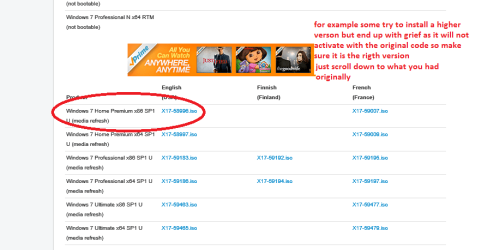
If it comes to the install mate use this as it will get rid of all the bloatware from Lenovo.
http://www.sevenforums.com/tutorials/219487-clean-reinstall-factory-oem-windows-7-a.html#post1839164
just make sure you pick the original version or you will have grief ++ > activating see pic
 

Attachments

  • ISO.PNG
    ISO.PNG
    22.9 KB · Views: 0

My Computer My Computer

At a glance

Desk1 7 Home Prem / Desk2 10 Pro / Main lap A...Desk1 i5 3750K / Laptop i7 GTX 860M / Desk2 i...Desk1 8GB (1866) / Desk2 16GB (1333) / Laptop...Desk 1& 2NVidia GTX 650 & Laptops on board Intel
Computer type
PC/Desktop
Computer Manufacturer/Model Number
Own build (new) Desk1 / Asus ROG Win 7 / Desk2 1st build
OS
Desk1 7 Home Prem / Desk2 10 Pro / Main lap Asus ROG 10 Pro 2 laptop Toshiba 7 Pro Asus P2520 7 & 10
CPU
Desk1 i5 3750K / Laptop i7 GTX 860M / Desk2 i5 2500
Motherboard
Desk1 Asus P877-V / Desk2 Gigabyte H67 UD3H / Laptop ?
Memory
Desk1 8GB (1866) / Desk2 16GB (1333) / Laptop 8Gb DDR3
Graphics Card(s)
Desk 1& 2NVidia GTX 650 & Laptops on board Intel
Sound Card
Desk 1 & 2 -XONAR DG Realtek High Def audio Laptop
Monitor(s) Displays
Desk 1 Benq HD 2450 / Desk2 Philips 24" / Laptop 17.5"
Screen Resolution
1920x1080 D1 & D2 & Laptop 1
Hard Drives
Desk1 Samsung 120GB 830 SSD
Asus ROG 256GB 850 Pro SSD
Desk2 Samsung 840 256 SSD
Toshiba 120GB EVO
PSU
Desk 1 Corsair HX 1050/ Laptop ? / Desk 2 Corsair HX 650
Case
Desk 1 Cooler HAF XM ? Toshiba laptop / Desk2 Coolermaster
Cooling
Fans on all Desk1 -2 Desk2 - all Coolermasters 5 Laptop ?
Keyboard
Desk 1 MS Sidewinder X6 Desk 2 MS Sidewinder X 4
Mouse
Desk 1&2 - Gigabyte MS 900 gamer - laptop - Logitec wireless
Internet Speed
ADSL2+
Other Info
One other Desktop (tester) and spare Toshba laptop both with SSD's
Running Kaspersky 2016 ISS on all machines config'd identically
Logitec audio stereo systems on each machine (x3)
Canon MG5250MFC
Router/modem TP-Link running WPA2SK
Hello everyone :).
I am very happy to announce you that my problem is solved! (At least for now... I will come back to that later on).
So, I went on and installed superantispyware and adwcleaner (I already had malwarebytes) and they picked up some tracking cookies and some other dirt e.g. Conduit. I went on and cleared everything up.
From that moment on, whenever I booted the laptop in an offline mode, there was NO code 43, NO yellow exclamation mark, not a thing. That was good.
So I decided to uninstall for a millionth time the 314.22 driver and move on to the 334.89. Call it a hunch, call it psychic, that's what I thought had to be done. All went well, no GeForce Experience of course and still no sign of code 43.
Then I thought that it was a very good time to run FurMark, now that I had the dedicated card working. And that's what I did. FurMark ran great (if 4-5 fps is great but then again, it's just a mere laptop card :( ). No particles, everything was going well but I had to stop it since the temp built up to 90o Celsius (the warning was set to 100, based on the tutorial I found here http://www.sevenforums.com/tutorials/100356-video-card-stress-test-furmark.html but I got scared that it might do any damage rather than good).
But if I attempted to play a game, boom! BSOD with a nasty STOP 0X00000116.
I was very frustrated and disappointed with my choice of laptop since everything pointed to a hardware error. But then, how did the card managed to run FurMark quite decently and didn't crash?
So I started reading about that error code here:
http://www.sevenforums.com/crash-lo...op-0x116-video_tdr_error-troubleshooting.html
and started leaving out the points that I had already tried out. So I finally arrived to this:


Use this technique to "reset" your pagefile:
a ) Go to Start...Run...and type in "sysdm.cpl" (without the quotes) and press Enter.
-Then click on the Advanced tab,
-then on the Performance Settings Button,
-then on the next Advanced tab,
-then on the Virtual Memory Change button.
b ) In this window, note down the current settings for your pagefile (so you can restore them later on).
-Then click on the "No paging file" radio button, and
- then on the "Set" button. Be sure, if you have multiple hard drives, that you ensure that the paging file is set to 0 on all of them.
-Click OK to exit the dialogs.
c ) Reboot (this will remove the pagefile from your system)
d ) Then go back in following the directions in step a ) and re-enter the settings that you wrote down in step b ). Follow the steps all the way through (and including) the reboot.
e ) Once you've rebooted this second time, go back in and check to make sure that the settings are as they're supposed to be.
I should mention at this point that, when I bought this laptop, it came with a single 4GB dimm of RAM and after a few months, I bought another one, EXACTLY the same in timings, etc. (I was searching for about a month to find one). So, when I first installed Windows with 4GB of RAM only, it set the paging file on 1.5 x 4096MB = 6142MB (6144MB should be the correct number but I found it that way, I' ll leave it that way). After the installation of the second dimm, Windows didn't re-set the paging file to 1.5*(8*1024MB). That was ok, I didn't care. 8GB of DDR3 RAM and 6142mb of paging file worked for me just fine.
Anyway, I went on with the above mentioned technique, retaining the same amount of pagefile, and ran for a gazillionth time sfc /scannow. All went well and no integrity violations were found.
Then, I went on and ran CCleaner with everything on the system sector, on Windows tab checked.
Oh boy, and I was in for a treat.
3.5GB approximately of garbage were thrown away and 33 missing registry values (something like that) were deleted.
Since then, I have ran The Walking Dead and Elder Sign: Omens without a single problem (offline games).
I will come back to you (hopefully with good news :crosses fingers: ) later this evening, when I get home and go online for some LoL and Hearthstone.
Let's hope for the best.
Wish me luck...

 

My Computer My Computer

At a glance

Windows 7 Ultimate x64Intel Core i5-4200M @ 2.50GHz8,00 GB Dual Channel DDR3 @ 800MHzNvidia GeForce GT 745M
Computer type
Laptop
Computer Manufacturer/Model Number
Lenovo IDEAPAD Z710 59407652 17.3''
OS
Windows 7 Ultimate x64
CPU
Intel Core i5-4200M @ 2.50GHz
Motherboard
Intel HM86 (Lynx Point)
Memory
8,00 GB Dual Channel DDR3 @ 800MHz
Graphics Card(s)
Nvidia GeForce GT 745M
Screen Resolution
1600 x 900
Hard Drives
Samsung SSD 850 EVO 250GB
Cooling
Cooler Master Notepal Ergostand
Mouse
Roccat Kova[+]
Antivirus
Avast! Free Antivirus
Browser
Google Chrome
Well done Steel and just for future reference mate when you buy RAM try to get it in matched sets ie one stick of say 8GB or two sticks of 4GB or four sticks of 2GB that come in the same pack as it is more likely to come from the same manufacturing "batch". If you are really pushed to but it separately then at least use the same brand.
The number of sticks are just an example and say for instance you are going for 16GB then obviously one stick is the best way and two sticks the next best and so forth.

If you want some good advice and like G Skill hen here is the place to go Welcome to the G.SKILL TECH FORUM Tradesman is really good - that is not say we don't have some top folks in here but for G Skill stuff I find the best place.
 

My Computer My Computer

At a glance

Desk1 7 Home Prem / Desk2 10 Pro / Main lap A...Desk1 i5 3750K / Laptop i7 GTX 860M / Desk2 i...Desk1 8GB (1866) / Desk2 16GB (1333) / Laptop...Desk 1& 2NVidia GTX 650 & Laptops on board Intel
Computer type
PC/Desktop
Computer Manufacturer/Model Number
Own build (new) Desk1 / Asus ROG Win 7 / Desk2 1st build
OS
Desk1 7 Home Prem / Desk2 10 Pro / Main lap Asus ROG 10 Pro 2 laptop Toshiba 7 Pro Asus P2520 7 & 10
CPU
Desk1 i5 3750K / Laptop i7 GTX 860M / Desk2 i5 2500
Motherboard
Desk1 Asus P877-V / Desk2 Gigabyte H67 UD3H / Laptop ?
Memory
Desk1 8GB (1866) / Desk2 16GB (1333) / Laptop 8Gb DDR3
Graphics Card(s)
Desk 1& 2NVidia GTX 650 & Laptops on board Intel
Sound Card
Desk 1 & 2 -XONAR DG Realtek High Def audio Laptop
Monitor(s) Displays
Desk 1 Benq HD 2450 / Desk2 Philips 24" / Laptop 17.5"
Screen Resolution
1920x1080 D1 & D2 & Laptop 1
Hard Drives
Desk1 Samsung 120GB 830 SSD
Asus ROG 256GB 850 Pro SSD
Desk2 Samsung 840 256 SSD
Toshiba 120GB EVO
PSU
Desk 1 Corsair HX 1050/ Laptop ? / Desk 2 Corsair HX 650
Case
Desk 1 Cooler HAF XM ? Toshiba laptop / Desk2 Coolermaster
Cooling
Fans on all Desk1 -2 Desk2 - all Coolermasters 5 Laptop ?
Keyboard
Desk 1 MS Sidewinder X6 Desk 2 MS Sidewinder X 4
Mouse
Desk 1&2 - Gigabyte MS 900 gamer - laptop - Logitec wireless
Internet Speed
ADSL2+
Other Info
One other Desktop (tester) and spare Toshba laptop both with SSD's
Running Kaspersky 2016 ISS on all machines config'd identically
Logitec audio stereo systems on each machine (x3)
Canon MG5250MFC
Router/modem TP-Link running WPA2SK
I have this in mind when buying RAM but the laptop originally came with a 4GB stick and, due to lack of money, I couldn't afford to buy 2 new sticks of 4GB or a new single one of 8GB. So I searched everywhere for an identical stick, I even bought a used one from a same laptop (exactly the same brand, timings, volts, etc.) from e-bay (but wasn't working so I got my money back :) ) but I ended on a G.Skill ;) stick of 4GB, identical to the already installed, except the brand of course (Lenovo installs SK Hynix on their machines, fyi).
Just a new and final update on my problem:
I got home and got online, device manager was looking crystal clean without errors.
But when I hit LoL, bam! BSOD again, error 116, without even logging in the game.
I uninstalled the 334.89 driver again following http://www.sevenforums.com/tutorials/327414-nvidia-drivers-avoid-problems.html
AND http://www.sevenforums.com/tutorials/83814-drivers-clean-left-over-files-after-uninstalling.html
and I decided to go with this:
Laptops and netbooks :: Lenovo G Series laptops :: Lenovo G780 Notebook - Lenovo (US) (the 64-bit ofc).
Went on and played about 2,5 hours while monitoring here and there the temperature of GPU. I didn't see anything above 80-81 centigrade.
So, to sum up, I believe it was a combined problem of corrupt paging file and malware, maybe just paging file imho.
I hope my (finally solved :party:) problem will help others with similar ones.
Thank you icit2lol for your guidance and advice and everyone else who got the time to look into my problem and provide me with their advice and suggestions.
Peace out \/
 

My Computer My Computer

At a glance

Windows 7 Ultimate x64Intel Core i5-4200M @ 2.50GHz8,00 GB Dual Channel DDR3 @ 800MHzNvidia GeForce GT 745M
Computer type
Laptop
Computer Manufacturer/Model Number
Lenovo IDEAPAD Z710 59407652 17.3''
OS
Windows 7 Ultimate x64
CPU
Intel Core i5-4200M @ 2.50GHz
Motherboard
Intel HM86 (Lynx Point)
Memory
8,00 GB Dual Channel DDR3 @ 800MHz
Graphics Card(s)
Nvidia GeForce GT 745M
Screen Resolution
1600 x 900
Hard Drives
Samsung SSD 850 EVO 250GB
Cooling
Cooler Master Notepal Ergostand
Mouse
Roccat Kova[+]
Antivirus
Avast! Free Antivirus
Browser
Google Chrome
No worries Steel I know what how it goes have been there and done similar partly through lack of funds and knowledge now thankfully things of the past.
Personally I think you have done really well and are to be acknowledged for same:)
 

My Computer My Computer

At a glance

Desk1 7 Home Prem / Desk2 10 Pro / Main lap A...Desk1 i5 3750K / Laptop i7 GTX 860M / Desk2 i...Desk1 8GB (1866) / Desk2 16GB (1333) / Laptop...Desk 1& 2NVidia GTX 650 & Laptops on board Intel
Computer type
PC/Desktop
Computer Manufacturer/Model Number
Own build (new) Desk1 / Asus ROG Win 7 / Desk2 1st build
OS
Desk1 7 Home Prem / Desk2 10 Pro / Main lap Asus ROG 10 Pro 2 laptop Toshiba 7 Pro Asus P2520 7 & 10
CPU
Desk1 i5 3750K / Laptop i7 GTX 860M / Desk2 i5 2500
Motherboard
Desk1 Asus P877-V / Desk2 Gigabyte H67 UD3H / Laptop ?
Memory
Desk1 8GB (1866) / Desk2 16GB (1333) / Laptop 8Gb DDR3
Graphics Card(s)
Desk 1& 2NVidia GTX 650 & Laptops on board Intel
Sound Card
Desk 1 & 2 -XONAR DG Realtek High Def audio Laptop
Monitor(s) Displays
Desk 1 Benq HD 2450 / Desk2 Philips 24" / Laptop 17.5"
Screen Resolution
1920x1080 D1 & D2 & Laptop 1
Hard Drives
Desk1 Samsung 120GB 830 SSD
Asus ROG 256GB 850 Pro SSD
Desk2 Samsung 840 256 SSD
Toshiba 120GB EVO
PSU
Desk 1 Corsair HX 1050/ Laptop ? / Desk 2 Corsair HX 650
Case
Desk 1 Cooler HAF XM ? Toshiba laptop / Desk2 Coolermaster
Cooling
Fans on all Desk1 -2 Desk2 - all Coolermasters 5 Laptop ?
Keyboard
Desk 1 MS Sidewinder X6 Desk 2 MS Sidewinder X 4
Mouse
Desk 1&2 - Gigabyte MS 900 gamer - laptop - Logitec wireless
Internet Speed
ADSL2+
Other Info
One other Desktop (tester) and spare Toshba laptop both with SSD's
Running Kaspersky 2016 ISS on all machines config'd identically
Logitec audio stereo systems on each machine (x3)
Canon MG5250MFC
Router/modem TP-Link running WPA2SK
Back
Top