This is a Stop 0x124 .... specially a hardware failure, but may de some hardware drivers also cause it in this case.
Code:
*******************************************************************************
*                                                                             *
*                        Bugcheck Analysis                                    *
*                                                                             *
*******************************************************************************

Use !analyze -v to get detailed debugging information.

BugCheck 124, {0, 858d2024, 0, 0}

Probably caused by : GenuineIntel

Followup: MachineOwner
---------

1: kd> !analyze -v
*******************************************************************************
*                                                                             *
*                        Bugcheck Analysis                                    *
*                                                                             *
*******************************************************************************

WHEA_UNCORRECTABLE_ERROR (124)
A fatal hardware error has occurred. Parameter 1 identifies the type of error
source that reported the error. Parameter 2 holds the address of the
WHEA_ERROR_RECORD structure that describes the error conditon.
Arguments:
Arg1: 00000000, Machine Check Exception
Arg2: 858d2024, Address of the WHEA_ERROR_RECORD structure.
Arg3: 00000000, High order 32-bits of the MCi_STATUS value.
Arg4: 00000000, Low order 32-bits of the MCi_STATUS value.

Debugging Details:
------------------


BUGCHECK_STR:  0x124_GenuineIntel

CUSTOMER_CRASH_COUNT:  1

DEFAULT_BUCKET_ID:  WIN7_DRIVER_FAULT

PROCESS_NAME:  System

CURRENT_IRQL:  0

STACK_TEXT:
8a913cc4 82914bad 858d2008 829acc68 829acc60 nt!WheapCreateTriageDumpFromPreviousSession+0x32
8a913ce4 829159d7 829acc60 858d2008 829acc90 nt!WheapProcessWorkQueueItem+0x56
8a913d00 828c0aab 829acc60 00000000 848d7d48 nt!WheapWorkQueueWorkerRoutine+0x1f
8a913d50 82a4cf5e 00000001 b2143c30 00000000 nt!ExpWorkerThread+0x10d
8a913d90 828f4219 828c099e 00000001 00000000 nt!PspSystemThreadStartup+0x9e
00000000 00000000 00000000 00000000 00000000 nt!KiThreadStartup+0x19


STACK_COMMAND:  kb

FOLLOWUP_NAME:  MachineOwner

MODULE_NAME: GenuineIntel

IMAGE_NAME:  GenuineIntel

DEBUG_FLR_IMAGE_TIMESTAMP:  0

FAILURE_BUCKET_ID:  0x124_GenuineIntel_PROCESSOR_MAE_PRV

BUCKET_ID:  0x124_GenuineIntel_PROCESSOR_MAE_PRV

Followup: MachineOwner
---------
As it is visible, the BIOS is fairly old.
Code:
System Manufacturer    BIOSTAR Group
System Model    G41 DVI
BIOS Version/Date    American Megatrends Inc. 080015,[COLOR=Red] 9/17/2009[/COLOR]
Update the BIOS and other drivers like chipset from
G41 DVI :: Motherboard :: BIOSTAR (click the "download"section to see the items to download).
The display driver is also old.
Code:
Name    AMD Radeon HD 6450
Driver    c:\windows\system32\drivers\atikmpag.sys (8.14.1.6210, 238.00 KB (243,712 bytes), [COLOR=Red]4/20/2011[/COLOR] 1:22 AM)
Update your ATI/AMD display driver.
You can get it from the link in our forum,
http://www.sevenforums.com/graphic-...alyst-video-driver-windows-7-a.html#post17671, or you may go to
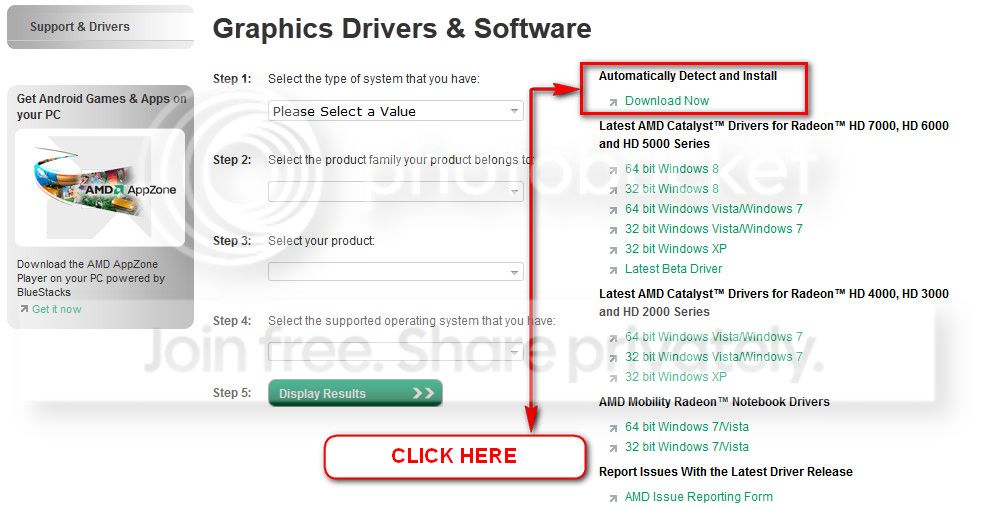
AMD Graphics Driver and Software and opt for Automatically Detect and Install the appropriate driver for your card.
During installation, you may opt for advanced installation, and install the display driver only, not the Catalyst Control Center.
Is the computer hot? Report us the heat of the computer after a couple of hours of your normal usage. Upload a screenshot of the summery tab of
Speccy.
If it is an old build (I am guessing so), dismantle the PC, clean the inside carefully. Clean the air vents and the fan grills, specially. When re-seating, dont forget to add thermal paste to the CPU.
Is the power supply supplying adequate power there? Make it sure.
eXtreme Power Supply Calculator
And, do some hardware check ..... like .....
Test your RAM modules for possible errors.
How to Test and Diagnose RAM Issues with Memtest86+
Run memtest for at least 8 passes, preferably overnight.
Stress test the Graphics Card using Furmark.
Video Card - Stress Test with Furmark
Stress test the CPU.
Hardware - Stress Test With Prime95
Let us know the results.