
BSOD & Crashing when gaming/streaming.

FreaK367

New member
Local time
11:19 PM
Messages
21
Location
England
Hello, I have recently built a new computer and I have been getting BSOD's and most recently complete crashes, where the screen either freezes or goes black and plays a recurring noise through the speakers, requiring a restart. Which happens either when gaming or once when I was buffering a video in fullscreen. Happens across multiple games, even ones that do not load my ststem very much. Often after 5 - 10 minutes of playing, varies.

System Specs:

OS: Windows 7 Home Premium 64bit (OEM version)
Motherboard: GIGABYTE GA-970A-DS3
CPU: AMD Bulldozer FX-6200 3.8GHz Black Edition
GPU: AMD/ATI 1GB Radeon 6850
RAM: (8GB total) 2x4GB Corsair Vengeance PC3-12800C9 - Running at 1333MHz
PSU: OCZ ZS Series 550W 80+ Bronze

CASE: Xclio Propeller ATX
Keyboard: Logitech G15 (Revised)
Mouse: Microsoft Sidewinder
HDD(s):750GB Western Digital, SATA, 7200RPM - 250GB SATA

All internal hardware has been purchased by me over the last 6 months, the CPU is about a week old, as is the motherboard and RAM. The rest varies, I used some components in my old system such as the GPU and PSU.

I do not overclock any of my hardware.

I have recently done a fresh install of Windows 7 when I put together my new PC a week ago or so. I have been using the OS and key for maybe 2 years. No problems.

Temperatures:

My CPU sometimes overheats slightly when under high load, I have set the BIOS to give me a warning sound when the temperature hits 60°C (to which I then shut down the computer instantly) This has randomly happened, sometimes when not actually under load?, (it has been acting strangely, but seems ok now) I set the BIOS to keep the CPU fan at 100% now and it doesn't overheat on games, only when something really loads the CPU.

Temperatures from CoreTemp 1.0 and PC Wizard 2012, AMD Vision where applicable:

CPU:
Idle (now): 11°C - 16°C
Load (gaming): 29°C - 38°C
Load (100%): 50°C - 60°C+

GPU:
Idle (now): 43°C - 46°C
Load (gaming): 60°C - 80°C

HDD(s):
Idle (now): 31°C and 32°C
Load: Not sure.

BIOS: System and CPU temperatures after a crash are between 30°C and 40°C

I have attached the files requested by the posting instructions, I'll tell you what I have tried so far.

For about 3 days now I have had this issue, it started with Blue Screens, but over the last day or so has stopped blue screening and now simply outright crashes instead. (The BSOD/dumps have stopped happening now, but still might show the reason for my crashing instead)

Memtest86+, no errors, completed.
S.M.A.R.T HDD test, both are healthy.
CHKDSK: No problems.

CPU stress test, at 100% load for too long, it sets off my BIOS alarm, I always cut it off at that point to avoid damage. (Games never load my CPU to 100%, it often hovers between 20% and 40%)

Updated BIOS: This motherboard only has 1 version available so far.

Updated all of my drivers, some manually, others through a driver updater.

Underclocked my CPU, still crashed. (software)
Turned off 2 cores, still crashed. (BIOS)

Reseated my RAM, just to be sure.

Loaded BIOS fail-safe defaults and optimized defaults, neither helped.

Windowed a game, lowered resolution and graphics, ran PC Wizard and CoreTemp at the side of my screen and played the game. Still crashed, but no temperatures looked worrying at the time of the crash.

And probably another 20 or so random tests and checks, including testing with power options etc... nothing has worked, and I have been looking at a LOT of threads on similar issues others have had, and I have tried using their solutions which haven't worked either.

This is my last resort, please help.
 

My Computer My Computer

At a glance

Windows 7 Home Premium 64bitAMD Bulldozer FX-6200 3.8GHz(8GB TOTAL) 2x4GB Corsair Vengeance PC3-12800...AMD/ATI 1GB Radeon 6850
OS
Windows 7 Home Premium 64bit
CPU
AMD Bulldozer FX-6200 3.8GHz
Motherboard
GIGABYTE GA-970A-DS3
Memory
(8GB TOTAL) 2x4GB Corsair Vengeance PC3-12800C9 - At 1333MHz
Graphics Card(s)
AMD/ATI 1GB Radeon 6850
Monitor(s) Displays
Samsung SyncMaster P2250 22"
Screen Resolution
1920 x 1080
Hard Drives
750GB Western Digital, SATA, 7200RPM
250GB SATA
PSU
OCZ ZS Series 550W 80+ Bronze
Case
Xclio Propeller ATX
Cooling
GELID Silent 8 - IN(80mm) Arctic Cooling F12 - OUT(120mm)
Keyboard
Logitech G15 (Revised)
Mouse
Microsoft Sidewinder
Internet Speed
50Mb DL 5Mb UL
Other Info
I do not overclock my system, everything is at stock.
CPUs have become more resilient to heat lately (though not as much as GPUs), so 60C is very cool and is a good stable region to keep it in (even old CPUs handle 60C very well). It's only when you start getting close or above 80C is when you need to rethink your cooling.

It's never good to keep the CPU fan running 100% constantly. It places extreme wear on the bearings and other internal parts of the fan and will greatly shorten its lifespan. As an example, a lot of laptops have had recalls or BIOS updates because a bug in the BIOS or hardware would cause their CPU fan to stay at 100% and would die in a couple months of use, resulting in overheating. Not good. There should be an automatic fan speed adjustment on your motherboard, which will work fine for you.

I want to note that while 550W does reach the minimum req for your GPU, it also is very close to it (50W off). It is often good to leave at least a 100W gap from the minimum to consider other items such as the CPU, HDs, etc. You will want to keep the PSU away from 80% load as much as you possibly can. Any time it hits above that the parts start degrading rapidly (may already have).

You'll want to run a battery of hardware tests. Considering Memtest, how many passes did you run on it? It should be at least 7 consecutive passes (best to just let it run overnight). The rest are as followed:

CPU: Prime95 - Torture Test; Blend; overnight (9+ hours)
GPU: MemtestCL - Run twice (if any of the tests work on your GPU; ATI cards will need to install the ATI APP SDK as it requires OpenCL)
Drives: Seatools - All basic tests aside from the Fix all or the advanced ones.

All of these (excluding MemtestCL) are included in the UBCD if you prefer a Live CD environment (which is the best environment to test hardware on). Note that Prime95 currently does not work on the UBCD. Also, please provide us temps/voltages using HWInfo with Sensors only option checked. Log two 30-minute instances: one for idle, and one for high load.
 

My Computer My Computer

At a glance

Windows 7 64-bit
OS
Windows 7 64-bit
CPUs have become more resilient to heat lately (though not as much as GPUs), so 60C is very cool and is a good stable region to keep it in (even old CPUs handle 60C very well). It's only when you start getting close or above 80C is when you need to rethink your cooling.

It's never good to keep the CPU fan running 100% constantly. It places extreme wear on the bearings and other internal parts of the fan and will greatly shorten its lifespan. As an example, a lot of laptops have had recalls or BIOS updates because a bug in the BIOS or hardware would cause their CPU fan to stay at 100% and would die in a couple months of use, resulting in overheating. Not good. There should be an automatic fan speed adjustment on your motherboard, which will work fine for you.

I want to note that while 550W does reach the minimum req for your GPU, it also is very close to it (50W off). It is often good to leave at least a 100W gap from the minimum to consider other items such as the CPU, HDs, etc. You will want to keep the PSU away from 80% load as much as you possibly can. Any time it hits above that the parts start degrading rapidly (may already have).

You'll want to run a battery of hardware tests. Considering Memtest, how many passes did you run on it? It should be at least 7 consecutive passes (best to just let it run overnight). The rest are as followed:

CPU: Prime95 - Torture Test; Blend; overnight (9+ hours)
GPU: MemtestCL - Run twice (if any of the tests work on your GPU; ATI cards will need to install the ATI APP SDK as it requires OpenCL)
Drives: Seatools - All basic tests aside from the Fix all or the advanced ones.

All of these (excluding MemtestCL) are included in the UBCD if you prefer a Live CD environment (which is the best environment to test hardware on). Note that Prime95 currently does not work on the UBCD. Also, please provide us temps/voltages using HWInfo with Sensors only option checked. Log two 30-minute instances: one for idle, and one for high load.

From research the AMD FX chips have a maximum safe temperature of 61°C, all AMD chips have max temperatures between 60°C and 75°C usually. Intel is similar but generally better. I know you can go beyond those, but I like to stay within the guide.

I'll go into the BIOS and turn back on the smart CPU fan function, thank you for that information.

I ran Memtest86+ for 8 passes.

I did a Prime95 torture test a few days ago, but after a few minutes my PC started screaming that the temperature was over 60°C so I stopped it for safety.

I'll try Seatools.


I have actually just ran a manual test out of curiosity, I took the side of my case off and took a desk fan, turned it on full blast and pointed it at my pc. (probably not recommended...) Then went on a game, played for a good 1 hour and a half with no problems atall. CoreTemp has a G15 app so my keyboard LCD lets me watch my CPU temperature while gaming, and it valued the temperature between 30°C - 32°C at all times, the CPU load varied between 50% and 70% (I think I underestimated the gaming load in my initial post)

So in a game that could hardly give me 10 - 15 minutes before crashing, I managed to play for 1 hour and a half with that fan blowing, so it must be an overheating issue :/ , my legs got really cold though.

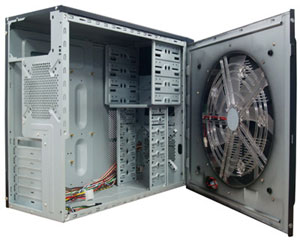
My case, an Xclio Propeller actually has a 36cm fan on that side of the case, which I used to have on when gaming, but this new system for some reason doesn't power the fan, it powers the LED's on the fan, but I can't actually turn the fan on...

scythe_2.jpg


So... if I got that working, it would give a similar effect and stop my PC crashing.

I'd still like to figure out what exactly was overheating though.


I think it might be the northbridge, the heatsink gets really hot to touch, GIGABYTE have it attached with two spring loaded plastic... things. And the heatsink seems to move slightly, I might have knocked it during installation, what do you think?, it doesn't feel properly attached and locked down to the board.
 

My Computer My Computer

At a glance

Windows 7 Home Premium 64bitAMD Bulldozer FX-6200 3.8GHz(8GB TOTAL) 2x4GB Corsair Vengeance PC3-12800...AMD/ATI 1GB Radeon 6850
OS
Windows 7 Home Premium 64bit
CPU
AMD Bulldozer FX-6200 3.8GHz
Motherboard
GIGABYTE GA-970A-DS3
Memory
(8GB TOTAL) 2x4GB Corsair Vengeance PC3-12800C9 - At 1333MHz
Graphics Card(s)
AMD/ATI 1GB Radeon 6850
Monitor(s) Displays
Samsung SyncMaster P2250 22"
Screen Resolution
1920 x 1080
Hard Drives
750GB Western Digital, SATA, 7200RPM
250GB SATA
PSU
OCZ ZS Series 550W 80+ Bronze
Case
Xclio Propeller ATX
Cooling
GELID Silent 8 - IN(80mm) Arctic Cooling F12 - OUT(120mm)
Keyboard
Logitech G15 (Revised)
Mouse
Microsoft Sidewinder
Internet Speed
50Mb DL 5Mb UL
Other Info
I do not overclock my system, everything is at stock.
Yer right, I forgot that AMDs are far more susceptible to heat than Intel CPUs. In that case, you'll want to consider doing something about that side case fan.

For temps I often use HwInfo as previously instructed. Make sure to turn on Sensors only at startup.

As for the heatsink, I don't believe the heatsink should jostle in any way. Any sort of leeway says that the heatsink is not firmly flush and seated properly on the northbridge. This could certainly be a problem in high load situations.
 

My Computer My Computer

At a glance

Windows 7 64-bit
OS
Windows 7 64-bit
Yer right, I forgot that AMDs are far more susceptible to heat than Intel CPUs. In that case, you'll want to consider doing something about that side case fan.

For temps I often use HwInfo as previously instructed. Make sure to turn on Sensors only at startup.

As for the heatsink, I don't believe the heatsink should jostle in any way. Any sort of leeway says that the heatsink is not firmly flush and seated properly on the northbridge. This could certainly be a problem in high load situations.

I have completed a 30 minute idle log on HwInfo, how would you suggest doing one under high load?, I have never used the program before so I'm not sure if it is an option, or if not how would you suggest I create that environment to run the test?

I appreciate your help.
 

My Computer My Computer

At a glance

Windows 7 Home Premium 64bitAMD Bulldozer FX-6200 3.8GHz(8GB TOTAL) 2x4GB Corsair Vengeance PC3-12800...AMD/ATI 1GB Radeon 6850
OS
Windows 7 Home Premium 64bit
CPU
AMD Bulldozer FX-6200 3.8GHz
Motherboard
GIGABYTE GA-970A-DS3
Memory
(8GB TOTAL) 2x4GB Corsair Vengeance PC3-12800C9 - At 1333MHz
Graphics Card(s)
AMD/ATI 1GB Radeon 6850
Monitor(s) Displays
Samsung SyncMaster P2250 22"
Screen Resolution
1920 x 1080
Hard Drives
750GB Western Digital, SATA, 7200RPM
250GB SATA
PSU
OCZ ZS Series 550W 80+ Bronze
Case
Xclio Propeller ATX
Cooling
GELID Silent 8 - IN(80mm) Arctic Cooling F12 - OUT(120mm)
Keyboard
Logitech G15 (Revised)
Mouse
Microsoft Sidewinder
Internet Speed
50Mb DL 5Mb UL
Other Info
I do not overclock my system, everything is at stock.
You simply log a session of, say, gaming with heavy graphics, or run a benchmark like Furmark or Unigine.
 

My Computer My Computer

At a glance

Windows 7 64-bit
OS
Windows 7 64-bit
You simply log a session of, say, gaming with heavy graphics, or run a benchmark like Furmark or Unigine.
I'll do that then, hopefully my PC won't crash, I have doubts I could last 30 minutes on a game though without that desk fan :/. Not sure how my computer will handle a benchmark, only one way to find out.


EDIT: Just ran HWiNFO64 and logged while playing one of the games that makes me crash, I ran the test for 30 - 40 minutes or so while gaming flawlessly, I then stopped the logging and closed HWiNFO64 while still in game, about 5 minutes of playing later, if that, my computer crashed. Very odd, it seems to me that running it actually let me play the game. Unless it was just a coincidence.

The game doesn't load my PC fully (I think), but my pc always crashes when playing it so surely something will appear abnormal. Anyways, I zipped the files and attached them to this post.
 
Last edited:

My Computer My Computer

At a glance

Windows 7 Home Premium 64bitAMD Bulldozer FX-6200 3.8GHz(8GB TOTAL) 2x4GB Corsair Vengeance PC3-12800...AMD/ATI 1GB Radeon 6850
OS
Windows 7 Home Premium 64bit
CPU
AMD Bulldozer FX-6200 3.8GHz
Motherboard
GIGABYTE GA-970A-DS3
Memory
(8GB TOTAL) 2x4GB Corsair Vengeance PC3-12800C9 - At 1333MHz
Graphics Card(s)
AMD/ATI 1GB Radeon 6850
Monitor(s) Displays
Samsung SyncMaster P2250 22"
Screen Resolution
1920 x 1080
Hard Drives
750GB Western Digital, SATA, 7200RPM
250GB SATA
PSU
OCZ ZS Series 550W 80+ Bronze
Case
Xclio Propeller ATX
Cooling
GELID Silent 8 - IN(80mm) Arctic Cooling F12 - OUT(120mm)
Keyboard
Logitech G15 (Revised)
Mouse
Microsoft Sidewinder
Internet Speed
50Mb DL 5Mb UL
Other Info
I do not overclock my system, everything is at stock.
Something dreadfully concerns me.

In your voltage readouts, your 3.3v and your 12v rails are both reporting extreme skews (~2.0v for 3.3v, and ~8v for 12v). If these can be trusted, then it means your PSU must be replaced ASAP. If they can't be trusted, then I presume you may have issues with your motherboard.

To confirm if this is true, you'll want to see if your BIOS tells you voltage readouts anywhere in it and verify what it's telling you. Most often the motherboards will only show memory and vcore, but you may have one that will display rail voltages as well. BIOS readouts are usually more reliable than software, but be advised that neither are 100% guarantee, and your best bet to determine the output with trustworthy accuracy is with a multimeter. Instructions are available here. It's an old article but it still applies.

If the BIOS says nothing and you aren't willing to grab a multimeter, try some other software like CPU Fan and perhaps any software that comes with your motherboard that shows readings (you'll want the latest from the motherboard manufacturer's website, and even then after you're done using it I'd recommend uninstalling it as they're prone to have bugs). Of course, as mentioned before, these are not guaranteed, but if all of them show up the same average voltages as I mentioned, then we're looking at a bad PSU.
 

My Computer My Computer

At a glance

Windows 7 64-bit
OS
Windows 7 64-bit
Hmmm, sounds worrying.

I really hope it isn't the PSU, I only bought it on the 7th of last month, used it with my old system without any problems for some weeks then changed the motherboard, CPU and RAM with a fresh install of Windows 7.

I went into the BIOS and monitored the voltages, they were as follows:

+12v = 12.168
+3.3v = 3.340 - 3.360

EasyTune6 which is software that came with the motherboard, show the voltages as:

+12v = 12.160
+3.3v = 3.340 - 3.360

So, the same as the BIOS.

I don't have a multimeter at the moment, there might be one around the house somewhere, but I'd need to ask my brother when he gets in from work tonight.

Hope this helps.
 

My Computer My Computer

At a glance

Windows 7 Home Premium 64bitAMD Bulldozer FX-6200 3.8GHz(8GB TOTAL) 2x4GB Corsair Vengeance PC3-12800...AMD/ATI 1GB Radeon 6850
OS
Windows 7 Home Premium 64bit
CPU
AMD Bulldozer FX-6200 3.8GHz
Motherboard
GIGABYTE GA-970A-DS3
Memory
(8GB TOTAL) 2x4GB Corsair Vengeance PC3-12800C9 - At 1333MHz
Graphics Card(s)
AMD/ATI 1GB Radeon 6850
Monitor(s) Displays
Samsung SyncMaster P2250 22"
Screen Resolution
1920 x 1080
Hard Drives
750GB Western Digital, SATA, 7200RPM
250GB SATA
PSU
OCZ ZS Series 550W 80+ Bronze
Case
Xclio Propeller ATX
Cooling
GELID Silent 8 - IN(80mm) Arctic Cooling F12 - OUT(120mm)
Keyboard
Logitech G15 (Revised)
Mouse
Microsoft Sidewinder
Internet Speed
50Mb DL 5Mb UL
Other Info
I do not overclock my system, everything is at stock.
Are those voltage settings are actual readings? If they're readings, than those are a lot more of a relief. It just means that HWInfo has trouble reading the voltage sensor output on your motherboard.

As for the temps, I did not see anything worrying. Again, it may be the temp sensors being read incorrectly from the motherboard as well, I'm not sure. But nothing looks troubling.

Anyways, so far from tests and all, nothing is apparent. You'll want to check on that 32mm fan, as well as reconnect and re-seat everything just to be sure. Also, please send any more crashdumps you may have, as analyzing from just one doesn't exactly do the job (especially if it's just a minidump). You'll also might want to turn on Driver Verifier. If for some reason this does happen to be a software bug (doubtful), Driver Verifier should catch it and BSOD your system. Provide us any resulting crashdumps. Note that aside from keeping Low Resource Simulation unchecked in Driver Verifier as instructed, also do the same for Force Pending I/O Request and IRP Logging. All three are no-nos.
 

My Computer My Computer

At a glance

Windows 7 64-bit
OS
Windows 7 64-bit
They are voltage readings I believe.

Right, so I followed that guide and took your advice, rebooted and my system instantly BSOD, did that 3 times, so now I'm in safe mode, I'll disable driver verifier now.

I followed the BSOD posting structions again and uploaded the result. And also uploaded the 3 raw crashdumps. They are just minidumps though, (I don't know how to get anything better.)
 
Last edited:

My Computer My Computer

At a glance

Windows 7 Home Premium 64bitAMD Bulldozer FX-6200 3.8GHz(8GB TOTAL) 2x4GB Corsair Vengeance PC3-12800...AMD/ATI 1GB Radeon 6850
OS
Windows 7 Home Premium 64bit
CPU
AMD Bulldozer FX-6200 3.8GHz
Motherboard
GIGABYTE GA-970A-DS3
Memory
(8GB TOTAL) 2x4GB Corsair Vengeance PC3-12800C9 - At 1333MHz
Graphics Card(s)
AMD/ATI 1GB Radeon 6850
Monitor(s) Displays
Samsung SyncMaster P2250 22"
Screen Resolution
1920 x 1080
Hard Drives
750GB Western Digital, SATA, 7200RPM
250GB SATA
PSU
OCZ ZS Series 550W 80+ Bronze
Case
Xclio Propeller ATX
Cooling
GELID Silent 8 - IN(80mm) Arctic Cooling F12 - OUT(120mm)
Keyboard
Logitech G15 (Revised)
Mouse
Microsoft Sidewinder
Internet Speed
50Mb DL 5Mb UL
Other Info
I do not overclock my system, everything is at stock.
I'm curious about something. I have a Gigabyte mobo and when I first installed it I constantly got BSODs. I uninstalled the Smart6 and EasyTune6 suites and the BSODs went away, completely. Softclocking is notorious for causing BSODs. EVGA precision causes BSODs as well. Maybe try uninstalling these two suites with REVO uninstaller, at the highest level.
 

My Computer My Computer

At a glance

Windows 7 Home Premium x64Intel 2500k @4.5ghz 66deg max P95/IBT8 Gigs Patriot Viper 2 Extreme @1600EVGA GTX 580 3 GIG 35degrees idle
Computer Manufacturer/Model Number
Home Made
OS
Windows 7 Home Premium x64
CPU
Intel 2500k @4.5ghz 66deg max P95/IBT
Motherboard
Gigabyte Z68A-D3-B3
Memory
8 Gigs Patriot Viper 2 Extreme @1600
Graphics Card(s)
EVGA GTX 580 3 GIG 35degrees idle
Sound Card
Nvidia HD audio via HDMI to 7.1 Receiver
Monitor(s) Displays
32" Olevia hdtv
Screen Resolution
1080p
Hard Drives
64gig SSD(OS/Apps)
250gig (Files and Dox)
1tb (imaging and backup)
PSU
Corsair vx550w
Case
Thermaltake V3 black
Cooling
CM 212+(push n pull) 4 case fans
Keyboard
Logitech wireless Combo, G13
Mouse
G300
Internet Speed
40mps
Other Info
Two others up and running; C2D E5200/MSI G41M-P26/Corsair XMS3 8gb/GTS 250 1gb and C2D E8200/xFx 750sli/8gb Corsair Dominator/2x EVGA 550ti
Working on; i2600 Build...
HP DV6
@Work I use a Lenovo 5536B8U + Lenovo U300s
Yes, I personally would recommend all motherboard software be uninstalled, aside from drivers. All of them have a propensity to harbor bugs and many of them deceptively show up appearing as hardware faults. Normally it's one of the first things I'd recommend to people but apparently in this case I didn't think about it.
 

My Computer My Computer

At a glance

Windows 7 64-bit
OS
Windows 7 64-bit
I uninstalled all motherboard software, the problem still persists.

I went on the same game earlier, with SMART cpu fan control, the fan decided to never go to 100%, and fairly quickly my CPU was at 60°C and rising, so I restarted, put the fan to 100%, managed to game for about 10 minutes before crashing, no BSOD, there was recurring sound from speakers, monitor stopped picking up a signal.

Had to restart, but this time instead of starting up I got a beep code and the PC was turned on, but I got nothing on the monitor, restarted, same thing. Then turned the PC off completely then back on and managed to get to the loading windows screen where it never actually loaded windows... so had to restart, then went into safe mode, didn't really do anything, then just restarted again and windows acted as normal. :/

Never heard a beep code like it, just a strange variation of 5 - 7 beeps in about 1.5 seconds, very quick.

I've had to do a startup repair about 2 times over the past 2 days after crashing, not always, most times I crash I restart no problem, sometimes though it never loads the operating system, just stays on that screen and has a chance to need a startup repair when I reboot, that time it didn't need one though.

Not sure what else to say, the Event Viewer might show something, these are all event logs.

I get the Kernel-Power, Event ID: 41 after every crash, which is common.

I get Kernel-EventTracing, Event ID: 3 around the time of crashes, and in the info it says: "Session "Microsoft Security Client OOBE" stopped due to the following error: 0xC000000D"

I've been getting Service Control Manager, Event ID: 7000 many times, which says:
"The AODDriver4.1 service failed to start due to the following error:
The system cannot find the file specified."

And another group of the same error saying
"The Computer Browser service depends on the Server service which failed to start because of the following error:
The dependency service or group failed to start."

VSS, Event ID: 8194 saying:
"Volume Shadow Copy Service error: Unexpected error querying for the IVssWriterCallback interface. hr = 0x80070005, Access is denied.
. This is often caused by incorrect security settings in either the writer or requestor process.

Operation:
Gathering Writer Data

Context:
Writer Class Id: {e8132975-6f93-4464-a53e-1050253ae220}
Writer Name: System Writer
Writer Instance ID: {9eb0e9bd-3753-44a1-9f16-16cc47b1b09a}"

(Happened for both of todays crashes)

Microsoft Antimalware, Event ID: 3002 saying:
"The description for Event ID 3002 from source Microsoft Antimalware cannot be found. Either the component that raises this event is not installed on your local computer or the installation is corrupted. You can install or repair the component on the local computer.

If the event originated on another computer, the display information had to be saved with the event.

The following information was included with the event:

%%860
3.0.8402.0
%%835
%%842
0x80004005
Unspecified error
5"

CAPI2, Event ID 513, saying:
"Cryptographic Services failed while processing the OnIdentity() call in the System Writer Object.

Details:
AddWin32ServiceFiles: Unable to back up image of service AppleChargerSrv since QueryServiceConfig API failed

System Error:
The system cannot find the file specified.
."


They have all happened multiple times.
 

My Computer My Computer

At a glance

Windows 7 Home Premium 64bitAMD Bulldozer FX-6200 3.8GHz(8GB TOTAL) 2x4GB Corsair Vengeance PC3-12800...AMD/ATI 1GB Radeon 6850
OS
Windows 7 Home Premium 64bit
CPU
AMD Bulldozer FX-6200 3.8GHz
Motherboard
GIGABYTE GA-970A-DS3
Memory
(8GB TOTAL) 2x4GB Corsair Vengeance PC3-12800C9 - At 1333MHz
Graphics Card(s)
AMD/ATI 1GB Radeon 6850
Monitor(s) Displays
Samsung SyncMaster P2250 22"
Screen Resolution
1920 x 1080
Hard Drives
750GB Western Digital, SATA, 7200RPM
250GB SATA
PSU
OCZ ZS Series 550W 80+ Bronze
Case
Xclio Propeller ATX
Cooling
GELID Silent 8 - IN(80mm) Arctic Cooling F12 - OUT(120mm)
Keyboard
Logitech G15 (Revised)
Mouse
Microsoft Sidewinder
Internet Speed
50Mb DL 5Mb UL
Other Info
I do not overclock my system, everything is at stock.
Read your motherboard's manual on beep codes. It should explain what it means. I have also heard beep codes from hard drives (imagine that) that are failing.

AODDriver is the AMD Overdrive service. This may mean that the item has not been completely uninstalled. This is typical for motherboard software (again, due to bugs). Driversweeper I hear usually does a good job cleaning up after it.

I checked the Antimalware events. While I have seen those events before, the lack of description for them usually means something went wrong. If you have Microsoft Security Essentials, you may wanna uninstall and reinstall it.

I've also seen the Apple Charger service problems as well. I do not believe they are of concern. Again, it just sounds like whatever software involves your apple products (Ipad/Ipod/Iphone, etc) got busted.

If there is anything in common with these, is that a good bit of them relate to missing files or lacking access to said files. These could be legitimate errors (as in the files actually do not exist or the process lacks access to them) or they could be caused by hard drive issues. Speaking of which, I don't recall you mentioned that you finished Seatools on your drives. To add, have you tried SFC Scan? You may wanna do that, in addition you'll wanna do a Disk Check with both options selected.

I know this sounds like running around in circles, which it is. However so far no hardware tests revealed anything, and no software checks revealed anything (I assume you still have Driver Verifier on and it did not cause your system to BSOD). This most certainly is hardware, but without test results we're scratching our heads as to what hardware it is. I personally think it's one of the dreaded Trio of Trouble which shows up these similar problems: Motherboard, CPU or Power Supply. They also usually cause hardware tests to come up with nothing. It could be the graphics card too, but again, hardware tests were inconclusive. So now we're pretty much grasping for straws right now, and hopefully something comes up positive. Otherwise, you'll have to start swapping hardware.
 

My Computer My Computer

At a glance

Windows 7 64-bit
OS
Windows 7 64-bit
Could you post snips from the sensor screens on GPU-Z and CPU-Z
 

My Computer My Computer

At a glance

Windows 7 Home Premium x64Intel 2500k @4.5ghz 66deg max P95/IBT8 Gigs Patriot Viper 2 Extreme @1600EVGA GTX 580 3 GIG 35degrees idle
Computer Manufacturer/Model Number
Home Made
OS
Windows 7 Home Premium x64
CPU
Intel 2500k @4.5ghz 66deg max P95/IBT
Motherboard
Gigabyte Z68A-D3-B3
Memory
8 Gigs Patriot Viper 2 Extreme @1600
Graphics Card(s)
EVGA GTX 580 3 GIG 35degrees idle
Sound Card
Nvidia HD audio via HDMI to 7.1 Receiver
Monitor(s) Displays
32" Olevia hdtv
Screen Resolution
1080p
Hard Drives
64gig SSD(OS/Apps)
250gig (Files and Dox)
1tb (imaging and backup)
PSU
Corsair vx550w
Case
Thermaltake V3 black
Cooling
CM 212+(push n pull) 4 case fans
Keyboard
Logitech wireless Combo, G13
Mouse
G300
Internet Speed
40mps
Other Info
Two others up and running; C2D E5200/MSI G41M-P26/Corsair XMS3 8gb/GTS 250 1gb and C2D E8200/xFx 750sli/8gb Corsair Dominator/2x EVGA 550ti
Working on; i2600 Build...
HP DV6
@Work I use a Lenovo 5536B8U + Lenovo U300s
I uninstalled all motherboard software, the problem still persists.

I went on the same game earlier, with SMART cpu fan control,

Are you referencing going into SMART before you removed all of the Gigabyte utilities?
 

My Computer My Computer

At a glance

Windows 7 Home Premium x64Intel 2500k @4.5ghz 66deg max P95/IBT8 Gigs Patriot Viper 2 Extreme @1600EVGA GTX 580 3 GIG 35degrees idle
Computer Manufacturer/Model Number
Home Made
OS
Windows 7 Home Premium x64
CPU
Intel 2500k @4.5ghz 66deg max P95/IBT
Motherboard
Gigabyte Z68A-D3-B3
Memory
8 Gigs Patriot Viper 2 Extreme @1600
Graphics Card(s)
EVGA GTX 580 3 GIG 35degrees idle
Sound Card
Nvidia HD audio via HDMI to 7.1 Receiver
Monitor(s) Displays
32" Olevia hdtv
Screen Resolution
1080p
Hard Drives
64gig SSD(OS/Apps)
250gig (Files and Dox)
1tb (imaging and backup)
PSU
Corsair vx550w
Case
Thermaltake V3 black
Cooling
CM 212+(push n pull) 4 case fans
Keyboard
Logitech wireless Combo, G13
Mouse
G300
Internet Speed
40mps
Other Info
Two others up and running; C2D E5200/MSI G41M-P26/Corsair XMS3 8gb/GTS 250 1gb and C2D E8200/xFx 750sli/8gb Corsair Dominator/2x EVGA 550ti
Working on; i2600 Build...
HP DV6
@Work I use a Lenovo 5536B8U + Lenovo U300s
Speaking of which, I don't recall you mentioned that you finished Seatools on your drives. To add, have you tried SFC Scan? You may wanna do that, in addition you'll wanna do a Disk Check with both options selected.

I know this sounds like running around in circles, which it is. However so far no hardware tests revealed anything, and no software checks revealed anything (I assume you still have Driver Verifier on and it did not cause your system to BSOD).
I'll get those done and see if they show anything.

Also, if you check the top post of page 2, I ran Driver Verifier and it made me instantly BSOD, 3 times before I went into safe mode and disabled it, see the attachments of that post for the resulting dumps.

Are you referencing going into SMART before you removed all of the Gigabyte utilities?

Yes, it is a BIOS option to enable or disable it. Although, saying that, I think I still have AMD vision installed, how did I miss that :S, removing that should also clear up the "The AODDriver4.1 service failed etc..." event logs.

And I'll get those sensor screens for you soon.


Would either of you recommend doing another fresh install of Windows 7?, to be honest I haven't installed a great deal so far, only a fraction of what I had on my "old" pc. It would be an inconvenience, but nothing too big, and if it would/could help, I'd do it, I really want it to not be a hardware problem.

Since my CPU seems to be overheating a bit too easily for my taste, I'm thinking of buying some thermal paste and rubbing alcohol, to clean and re-apply the paste and heatsink/fan, and take great care doing it, just incase it was a problem with the installation since this is my first AMD and first experience with the socket.

I could even do it with the northbridge heatsink to be safe, if that's easy to do... I'd have to research it.


Also, as for the 360mm fan built into the side of my case, I've plugged it into every remaining molex connection and the LED lights come on, but the fan does not, I even opened the fan up and directly connected to the inner molex to eliminate some of the wiring, same thing happened.

I might have to buy a new case, this one is fairly unequipped, only has space for two fans, back and front, however the front fan blows under the GPU, so doesn't reach the northbridge or RAM, and the one on the back is just removing air. I think the idea was that the giant side fan would do most of the work... now though it has left my case with virtually no airflow, which is a problem.
 

My Computer My Computer

At a glance

Windows 7 Home Premium 64bitAMD Bulldozer FX-6200 3.8GHz(8GB TOTAL) 2x4GB Corsair Vengeance PC3-12800...AMD/ATI 1GB Radeon 6850
OS
Windows 7 Home Premium 64bit
CPU
AMD Bulldozer FX-6200 3.8GHz
Motherboard
GIGABYTE GA-970A-DS3
Memory
(8GB TOTAL) 2x4GB Corsair Vengeance PC3-12800C9 - At 1333MHz
Graphics Card(s)
AMD/ATI 1GB Radeon 6850
Monitor(s) Displays
Samsung SyncMaster P2250 22"
Screen Resolution
1920 x 1080
Hard Drives
750GB Western Digital, SATA, 7200RPM
250GB SATA
PSU
OCZ ZS Series 550W 80+ Bronze
Case
Xclio Propeller ATX
Cooling
GELID Silent 8 - IN(80mm) Arctic Cooling F12 - OUT(120mm)
Keyboard
Logitech G15 (Revised)
Mouse
Microsoft Sidewinder
Internet Speed
50Mb DL 5Mb UL
Other Info
I do not overclock my system, everything is at stock.
Here are the snips of CPU-Z and GPU-Z, on CPU-Z I'm not sure what screen you wanted since none of them seemed to show too much, but I've never used it before, GPU-Z was easier.

2hrg3e9.jpg
wkfces.gif


I think it's the Nortbridge, I can't keep my finger on it for more than about 2 seconds, (it is REALLY hot), that's when not gaming. And I can play a game for as long as I want if I point a desk fan at my motherboard. Something is overheating.

I'm going to get some Arctic Silver 5 and re-install the CPU and NB heatsinks using it. In the meantime I'll do an SFC Scan when I have the time and post the results.

I've done something wrong when installing the motherboard, it was a bit of a faff on when doing so since I didn't have any motherboard standoffs, and I ended up taking out the motherboard about 5 times to test standoffs (from a local PC shop), until I was happy with 7 of the same which are holding it in place. Installing the CPU could have went smoother since I was fiddling with connecting the heatsink since I'm new with AMD,

And I'm looking to buy myself a new PC case, one that allows for atleast 5 fans.

I appreciate both of your help with this issue, if anything, following your advice has helped sort out some underlying issues and made my system more stable. So thank you. I'll keep this thread posted with my progress.
 

My Computer My Computer

At a glance

Windows 7 Home Premium 64bitAMD Bulldozer FX-6200 3.8GHz(8GB TOTAL) 2x4GB Corsair Vengeance PC3-12800...AMD/ATI 1GB Radeon 6850
OS
Windows 7 Home Premium 64bit
CPU
AMD Bulldozer FX-6200 3.8GHz
Motherboard
GIGABYTE GA-970A-DS3
Memory
(8GB TOTAL) 2x4GB Corsair Vengeance PC3-12800C9 - At 1333MHz
Graphics Card(s)
AMD/ATI 1GB Radeon 6850
Monitor(s) Displays
Samsung SyncMaster P2250 22"
Screen Resolution
1920 x 1080
Hard Drives
750GB Western Digital, SATA, 7200RPM
250GB SATA
PSU
OCZ ZS Series 550W 80+ Bronze
Case
Xclio Propeller ATX
Cooling
GELID Silent 8 - IN(80mm) Arctic Cooling F12 - OUT(120mm)
Keyboard
Logitech G15 (Revised)
Mouse
Microsoft Sidewinder
Internet Speed
50Mb DL 5Mb UL
Other Info
I do not overclock my system, everything is at stock.
Reading over your post again, I would definitely recommend getting a couple tubes of Artic Silver, clean up with alcohol and reseat cpu and northbridge. You also need to get an after market cpu cooler, fill any other open fan slots on your case, and hook them and your 36cm fan, up to a fan controller. Do a clean install. Only install necessary drivers. Do not install any of the Gigabyte utilities. I would recommend downloading all current drivers to a flash drive before you do your clean install, so you dont even have to stick the Gigabyte utilities disk in. After doing this, run the battery of tests as previously stated.
 

My Computer My Computer

At a glance

Windows 7 Home Premium x64Intel 2500k @4.5ghz 66deg max P95/IBT8 Gigs Patriot Viper 2 Extreme @1600EVGA GTX 580 3 GIG 35degrees idle
Computer Manufacturer/Model Number
Home Made
OS
Windows 7 Home Premium x64
CPU
Intel 2500k @4.5ghz 66deg max P95/IBT
Motherboard
Gigabyte Z68A-D3-B3
Memory
8 Gigs Patriot Viper 2 Extreme @1600
Graphics Card(s)
EVGA GTX 580 3 GIG 35degrees idle
Sound Card
Nvidia HD audio via HDMI to 7.1 Receiver
Monitor(s) Displays
32" Olevia hdtv
Screen Resolution
1080p
Hard Drives
64gig SSD(OS/Apps)
250gig (Files and Dox)
1tb (imaging and backup)
PSU
Corsair vx550w
Case
Thermaltake V3 black
Cooling
CM 212+(push n pull) 4 case fans
Keyboard
Logitech wireless Combo, G13
Mouse
G300
Internet Speed
40mps
Other Info
Two others up and running; C2D E5200/MSI G41M-P26/Corsair XMS3 8gb/GTS 250 1gb and C2D E8200/xFx 750sli/8gb Corsair Dominator/2x EVGA 550ti
Working on; i2600 Build...
HP DV6
@Work I use a Lenovo 5536B8U + Lenovo U300s
Back
Top