BSOD Critical_Object_Termination (f4)

keyboardcowboy

New member
Local time
5:54 AM
Messages
17
BSOD Critical_Object_Termination (f4) Help Please

I get this BSOD randomly, but the time frame between each BSOD is quite long something like 3 to 4 weeks. If it is time to crash the laptop crashes no matter how long I have been running it for. I use the laptop for long periods of times, and sometimes also do some casual video encoding without any issues, but after every 3-4 weeks I will get this BSOD. I did some poking around with the dump file and this is what i came up with. Suspecting the memory I have run memtest a couple of time, but they seem to be fine. All the BSOD that I have had have been the same.

Here is the original memory dump https://www.dropbox.com/s/1rtzrgskmw825jp/MEMORY.rar?dl=0 (980MB unpacked)

Code:
*******************************************************************************
*                                                                             *
*                        Bugcheck Analysis                                    *
*                                                                             *
*******************************************************************************

Use !analyze -v to get detailed debugging information.

BugCheck F4, {3, fffffa80107a7b10, fffffa80107a7df0, fffff800031c9e20}

Probably caused by : wininit.exe

Followup: MachineOwner
---------

6: kd> !analyze -v
*******************************************************************************
*                                                                             *
*                        Bugcheck Analysis                                    *
*                                                                             *
*******************************************************************************

CRITICAL_OBJECT_TERMINATION (f4)
A process or thread crucial to system operation has unexpectedly exited or been
terminated.
Several processes and threads are necessary for the operation of the
system; when they are terminated (for any reason), the system can no
longer function.
Arguments:
Arg1: 0000000000000003, Process
Arg2: fffffa80107a7b10, Terminating object
Arg3: fffffa80107a7df0, Process image file name
Arg4: fffff800031c9e20, Explanatory message (ascii)

Debugging Details:
------------------


PROCESS_OBJECT: fffffa80107a7b10

DEBUG_FLR_IMAGE_TIMESTAMP:  0

MODULE_NAME: wininit

FAULTING_MODULE: 0000000000000000 

PROCESS_NAME:  WerFault.exe

BUGCHECK_STR:  0xF4_WerFault.exe

DEFAULT_BUCKET_ID:  VISTA_DRIVER_FAULT

CURRENT_IRQL:  0

LAST_CONTROL_TRANSFER:  from fffff8000325c582 to fffff80002ec68c0

STACK_TEXT:  
fffff880`02d759c8 fffff800`0325c582 : 00000000`000000f4 00000000`00000003 fffffa80`107a7b10 fffffa80`107a7df0 : nt!KeBugCheckEx
fffff880`02d759d0 fffff800`0321299b : ffffffff`ffffffff fffffa80`16abdb50 fffffa80`107a7b10 fffffa80`16c4e060 : nt!PspCatchCriticalBreak+0x92
fffff880`02d75a10 fffff800`0317e26c : ffffffff`ffffffff 00000000`00000001 fffffa80`107a7b10 00000000`00000008 : nt! ?? ::NNGAKEGL::`string'+0x29d16
fffff880`02d75a60 fffff800`02ec5b53 : fffffa80`107a7b10 fffff880`000000ff fffffa80`16abdb50 00000000`00000000 : nt!NtTerminateProcess+0xf4
fffff880`02d75ae0 00000000`7780de7a : 00000000`00000000 00000000`00000000 00000000`00000000 00000000`00000000 : nt!KiSystemServiceCopyEnd+0x13
00000000`0028cfd8 00000000`00000000 : 00000000`00000000 00000000`00000000 00000000`00000000 00000000`00000000 : 0x7780de7a


STACK_COMMAND:  kb

FOLLOWUP_NAME:  MachineOwner

IMAGE_NAME:  wininit.exe

FAILURE_BUCKET_ID:  X64_0xF4_WerFault.exe_IMAGE_wininit.exe

BUCKET_ID:  X64_0xF4_WerFault.exe_IMAGE_wininit.exe

Followup: MachineOwner
---------

6: kd> !process fffffa80107a7b10 3
PROCESS fffffa80107a7b10
    SessionId: 0  Cid: 02d4    Peb: 7fffffd5000  ParentCid: 01f4
    DirBase: 3e852c000  ObjectTable: fffff8a0013c0c60  HandleCount:  87.
    Image: wininit.exe
    VadRoot fffffa8010cc1b10 Vads 67 Clone 0 Private 526. Modified 9. Locked 3.
    DeviceMap fffff8a000008aa0
    Token                             fffff8a0013c7060
    ElapsedTime                       03:20:49.419
    UserTime                          00:00:00.015
    KernelTime                        00:00:00.140
    QuotaPoolUsage[PagedPool]         0
    QuotaPoolUsage[NonPagedPool]      0
    Working Set Sizes (now,min,max)  (1442, 50, 345) (5768KB, 200KB, 1380KB)
    PeakWorkingSetSize                1442
    VirtualSize                       49 Mb
    PeakVirtualSize                   53 Mb
    PageFaultCount                    1692
    MemoryPriority                    BACKGROUND
    BasePriority                      13
    CommitCharge                      570

        THREAD fffffa80107a9b50  Cid 02d4.02d8  Teb: 000007fffffde000 Win32Thread: fffff900c00e1740 WAIT: (UserRequest) UserMode Non-Alertable
            fffffa8010ce7ab0  NotificationEvent

        THREAD fffffa80107beb50  Cid 02d4.02f4  Teb: 000007fffffda000 Win32Thread: 0000000000000000 WAIT: (WrQueue) UserMode Alertable
            fffffa80107bcc80  QueueObject

        THREAD fffffa8010501b50  Cid 02d4.0310  Teb: 000007fffffd6000 Win32Thread: 0000000000000000 WAIT: (UserRequest) UserMode Alertable
            fffffa8010500360  SynchronizationTimer
            fffffa80105004d0  SynchronizationTimer
            fffffa8010510b10  ProcessObject
            fffffa8010524b10  ProcessObject
            fffffa80105019e0  SynchronizationTimer

        THREAD fffffa801673b040  Cid 02d4.2090  Teb: 000007fffffdc000 Win32Thread: 0000000000000000 WAIT: (Executive) UserMode Non-Alertable
            fffffa8015b27228  Semaphore Limit 0x7fffffff

        THREAD fffffa8016f18b50  Cid 02d4.0e2c  Teb: 000007fffffd8000 Win32Thread: 0000000000000000 WAIT: (WrQueue) UserMode Alertable
            fffffa80107bcc80  QueueObject

        THREAD fffffa8012b14060  Cid 02d4.0fe0  Teb: 000007fffffd3000 Win32Thread: 0000000000000000 WAIT: (UserRequest) UserMode Non-Alertable
            fffffa8016c4e060  ProcessObject
            fffffa80154b62f0  NotificationEvent


6: kd> da fffffa80107a7df0
fffffa80`107a7df0  "wininit.exe"
6: kd> da fffff800031c9e20
fffff800`031c9e20  "Terminating critical process 0x%"
fffff800`031c9e40  "p (%s)."
 
Last edited:

My Computer

Computer type
PC/Desktop
OS
Windows 7 Ultimate x64
I did some searching on the forum, and found many having the same BSOD, most of the suggestion seems to be pointing towards a failing hard drive. I am on an SSD Crucial Mx100. How can I tell from the memory dump if the BSOD is related to the hard disk?
 

My Computer

Computer type
PC/Desktop
OS
Windows 7 Ultimate x64
Your memory dump does not give that much information, but an F4 error is typically a storage error. Make sure your SSD has the most recent firmware update. It can also come from a drive other than a system drive. You can run Seatools on your Mechanical drives. Seatools is not made for SSDs, so I wouldn't trust the results and wouldn't recommend running it on the SSD. Please use the Seatools for DOS and run the short and the long test. http://www.sevenforums.com/tutorials/313457-seatools-dos-windows-how-use.html#Part2
 

My Computers

System One System Two

  • Computer type
    PC/Desktop
    Computer Manufacturer/Model Number
    ALWAYS UNDER CONSTRUCTION
    OS
    Windows 11 Pro
    CPU
    Ryzen 9 5900X
    Motherboard
    Asus X570 Crosshair Viii Hero
    Memory
    32GB G Skill DDR4-3600
    Graphics Card(s)
    EVGA RTX 3080 FTW 3 Ultra
    Sound Card
    On Board/Sennheiser PC37X Headset
    Monitor(s) Displays
    3 X Asus 27"
    Screen Resolution
    2560x1440
    Hard Drives
    2 X 1 TB NVME drives
    PSU
    EVGA 850
    Case
    Phanteks Eclipse P400A
    Cooling
    EVGA 280 AIO
    Keyboard
    Logitech G510s/ Logitech G13
    Mouse
    Logitech G502
    Internet Speed
    24/1
    Antivirus
    ESET/MBAM Pro/SAS Pro
    Browser
    Chrome/ Firefox/ Edge
  • Computer type
    Laptop
    System Manufacturer/Model Number
    Dell 16 Plus
    OS
    Windows 11 Pro
    CPU
    Intel Ultra 9 288V
    Memory
    32 GB LPDDR5X 8533
    Monitor(s) Displays
    16" Mini-LED HDR600 Touch 90 Hz
    Screen Resolution
    2560X1600
    Hard Drives
    1 TB NVME
I have two drives, SSD and a WD mechanical drive which I am using through laptops DVD bay, through a caddy. I will run a seatools test on it, but could the caddy be a problem here?
The ssd is on the latest firmware
 

My Computer

Computer type
PC/Desktop
OS
Windows 7 Ultimate x64
I would not think the caddy would matter at all. The only thing that could matter is the connections. Bad connections or bad wiring could not affect a DVD but could affect a hard drive. The caddy is basically just a holder. As long as the hard drive is secure and not bouncing around, I don't see how the caddy could affect anything.
 

My Computers

System One System Two

  • Computer type
    PC/Desktop
    Computer Manufacturer/Model Number
    ALWAYS UNDER CONSTRUCTION
    OS
    Windows 11 Pro
    CPU
    Ryzen 9 5900X
    Motherboard
    Asus X570 Crosshair Viii Hero
    Memory
    32GB G Skill DDR4-3600
    Graphics Card(s)
    EVGA RTX 3080 FTW 3 Ultra
    Sound Card
    On Board/Sennheiser PC37X Headset
    Monitor(s) Displays
    3 X Asus 27"
    Screen Resolution
    2560x1440
    Hard Drives
    2 X 1 TB NVME drives
    PSU
    EVGA 850
    Case
    Phanteks Eclipse P400A
    Cooling
    EVGA 280 AIO
    Keyboard
    Logitech G510s/ Logitech G13
    Mouse
    Logitech G502
    Internet Speed
    24/1
    Antivirus
    ESET/MBAM Pro/SAS Pro
    Browser
    Chrome/ Firefox/ Edge
  • Computer type
    Laptop
    System Manufacturer/Model Number
    Dell 16 Plus
    OS
    Windows 11 Pro
    CPU
    Intel Ultra 9 288V
    Memory
    32 GB LPDDR5X 8533
    Monitor(s) Displays
    16" Mini-LED HDR600 Touch 90 Hz
    Screen Resolution
    2560X1600
    Hard Drives
    1 TB NVME
I would not think the caddy would matter at all. The only thing that could matter is the connections. Bad connections or bad wiring could not affect a DVD but could affect a hard drive. The caddy is basically just a holder. As long as the hard drive is secure and not bouncing around, I don't see how the caddy could affect anything.

I just tried running seatools, and strangely it does not detect the hard drive connected through the caddy. Is seatools capable of detecting a drive connected through the caddy?. If it should then could be a busted caddy. The smart status for the caddy drive reports no errors though
 

My Computer

Computer type
PC/Desktop
OS
Windows 7 Ultimate x64
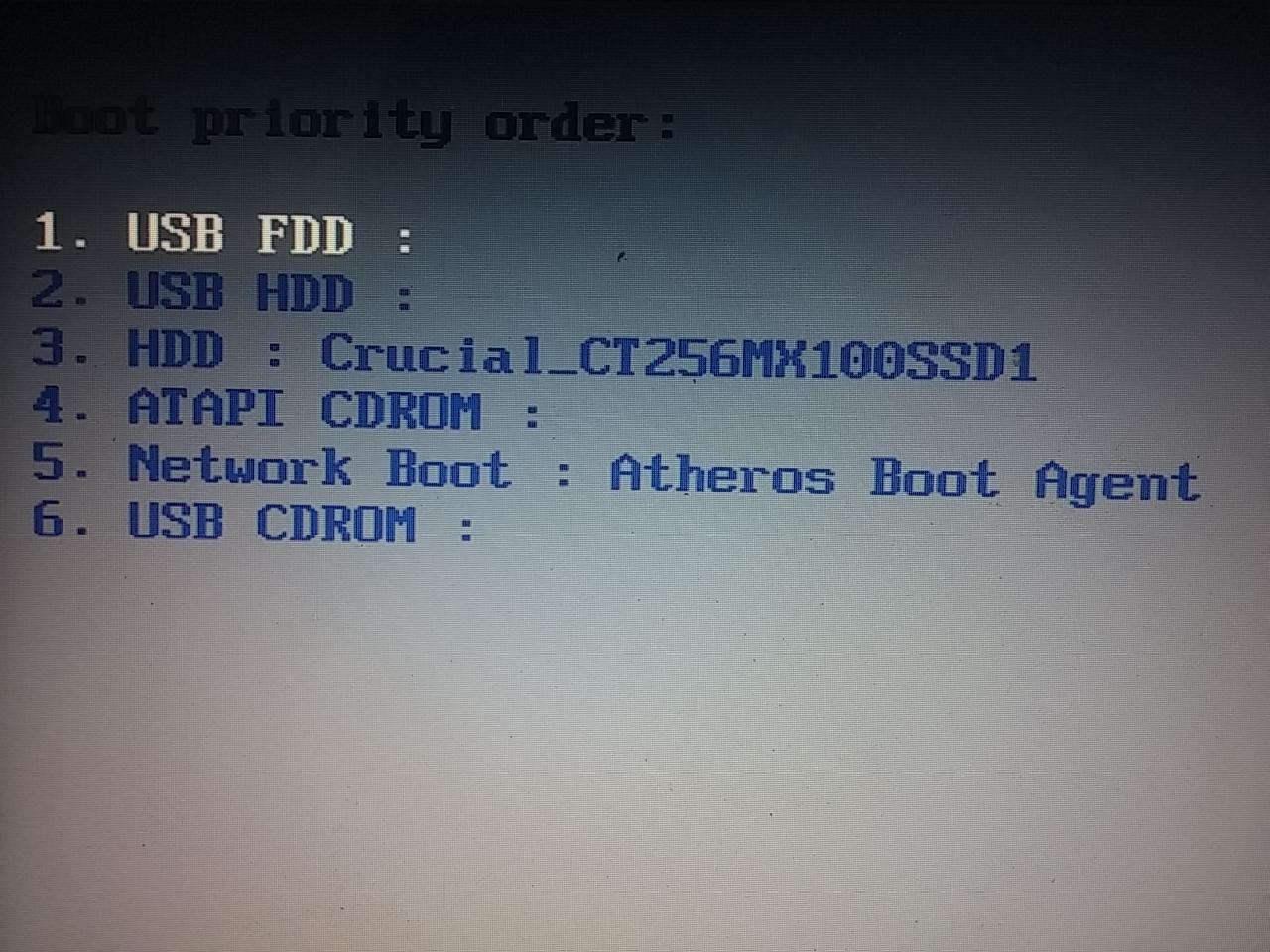
The bios also does not seem to recognize the drive connected through the caddy, here is a screenshot with the caddy

mjnjngY.jpg


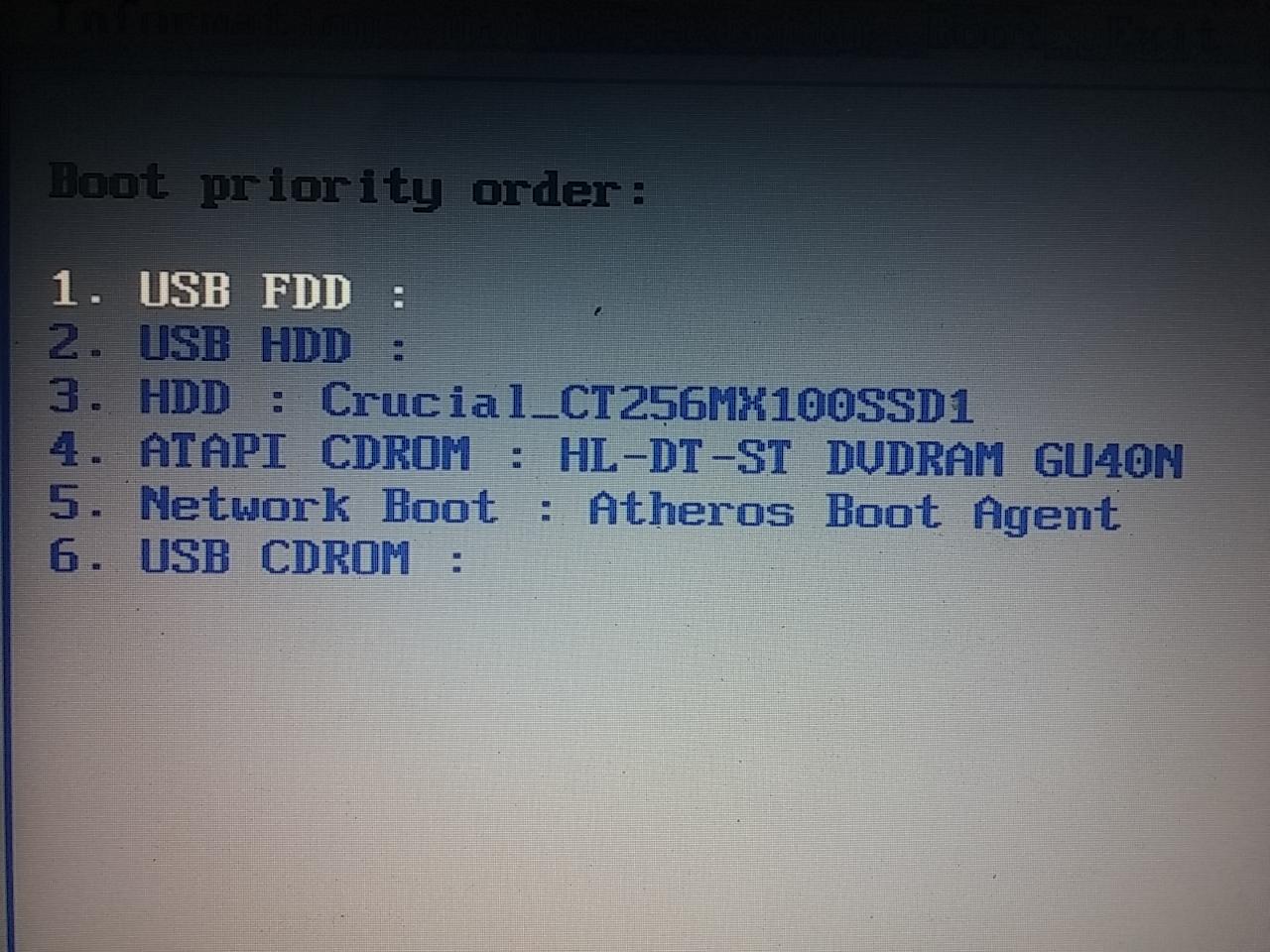
and here is the screenshot with the caddy removed and the DVD drive inserted


ks7NtxV.jpg


is it suppose to behave like this? I think the drive does get detected during POST, but I am not sure because all the messages on screen come and go very quickly
 

My Computer

Computer type
PC/Desktop
OS
Windows 7 Ultimate x64
yes, the BIOS should detect every hard drive in your system during POST. That is the purpose of POST, to identify all the hardware in your system and initialize it. If BIOS does not detect it, there is a problem. The BIOS will detect it when the OS does not.
 

My Computers

System One System Two

  • Computer type
    PC/Desktop
    Computer Manufacturer/Model Number
    ALWAYS UNDER CONSTRUCTION
    OS
    Windows 11 Pro
    CPU
    Ryzen 9 5900X
    Motherboard
    Asus X570 Crosshair Viii Hero
    Memory
    32GB G Skill DDR4-3600
    Graphics Card(s)
    EVGA RTX 3080 FTW 3 Ultra
    Sound Card
    On Board/Sennheiser PC37X Headset
    Monitor(s) Displays
    3 X Asus 27"
    Screen Resolution
    2560x1440
    Hard Drives
    2 X 1 TB NVME drives
    PSU
    EVGA 850
    Case
    Phanteks Eclipse P400A
    Cooling
    EVGA 280 AIO
    Keyboard
    Logitech G510s/ Logitech G13
    Mouse
    Logitech G502
    Internet Speed
    24/1
    Antivirus
    ESET/MBAM Pro/SAS Pro
    Browser
    Chrome/ Firefox/ Edge
  • Computer type
    Laptop
    System Manufacturer/Model Number
    Dell 16 Plus
    OS
    Windows 11 Pro
    CPU
    Intel Ultra 9 288V
    Memory
    32 GB LPDDR5X 8533
    Monitor(s) Displays
    16" Mini-LED HDR600 Touch 90 Hz
    Screen Resolution
    2560X1600
    Hard Drives
    1 TB NVME
but windows detects it without any problems.
 

My Computer

Computer type
PC/Desktop
OS
Windows 7 Ultimate x64
I't looks like it is detecting it as a CDRom, perhaps. I assume you don't have one of them, but it's listed.
 

My Computers

System One System Two

  • Computer type
    PC/Desktop
    Computer Manufacturer/Model Number
    ALWAYS UNDER CONSTRUCTION
    OS
    Windows 11 Pro
    CPU
    Ryzen 9 5900X
    Motherboard
    Asus X570 Crosshair Viii Hero
    Memory
    32GB G Skill DDR4-3600
    Graphics Card(s)
    EVGA RTX 3080 FTW 3 Ultra
    Sound Card
    On Board/Sennheiser PC37X Headset
    Monitor(s) Displays
    3 X Asus 27"
    Screen Resolution
    2560x1440
    Hard Drives
    2 X 1 TB NVME drives
    PSU
    EVGA 850
    Case
    Phanteks Eclipse P400A
    Cooling
    EVGA 280 AIO
    Keyboard
    Logitech G510s/ Logitech G13
    Mouse
    Logitech G502
    Internet Speed
    24/1
    Antivirus
    ESET/MBAM Pro/SAS Pro
    Browser
    Chrome/ Firefox/ Edge
  • Computer type
    Laptop
    System Manufacturer/Model Number
    Dell 16 Plus
    OS
    Windows 11 Pro
    CPU
    Intel Ultra 9 288V
    Memory
    32 GB LPDDR5X 8533
    Monitor(s) Displays
    16" Mini-LED HDR600 Touch 90 Hz
    Screen Resolution
    2560X1600
    Hard Drives
    1 TB NVME
if the problem is the caddy then is windows suppose to crash with a BSOD? the harddrive being used through the caddy has no windows files on it it is just a backup drive
 

My Computer

Computer type
PC/Desktop
OS
Windows 7 Ultimate x64
I said I didn't think it would be the caddy. It could be the hard drive or the wiring/connections though. An F4 error is usually a storage error. Unless crucial provides a tool box which will test the drive, I know of no way to test it other than performance benchmarks. I had a non system hard drive that went bad on me once and Windows wouldn't even boot with it connected. With only 1 dump file and no system specs, it is difficult to tell what's really going on. But based on that one dump file it is storage related.
 

My Computers

System One System Two

  • Computer type
    PC/Desktop
    Computer Manufacturer/Model Number
    ALWAYS UNDER CONSTRUCTION
    OS
    Windows 11 Pro
    CPU
    Ryzen 9 5900X
    Motherboard
    Asus X570 Crosshair Viii Hero
    Memory
    32GB G Skill DDR4-3600
    Graphics Card(s)
    EVGA RTX 3080 FTW 3 Ultra
    Sound Card
    On Board/Sennheiser PC37X Headset
    Monitor(s) Displays
    3 X Asus 27"
    Screen Resolution
    2560x1440
    Hard Drives
    2 X 1 TB NVME drives
    PSU
    EVGA 850
    Case
    Phanteks Eclipse P400A
    Cooling
    EVGA 280 AIO
    Keyboard
    Logitech G510s/ Logitech G13
    Mouse
    Logitech G502
    Internet Speed
    24/1
    Antivirus
    ESET/MBAM Pro/SAS Pro
    Browser
    Chrome/ Firefox/ Edge
  • Computer type
    Laptop
    System Manufacturer/Model Number
    Dell 16 Plus
    OS
    Windows 11 Pro
    CPU
    Intel Ultra 9 288V
    Memory
    32 GB LPDDR5X 8533
    Monitor(s) Displays
    16" Mini-LED HDR600 Touch 90 Hz
    Screen Resolution
    2560X1600
    Hard Drives
    1 TB NVME
Back
Top