BSOD during general system use, error KERNEL_DATA_INPAGE_ERROR

redroar

New member
Local time
8:03 PM
Messages
8
Around 6 months ago I replaced my computer hard drives for additional storage and speed. At some point I started getting BSODs with the error message KERNEL_DATA_INPAGE_ERROR. These errors occur whilst gaming, watching video or generally browsing the web. They may have started before the HDD replacement, to be honest I can't remember.

The timing of them seems somewhat random - they can appear after an hour of usage or several days. I frequently run my computer overnight, sometimes for days on end, without receiving a BSOD, only then to get two in a day.

I've tried numerous solutions including removing one of the drives (I've got two, an SSD and a regular), and just using the other, formatting Windows, switching around HDD cables, running virus scans and more. Nothing seems to make a difference.

I've run numerous CHKDSK scans, without finding anything, and I don't think the drives are failing, they are pretty new.

After some research into this error, the two likeliest causes for my problem seems to be either a faulty driver or faulty HDD. I'd rather not deal with the hassle of backing up and returning my HDD's and I'm not sure which driver to update, so I'd appreciate any help in tracking the error down.

I've filled in my system specs and attached the "DM Log Collector" files. Any help in resolving this issue is greatly appreciated.
 
Last edited:

My Computer

Computer type
PC/Desktop
Computer Manufacturer/Model Number
Custom Build
OS
Windows 7 Home Premium 64 Bit
CPU
Intel Core i5-4760K
Motherboard
MSI Z87-GD65
Memory
Corsair CMZ8GX3M2A 2x4GB
Graphics Card(s)
Nvidia GTX 560Ti
Hard Drives
Crucial CT128M550SSD1 128GB M550
WD Caviar 3TB
Antivirus
AVG
Browser
Chromium
Hello and welcome Hugh now mate I am just a beginner at this dump stuff but I do see memory corruption and disk problems so I would suggest you run two tests one for the RAM and one for the drive/

The memtest you will need to make a bootable disk / stick and set the BIOS to boot from the optical and it will take a fair time to run- some leave it overnight. see the attached document.
But one thing is very important you must let the test run for at least 8 passes any less and the findings are no good. Now if errors come up straight away then you can stop it - see my pics. Now if there are errors and you have more than one stick of RAM in then you will need to test each stick ie remove the sticks and replace stick 1 in slot 1 and test no errors do the same in slot 2 with stick 1 no errors then repeat the process with stick 2 - that will show up the faulty stick - the other thing is it could be a faulty slot but most unusual.
It is a very lengthy and tedious process but worth it if you have errors.

The drive is easier to do just use this SeaTools for Windows | Seagate it does not take anywhere near what the memtest does
 

My Computer

Computer type
PC/Desktop
Computer Manufacturer/Model Number
Own build (new) Desk1 / Asus ROG Win 7 / Desk2 1st build
OS
Desk1 7 Home Prem / Desk2 10 Pro / Main lap Asus ROG 10 Pro 2 laptop Toshiba 7 Pro Asus P2520 7 & 10
CPU
Desk1 i5 3750K / Laptop i7 GTX 860M / Desk2 i5 2500
Motherboard
Desk1 Asus P877-V / Desk2 Gigabyte H67 UD3H / Laptop ?
Memory
Desk1 8GB (1866) / Desk2 16GB (1333) / Laptop 8Gb DDR3
Graphics Card(s)
Desk 1& 2NVidia GTX 650 & Laptops on board Intel
Sound Card
Desk 1 & 2 -XONAR DG Realtek High Def audio Laptop
Monitor(s) Displays
Desk 1 Benq HD 2450 / Desk2 Philips 24" / Laptop 17.5"
Screen Resolution
1920x1080 D1 & D2 & Laptop 1
Hard Drives
Desk1 Samsung 120GB 830 SSD
Asus ROG 256GB 850 Pro SSD
Desk2 Samsung 840 256 SSD
Toshiba 120GB EVO
PSU
Desk 1 Corsair HX 1050/ Laptop ? / Desk 2 Corsair HX 650
Case
Desk 1 Cooler HAF XM ? Toshiba laptop / Desk2 Coolermaster
Cooling
Fans on all Desk1 -2 Desk2 - all Coolermasters 5 Laptop ?
Keyboard
Desk 1 MS Sidewinder X6 Desk 2 MS Sidewinder X 4
Mouse
Desk 1&2 - Gigabyte MS 900 gamer - laptop - Logitec wireless
Internet Speed
ADSL2+
Other Info
One other Desktop (tester) and spare Toshba laptop both with SSD's
Running Kaspersky 2016 ISS on all machines config'd identically
Logitec audio stereo systems on each machine (x3)
Canon MG5250MFC
Router/modem TP-Link running WPA2SK
Hi ICIT2LOL, thanks for your reply.

I ran Memtest86 overnight then during the day. It completed 13 passes with no errors. As for SeaTools, which tests should I run? I tried Basic Short Generic on both and they passed fine.

Thanks
 

My Computer

Computer type
PC/Desktop
Computer Manufacturer/Model Number
Custom Build
OS
Windows 7 Home Premium 64 Bit
CPU
Intel Core i5-4760K
Motherboard
MSI Z87-GD65
Memory
Corsair CMZ8GX3M2A 2x4GB
Graphics Card(s)
Nvidia GTX 560Ti
Hard Drives
Crucial CT128M550SSD1 128GB M550
WD Caviar 3TB
Antivirus
AVG
Browser
Chromium
Hmm one last drive test you could run just eliminate a cause there is a surface test with Partition Wizard
MiniTool Free Partition Manager for Window 8/7/vista/xp | Partition Wizard Free Edition see pic for that. It will show up any physical damage or surface imperfections as well as show up any problems with the actuating arms and read / write heads.
It takes a while and is usually clear but I still do them when not sure about physical condition of the drive.
 

My Computer

Computer type
PC/Desktop
Computer Manufacturer/Model Number
Own build (new) Desk1 / Asus ROG Win 7 / Desk2 1st build
OS
Desk1 7 Home Prem / Desk2 10 Pro / Main lap Asus ROG 10 Pro 2 laptop Toshiba 7 Pro Asus P2520 7 & 10
CPU
Desk1 i5 3750K / Laptop i7 GTX 860M / Desk2 i5 2500
Motherboard
Desk1 Asus P877-V / Desk2 Gigabyte H67 UD3H / Laptop ?
Memory
Desk1 8GB (1866) / Desk2 16GB (1333) / Laptop 8Gb DDR3
Graphics Card(s)
Desk 1& 2NVidia GTX 650 & Laptops on board Intel
Sound Card
Desk 1 & 2 -XONAR DG Realtek High Def audio Laptop
Monitor(s) Displays
Desk 1 Benq HD 2450 / Desk2 Philips 24" / Laptop 17.5"
Screen Resolution
1920x1080 D1 & D2 & Laptop 1
Hard Drives
Desk1 Samsung 120GB 830 SSD
Asus ROG 256GB 850 Pro SSD
Desk2 Samsung 840 256 SSD
Toshiba 120GB EVO
PSU
Desk 1 Corsair HX 1050/ Laptop ? / Desk 2 Corsair HX 650
Case
Desk 1 Cooler HAF XM ? Toshiba laptop / Desk2 Coolermaster
Cooling
Fans on all Desk1 -2 Desk2 - all Coolermasters 5 Laptop ?
Keyboard
Desk 1 MS Sidewinder X6 Desk 2 MS Sidewinder X 4
Mouse
Desk 1&2 - Gigabyte MS 900 gamer - laptop - Logitec wireless
Internet Speed
ADSL2+
Other Info
One other Desktop (tester) and spare Toshba laptop both with SSD's
Running Kaspersky 2016 ISS on all machines config'd identically
Logitec audio stereo systems on each machine (x3)
Canon MG5250MFC
Router/modem TP-Link running WPA2SK
Hi ICIT2LOL,

I ran the test on both drives, and both reported no errors.

Thanks
 

My Computer

Computer type
PC/Desktop
Computer Manufacturer/Model Number
Custom Build
OS
Windows 7 Home Premium 64 Bit
CPU
Intel Core i5-4760K
Motherboard
MSI Z87-GD65
Memory
Corsair CMZ8GX3M2A 2x4GB
Graphics Card(s)
Nvidia GTX 560Ti
Hard Drives
Crucial CT128M550SSD1 128GB M550
WD Caviar 3TB
Antivirus
AVG
Browser
Chromium

My Computer

Computer type
PC/Desktop
Computer Manufacturer/Model Number
Own build (new) Desk1 / Asus ROG Win 7 / Desk2 1st build
OS
Desk1 7 Home Prem / Desk2 10 Pro / Main lap Asus ROG 10 Pro 2 laptop Toshiba 7 Pro Asus P2520 7 & 10
CPU
Desk1 i5 3750K / Laptop i7 GTX 860M / Desk2 i5 2500
Motherboard
Desk1 Asus P877-V / Desk2 Gigabyte H67 UD3H / Laptop ?
Memory
Desk1 8GB (1866) / Desk2 16GB (1333) / Laptop 8Gb DDR3
Graphics Card(s)
Desk 1& 2NVidia GTX 650 & Laptops on board Intel
Sound Card
Desk 1 & 2 -XONAR DG Realtek High Def audio Laptop
Monitor(s) Displays
Desk 1 Benq HD 2450 / Desk2 Philips 24" / Laptop 17.5"
Screen Resolution
1920x1080 D1 & D2 & Laptop 1
Hard Drives
Desk1 Samsung 120GB 830 SSD
Asus ROG 256GB 850 Pro SSD
Desk2 Samsung 840 256 SSD
Toshiba 120GB EVO
PSU
Desk 1 Corsair HX 1050/ Laptop ? / Desk 2 Corsair HX 650
Case
Desk 1 Cooler HAF XM ? Toshiba laptop / Desk2 Coolermaster
Cooling
Fans on all Desk1 -2 Desk2 - all Coolermasters 5 Laptop ?
Keyboard
Desk 1 MS Sidewinder X6 Desk 2 MS Sidewinder X 4
Mouse
Desk 1&2 - Gigabyte MS 900 gamer - laptop - Logitec wireless
Internet Speed
ADSL2+
Other Info
One other Desktop (tester) and spare Toshba laptop both with SSD's
Running Kaspersky 2016 ISS on all machines config'd identically
Logitec audio stereo systems on each machine (x3)
Canon MG5250MFC
Router/modem TP-Link running WPA2SK
Hi ICIT2LOL,

So as I said in my first post, I've run chkdsk before, found nothing. The other scan did apparently find some corrupt Windows files, although what it repaired I can't tell - the log is like 200MB and almost crashes notepad opening it. Opening it with Notepad++, there's a lot to look through. Here's a section:

POQ 129 ends.
2015-02-12 19:20:10, Info CSI 000004df [SR] Verify complete
2015-02-12 19:20:10, Info CSI 000004e0 [SR] Verifying 100 (0x0000000000000064) components
2015-02-12 19:20:10, Info CSI 000004e1 [SR] Beginning Verify and Repair transaction
2015-02-12 19:20:11, Info CSI 000004e2 Repair results created:
POQ 130 starts:
0: Move File: Source = [l:192{96}]"\SystemRoot\WinSxS\Temp\PendingRenames\06a56eebf846d001523a00004801700b._0000000000000000.cdf-ms", Destination = [l:104{52}]"\SystemRoot\WinSxS\FileMaps\_0000000000000000.cdf-ms"
1: Move File: Source = [l:162{81}]"\SystemRoot\WinSxS\Temp\PendingRenames\16cc6eebf846d001533a00004801700b.$$.cdf-ms", Destination = [l:74{37}]"\SystemRoot\WinSxS\FileMaps\$$.cdf-ms"
2: Move File: Source = [l:224{112}]"\SystemRoot\WinSxS\Temp\PendingRenames\27f36eebf846d001543a00004801700b.$$_microsoft.net_3296b36dbe4c7fa3.cdf-ms", Destination = [l:136{68}]"\SystemRoot\WinSxS\FileMaps\$$_microsoft.net_3296b36dbe4c7fa3.cdf-ms"
3: Move File: Source = [l:244{122}]"\SystemRoot\WinSxS\Temp\PendingRenames\27f36eebf846d001553a00004801700b.$$_microsoft.net_framework_83386eac0379231b.cdf-ms", Destination = [l:156{78}]"\SystemRoot\WinSxS\FileMaps\$$_microsoft.net_framework_83386eac0379231b.cdf-ms"
4: Move File: Source = [l:266{133}]"\SystemRoot\WinSxS\Temp\PendingRenames\48416febf846d001563a00004801700b.$$_microsoft.net_framework_v2.0.50727_e9368840261e60ee.cdf-ms", Destination = [l:178{89}]"\SystemRoot\WinSxS\FileMaps\$$_microsoft.net_framework_v2.0.50727_e9368840261e60ee.cdf-ms"
5: Move File: Source = [l:288{144}]"\SystemRoot\WinSxS\Temp\PendingRenames\59686febf846d001573a00004801700b.$$_microsoft.net_framework_v2.0.50727_redistlist_2e6ab8b35e9ef953.cdf-ms", Destination = [l:200{100}]"\SystemRoot\WinSxS\FileMaps\$$_microsoft.net_framework_v2.0.50727_redistlist_2e6ab8b35e9ef953.cdf-ms"

POQ 130 ends.
2015-02-12 19:20:11, Info CSI 000004e3 [SR] Verify complete
2015-02-12 19:20:11, Info CSI 000004e4 [SR] Verifying 100 (0x0000000000000064) components
2015-02-12 19:20:11, Info CSI 000004e5 [SR] Beginning Verify and Repair transaction
2015-02-12 19:20:12, Info CSI 000004e6 Repair results created:
POQ 131 starts:

POQ 131 ends.
2015-02-12 19:20:12, Info CSI 000004e7 [SR] Verify complete
2015-02-12 19:20:12, Info CSI 000004e8 [SR] Verifying 100 (0x0000000000000064) components
2015-02-12 19:20:12, Info CSI 000004e9 [SR] Beginning Verify and Repair transaction
2015-02-12 19:20:13, Info CSI 000004ea Repair results created:
POQ 132 starts:

POQ 132 ends.
2015-02-12 19:20:13, Info CSI 000004eb [SR] Verify complete
2015-02-12 19:20:13, Info CSI 000004ec [SR] Verifying 40 (0x0000000000000028) components
2015-02-12 19:20:13, Info CSI 000004ed [SR] Beginning Verify and Repair transaction
2015-02-12 19:20:13, Info CSI 000004ee Repair results created:
POQ 133 starts:

POQ 133 ends.
2015-02-12 19:20:13, Info CSI 000004ef [SR] Verify complete
2015-02-12 19:20:13, Info CSI 000004f0 [SR] Repairing 2 components
2015-02-12 19:20:13, Info CSI 000004f1 [SR] Beginning Verify and Repair transaction
2015-02-12 19:20:13, Info CSI 000004f2 Hashes for file member \??\C:\Windows\System32\Utilman.exe do not match actual file [l:22{11}]"Utilman.exe" :
Found: {l:32 b:PJ/ZYCZLr7R0VkowmSLoDCxfhw80xjIpENVnsHo9Jew=} Expected: {l:32 b:fKkGFuaLyFHxRlijZtgPId23p92KhmBJ5UZRFYeEqeo=}
2015-02-12 19:20:13, Info CSI 000004f3 [SR] Repairing corrupted file [ml:520{260},l:46{23}]"\??\C:\Windows\System32"\[l:22{11}]"Utilman.exe" from store
2015-02-12 19:20:13, Info CSI 000004f4 Hashes for file member \??\C:\Windows\Branding\Basebrd\basebrd.dll do not match actual file [l:22{11}]"basebrd.dll" :
Found: {l:32 b:Y6uLQT9xn3Tpe0ltc4CxCs7SjYlavclra0kwECNmkzE=} Expected: {l:32 b:1/rvSBIH01hJr4Vx0JqwAqyvKh5qd72PvSzwCL34M4Y=}
2015-02-12 19:20:13, Info CSI 000004f5 [SR] Repairing corrupted file [ml:520{260},l:62{31}]"\??\C:\Windows\Branding\Basebrd"\[l:22{11}]"basebrd.dll" from store
2015-02-12 19:20:13, Info CSI 000004f6 Ignoring duplicate ownership for directory [l:62{31}]"\??\C:\Windows\Branding\Basebrd" in component Microsoft-Windows-Branding-Base-HomePremium, Version = 6.1.7600.16385, pA = PROCESSOR_ARCHITECTURE_AMD64 (9), Culture neutral, VersionScope = 1 nonSxS, PublicKeyToken = {l:8 b:31bf3856ad364e35}, Type neutral, TypeName neutral, PublicKey neutral

2015-02-12 19:20:13, Info CSI 000004f7 Repair results created:
POQ 134 starts:
0: Move File: Source = [l:192{96}]"\SystemRoot\WinSxS\Temp\PendingRenames\2df5d2ecf846d001483b00004801700b._0000000000000000.cdf-ms", Destination = [l:104{52}]"\SystemRoot\WinSxS\FileMaps\_0000000000000000.cdf-ms"
1: Move File: Source = [l:162{81}]"\SystemRoot\WinSxS\Temp\PendingRenames\2df5d2ecf846d001493b00004801700b.$$.cdf-ms", Destination = [l:74{37}]"\SystemRoot\WinSxS\FileMaps\$$.cdf-ms"
2: Move File: Source = [l:214{107}]"\SystemRoot\WinSxS\Temp\PendingRenames\2fb0d7ecf846d0014a3b00004801700b.$$_system32_21f9a9c4a2f8b514.cdf-ms", Destination = [l:126{63}]"\SystemRoot\WinSxS\FileMaps\$$_system32_21f9a9c4a2f8b514.cdf-ms"
3: Hard Link File: Source = [l:232{116}]"\SystemRoot\WinSxS\amd64_microsoft-windows-utilman_31bf3856ad364e35_6.1.7600.16385_none_5e9ea1964aee5579\Utilman.exe", Destination = [l:70{35}]"\??\C:\Windows\System32\Utilman.exe"
4: Move File: Source = [l:214{107}]"\SystemRoot\WinSxS\Temp\PendingRenames\d536d9ecf846d0014b3b00004801700b.$$_branding_1728f5d8b15e5263.cdf-ms", Destination = [l:126{63}]"\SystemRoot\WinSxS\FileMaps\$$_branding_1728f5d8b15e5263.cdf-ms"
5: Move File: Source = [l:230{115}]"\SystemRoot\WinSxS\Temp\PendingRenames\e55dd9ecf846d0014c3b00004801700b.$$_branding_basebrd_9ee9a176c9fadab4.cdf-ms", Destination = [l:142{71}]"\SystemRoot\WinSxS\FileMaps\$$_branding_basebrd_9ee9a176c9fadab4.cdf-ms"
6: Hard Link File: Source = [l:262{131}]"\SystemRoot\WinSxS\amd64_microsoft-windows-b..ng-base-homepremium_31bf3856ad364e35_6.1.7600.16385_none_7de3f055667d5adf\basebrd.dll", Destination = [l:86{43}]"\??\C:\Windows\Branding\Basebrd\basebrd.dll"

POQ 134 ends.
2015-02-12 19:20:13, Info CSI 000004f8 [SR] Repair complete
2015-02-12 19:20:13, Info CSI 000004f9 [SR] Committing transaction
2015-02-12 19:20:13, Info CSI 000004fa Creating NT transaction (seq 2), objectname [6]"(null)"
2015-02-12 19:20:13, Info CSI 000004fb Created NT transaction (seq 2) result 0x00000000, handle @0x19a0
2015-02-12 19:20:13, Info CSI 000004fc@2015/2/12:19:20:13.347 CSI perf trace:
CSIPERF:TXCOMMIT;15557
2015-02-12 19:20:13, Info CSI 000004fd [SR] Verify and Repair Transaction completed. All files and registry keys listed in this transaction have been successfully repaired

 

My Computer

Computer type
PC/Desktop
Computer Manufacturer/Model Number
Custom Build
OS
Windows 7 Home Premium 64 Bit
CPU
Intel Core i5-4760K
Motherboard
MSI Z87-GD65
Memory
Corsair CMZ8GX3M2A 2x4GB
Graphics Card(s)
Nvidia GTX 560Ti
Hard Drives
Crucial CT128M550SSD1 128GB M550
WD Caviar 3TB
Antivirus
AVG
Browser
Chromium
Ok mate now I keep coming up with crss.exe as a possible problem and as you can see in this thread http://www.sevenforums.com/system-security/289062-csrss-exe-trojan.html it is a critical Windows process but also can be malware so lets run these and also that suggestion post # 4 and in post #5 have a look in your system as per that suggestion.

These are ones I usally ask folk to start with if you have doe them already then don't worry
http://www.superantispyware.com/
http://www.malwarebytes.org/products/malwarebytes_free/
http://www.bleepingcomputer.com/download/adwcleaner/
ADW download from bleeping computer delete any rubbish found with the malware scans
(with ADW if you are running Kaspersky it will throw it up as malware just override Kaspersky)
 

My Computer

Computer type
PC/Desktop
Computer Manufacturer/Model Number
Own build (new) Desk1 / Asus ROG Win 7 / Desk2 1st build
OS
Desk1 7 Home Prem / Desk2 10 Pro / Main lap Asus ROG 10 Pro 2 laptop Toshiba 7 Pro Asus P2520 7 & 10
CPU
Desk1 i5 3750K / Laptop i7 GTX 860M / Desk2 i5 2500
Motherboard
Desk1 Asus P877-V / Desk2 Gigabyte H67 UD3H / Laptop ?
Memory
Desk1 8GB (1866) / Desk2 16GB (1333) / Laptop 8Gb DDR3
Graphics Card(s)
Desk 1& 2NVidia GTX 650 & Laptops on board Intel
Sound Card
Desk 1 & 2 -XONAR DG Realtek High Def audio Laptop
Monitor(s) Displays
Desk 1 Benq HD 2450 / Desk2 Philips 24" / Laptop 17.5"
Screen Resolution
1920x1080 D1 & D2 & Laptop 1
Hard Drives
Desk1 Samsung 120GB 830 SSD
Asus ROG 256GB 850 Pro SSD
Desk2 Samsung 840 256 SSD
Toshiba 120GB EVO
PSU
Desk 1 Corsair HX 1050/ Laptop ? / Desk 2 Corsair HX 650
Case
Desk 1 Cooler HAF XM ? Toshiba laptop / Desk2 Coolermaster
Cooling
Fans on all Desk1 -2 Desk2 - all Coolermasters 5 Laptop ?
Keyboard
Desk 1 MS Sidewinder X6 Desk 2 MS Sidewinder X 4
Mouse
Desk 1&2 - Gigabyte MS 900 gamer - laptop - Logitec wireless
Internet Speed
ADSL2+
Other Info
One other Desktop (tester) and spare Toshba laptop both with SSD's
Running Kaspersky 2016 ISS on all machines config'd identically
Logitec audio stereo systems on each machine (x3)
Canon MG5250MFC
Router/modem TP-Link running WPA2SK
Malware Bytes found one unrelated file (which I think is a false positive). Nothing about crss.exe.
 

My Computer

Computer type
PC/Desktop
Computer Manufacturer/Model Number
Custom Build
OS
Windows 7 Home Premium 64 Bit
CPU
Intel Core i5-4760K
Motherboard
MSI Z87-GD65
Memory
Corsair CMZ8GX3M2A 2x4GB
Graphics Card(s)
Nvidia GTX 560Ti
Hard Drives
Crucial CT128M550SSD1 128GB M550
WD Caviar 3TB
Antivirus
AVG
Browser
Chromium
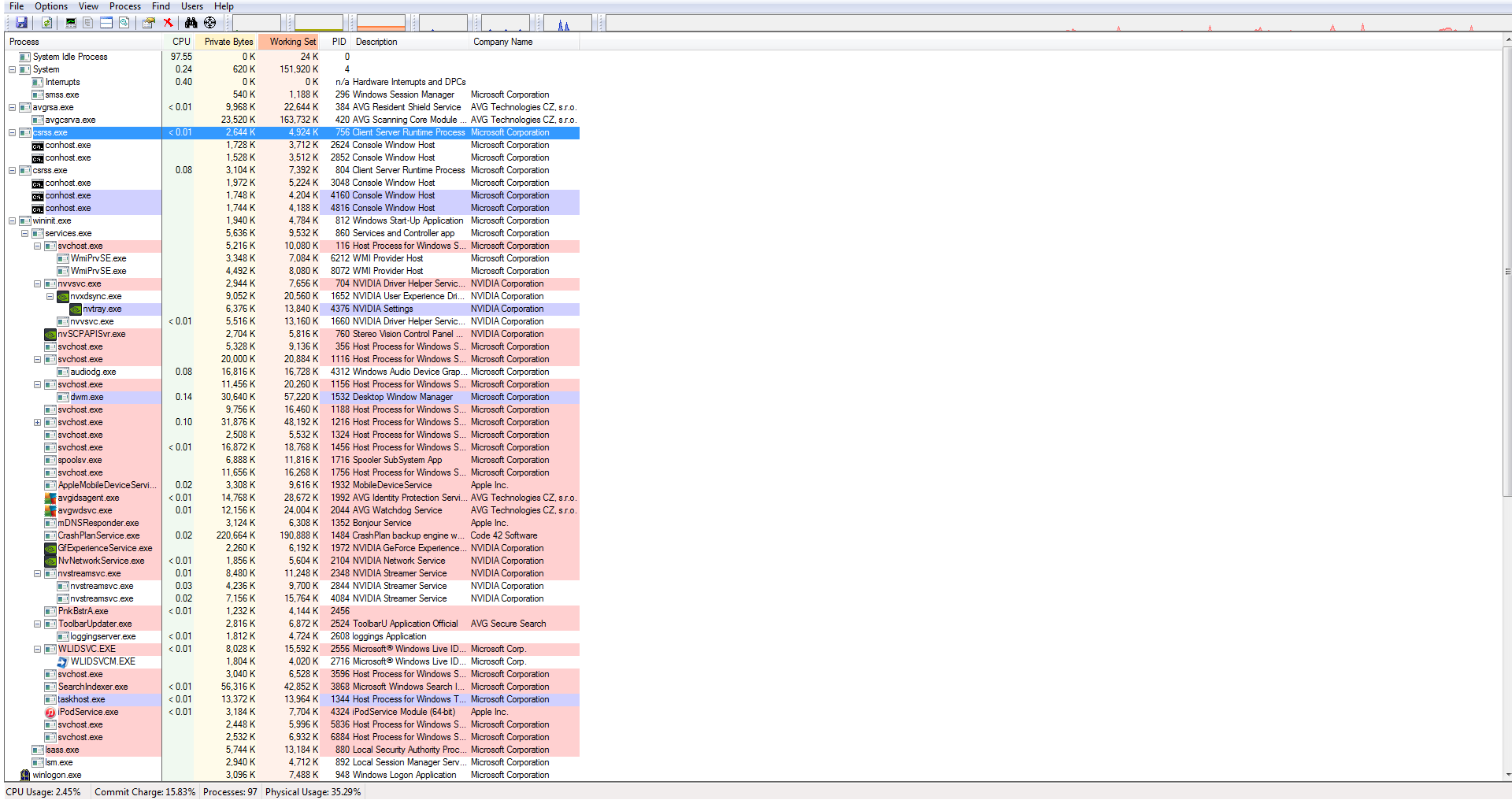
OK Red lets try something else run this an scroll down and see if there are two "csrss.exe" in the listing because everything is pointing to there only having to be one.

Now if there are two it might be a bit sorting out of which is the right one and which is the Trojan I am not thinking there will be just eliminating as we go.
https://technet.microsoft.com/en-us/sysinternals/bb896653 < it is ok to go if your security pops up any warnings as it is from a genuine source.
 

My Computer

Computer type
PC/Desktop
Computer Manufacturer/Model Number
Own build (new) Desk1 / Asus ROG Win 7 / Desk2 1st build
OS
Desk1 7 Home Prem / Desk2 10 Pro / Main lap Asus ROG 10 Pro 2 laptop Toshiba 7 Pro Asus P2520 7 & 10
CPU
Desk1 i5 3750K / Laptop i7 GTX 860M / Desk2 i5 2500
Motherboard
Desk1 Asus P877-V / Desk2 Gigabyte H67 UD3H / Laptop ?
Memory
Desk1 8GB (1866) / Desk2 16GB (1333) / Laptop 8Gb DDR3
Graphics Card(s)
Desk 1& 2NVidia GTX 650 & Laptops on board Intel
Sound Card
Desk 1 & 2 -XONAR DG Realtek High Def audio Laptop
Monitor(s) Displays
Desk 1 Benq HD 2450 / Desk2 Philips 24" / Laptop 17.5"
Screen Resolution
1920x1080 D1 & D2 & Laptop 1
Hard Drives
Desk1 Samsung 120GB 830 SSD
Asus ROG 256GB 850 Pro SSD
Desk2 Samsung 840 256 SSD
Toshiba 120GB EVO
PSU
Desk 1 Corsair HX 1050/ Laptop ? / Desk 2 Corsair HX 650
Case
Desk 1 Cooler HAF XM ? Toshiba laptop / Desk2 Coolermaster
Cooling
Fans on all Desk1 -2 Desk2 - all Coolermasters 5 Laptop ?
Keyboard
Desk 1 MS Sidewinder X6 Desk 2 MS Sidewinder X 4
Mouse
Desk 1&2 - Gigabyte MS 900 gamer - laptop - Logitec wireless
Internet Speed
ADSL2+
Other Info
One other Desktop (tester) and spare Toshba laptop both with SSD's
Running Kaspersky 2016 ISS on all machines config'd identically
Logitec audio stereo systems on each machine (x3)
Canon MG5250MFC
Router/modem TP-Link running WPA2SK
Hey ICIT2LOL,

Sorry for not getting back to you sooner. Here's a screenshot:
bRd3RVL.png


EDIT: Also have had several more BSOD's, different error messages. New zip is attached.
 
Last edited:

My Computer

Computer type
PC/Desktop
Computer Manufacturer/Model Number
Custom Build
OS
Windows 7 Home Premium 64 Bit
CPU
Intel Core i5-4760K
Motherboard
MSI Z87-GD65
Memory
Corsair CMZ8GX3M2A 2x4GB
Graphics Card(s)
Nvidia GTX 560Ti
Hard Drives
Crucial CT128M550SSD1 128GB M550
WD Caviar 3TB
Antivirus
AVG
Browser
Chromium
Hey look Hugh I made a big mistake mate that post was another person in strife so forget the csrrs stuff.

Now the latest dump files are saying there is still a disk problem and I think it might be time to ask for help on this one because I am no expert apart from the absolutely obvious.


Code:
BugCheck 7A, {fffff6fc40009b60, ffffffffc000009d, c659f860, fffff8800136c350}
*** WARNING: Unable to verify timestamp for mssmbios.sys
*** ERROR: Module load completed but symbols could not be loaded for mssmbios.sys
*** WARNING: Unable to verify timestamp for Ntfs.sys
*** ERROR: Module load completed but symbols could not be loaded for Ntfs.sys
***** Kernel symbols are WRONG. Please fix symbols to do analysis.

There are as you can see other warnings too and this might explain the problem a little
How To Fix Mssmbios.sys Blue Screen Errors (BSOD)
But as I said time for some help on this one because we have been down the drive test path already and it is probably software problems??
 

My Computer

Computer type
PC/Desktop
Computer Manufacturer/Model Number
Own build (new) Desk1 / Asus ROG Win 7 / Desk2 1st build
OS
Desk1 7 Home Prem / Desk2 10 Pro / Main lap Asus ROG 10 Pro 2 laptop Toshiba 7 Pro Asus P2520 7 & 10
CPU
Desk1 i5 3750K / Laptop i7 GTX 860M / Desk2 i5 2500
Motherboard
Desk1 Asus P877-V / Desk2 Gigabyte H67 UD3H / Laptop ?
Memory
Desk1 8GB (1866) / Desk2 16GB (1333) / Laptop 8Gb DDR3
Graphics Card(s)
Desk 1& 2NVidia GTX 650 & Laptops on board Intel
Sound Card
Desk 1 & 2 -XONAR DG Realtek High Def audio Laptop
Monitor(s) Displays
Desk 1 Benq HD 2450 / Desk2 Philips 24" / Laptop 17.5"
Screen Resolution
1920x1080 D1 & D2 & Laptop 1
Hard Drives
Desk1 Samsung 120GB 830 SSD
Asus ROG 256GB 850 Pro SSD
Desk2 Samsung 840 256 SSD
Toshiba 120GB EVO
PSU
Desk 1 Corsair HX 1050/ Laptop ? / Desk 2 Corsair HX 650
Case
Desk 1 Cooler HAF XM ? Toshiba laptop / Desk2 Coolermaster
Cooling
Fans on all Desk1 -2 Desk2 - all Coolermasters 5 Laptop ?
Keyboard
Desk 1 MS Sidewinder X6 Desk 2 MS Sidewinder X 4
Mouse
Desk 1&2 - Gigabyte MS 900 gamer - laptop - Logitec wireless
Internet Speed
ADSL2+
Other Info
One other Desktop (tester) and spare Toshba laptop both with SSD's
Running Kaspersky 2016 ISS on all machines config'd identically
Logitec audio stereo systems on each machine (x3)
Canon MG5250MFC
Router/modem TP-Link running WPA2SK
Thanks, ICTIT2LOL, any idea if anyone else can help?
 

My Computer

Computer type
PC/Desktop
Computer Manufacturer/Model Number
Custom Build
OS
Windows 7 Home Premium 64 Bit
CPU
Intel Core i5-4760K
Motherboard
MSI Z87-GD65
Memory
Corsair CMZ8GX3M2A 2x4GB
Graphics Card(s)
Nvidia GTX 560Ti
Hard Drives
Crucial CT128M550SSD1 128GB M550
WD Caviar 3TB
Antivirus
AVG
Browser
Chromium
Yes mate I will ask for more help as there are others more experienced than I am so just hang on and I am sure someone will get back to you.
 

My Computer

Computer type
PC/Desktop
Computer Manufacturer/Model Number
Own build (new) Desk1 / Asus ROG Win 7 / Desk2 1st build
OS
Desk1 7 Home Prem / Desk2 10 Pro / Main lap Asus ROG 10 Pro 2 laptop Toshiba 7 Pro Asus P2520 7 & 10
CPU
Desk1 i5 3750K / Laptop i7 GTX 860M / Desk2 i5 2500
Motherboard
Desk1 Asus P877-V / Desk2 Gigabyte H67 UD3H / Laptop ?
Memory
Desk1 8GB (1866) / Desk2 16GB (1333) / Laptop 8Gb DDR3
Graphics Card(s)
Desk 1& 2NVidia GTX 650 & Laptops on board Intel
Sound Card
Desk 1 & 2 -XONAR DG Realtek High Def audio Laptop
Monitor(s) Displays
Desk 1 Benq HD 2450 / Desk2 Philips 24" / Laptop 17.5"
Screen Resolution
1920x1080 D1 & D2 & Laptop 1
Hard Drives
Desk1 Samsung 120GB 830 SSD
Asus ROG 256GB 850 Pro SSD
Desk2 Samsung 840 256 SSD
Toshiba 120GB EVO
PSU
Desk 1 Corsair HX 1050/ Laptop ? / Desk 2 Corsair HX 650
Case
Desk 1 Cooler HAF XM ? Toshiba laptop / Desk2 Coolermaster
Cooling
Fans on all Desk1 -2 Desk2 - all Coolermasters 5 Laptop ?
Keyboard
Desk 1 MS Sidewinder X6 Desk 2 MS Sidewinder X 4
Mouse
Desk 1&2 - Gigabyte MS 900 gamer - laptop - Logitec wireless
Internet Speed
ADSL2+
Other Info
One other Desktop (tester) and spare Toshba laptop both with SSD's
Running Kaspersky 2016 ISS on all machines config'd identically
Logitec audio stereo systems on each machine (x3)
Canon MG5250MFC
Router/modem TP-Link running WPA2SK
Hi redroar.

Make it sure that you are using the latest firmware for your SSD. It should be version MU02, Release Date: 01/8/2015.

When done, post a screenshot of the SSD (and the HDD too) using CrystalDiscInfo. Also let us know for any further BSOD.
__________________________________________________
Code:
ERROR_CODE: (NTSTATUS) 0xc000000e - A device which does not exist was specified.

[COLOR=Red][B]DISK_HARDWARE_ERROR: There was error with disk hardware[/B][/COLOR]

BUGCHECK_STR:  0x7a_c000000e

CUSTOMER_CRASH_COUNT:  1

DEFAULT_BUCKET_ID:  WIN7_DRIVER_FAULT

PROCESS_NAME:  System

CURRENT_IRQL:  0
 

My Computer

Computer type
PC/Desktop
Computer Manufacturer/Model Number
Self Assembled
OS
Microsoft Windows 10 Pro Insider Preview 64-bit
CPU
Intel(R) Core(TM) i3-4130 CPU @ 3.40GHz
Motherboard
Gigabyte Technology Co., Ltd. B85M-D3H
Memory
Corsair Vengence 4GB x2 (8.00GB Dual-Channel DDR3 @ 798MHz)
Graphics Card(s)
2047MB GeForce GTS 450 (ZOTAC International)
Sound Card
Onboard (Realtek High Definition Audio)
Monitor(s) Displays
LG Flatron E2040T
Screen Resolution
1600x900
Hard Drives
Western Digital 1 TB
Seagate 500 GB
PSU
Corsair VS550
Case
Cooler Master K380
Cooling
Cooler Master Seidon 120V Plus
Keyboard
Logitech MK260r
Mouse
Logitech MK260r
Internet Speed
PMPL Broadband
Antivirus
Windows Defender + MBAM
Browser
Firefox
Other Info
Dell Studio 15" Laptop
Hi Arc, ICIT2LOL,

Extremely late update here. The BSOD's seen to subside, I thought uninstalling the AV I was using fixed it. Apparently not. I'm now getting the same BSOD's again, same error messages.

I have updated the SSD Firmware, didn't make a difference. Attached is a screenshot of CrystalDiscInfo.

Thanks for all the help so far,
RedRoar.
 

My Computer

Computer type
PC/Desktop
Computer Manufacturer/Model Number
Custom Build
OS
Windows 7 Home Premium 64 Bit
CPU
Intel Core i5-4760K
Motherboard
MSI Z87-GD65
Memory
Corsair CMZ8GX3M2A 2x4GB
Graphics Card(s)
Nvidia GTX 560Ti
Hard Drives
Crucial CT128M550SSD1 128GB M550
WD Caviar 3TB
Antivirus
AVG
Browser
Chromium
Hmm the temp on the SSD seems a tad high for my liking but I cannot see anything amongst that data that says much to me.
Can you send the latest dumps mate - not out of the possibility that SSD is failing I have just had a new Samsung 850 Pro go bad after five months so it would be to see if the dumps are coming up the same please.
 

My Computer

Computer type
PC/Desktop
Computer Manufacturer/Model Number
Own build (new) Desk1 / Asus ROG Win 7 / Desk2 1st build
OS
Desk1 7 Home Prem / Desk2 10 Pro / Main lap Asus ROG 10 Pro 2 laptop Toshiba 7 Pro Asus P2520 7 & 10
CPU
Desk1 i5 3750K / Laptop i7 GTX 860M / Desk2 i5 2500
Motherboard
Desk1 Asus P877-V / Desk2 Gigabyte H67 UD3H / Laptop ?
Memory
Desk1 8GB (1866) / Desk2 16GB (1333) / Laptop 8Gb DDR3
Graphics Card(s)
Desk 1& 2NVidia GTX 650 & Laptops on board Intel
Sound Card
Desk 1 & 2 -XONAR DG Realtek High Def audio Laptop
Monitor(s) Displays
Desk 1 Benq HD 2450 / Desk2 Philips 24" / Laptop 17.5"
Screen Resolution
1920x1080 D1 & D2 & Laptop 1
Hard Drives
Desk1 Samsung 120GB 830 SSD
Asus ROG 256GB 850 Pro SSD
Desk2 Samsung 840 256 SSD
Toshiba 120GB EVO
PSU
Desk 1 Corsair HX 1050/ Laptop ? / Desk 2 Corsair HX 650
Case
Desk 1 Cooler HAF XM ? Toshiba laptop / Desk2 Coolermaster
Cooling
Fans on all Desk1 -2 Desk2 - all Coolermasters 5 Laptop ?
Keyboard
Desk 1 MS Sidewinder X6 Desk 2 MS Sidewinder X 4
Mouse
Desk 1&2 - Gigabyte MS 900 gamer - laptop - Logitec wireless
Internet Speed
ADSL2+
Other Info
One other Desktop (tester) and spare Toshba laptop both with SSD's
Running Kaspersky 2016 ISS on all machines config'd identically
Logitec audio stereo systems on each machine (x3)
Canon MG5250MFC
Router/modem TP-Link running WPA2SK
Back
Top